
 Astroworld
Getting started
How much RAM does a Minecraft server need?
Memory is what a Minecraft server runs out of first. When it is too small the world stutters, chunks load slowly and the server can crash. When it is far too big you pay for memory that sits unused, because extra RAM does not make the game itself any faster.
The good news is that the amount is predictable. It depends on three things: what the server runs, how many people are online at the same time, and how far each of them can see.
In short
A Minecraft server needs a base of about 2 GB plus 1 GB for every four players online on the normal game, so 4 GB carries up to 8 friends and 8 GB about 24. With 20 or more plugins count 1 GB per three players, a light modpack of about 50 mods needs 6 to 8 GB for a few friends, and a heavy modpack of 300 mods or more needs 12 GB for up to six players. A higher view distance raises all of it.
The short answer: RAM per Minecraft server
| Server | Players online at once | Memory |
|---|---|---|
| Normal game (vanilla or Paper, few plugins) | Up to 8 | 4 GB |
| Normal game | Up to 24 | 8 GB |
| Paper with 20 or more plugins | Up to 15 | 8 GB |
| Light modpack, about 50 mods | Up to 8 | 8 GB |
| Heavy modpack, 300 mods or more | Up to 6 | 12 GB |
| Heavy modpack | Up to 10 | 16 GB |
Count the players who are online at the same moment, not everyone on the whitelist. A server with 40 members of whom 8 play in the evening is an 8 player server.
The sum behind the Minecraft RAM table
Every server needs a base amount before the first player joins: the game itself, the loaded spawn area and whatever plugins or mods are installed. On top of that, each player keeps the area around them loaded, and that costs memory per player.
| What it runs | Base | Then 1 GB for every |
|---|---|---|
| Normal game | 2 GB | 4 players |
| Game with 20+ plugins | 2 GB | 3 players |
| Light modpack | 4 GB | 2 players |
| Heavy modpack | 6 GB | 1 player |
So twelve friends on a normal survival world come to 2 GB plus 12 divided by 4, which is 5 GB. Round up to the next size that exists, and you have a server that does not run at its limit.
We lean to the careful side of each range on purpose. A server that has a little room to spare copes with a busy evening; one that is sized exactly does not.
Worked examples: the Minecraft server RAM sum for five servers
The same sum, filled in for five servers we see all the time. The memory column rounds up to a size you can actually pick.
| Minecraft server | The sum | Memory to pick |
|---|---|---|
| Six friends on Paper with 10 plugins | 2 GB plus 6 divided by 3 = 4 GB | 4 GB |
| An SMP of 20 players on Paper with 25 plugins | 2 GB plus 20 divided by 3 = 8.7 GB | 9 GB |
| Thirty players on the normal game | 2 GB plus 30 divided by 4 = 9.5 GB | 10 GB |
| Four friends on a light modpack | 4 GB plus 4 divided by 2 = 6 GB | 6 GB |
| Five friends on a heavy modpack | 6 GB plus 5 = 11 GB | 12 GB |
Between the plans you can set the memory per GB up to 16 GB on the configure page, so a server that needs 9 GB does not have to pay for 12. Above 16 GB the steps grow with the size.
View distance changes everything about Minecraft server RAM
The numbers above assume the view distance Minecraft starts with, which is 10 chunks. A player keeps a square of chunks loaded around them that grows with the square of that distance.
| View distance | Chunks per player | Compared with 10 |
|---|---|---|
| 10 | 441 | 1x |
| 12 | 625 | 1.4x |
| 16 | 1,089 | 2.5x |
| 32 | 4,225 | 9.6x |
Raising the view distance from 10 to 16 makes the player part of the sum two and a half times as heavy. If you want long views, plan the memory for it, or lower the simulation distance instead. Reduce lag on your server explains the difference between the two.
View distance or simulation distance: which one costs RAM
Since Minecraft 1.18 these are two settings in server.properties, and they cost different things. Both start at 10.
| Setting | What it decides | Costs mostly |
|---|---|---|
view-distance | How far players can see the world around them | Memory: every visible chunk is kept loaded |
simulation-distance | How far from a player mobs move, crops grow and redstone runs | Processor: every ticking chunk takes tick time |
A server short of memory gains most from a lower view distance; a server short of processor gains most from a lower simulation distance. Lowering the simulation distance to 6 while keeping the view at 10 is a common trade on a busy Minecraft server: the world still looks wide, and fewer chunks have to be simulated.
Modpacks: check the RAM the pack itself asks for
Modpacks vary more than anything else. A pack of 50 small quality of life mods behaves almost like the normal game; a pack of 400 mods with world generation, machines and dimensions needs several gigabytes before anyone logs in.
- Look at the pack page: many authors state a minimum for the server.
- Count the mods. Under 100 is light, 100 to 250 is medium, above that is heavy.
- Packs with big automation mods (Create, Mekanism, Applied Energistics) grow over time as bases get bigger. Leave room.
Install a modpack on your server shows how to put a CurseForge or FTB pack on the server in one go.
Plugins and worlds that need more Minecraft server RAM
Most plugins cost little memory. A few are known to need more, and they are worth counting separately in the sum.
- Live web maps such as BlueMap, Dynmap and squaremap use a lot of memory and processor while they render the world the first time, and again after a big exploring session.
- WorldEdit keeps every block of an edit in memory, so pasting a huge build or undoing one can take gigabytes for a moment.
- Extra worlds, such as a separate creative, resource or minigame world, each keep their own loaded area in memory, even when few players are in them.
- Pregenerating with Chunky runs fine on the normal sum, but it is best done when few players are online, because it keeps many chunks busy at once.
If your Minecraft server runs one of these, add 1 to 2 GB to the result of the sum, or watch the memory graph while the job runs and decide from there.
RAM for Bedrock Minecraft servers
A Bedrock server has no Forge or Fabric and no Java plugins, so the sum is the one for the normal game. For most groups of friends 4 GB is plenty, and 8 GB carries a busy community.
RAM for a crossplay Minecraft server and for a network
A crossplay server is a Java server with Geyser inside it, and Geyser translates everything a Bedrock player sees. Count Bedrock players like everyone else in the sum and round up to the next size rather than down. Java and Bedrock crossplay explains how it works.
A network of several servers behind a proxy is a sum per server. The Velocity proxy itself needs little, 512 MB to 1 GB is common, and every server behind it, such as a lobby, a survival world and a minigame, gets its own sum. A lobby with no farms and a small world is the lightest of them. Build a Minecraft server network shows how the parts fit together.
Signs that the Minecraft server is short of memory
- The console shows
Can't keep up! Is the server overloaded?often, not just once at startup. - The memory graph on the Overview tab sits against the top for long periods.
- The server crashes with
OutOfMemoryErrorin the log. - Chunks load in late when players fly or ride fast.
Not every lag is memory. A slow plugin or a huge farm can make a server lag with memory to spare. Reduce lag helps you tell the two apart.
How to check the RAM use of your Minecraft server
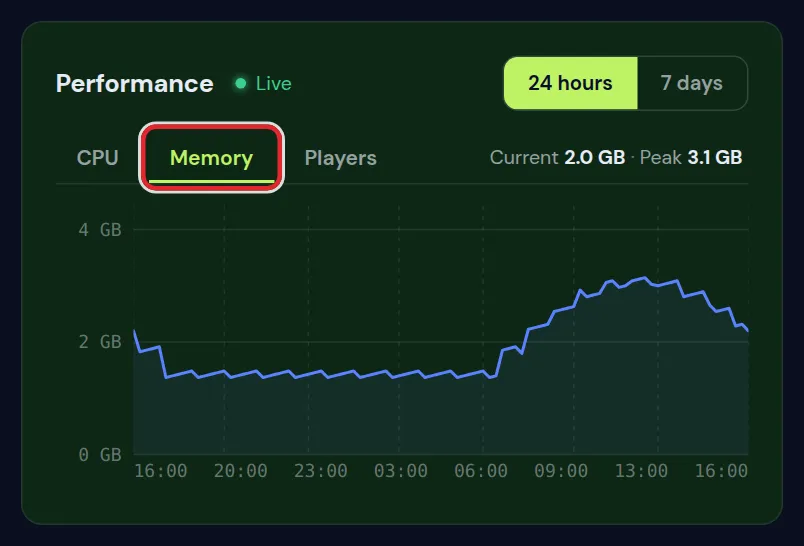
- Open the Overview tab during a busy evening and look at the memory graph over 24 hours, not at a single moment.
- A sawtooth line that climbs and drops again is healthy: Java fills its memory and cleans it up in batches. A line that stays flat against the top while players complain is the warning sign.
- On Paper and Purpur, type
/spark healthin the console. It shows the ticks per second, the time per tick, the processor and the memory in one view. - If the ticks drop below 20 while memory has room to spare, the cause is not RAM. Reduce lag on your Minecraft server helps you find it.
Recent versions of Paper and Purpur come with the spark profiler built in. On older versions, or on Fabric and Forge, spark is a plugin or mod you add yourself.
Changing the size of your Minecraft server later
You do not have to get it perfect on day one. Start at the size the sum gives, watch the memory graph during a busy evening, and move up when it runs full. Your world stays as it is when the memory changes.
Want the sum done for you? The server finder asks what you run and how many play, and gives the size.
Why a Minecraft server gets a little less heap than its plan
Java keeps the world, the players and the plugins in its heap, but it also needs memory outside the heap for itself: its own code, the network buffers, the threads and the bookkeeping of the clean up. On a Minecraft server that is several hundred megabytes, and more on bigger servers.
That is why the panel gives Java a heap a little below the memory of your plan. If the heap took the whole plan, the part outside it would have nowhere to go, and the system would stop the server without a crash line in the log. A server that vanishes without any error is often exactly that, on hosts that set the heap to the full amount.
Giving a Minecraft server far more heap than it uses does not help either. Java fills the room it is given before it cleans up, so you pay for memory that only holds waste, and the clean up itself can take longer. Size by the sum, not by the biggest number you can afford.
Questions from Minecraft server owners
Is 2 GB enough for a Minecraft server?
For two or three friends on the normal game with no plugins, yes. As soon as you add plugins, more players or any mods, 2 GB runs out. 4 GB is the more comfortable start.
Does more RAM reduce Minecraft server lag?
Only if the server was short of memory. Once there is enough, extra RAM does nothing for lag caused by farms, redstone or slow plugins; those depend on the processor.
How many players can an 8 GB Minecraft server hold?
On the normal game about 24 at the default view distance, with 20 or more plugins about 18, and on a light modpack about 8. A heavy modpack needs 8 GB just to run comfortably for a couple of players.
Why does the Minecraft server use all its memory even with nobody online?
Java keeps the memory it was given and cleans it up in batches. A memory graph that stays high while the server is quiet is normal. Worry only when it stays at the top and the game stutters.
How much RAM do I need for a Minecraft server with 10 players?
On the normal game 5 GB (2 GB plus 10 divided by 4, rounded up). With 20 or more plugins 6 GB, on a light modpack 9 GB, and on a heavy modpack 16 GB.
Is 4 GB of RAM enough for a Minecraft server?
Yes for the normal game with up to 8 players at the default view distance, and for Paper with 20 or more plugins and about 6 players. Not for modpacks: even a light one wants 6 to 8 GB.
How much RAM does a modded Minecraft server need?
A light pack of about 50 mods runs on 6 to 8 GB for a few friends. A heavy pack of 300 mods or more needs 6 GB before anyone joins and 1 GB per player on top, so six players come to 12 GB. Check the minimum the pack page gives as well.
Is 16 GB of RAM too much for a Minecraft server?
For the normal game with a few friends, yes: most of it would sit unused. 16 GB fits a heavy modpack with up to 10 players, or a public world of about 50 players on the normal game.
Does a Minecraft server need more RAM as the world gets older?
Not because the world file grows; that lives on the disk. It needs more when more players are online at once, when farms and bases get bigger, and on modpacks with automation that keeps growing. Look at the memory graph on a busy evening every few weeks.
Checked against Minecraft Java 26.2, September 2026. Written by the Cheapest Minecraft Hosting team, first published , updated .