
 Astroworld
Getting started
Minecraft server.properties explained, setting by setting
server.properties is the main settings file of a Minecraft Java server. It decides who can join, how the game plays, how far players see and how hard the server works. It is a plain text file with one setting per line, like max-players=20.
Below are the settings you can change in the panel, grouped the way the form groups them, with the name of the line in the file and the value Minecraft uses when you change nothing.
In short
server.properties is the plain text settings file in the top folder of a Minecraft Java server, with one setting per line such as max-players=20 or view-distance=10. It decides who can join, how the game plays and how hard the server works. Change it in the Settings tab under Server settings or in the Files tab, then restart, because Minecraft only reads it when the server starts.
Where to change Minecraft server.properties
- In the form: open Settings and go to Server settings. Every field has a name in plain words and a short explanation, and the search box finds a setting by name. The Advanced group appears after Show advanced settings.
- In the file: open Files and click
server.propertiesin the top folder of the server.
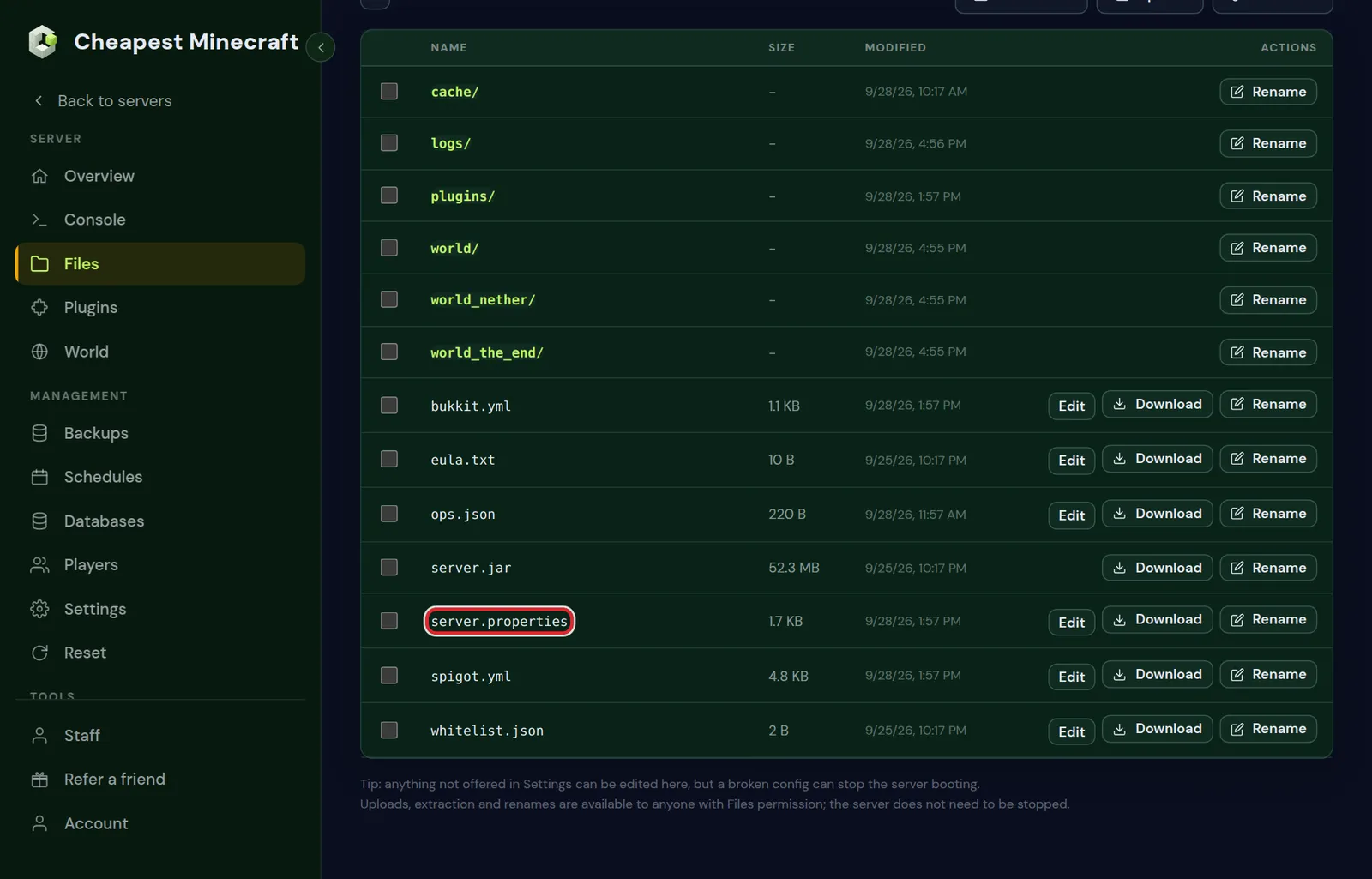
Either way, save and restart the server. Minecraft reads the file when it starts, so a change does nothing until the next restart.
General: Minecraft server list, players and resource pack
| In the panel | Line in the file | What it does | Minecraft default |
|---|---|---|---|
| Server description | motd | The text under your server's name in the server list, up to 150 characters in the form | A Minecraft Server |
| Max players | max-players | How many people can be online at once | 20 |
| Idle kick (minutes) | player-idle-timeout | Kicks players who do nothing for this many minutes; 0 never kicks | 0 |
| Resource pack URL | resource-pack | A direct https link to a zip that players download on join | empty |
| Resource pack SHA-1 | resource-pack-sha1 | The 40 character checksum of that zip | empty |
| Resource pack prompt | resource-pack-prompt | A line players see when asked to accept the pack | empty |
| Force resource pack | require-resource-pack | Players who decline the pack cannot play | false |
Colours and a second line in the MOTD are in change your server icon and MOTD; the resource pack lines in add a resource pack to your server. Max players is a limit, not a promise: how many can play smoothly depends on your RAM, see how much RAM.
Gameplay: Minecraft difficulty, game mode, PvP and spawn
| In the panel | Line in the file | What it does | Minecraft default |
|---|---|---|---|
| Difficulty | difficulty | peaceful, easy, normal or hard; peaceful removes hostile mobs | easy |
| Default gamemode | gamemode | What new players start in: survival, creative, adventure or spectator | survival |
| Force gamemode on join | force-gamemode | Puts everyone back in the default mode each time they join | false |
| Hardcore | hardcore | One life per player; dead players become spectators | false |
| PvP | pvp | Players can damage each other | true |
| Spawn protection (blocks) | spawn-protection | Radius around spawn where only operators can build; 0 turns it off | 16 |
| Allow the Nether | allow-nether | Nether portals work | true |
| Allow flight | allow-flight | Stops the kick for flying; some mods and plugins need it on | false |
| Command blocks | enable-command-block | Command blocks run in the world | false |
| Spawn monsters | spawn-monsters | Hostile mobs spawn | true |
Spawn protection is why new players often cannot break blocks at spawn: set it to 0 if everyone should be able to build there. On 1.21.11 and newer, PvP and monster spawning are also game rules, which you switch in the World tab; see keep inventory and game rules. For a one life server, see make a hardcore Minecraft server.
World: Minecraft structures and world type
| In the panel | Line in the file | What it does | Minecraft default |
|---|---|---|---|
| Generate structures | generate-structures | Villages, strongholds and other structures in new land | true |
| World type | level-type | minecraft:normal, minecraft:flat, minecraft:large_biomes, minecraft:amplified or minecraft:single_biome_surface | minecraft:normal |
Both only change land that has not been generated yet. For a whole world of the new type, start a new world. The file also holds level-name, the name of the world folder, and level-seed, the seed of a new world; change your server's seed shows how to use them.
Performance: Minecraft view distance and simulation distance
| In the panel | Line in the file | What it does | Minecraft default |
|---|---|---|---|
| View distance (chunks) | view-distance | How far players can see, from 2 to 32 | 10 |
| Simulation distance (chunks) | simulation-distance | How far around each player the world keeps working: farms, mobs, crops | 10 |
| Entity range (%) | entity-broadcast-range-percentage | How far away players see mobs and items | 100 |
| Watchdog (ms) | max-tick-time | How long one tick may take before the server counts itself as stuck and stops | 60000 |
| Synchronous chunk writes | sync-chunk-writes | Waits for each chunk to be written to disk before going on; off saves faster | true |
Simulation distance is the biggest single lever for performance: every step down means much less world to keep running. A view distance of 10 with a simulation distance of 6 looks the same to players and asks far less of the server. Reduce lag goes deeper.
Keep the watchdog at 60000 or higher. Below that, the server may stop itself during a short heavy moment, such as a big explosion or loading a large area.
Access: Minecraft whitelist and online mode
| In the panel | Line in the file | What it does | Minecraft default |
|---|---|---|---|
| Whitelist | white-list | Only players on the whitelist can join | false |
| Enforce whitelist immediately | enforce-whitelist | Kicks online players who are not on the whitelist as soon as it applies | false |
| Verify accounts with Mojang | online-mode | Checks that every player owns the account they log in with | true |
| Require signed chat | enforce-secure-profile | Refuses clients that cannot sign their chat messages | true |
| Block proxy connections | prevent-proxy-connections | Refuses players who connect through a VPN or proxy | false |
| Hide the player list | hide-online-players | Does not show who is online in the server list | false |
Leave online mode on. With it off, anyone can join under any name, including yours as the owner. The only reason to switch it off is a server behind a proxy of a server network that checks accounts for you. More on the whitelist in whitelist and operator levels.
Advanced: Minecraft server list, logs and network
| In the panel | Line in the file | What it does | Minecraft default |
|---|---|---|---|
| Answer server-list pings | enable-status | The server shows as online in multiplayer lists; off makes it look offline | true |
| Send console output to operators | broadcast-console-to-ops | Operators see the result of console commands in the game | true |
| Send remote command output to operators | broadcast-rcon-to-ops | The same for commands sent from outside the game | true |
| Log player IP addresses | log-ips | Writes the address of each player to the log | true |
| Network compression threshold | network-compression-threshold | Packets bigger than this many bytes are compressed; -1 turns compression off | 256 |
| Connection rate limit | rate-limit | Kicks a player who sends more packets per second than this; 0 is no limit | 0 |
The Minecraft defaults are the right choice here for almost every server.
More Minecraft server.properties lines: permissions, pausing and world size
The file holds a few more lines than the form shows. Most can stay as they are, but it helps to know what they do when you open the file.
| Line in the file | What it does | Minecraft default |
|---|---|---|
op-permission-level | The level a player gets when you op them, from 1 to 4 | 4 |
function-permission-level | The level at which functions from data packs run | 2 |
pause-when-empty-seconds | Since 1.21.2 the server stops ticking after this many seconds with nobody online; 0 turns the pause off | 60 |
max-world-size | The largest the world border can grow, counted in blocks from its centre | 29999984 |
max-chained-neighbor-updates | Caps chain reactions of block updates, a guard against lag machines | 1000000 |
accepts-transfers | Since 1.20.5, lets another server send players here with the transfer command | false |
region-file-compression | Since 1.20.5, how chunk files are packed: deflate, lz4 or none | deflate |
initial-enabled-packs | The data packs and experiments a brand new world starts with | vanilla |
level-name | The name of the world folder the server loads | world |
enable-rcon and enable-query | Remote control and status queries over the network; the Console tab does the same job | false |
Recommended server.properties for a friends SMP, a public server and a creative server
Three starting points we would pick ourselves. Change one value at a time afterwards, so you know what each change did.
| Line | Friends SMP | Public survival | Creative build server |
|---|---|---|---|
difficulty | normal | hard | peaceful |
gamemode | survival | survival | creative |
max-players | 10 | 60 | 20 |
view-distance | 10 | 8 | 12 |
simulation-distance | 6 | 5 | 4 |
white-list | true | false | true |
spawn-protection | 0 | 16 | 0 |
pvp | true | true, with a protected spawn | false |
allow-flight | false | true, with an anticheat such as GrimAC | true |
player-idle-timeout | 0 | 15 | 0 |
enable-command-block | false | false | true |
A public server sees more players at once, which is why its view and simulation distance are lower. A creative server simulates little, so it can show more of the builds. Whatever you pick, the memory has to match the players; count it per player with how much RAM a Minecraft server needs.
Minecraft server.properties lines to leave alone
A few lines in the file belong to how your server is reached, such as server-port and server-ip. They are set for your play address; change them and players can no longer connect. Change the settings above freely, but leave these as they are.
On Paper and Purpur, server.properties is only part of the story: the files bukkit.yml, spigot.yml and the config folder with the Paper settings hold many more options, mostly for performance. Paper, Purpur or Spigot explains what those server types add.
Server.properties not working? Settings that surprise server owners
Some lines do something slightly different from what their name suggests. These are the ones we get asked about most.
- Changing `level-name` does not rename the world. Minecraft starts a brand new world in a folder with the new name, and the old world waits untouched in its own folder. Change the name back and the old world returns.
- `level-seed` is only read when a world is created. On a world that already exists nothing happens; change your server's seed covers the steps.
- `gamemode` only applies to players who join for the first time. Turn on
force-gamemodeto put everyone in it each time they join. - `spawn-protection` only works when the server has at least one operator. With an empty operator list, anyone can build at spawn.
- `max-players` also keeps operators out when the server is full, unless
bypassesPlayerLimitistruefor them inops.json. - `difficulty` is locked to hard on a hardcore world, whatever the line says.
Beyond server.properties: bukkit.yml, spigot.yml and the Paper config files
Paper, Purpur and Spigot read server.properties like every server, and then add files of their own with many more options. They appear after the first start, and they also need a restart after a change.
| File | What it holds | An option owners often change |
|---|---|---|
bukkit.yml | How many mobs of each kind may spawn and how often | spawn-limits, with 70 monsters per player area by default |
spigot.yml | How far from players mobs and items stay active, and how dropped items merge | entity-activation-range |
config/paper-global.yml | Settings for the whole server, such as chunk loading for players | Rarely needed for a normal server |
config/paper-world-defaults.yml | Defaults for every world: explosions, despawn ranges, redstone and hoppers | optimize-explosions |
purpur.yml | Purpur's own gameplay options, such as mobs players can ride | Whatever Purpur feature you want to switch on |
Fabric, Forge and NeoForge keep the settings of each mod in the config folder instead, one file per mod. Reduce lag on your server shows which of these options matter for performance.
Bedrock server.properties: the lines that differ from Java
The official Bedrock server also has a server.properties in its top folder, and you change it the same way in the Files tab. Many lines have other names or other defaults than on Java.
| Line in the file | What it does | Bedrock default |
|---|---|---|
server-name | The name shown in the server list and the Friends tab | Any text you like |
gamemode | survival, creative or adventure | survival |
difficulty | peaceful, easy, normal or hard | easy |
allow-cheats | Lets operators use cheat commands such as gamemode and give in the game | false |
max-players | How many people can be online at once | 10 |
allow-list | Only players on the allowlist can join | false |
view-distance | How far players can see, in chunks | 32 |
tick-distance | How far around players the world keeps working, from 4 to 12 | 4 |
player-idle-timeout | Minutes before a player who does nothing is kicked; 0 never kicks | 30 |
default-player-permission-level | What a new player is: visitor, member or operator | member |
texturepack-required | Players must accept the resource pack of the world | false |
Leave the port lines of a Bedrock server alone for the same reason as on Java: they belong to your play address. A crossplay server is a Java server, so for crossplay the Java lines on this page apply.
Questions from Minecraft server owners
Where is server.properties on my Minecraft server?
In the top folder of the server, next to the world folder. Open it in the Files tab, or change the same settings in the Settings tab under Server settings.
Do I need to restart the Minecraft server after changing server.properties?
Yes. Minecraft reads the file when it starts, so a change works after the next restart.
Why did my change in Minecraft server.properties not work?
Usually the server was not restarted, or the value is spelled wrong. true and false are written in small letters, and there are no spaces around the equals sign.
What is a good view distance for a Minecraft server?
Around 10 for view distance and 6 for simulation distance suits most survival servers. Lower both on a busy or heavily modded server.
What is the default port in Minecraft server.properties?
server-port is 25565 on Java and 19132 on Bedrock. On our servers the port belongs to your play address, so leave that line as it is; players use the address shown in the panel.
Why does spawn protection not work on my Minecraft server?
Minecraft only protects the spawn area when the server has at least one operator. Type op and your name in the Console tab and it works. Operators themselves can always build there.
Why do farms stop when nobody is online on my Minecraft server?
Since Minecraft 1.21.2 the server pauses after pause-when-empty-seconds, 60 by default, once the last player leaves. Set it higher, or to 0 to turn the pause off. Farms also only run in chunks that are loaded.
How do I let an operator join when the Minecraft server is full?
Open ops.json in the Files tab, set bypassesPlayerLimit to true for that operator and restart. Raising max-players works as well.
Is server.properties the same on Paper, Fabric and Forge?
Yes. Every Java server type reads the same server.properties. Paper and its forks add their own files on top, and mods keep their settings in the config folder.
Checked against the Server settings form in the Settings tab and the Files tab of our control panel, September 2026. Written by the Cheapest Minecraft Hosting team, first published , updated .