
 Astroworld
Performance
How to reduce lag on a Minecraft server
Lag is a catch all word for three different problems, and the fix depends on which one you have. Guessing wastes time; a two minute check tells you where to look.
In short
To reduce lag on a Minecraft server, first make sure it is server lag: everyone feels it at once and the TPS drops below 20. Then lower the simulation distance to about 6, thin out big mob and item farms, pre-generate the world, run Paper instead of vanilla, and let spark show which plugin, mod or build takes the most time per tick. More RAM only helps when the memory graph sits at the top.
Which kind of Minecraft lag is it?
| What players see | Kind | Where the problem is |
|---|---|---|
| Blocks come back after breaking them, mobs freeze then jump, everyone feels it at once | Server lag (low TPS) | The server |
| Only one player rubber bands, others are fine | Connection lag (high ping) | That player's connection |
| The picture stutters, but the world keeps moving normally | Low FPS | That player's computer |
Only the first one is about the server. The server runs at 20 ticks per second (TPS). Each tick has 50 milliseconds; when a tick takes longer, the server falls behind and the whole world slows down for everyone.
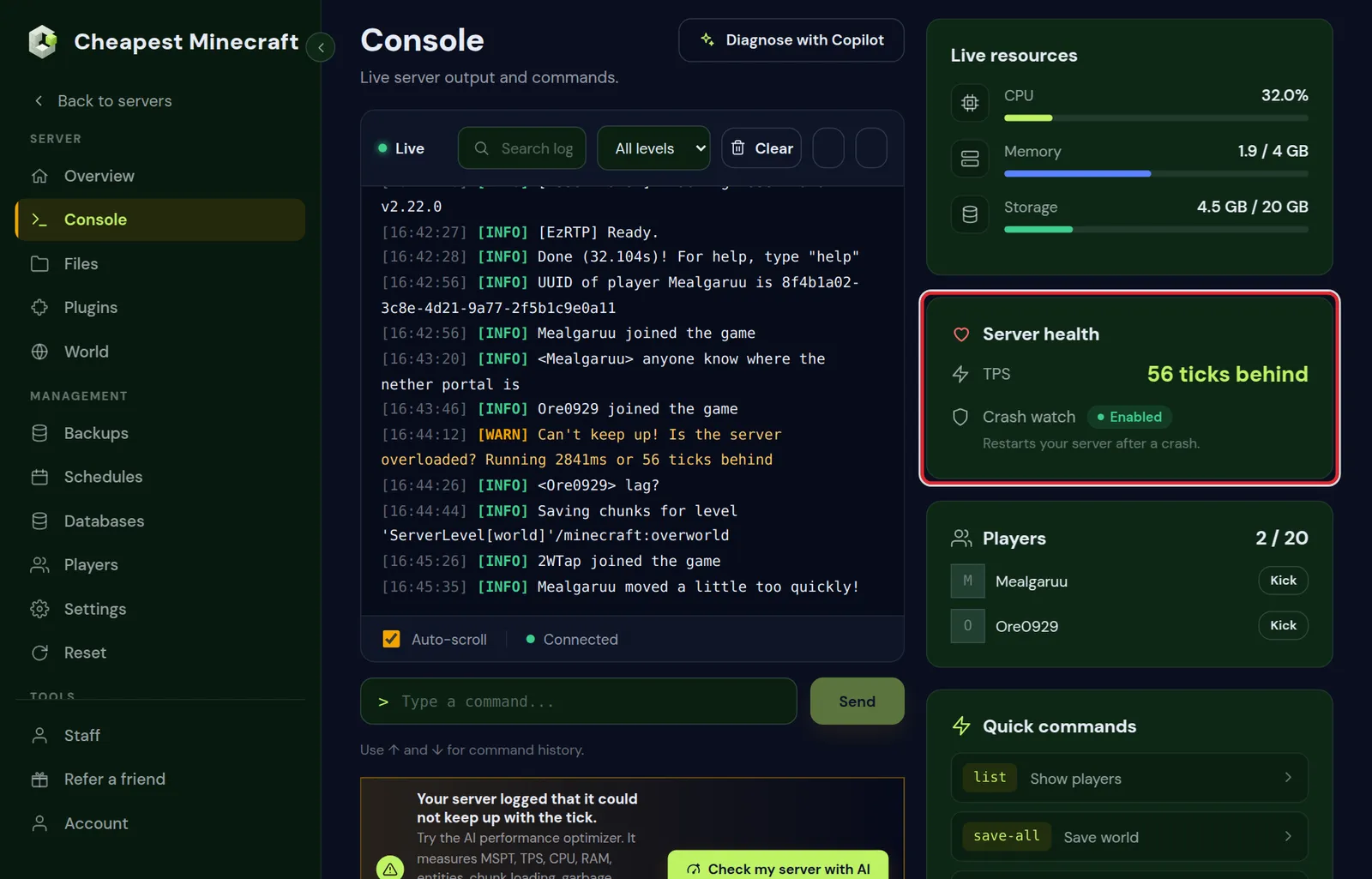
The Server health card in the Console tab shows it without any plugin: 20.0 when all is well, or how many ticks the server fell behind the last time it could not keep up.
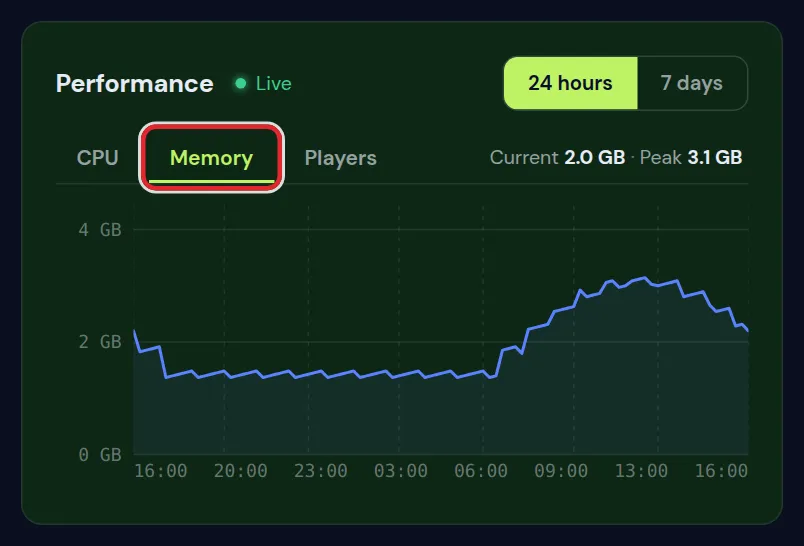
The Performance card on the Overview tab shows CPU, Memory and Players over the last day or week, so you can see whether the lag comes with more players or with memory at the top.
Measure it with spark: Minecraft server lag
spark is a free profiler that shows exactly what the server spends its time on. It is available as a plugin for Paper and as a mod for Fabric, Forge and NeoForge.
- Install spark from the Plugins or Mods tab and restart.
- When the lag happens, type
/spark tps. It shows TPS and MSPT, the milliseconds per tick. Under 50 MSPT is healthy. - Start a profile with
/spark profiler start, let it run for two or three minutes while the lag is there, then/spark profiler stop. - spark gives a link to a report. Open it and expand the biggest entries: they tell you whether entities, chunk loading, redstone or a plugin eats the time.
How to read a spark report on a lagging Minecraft server
A spark report is a tree of everything the server thread did, with the share of time each part took. Open the biggest branch under the server tick and look for one of these:
| What takes the most time | What it usually is | Where to go next |
|---|---|---|
| Entries about entities | Too many mobs, items or villagers in loaded chunks | The entity part below |
| Entries about chunks and world generation | Players exploring new land | Pre-generate the world |
| Block entities and hoppers | Long hopper chains, furnace arrays or full storage systems | The lag machines part below |
| A plugin's own name | One plugin doing too much work in the tick | Its settings, or a lighter alternative |
Long garbage collection pauses in /spark gc | Memory running short | How much RAM a server needs |
Run the profiler while the lag is actually there. A report from a quiet moment shows a healthy server and sends you looking in the wrong place.
View distance and simulation distance on a Minecraft server
These two settings in server.properties have the biggest effect of anything you can change, and they do different things.
view-distanceis how far players can see. Chunks in that range are sent to players but not simulated.simulation-distanceis how far around each player the world is alive: mobs move, crops grow, redstone runs.
Simulation is the expensive part. Lowering simulation-distance to 6 while keeping view-distance at 10 keeps the view the same and takes a large load off the server. Players only notice that farms far away from them stop running, which they do in singleplayer too.
Paper and Spigot settings that reduce Minecraft server lag
Paper and Spigot have settings that vanilla does not, and a few of them make a clear difference on a busy server. Change one at a time and restart after each change.
| File and setting | Default | What to try |
|---|---|---|
bukkit.yml, spawn-limits for monsters | 70 | 50 lowers the number of hostile mobs per player area |
bukkit.yml, ticks-per for monster spawns | 1 | 2 tries to spawn monsters every other tick |
spigot.yml, entity-activation-range for animals and monsters | 32 | 24 lets mobs further from players think less often |
config/paper-world-defaults.yml, max-entity-collisions | 8 | 2 stops crowded mobs from pushing each other endlessly |
config/paper-world-defaults.yml, optimize-explosions | false | true makes TNT and creeper blasts cheaper to work out |
config/paper-world-defaults.yml, despawn-ranges for monsters | hard 128 | 96 removes far away mobs a little sooner |
Each of these changes the game slightly, so tell your players. Server.properties explained shows where these files sit next to server.properties.
Entities: the usual suspect of Minecraft server lag
In most spark reports on busy survival servers, entities are at the top: mobs, dropped items, minecarts and item frames. Common causes:
- Mob farms that collect hundreds of animals or villagers in one place.
- Item farms without a collection system, so thousands of items lie on the ground.
- Large animal pens. Cows and chickens tick like any mob.
Talk to the owners of big farms first. On Paper, config/paper-world-defaults.yml also has limits, for example on how many entities can push into each other, and bukkit.yml controls how many mobs spawn per player.
Hoppers, redstone clocks and villagers: Minecraft lag machines
Some builds cost tick time all day, also when nobody uses them. These are the ones to look for after a spark report points at entities or block entities.
- Hopper chains: every hopper checks for items many times a second. Long lines of hoppers under a storage system add up; water streams or minecarts with hoppers carry items more cheaply.
- Redstone clocks that run all the time, often left behind in an old farm. Ask players to put a lever on each clock so it can be turned off.
- Villager trading halls with dozens of villagers. Each villager thinks about paths and jobs; locking them in one block cells keeps that work down.
- Piles of item frames, armor stands and minecarts in one area, such as a decorated shop street.
To find where entities pile up on Paper, type paper entity list in the console. It counts every entity type per world, and adding a type, such as paper entity list minecraft:item, shows the chunks where that type gathers.
Pre-generate the Minecraft world
Generating new terrain is one of the heaviest things a server does. When players explore in different directions on a fresh world, TPS drops. Generating the area in advance, while nobody plays, removes that cost. Pre-generate your world shows how, straight from the World tab.
Minecraft server software and mods
- On vanilla? Switch to Paper in Settings. It is the same game with much better performance, and the world stays as it is.
- On Fabric? Add performance mods such as Lithium and FerriteCore. They change nothing about gameplay.
- Heavy plugins: if spark points at one plugin, look for a lighter alternative or check its settings. Plugins that scan the whole world, like some anti cheat or map plugins, can be heavy.
When it is not the server: Minecraft lag on the player side
If spark shows 20 TPS and players still complain, look at their side. High ping comes from distance and the player's own connection; a player far away from the server always has more delay. Low FPS is solved on the player's computer, for example with the Sodium mod, lower render distance, or closing other programs.
Processor: when your Minecraft server needs more CPU
Minecraft runs the world on one main thread, so the speed of a single core matters most. That is why our servers run on the AMD Ryzen 9 7950X, which boosts to 5.7 GHz. Extra cores still help: world generation, chunk loading, garbage collection and many plugins work next to the main thread.
| Memory of the plan | vCPU included |
|---|---|
| Up to 4 GB | 1 |
| Up to 12 GB | 2 |
| Up to 24 GB | 3 |
| Up to 48 GB | 4 |
| Up to 96 GB | 6 |
| Above 96 GB | 8 |
When the CPU graph on the Overview tab stays at the top during play, while the settings on this page are already in order, the server needs more processor. Extra vCPU can be added when you configure a server.
Minecraft server lag checklist, in order
- Check the Server health card: is the TPS below 20 while people play?
- Look at the memory and CPU graphs on the Overview tab during the lag.
- Run a spark profile while the lag is there and open the biggest branch.
- Set
simulation-distanceto 6 and keepview-distanceat 10. - Count the entities, and talk to the owners of the biggest farms.
- Pre-generate the world inside a world border.
- Run Paper or Purpur, or Lithium and FerriteCore on Fabric, and go through the Paper settings above.
- Replace or reconfigure the plugin or mod that spark points at.
- Only then look at more memory or more vCPU.
Questions from Minecraft server owners
Will more RAM fix Minecraft server lag?
Only if the server is short of memory. Most lag comes from the processor having too much to do in each tick: entities, redstone, new chunks. spark tells you which it is.
What does Can't keep up! Is the server overloaded? mean on a Minecraft server?
The server was a number of ticks behind and skipped ahead. Once at startup is normal. If it repeats while people play, the server is lagging and a spark profile will show why.
What is a good TPS for a Minecraft server?
20 is perfect and the maximum. Above 19 nobody notices. Below 15 players start to feel it, and below 10 the game becomes hard to play.
Do scheduled restarts help against Minecraft server lag?
They clear memory and unload chunks, which helps servers with plugins that slowly build up. They do not fix a farm or a plugin that causes lag straight after a restart.
What is MSPT on a Minecraft server?
Milliseconds per tick: how long the server needs for one tick of the game. A server has 50 ms per tick to reach 20 TPS, so under 50 MSPT it keeps up and above 50 it falls behind.
Why does my Minecraft server lag with only one player online?
Usually because that player explores new land, which makes the server generate terrain, or stands near a large farm. Pre-generating the world fixes the first; a spark profile shows the second.
Is Paper or Fabric better against Minecraft server lag?
Paper has many optimisations built in and suits plugin servers. Fabric with Lithium and FerriteCore is just as fast for modded play. Plain vanilla is the slowest of the three.
How do I find which chunk causes lag on my Minecraft server?
On Paper, paper entity list shows where entities gather. A spark profile taken while the lag is there shows what the server spends its time on, and the chunk usually follows from that.
Checked against Paper and Fabric for Minecraft Java 26.2, September 2026. Written by the Cheapest Minecraft Hosting team, first published , updated .