
 Astroworld
Performance
Pre-generate your Minecraft world to stop exploration lag
Every time a player walks into land nobody has seen, the server has to invent it: terrain, caves, ores, villages. That is some of the heaviest work a server does, and with a few players exploring in different directions it makes everyone lag.
Pre-generating does that work in advance. Terrain that already exists only has to be loaded from disk, which is far cheaper.
In short
To pre-generate a Minecraft world, open the World tab, choose a radius under Pre-generate the world and start it: the panel installs Chunky and generates the land around spawn while the server runs. From the console, chunky radius 3000 followed by chunky start does the same. Then set a world border twice the radius wide, such as worldborder set 6000, so players never walk into new land.
How big should the Minecraft map be?
| Server | Radius from spawn | Area |
|---|---|---|
| A few friends | 2,000 blocks | 4,000 by 4,000 |
| A small community | 3,000 blocks | 6,000 by 6,000 |
| A public survival server | 5,000 blocks | 10,000 by 10,000 |
Bigger is not better. Every chunk takes storage, and a 5,000 block radius already covers more than most communities ever walk. Check the free storage in the panel first; a large map can take several gigabytes.
How much storage a pre-generated world takes
Minecraft saves land in region files of 512 by 512 blocks. Counting them gives a feel for the size of a map:
| Area | Region files in the overworld |
|---|---|
| 4,000 by 4,000 blocks | About 64 |
| 6,000 by 6,000 blocks | About 144 |
| 10,000 by 10,000 blocks | About 400 |
On the normal game a full region file is usually several megabytes, so a 10,000 by 10,000 map lands in the gigabytes, and terrain mods or datapacks add more. The Nether and the End come on top, each in its own folder.
Pre-generate from the World tab of your Minecraft server
- Open the World tab and find Pre-generate the world.
- Choose how far from spawn to generate.
- Start it. The panel installs Chunky if it is not there yet and begins generating.
- Leave the server running. You can follow the progress in the Console.
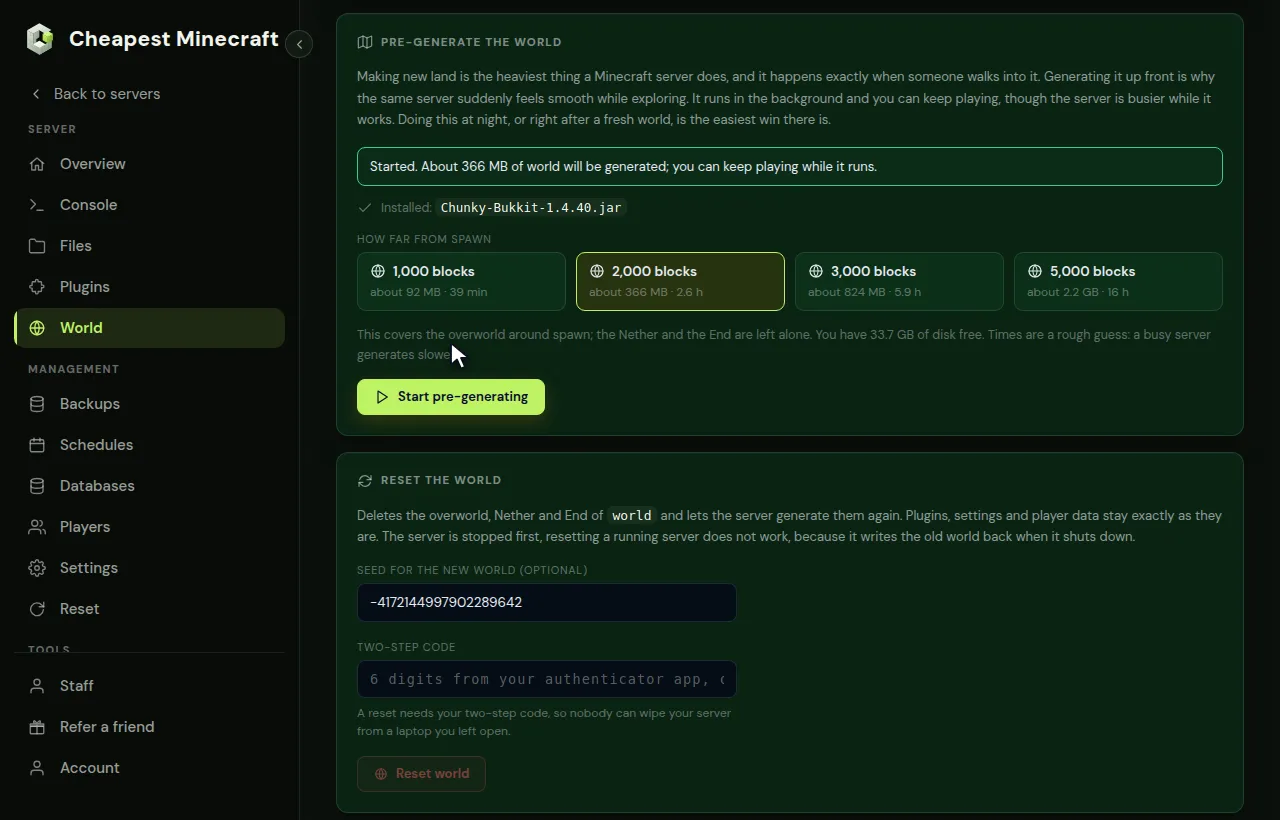
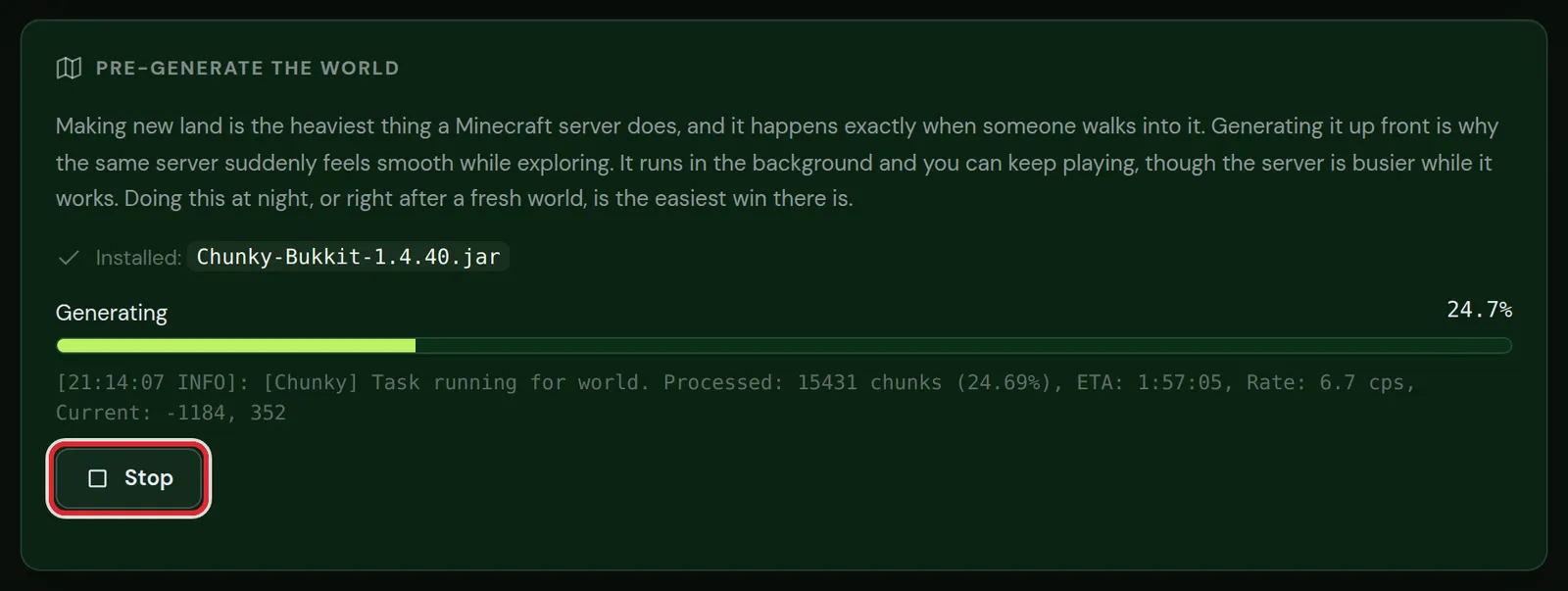
Run it when few people are online, such as at night. Players can stay on, but the server works hard while it generates.
With Chunky commands on your Minecraft server
Chunky is the tool behind the button, and you can drive it yourself from the console for more control, for example to do the Nether as well.
chunky world world
chunky center 0 0
chunky radius 3000
chunky start
chunky pauseandchunky continuestop and resume. Progress survives a restart.chunky world world_netherand a smaller radius, since Nether distances count eight times, does the Nether.chunky spawnsets the centre to the world spawn instead of 0 0.
On Paper the dimensions are named world, world_nether and world_the_end. On Fabric and Forge, use minecraft:overworld and minecraft:the_nether instead.
More Chunky commands for a Minecraft server
| Command | What it does |
|---|---|
chunky worldborder | Takes the centre and size from the world border, so the two always match |
chunky shape circle | Generates a round area instead of a square |
chunky progress | Shows how far the task is |
chunky quiet 60 | Prints progress once a minute instead of all the time, which keeps the console readable |
chunky cancel | Stops the task and forgets it, where chunky pause keeps it for later |
When a task is done, the console says it finished, with the number of chunks and the total time.
Add a Minecraft world border
Pre-generating does not stop players from walking past the edge into new land. A world border does. Set it to the same size as the area you generated. The border takes a width, which is twice the radius:
worldborder center 0 0
worldborder set 6000
That border matches a Chunky radius of 3000. Players who reach it simply cannot go further, and the server never has to generate new terrain again.
Pre-generate the Nether and the End
One block in the Nether is eight in the overworld. A Nether radius of one eighth of the overworld radius therefore covers every portal players can build inside your overworld area. For a 3,000 block overworld:
chunky world world_nether
chunky radius 375
chunky start
The outer islands of the End start about 1,000 blocks from the centre, and players with elytra fly far. A radius of 3,000 to 5,000 blocks in world_the_end covers most trips.
On Paper each dimension has a border of its own. Set the Nether border from the console with execute in minecraft:the_nether run worldborder set 750, twice the Nether radius.
Good to know about pre-generating a Minecraft world
- Generation speed depends on the world type and mods. A heavy modpack generates far slower than the normal game.
- A Minecraft update that changes world generation, such as new biomes, only applies to chunks that did not exist yet. Pre-generated land keeps the old terrain.
- Generating a new world after a reset? Run it again; the old progress belonged to the old world.
Pre-generating a modded Minecraft world
Chunky also runs as a mod on Fabric, Forge and NeoForge, and the commands are the same. Two differences:
- The dimensions have their full names:
minecraft:overworld,minecraft:the_netherandminecraft:the_end, and modded dimensions such astwilightforest:twilight_forestwhen the pack has them. - Modded terrain is far heavier to generate. Start with a smaller radius, such as 1,500 blocks, and add more later with a bigger radius; Chunky skips the chunks that already exist.
Install a modpack explains why this matters most for big packs.
After pre-generating: backup and border
- Check with
chunky progressthat every task is done. - Set the world border to the generated area, if you have not yet.
- Make a backup in the Backups tab. The pre-generated world is the base you never want to generate again, and a restore is quicker than another run.
A bigger world also makes every backup bigger and slower to make. That is one more reason to keep the map no larger than your players need.
Questions from Minecraft server owners
How long does pre-generating a Minecraft world take?
From tens of minutes for a small area on the normal game to many hours for a large area on a heavy modpack. Chunky shows the speed and an estimate in the console.
Can players play on the Minecraft server while it runs?
Yes, but they will notice the server working. Run it at a quiet time, or pause it while people play and continue later.
Does it help on a Bedrock Minecraft server?
Chunky is for Java servers, including crossplay. The official Bedrock server has no equivalent, so there it is not an option.
Does pre-generating use a lot of RAM?
A little more than normal while it runs, because new chunks pass through memory before they are saved. Memory use drops back once the task is done. On a small plan, run it while few players are online.
How big should the Nether be pre-generated?
One eighth of the overworld radius covers every portal players can build inside the overworld area: 375 blocks for an overworld radius of 3,000.
Should I pre-generate the End on my Minecraft server?
Only if players explore the outer islands a lot. They start about 1,000 blocks from the centre, so a radius of 3,000 to 5,000 blocks covers most elytra trips.
Checked against Chunky on Paper and Fabric for Minecraft Java 26.2, September 2026. Written by the Cheapest Minecraft Hosting team, first published , updated .