
 Astroworld
Getting started
How to change the seed of your Minecraft server
The seed decides the whole world: where the mountains, oceans, villages and caves are. A server uses its seed once, when it creates the world. Changing the seed therefore always means a new world.
The World tab does this in one go and takes a backup first, so the old world is never lost by accident.
In short
To change the seed of a Minecraft server, open the World tab, type the seed in Seed for the new world and click Reset world. The panel makes a full backup, removes the overworld, the Nether and the End, and starts a new world from that seed, while plugins, the whitelist and operators stay. Changing level-seed alone does nothing for a world that already exists.
Find the Minecraft seed you want
- From a singleplayer world you like: open it and type
/seedin the chat. Click the number to copy it. - From a friend or a video: a seed is a number, sometimes a word. Words work too: Minecraft turns them into a number, and the same word always gives the same world.
- From your current server: type
seedin the Console.
A seed gives the same land on the same Minecraft version. Big updates can change terrain generation, so a seed from a video made on an older version may look different on yours.
What makes a good seed for a Minecraft server
A seed that is great in singleplayer is not always great for a server, because every player starts at the same spot. Before you pick one, look at the land around spawn:
- Room to build near spawn: plains or a forest edge, rather than a steep mountain or an ocean.
- Several biomes within a few hundred blocks, so players can spread out without walking for half an hour.
- A village close by for early trading and beds on the first night.
- Ores and caves near spawn matter less on a server: a group explores in all directions anyway.
An online seed map shows a seed's biomes and structures before you use it. Type the seed and pick the same Minecraft version and edition as your server, or the map will not match.
Reset the Minecraft world with a new seed
- Open the World tab of your server.
- In the reset card, fill in Seed for the new world. Leave it empty for a random world.
- Click Reset world and confirm. The panel takes a full backup, deletes the overworld, the Nether and the End, and starts the server with the new seed.
- Watch the Console while the new world is generated. It takes about a minute.
Your plugins, their settings, the whitelist and your operators stay as they are. Only the world is replaced. Want the old world back? Restore the backup from the Backups tab, as in back up and restore your server.
The Reset tab in the menu is something else: it wipes the whole server, plugins and settings included. For a new seed you only need the World tab.
Change level-seed in server.properties by hand
Doing it yourself is useful when you want to keep the old world folder on the server, or add a data pack before the new world is made.
- Stop the server.
- In Files, open
server.propertiesand setlevel-seed=to your seed, for examplelevel-seed=8675309. - Rename the world folder, the name in
level-name, which is usuallyworld. Call itworld-old, for example. On Paper and Purpur also renameworld_netherandworld_the_endif you see them. - Start the server. It finds no world under that name and generates a new one from your seed.
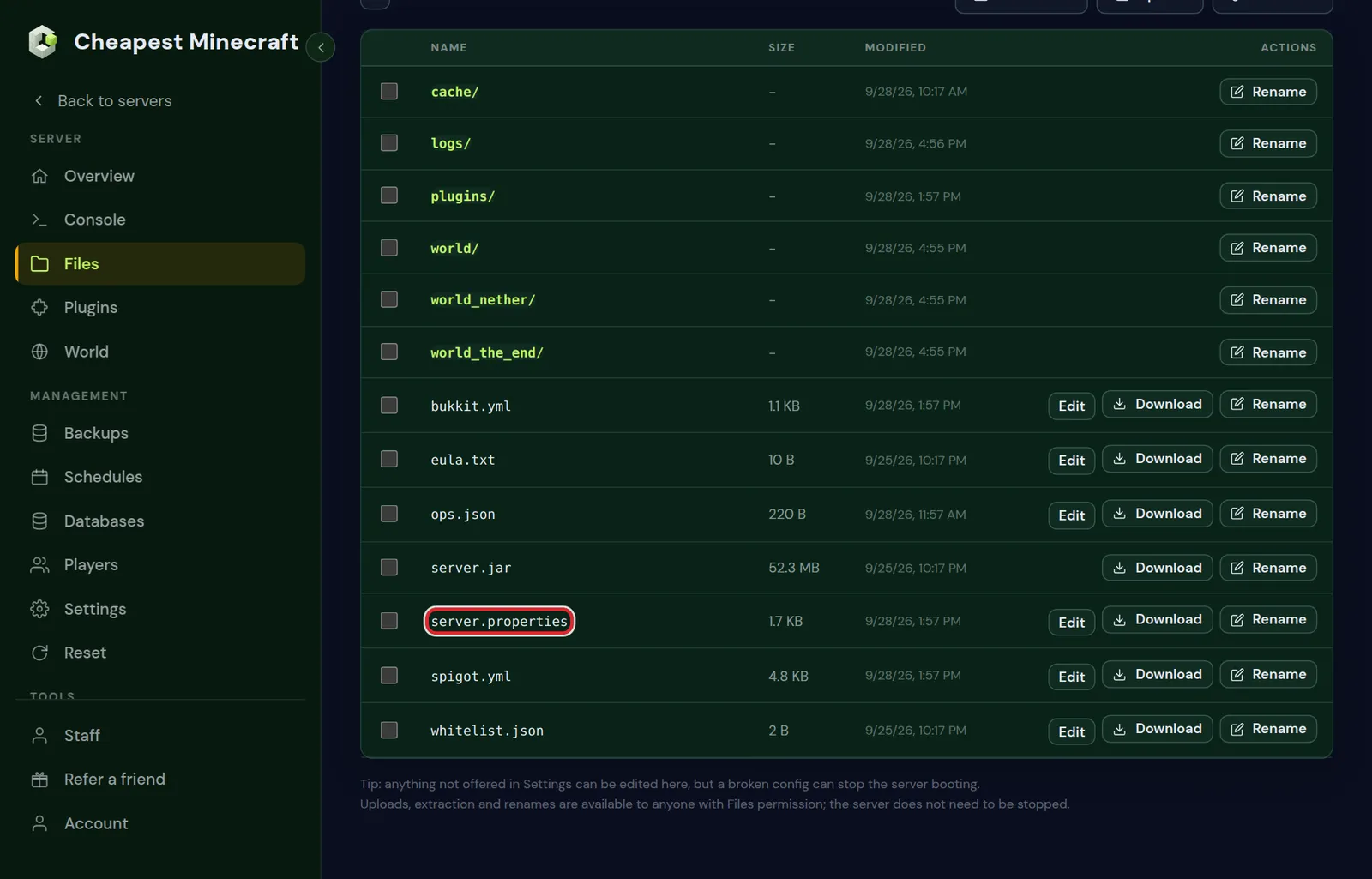
level-seed and level-name are both in server.properties.Changing level-seed without removing the world does nothing. The world keeps the seed it was created with, which is saved inside the world folder.
An old world folder takes up disk space. Download it, or delete it once you are sure you will not need it again.
Keep the old Minecraft world and switch between two worlds
Renaming the world folder instead of deleting it means you can go back at any time. Two details make that work:
- On Paper and Purpur the Nether and the End live next to the overworld in their own folders, named after
level-name:world_netherandworld_the_end. Rename all three the same way, such asworld-old,world-old_netherandworld-old_the_end, so they stay a set. - To go back, stop the server, set
level-name=world-oldinserver.propertiesand start again. The new world waits in its own folder.
Want both worlds online at the same time? The Multiverse-Core plugin loads an extra world next to the main one, and players move between them with a command or a portal.
Change the seed of a Bedrock Minecraft server
A Bedrock server keeps its worlds in the worlds folder, one folder per world, and loads the one named in level-name.
- Stop the server.
- In Files, open
server.propertiesand setlevel-seed=to your seed. - Change
level-nameto a new name, such asSeason 2. The old world folder stays inworldsunder its old name. - Start the server. It finds no world with the new name and generates one from your seed.
World type and structures of a new Minecraft world
Two more settings shape a new world. Both are in Settings under Server settings, and like the seed they only apply to land generated after the change.
- World type (
level-type): normal, flat, large biomes, amplified, or a single biome. - Generate structures: villages, temples, strongholds and the rest. Switched off, the world is bare land.
A data pack can change world generation as well. To have it in the new world from the first chunk, use the way by hand above and put the pack in place before the first start; install datapacks shows where it goes.
The same seed with flat, amplified or large biomes
A seed and a world type work together, so the same seed gives a different world when the type changes:
| World type | What the seed does |
|---|---|
| Normal | The world you see on a seed map for that version |
| Large biomes | Biomes about four times as wide, so the land is not the same as on normal |
| Amplified | The same seed stretched into extreme mountains and deep valleys |
| Flat | No terrain from the seed: every chunk has the same layers |
| Single biome | One biome everywhere, with the seed only shaping the land within it |
So a seed found in a video only gives that world on the normal type and on the same Minecraft version.
After the new Minecraft world is made
- Stand where the spawn should be and type
/setworldspawn. - Pre-generate the area players will use, so exploring does not cause lag: pre-generate your world.
- Set a world border if the map should have a fixed size, for example
worldborder set 10000.
Take your builds to the new seed with WorldEdit schematics
A new seed does not have to cost your best builds. With the WorldEdit plugin you save them as schematics before the reset and paste them in the new world.
- Install WorldEdit from the Plugins tab and restart.
- Stand at one corner of the build and type
//pos1, then at the opposite corner, top or bottom included, and type//pos2. - Stand where you want the paste point to be and type
//copy, then//schem save townhallwith a name of your choice. - Reset the world with the new seed. Schematics are kept in
plugins/WorldEdit/schematics, which the reset leaves alone. - In the new world, stand where the build should go and type
//schem load townhalland then//paste.
Paste on flat ground or clear the spot first with WorldEdit, and use //undo straight away if it lands in the wrong place.
Questions from Minecraft server owners
Can I change the Minecraft seed and keep my builds?
Not in the same world. You can copy builds with a plugin such as WorldEdit: save them as schematics before the reset and paste them into the new world.
Does a new Minecraft seed also change the Nether and the End?
Yes. They are generated from the same seed, so a reset gives a new Nether and new outer End islands as well. The main End island with the dragon always looks the same.
Do Java and Bedrock give the same Minecraft world from one seed?
Since version 1.18 the terrain and biomes mostly match, but villages and other structures can be in different places.
Where is the seed of my current Minecraft world?
Type seed in the Console of the panel, or /seed in the game as an operator.
What is a seed in Minecraft?
The number a world is generated from. The same seed on the same version and world type always gives the same mountains, caves, biomes and structures.
Can I use a Bedrock seed on my Java Minecraft server?
Yes. Since 1.18 the same seed gives mostly the same terrain and biomes on both editions, although villages and other structures can be in other places.
How do I get a random seed for my Minecraft server?
Leave Seed for the new world empty in the World tab. Minecraft then picks a random seed, which you can read afterwards by typing seed in the console.
Does changing the seed delete my Minecraft world?
The World tab replaces the world, but it makes a full backup first, so you can restore it from the Backups tab. Done by hand, you rename the world folder and nothing is deleted.
Checked against the World, Files and Backups tabs of our control panel, September 2026. Written by the Cheapest Minecraft Hosting team, first published , updated .