
 Astroworld
Players
Minecraft server commands every admin needs
Commands are how you run a Minecraft server from the inside: who may join, who is in charge, and what the world does. This page lists the ones admins actually use, grouped by the job they do, with an example you can copy.
Every command here is part of Minecraft Java Edition itself, so it works on vanilla, Paper, Purpur, Fabric, Forge and NeoForge without installing anything. The sections near the end add the extra commands that Paper, EssentialsX and the Bedrock server bring, and say where each one comes from.
In short
The Minecraft server commands an admin needs most are op and deop for operators, whitelist add to let people in, kick, ban and pardon for troublemakers, gamemode and difficulty for the rules of play, tp, time set and weather clear for the world, and save-all and stop to save and shut down. Type them without a slash in the Console tab of the panel, or with a slash in the game once you are an operator.
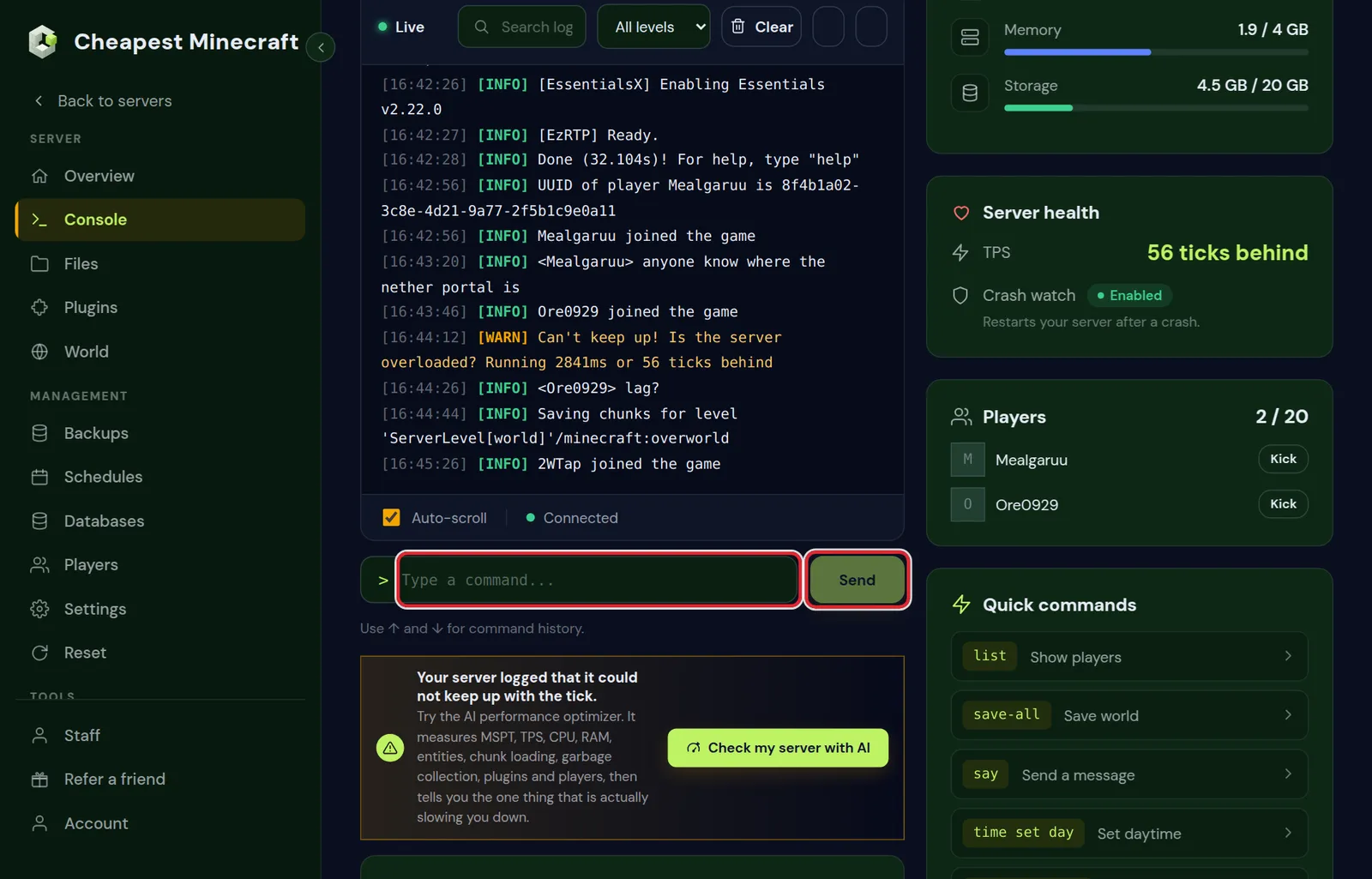
Where to type Minecraft server commands
There are two places, and the only difference is the slash.
| Where | How to type it | Who can use it |
|---|---|---|
| The Console tab of the control panel | Without a slash: op Steve | You, as the server itself, with every permission |
| The chat in the game | With a slash: /op Steve | Operators, and players a permissions plugin allows |
In the game, a slash opens the command line and Minecraft suggests every command and every part of it as you type. Press Tab to take the suggestion. It is the quickest way to find the exact spelling for your version.
In the lists below, <player> means you fill in a name and square brackets mean the part is optional.
Minecraft operators and op commands
| Command | What it does |
|---|---|
op <player> | Makes a player an operator, so they can use admin commands in the game. |
deop <player> | Takes operator status away again. |
How much an operator may do depends on their level. Level 4, the default, can use every command including stop. Whitelist and operator levels explained shows how to give a moderator a lower level.
Which operator level each Minecraft command needs
Every Java command has a permission level from 0 to 4. An operator can use every command up to their own level, and the console counts as level 4. This table answers the question of why a moderator can kick but not stop the server.
| Level | Commands that need it | Typical role |
|---|---|---|
| 0, every player | help, list, msg, me, trigger | Everyone on the server |
| 1 | No extra commands, but may build inside spawn protection | A trusted builder at spawn |
| 2 | gamemode, give, tp, time, weather, gamerule, difficulty, effect, clear, kill, fill, setblock, summon, locate, worldborder, say, seed, and editing command blocks | Event hosts and creative builders |
| 3 | kick, ban, ban-ip, pardon, banlist, op, deop, whitelist, tick, debug | Moderators who manage players |
| 4 | stop, save-all, save-off, save-on, perf | The owner and the console |
Keep in mind that op gives the new operator the level set in op-permission-level, not the level of whoever typed it, so a level 3 moderator can make a level 4 operator. For anything finer, such as a helper who may mute but not ban, a permissions plugin is the way: permissions with LuckPerms sets that up command by command.
Minecraft whitelist, kick and ban commands
| Command | What it does |
|---|---|
whitelist on and whitelist off | Turns the whitelist on or off. |
whitelist add <player> | Lets a player in while the whitelist is on. |
whitelist remove <player> | Takes them off the list. |
whitelist list | Shows everyone on the list. |
kick <player> [reason] | Disconnects a player. They can join again straight away. |
ban <player> [reason] | Keeps a player out until you lift the ban. |
pardon <player> | Lifts a ban. |
ban-ip <player or address> | Bans the connection a player uses, which also keeps out a second account from the same place. |
pardon-ip <address> | Lifts a ban on a connection. |
banlist | Shows who is banned. |
A reason is shown on the player's screen: kick Steve Spamming in chat. The same lists are in the Players tab of the panel if you prefer clicking.
Minecraft game mode and difficulty commands
| Command | What it does |
|---|---|
gamemode creative <player> | Switches one player to creative. The others are survival, adventure and spectator. |
gamemode survival @a | Puts every online player in survival. |
defaultgamemode survival | Sets the mode new players start in. |
difficulty hard | Sets the difficulty: peaceful, easy, normal or hard. |
Instead of a name you can use a target: @a is every player, @p the nearest player, @r a random player and @s yourself. @e means every entity, animals and dropped items included, so use it with care.
To make the difficulty or the default game mode stick after a restart, also set it in Settings under Server settings. The server reads those values every time it starts.
Minecraft target selectors: pick players and mobs with @a, @p and @e
A selector can be narrowed with filters between square brackets, so a command hits exactly the players or mobs you mean. Several filters can be combined with a comma.
| Selector | What it picks |
|---|---|
@a[distance=..10] | Every player within 10 blocks of where the command runs |
@a[gamemode=survival] | Every player in survival |
@r[gamemode=!spectator] | One random player who is not spectating, handy for a prize draw |
@a[level=30..] | Players with 30 experience levels or more |
@e[type=minecraft:zombie,distance=..30] | Every zombie within 30 blocks |
@e[type=minecraft:item,limit=10,sort=nearest] | The ten nearest dropped items |
From the console a command runs at the world spawn, so a distance filter measures from there. To measure from a player instead, wrap the command in execute at:
execute at Steve run kill @e[type=minecraft:item,distance=..16]That clears the dropped items in a radius of 16 blocks around Steve and leaves the rest of the world alone, which is a lot safer than a bare kill @e.
Teleport, time, weather and items: Minecraft commands
| Command | What it does |
|---|---|
tp <player> <other player> | Teleports a player to another player. |
tp <player> <x> <y> <z> | Teleports a player to coordinates. Press F3 in the game to see your own. |
time set day | Sets the time to morning. noon, night and midnight work too. |
weather clear | Ends rain or a storm. The others are rain and thunder. |
give <player> <item> [amount] | Gives items, for example give Steve minecraft:diamond 5. |
xp add <player> 10 levels | Gives experience levels. |
clear <player> | Empties a player's inventory. There is no undo. |
kill @e[type=item] | Removes every dropped item in loaded chunks, a quick relief when items pile up. |
Spawn, world border and seed commands in Minecraft
| Command | What it does |
|---|---|
setworldspawn | Makes the spot where you stand the world spawn. From the console, add coordinates: setworldspawn 0 70 0. |
spawnpoint <player> <x> <y> <z> | Sets where one player comes back after dying. |
worldborder set 10000 | Sets the world border to 10,000 blocks wide, with the centre in the middle. |
worldborder center 0 0 | Moves the centre of the border. |
seed | Shows the seed of the world. |
A world border goes well with pre-generating the land inside it, so nobody explores into terrain that still has to be made. See pre-generate your world. For a different seed, see change your server's seed.
Minecraft building commands: setblock, fill, clone and locate
These commands shape the world directly. They are what admins use to prepare a spawn, clear an area or find a structure for an event.
| Command | What it does |
|---|---|
setblock <x> <y> <z> <block> | Places one block, for example setblock 0 64 0 minecraft:chest. |
fill <x1> <y1> <z1> <x2> <y2> <z2> <block> | Fills a box with one block. By default one command changes up to 32,768 blocks. |
fill 0 60 0 20 70 20 minecraft:air replace minecraft:water | Removes only the water inside the box and leaves every other block. |
clone <x1> <y1> <z1> <x2> <y2> <z2> <x> <y> <z> | Copies a box to another spot, the last three numbers being its new corner. |
locate structure minecraft:village_plains | Finds the nearest plains village. Works on 1.19 and newer. |
locate biome minecraft:cherry_grove | Finds the nearest cherry grove, or any other biome. |
summon minecraft:villager <x> <y> <z> | Spawns a mob at a spot, a villager for a trading hall for example. |
For bigger builds than the block limit allows, the WorldEdit plugin selects an area with a wand and can undo its changes, which the vanilla commands cannot. You add it like any other plugin; see install plugins on your server.
Minecraft chat, saving and stopping commands
| Command | What it does |
|---|---|
list | Shows who is online. |
say <message> | Sends a message to everyone, shown as coming from the server. |
msg <player> <message> | Sends one player a private message. |
save-all | Writes the world to disk right now. |
stop | Saves the world and shuts the server down, like the Stop button in the panel. |
The Schedules tab runs any of these at set times, for example a say warning ten minutes before a nightly restart.
Leave reload alone on Paper and Purpur. It reloads plugins in a way many of them do not survive; restart the server instead. To reload only data packs, type minecraft:reload.
Minecraft performance commands: tick query, perf and forceload
When the server feels slow, a few vanilla commands tell you whether it keeps up and what is holding it back.
| Command | What it does |
|---|---|
tick query | Shows the target of 20 ticks per second and the average time a tick takes. Under 50 ms per tick the server keeps up. On 1.20.3 and newer. |
tick freeze and tick unfreeze | Stops mobs, redstone and everything else except players, so you can look at a lag machine without it running. |
perf start | Records ten seconds of performance data and saves a report in the debug folder, which you can download from the Files tab. |
forceload query | Lists the chunks that stay loaded even with nobody near them. A forgotten one keeps a farm running all day. |
forceload remove all | Releases every force loaded chunk in the world you are in. |
On Paper and Purpur the profiler spark gives a fuller picture. Reduce lag on your server walks through what to look for in it.
Paper, EssentialsX and CoreProtect commands that vanilla does not have
Plugins add commands of their own, and many of the ones players ask for, such as homes and teleport requests, come from them. These only work when the server software or plugin in the second column is installed.
| Command | Comes from | What it does |
|---|---|---|
plugins | Paper, Purpur and Spigot | Lists the installed plugins. A red name failed to load. |
version | Paper, Purpur and Spigot | Shows the server software and the build it runs. |
tps | Paper, Purpur and Spigot | Ticks per second over the last 1, 5 and 15 minutes. 20 is the most a server does. |
mspt | Paper and Purpur | The milliseconds each tick takes, the most direct sign of lag. |
sethome and home | EssentialsX | Saves a home and teleports the player back to it. |
tpa <player> | EssentialsX | Asks to teleport to a player, who answers with tpaccept or tpdeny. |
back | EssentialsX | Returns a player to where they were before their last teleport. |
spawn | EssentialsX Spawn | Teleports a player to the spawn point. |
mute <player> [time] | EssentialsX | Stops a player from chatting, for a while or until you unmute them. |
tempban <player> <time> [reason] | EssentialsX | A ban that ends by itself, such as tempban Steve 3d Griefing. |
co inspect | CoreProtect | Turns your next click into a lookup of who placed or broke that block. |
EssentialsX and CoreProtect are both in the plugin catalog of the panel. To put griefing right with CoreProtect, see stop griefing on your server.
Minecraft game rules without typing
Game rules switch parts of the game on and off, such as keeping your inventory after death, mobs breaking blocks, PvP or the day and night cycle. The World tab has a Game rules card that lists them with their current values, so you do not need to know their names. The server has to be running to see them, and a change applies to the overworld, the Nether and the End.
You can also type gamerule <rule> <value>. In the game, type /gamerule and a space and Minecraft suggests every rule your version knows.
How to turn on command blocks on a Minecraft server
Command blocks are off on a new server. Five steps switch them on:
- Open Settings, go to Server settings and turn on Command blocks. In the file this is
enable-command-block=trueinserver.properties. - Restart the server, because the setting is read at startup.
- Make sure you are an operator of level 2 or higher, and switch to creative with
gamemode creative <your name>. - Give yourself the block:
give <your name> minecraft:command_block. It is not in the creative inventory. - Place it, right click it, and type the command. A slash in front is optional inside a command block.
Set a block to Repeat and Always Active for a command that should run every tick, and keep those light: a repeating command block that searches every entity costs tick time all day.
Minecraft Bedrock server commands: what is different
The official Bedrock server takes most of the same commands in its console: op, deop, kick, gamemode, difficulty, tp, time set, weather, give and stop work as above. A few things differ.
- The whitelist is called the allowlist:
allowlist add Steve,allowlist remove Steveandallowlist list. - There is no
bancommand. To keep someone out for good, turn the allowlist on and leave them off it. - Game rules are written in lower case, such as
gamerule keepinventory true.
On a crossplay server every Java command on this page works as well, Bedrock players included, because the server underneath is Java.
Questions from Minecraft server owners
Why can I not use Minecraft commands in the game?
Only operators can use admin commands. Type op and your exact Minecraft name in the Console tab of the panel, then try again in the game. A permissions plugin can also give commands to players who are not operators; see permissions with LuckPerms.
What does Unknown or incomplete command mean in Minecraft?
The command is misspelled, a part is missing, or it belongs to a plugin or mod that is not on the server. Type it in the game chat with a slash and follow Minecraft's suggestions for each part.
How do I use a Minecraft command on a Bedrock player?
On a crossplay server, Bedrock names start with a dot, so a Bedrock player called Sam is .Sam in commands: op .Sam. See crossplay between Java and Bedrock.
Can I undo a Minecraft command?
No. Commands such as clear and kill act at once. Make a backup in the Backups tab before a big change, so you can go back if something goes wrong.
How do I check the TPS of my Minecraft server with a command?
On Paper, Purpur and Spigot type tps in the console; Paper and Purpur also have mspt. On vanilla and Fabric 1.20.3 or newer, tick query shows the average time per tick. Under 50 ms per tick, which is 20 ticks per second, the server keeps up.
What is the Minecraft command for keep inventory?
Type gamerule keep_inventory true in the console on 1.21.11 or any 26.x version; before 1.21.11 the rule is called keepInventory. Keep inventory and other game rules lists every rule with both names.
How do I find the coordinates of a player with a command?
Type data get entity Steve Pos in the console, with the player's name instead of Steve. It prints the x, y and z of that player. To go there yourself, use tp with your name and theirs.
Do Minecraft server commands work on Fabric and Forge?
Every vanilla command on this page does. Commands such as tpa, home and tps come from Paper and plugins, so a Fabric or Forge server only has them when a mod adds them.
How do I give items to every player at once?
Use @a instead of a name: give @a minecraft:bread 16 gives every online player sixteen bread. To skip players who are spectating, use @a[gamemode=!spectator].
Written for Minecraft Java Edition servers; the console steps checked against our control panel, September 2026. Written by the Cheapest Minecraft Hosting team, first published , updated .