
 Astroworld
Performance
How to schedule automatic restarts and commands on a Minecraft server
A Minecraft server that runs for days on end slowly collects things it no longer needs in memory. Many owners restart once a day at a quiet hour, and let the server do it by itself.
There are two ways: the Automatic restart switch in Settings for a plain daily restart, and the Schedules tab for anything more, such as warnings in chat, several restarts a day, or commands at a fixed time.
In short
To restart a Minecraft server automatically, open Settings, switch on Automatic restart under Automatic saves and restarts, and choose Daily or Mondays and an hour: the server warns players, saves the world and is running again a minute or two later. For your own warnings, several restarts a day, backups or commands at set times, build a schedule in the Schedules tab with Console command, Power action and Create a backup tasks.
The quick way: Automatic restart of your Minecraft server in Settings
- Open Settings and find Automatic saves and restarts.
- Switch Automatic restart on.
- Choose Daily or Mondays, and the hour.
- Save.
At that time the server warns players in chat, saves the world and comes back within a minute or two. On a modded server it also clears memory that mods leak over a long uptime. For most servers this is all you need.
The same card sets how often the world is saved: Use Minecraft default, Every 15 minutes, Every 30 minutes or Every hour. More frequent saves mean less lost work after a crash.
What happens during an automatic Minecraft server restart
- Players see the warning in chat. Then the world is saved, the server closes and everyone online is disconnected for a moment.
- The console shows the server stopping and starting again. Players can join as soon as it says
Done. - On a server network, players who came in through the network address wait in the lobby while one server restarts.
- With Discord notifications on in Settings, your Discord gets a message when the server is up again; see link your chat to Discord.
Pick a quiet hour for the Minecraft server restart
The Players tab has a card called When your players are online. It shows the average number of players per hour over the last 30 days, in your own time zone, and names the quietest moment: "A good moment for a restart." A new server needs a few days before the picture fills in.
Make a Minecraft server schedule in the Schedules tab
A schedule runs something on the server at a fixed time. First you make the schedule, then you add what it should do.
- Open the Schedules tab and go to New schedule.
- Give it a Name, such as
Nightly restart. - Under How often, choose Every day, Every week, Every 6 hours or Every hour, and for a daily or weekly schedule the hour and the day.
- Leave Only run when the server is online ticked for a restart, so a server you stopped on purpose stays off.
- Click Create.
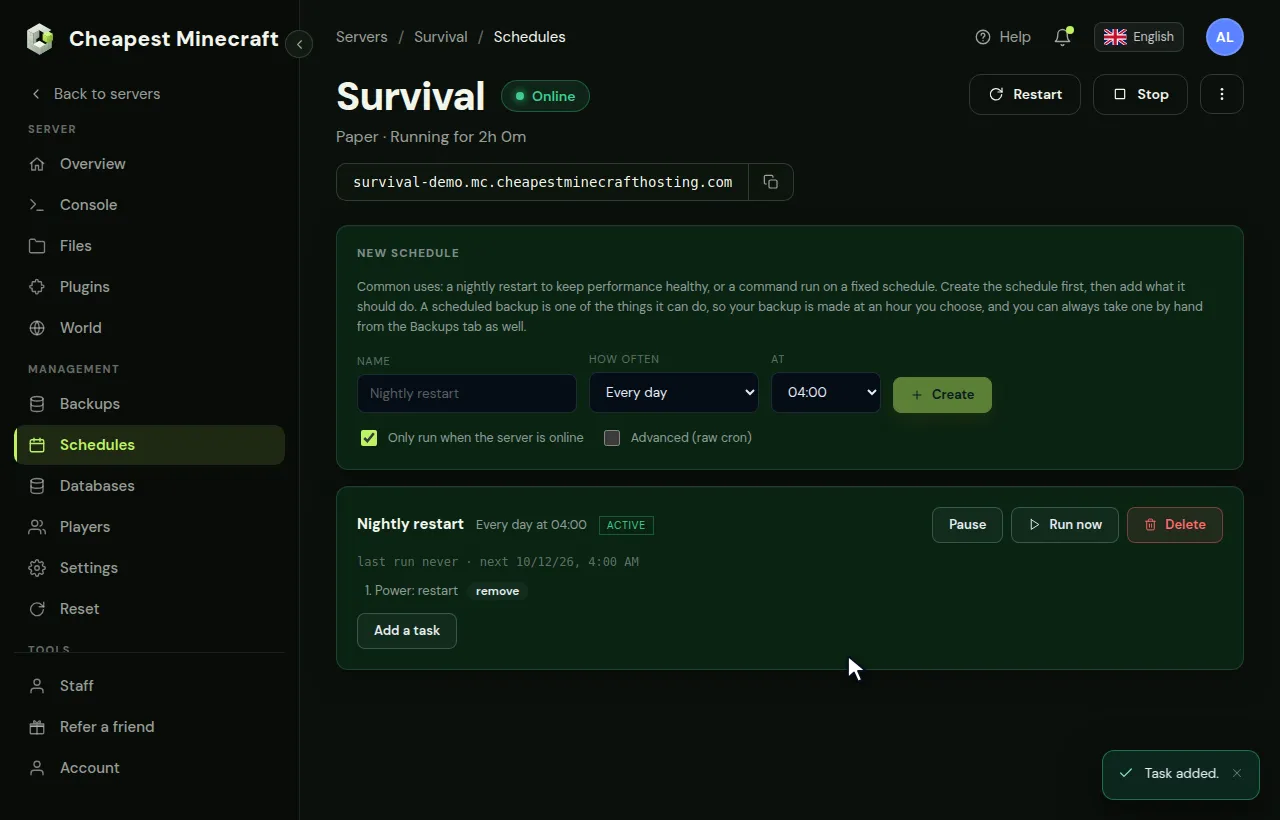
Under each schedule you see when it ran last and when it runs next. Check next after you make one, so you know it will run at the time you meant.
A schedule without tasks does nothing. The panel says so under the schedule until you add one.
Add a restart with warnings in Minecraft chat
Each task has a Do what and a Wait first (s): the number of seconds after the previous step. That lets you build a countdown. Add these tasks to the schedule, in this order:
| Do what | Command or action | Wait first (s) |
|---|---|---|
| Console command | say Restarting in 5 minutes | 0 |
| Console command | say Restarting in 1 minute, find a safe spot | 240 |
| Console command | save-all | 50 |
| Power action | Restart | 10 |
Click Add a task under the schedule, pick the kind, fill it in and click Add task. Console commands are typed without a slash, just like in the console.
Players see the messages in chat, the world is saved, and the server restarts five minutes after the first warning.
Other useful Minecraft server schedules
- A message every hour:
say Vote for the server and join our Discordwith Every hour. Keep it short and not too often, or players tune it out. - A restart every 6 hours on a busy modded server that grows heavy during the day.
- Clear dropped items with
kill @e[type=item]a minute after a warning in chat, if items lying around cause lag. It also removes the items of a player who just died, so warn first. See reduce lag for the causes worth fixing. - Start the server in the morning and stop it at night with two schedules and the Start and Stop power actions, for a server that only a class or a club uses. Untick Only run when the server is online on the start schedule, because the server is off when it runs.
Back up your Minecraft server on a schedule
A schedule can make backups too. The task Create a backup makes one at the time you choose, for example every Sunday night.
- Make a new schedule called
Weekly backupwith Every week, a day and an hour when few players are online. - Untick Only run when the server is online, so the backup is also made when the server happens to be off.
- Click Add a task, choose Create a backup under Do what and click Add task.
- Keep at least half an hour between this schedule and your nightly restart, so the server does not restart while the backup is still being written.
When all backup slots are in use, a backup from a schedule takes the place of the oldest one. Download a backup you want to keep for longer, as described in back up and restore your server.
Pause, test and remove a Minecraft server schedule
- Run now runs the tasks at once. Handy to test your countdown, but warn your players first.
- Pause stops a schedule without losing it, and Activate turns it back on. A paused schedule is marked Paused.
- Delete removes the schedule and its tasks.
- Advanced (raw cron) is for people who know cron and want times the simple choices do not cover, such as twice a day.
Cron examples for a Minecraft server schedule
Advanced (raw cron) has five fields: minute, hour, day/mo for the day of the month, month, and day/wk for the day of the week, where 0 is Sunday. A * means every, and */6 means every sixth.
| minute | hour | day/mo | month | day/wk | Runs |
|---|---|---|---|---|---|
| 0 | 4 | * | * | * | Every day at 04:00 |
| 0 | 6,18 | * | * | * | Twice a day, at 06:00 and 18:00 |
| 0 | */12 | * | * | * | Every 12 hours |
| */30 | * | * | * | * | Every 30 minutes, for a short message in chat |
| 30 | 3 | * | * | 1 | Mondays at 03:30 |
| 0 | 5 | 1 | * | * | The first day of every month at 05:00 |
Once saved, the schedule shows in plain words when it runs next. If that line does not match what you had in mind, fix the fields before the first run comes round.
Why a Minecraft server schedule did not run, and the fix
| What you see | Cause and fix |
|---|---|
| It stays on Running for a long time | It got stuck on a task. Click Pause and then Activate to free it, then check its tasks |
| It ran at another hour than you expected | Compare the next run time under the schedule with your own clock and move the hour by the difference |
| The restart ran but the server stayed off | The server failed to come back; read the console and see Minecraft server won't start |
| A console command task did nothing | Try the command by hand in the Console first; a typo, or a command from a plugin that is not installed, fails without a word in chat |
| A start schedule never starts the server | Only run when the server is online is still ticked; untick it on every schedule that starts a stopped server |
Questions from Minecraft server owners
How often should a Minecraft server restart?
Once a day is common and enough for most servers. A heavy modded server can do well with a restart every 6 or 12 hours. If a server needs a restart every hour to stay smooth, something else is wrong; see reduce lag.
Do players lose anything in a scheduled Minecraft server restart?
No, as long as the world is saved first. The Automatic restart in Settings saves by itself; in your own schedule, put save-all before the restart.
Why did my Minecraft server schedule not run?
Check that it has at least one task, that it is not paused, and whether Only run when the server is online is ticked while the server was off. The next run time under the schedule shows when it will try again.
Should I use Automatic restart or a schedule for my Minecraft server?
Automatic restart in Settings for one plain restart a day or a week, with the warning and the save built in. A schedule when you want your own messages, more restarts a day, or commands at set times.
Can a schedule make a backup of my Minecraft server?
Yes. Add the task Create a backup to a schedule, for example every Sunday night. When your slots are full, the new backup takes the place of the oldest one.
Does a scheduled restart kick players off the Minecraft server?
For a minute or two, yes: everyone is disconnected while the server stops and starts. The warnings in chat give them time to finish what they are doing, and they can join again once the console says Done.
Can my Minecraft server restart only when nobody is online?
A schedule runs at its time, whoever is online. Pick the quietest hour from the card When your players are online in the Players tab, so the restart affects as few players as possible.
How do I run a command every 30 minutes on my Minecraft server?
Make a schedule with Advanced (raw cron), put */30 in the minute field and * in the other four, and add the command as a Console command task.
Checked against the Settings, Schedules and Players tabs of our control panel, September 2026. Written by the Cheapest Minecraft Hosting team, first published , updated .