
 Astroworld
Players
How to put your Minecraft server in maintenance mode
Updating to a new Minecraft version, installing a modpack or rebuilding the spawn goes better without thirty players walking around. Maintenance mode closes the server for everyone except your own team and tells the rest why, right in their server list.
When you are done, one click opens the server again and puts your whitelist and your normal server message back exactly as they were.
In short
To put your Minecraft server in maintenance mode, open Settings, find Maintenance mode, type a maintenance message, tick Restart now and click Turn maintenance on. From then on only whitelisted players and operators can join, and the server list shows your message. Turning it off the same way brings back your whitelist setting and your normal server message exactly as they were.
What Minecraft server maintenance mode does
- It turns the whitelist on, so only whitelisted players and operators can join.
- It replaces your server message in the multiplayer list with your maintenance message, so players see the server is closed on purpose and not broken.
- It remembers how things were. Turning it off restores your whitelist setting and your own message exactly.
Your world, plugins and settings are not touched. Only who can join and what the server list says change.
When to use maintenance mode on a Minecraft server
| What you are doing | Maintenance mode? |
|---|---|
| Updating to a new Minecraft version | Yes: plugins may need updates before players should come in |
| Installing or updating a modpack | Yes: players need the new pack version before they can join |
| Rebuilding the spawn or resetting a world | Yes: nobody should build in a world that is about to change |
| Updating a single plugin | Usually not: a restart is enough, unless its settings change a lot |
| A daily restart | No: schedule automatic restarts handles that without closing anything |
Turn Minecraft server maintenance mode on
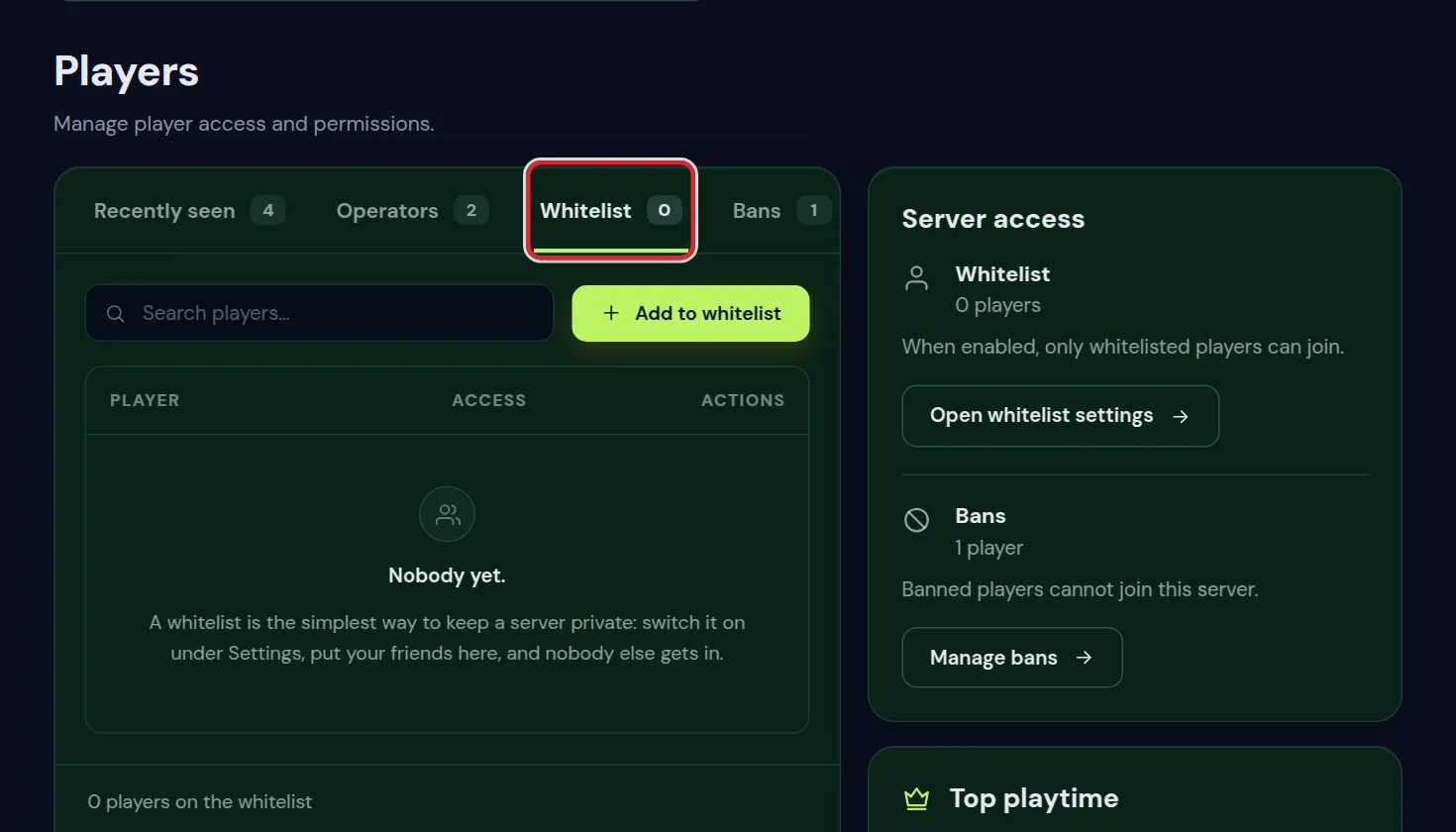
- Put everyone who helps you on the whitelist first, in the Players tab. Operators can join anyway.
- Open Settings and find Maintenance mode.
- Type your Maintenance message, for example
Updating to 26.1, back at 20:00. The dark box under the field shows how it will look in the server list. - Tick Restart now if the message should show at once and players who are not whitelisted should be sent off. Everyone online is disconnected for about a minute.
- Click Turn maintenance on.
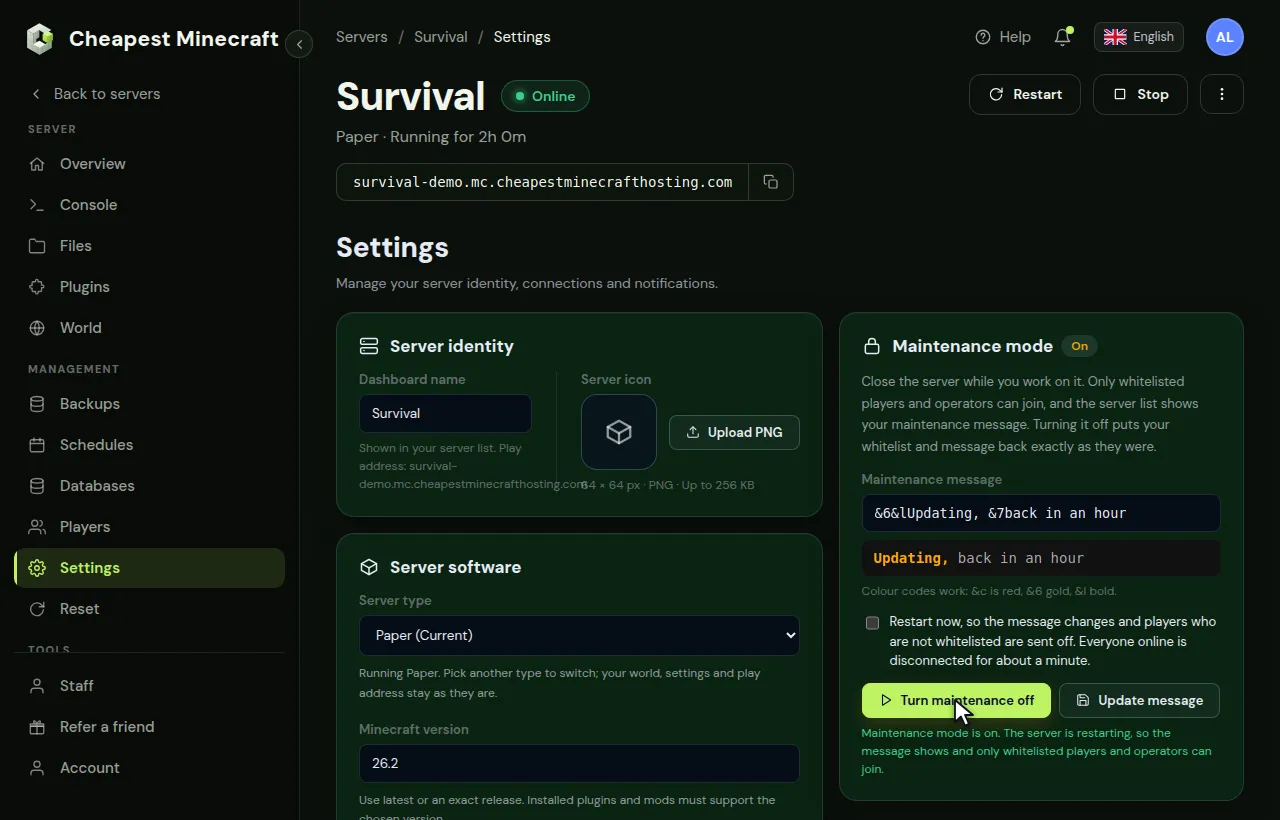
Without Restart now, the maintenance message appears in the server list after the next restart.
What players see while the server is closed
- In the server list: your maintenance message where the normal message was, with the server still shown as online.
- When they try to join: the message that they are not whitelisted, unless they are on the whitelist or an operator.
- On a crossplay server: Bedrock players follow the same whitelist. Bedrock helpers need
fwhitelist addwith their name, as at any time the whitelist is on.
Write a good Minecraft maintenance message
Players see the message in their multiplayer list. Say what is happening and when the server is back; that saves you a dozen questions in Discord.
Colour codes work with &: &c is red, &6 gold and &l bold. For example:
&c&lMaintenance &7Updating to 26.1, back at 20:00Put the colour first and then &l, because a colour code ends bold. Change your server icon and MOTD has the full list of colours.
Need to change the text while maintenance is on? Type the new message and click Update message.
Minecraft maintenance message examples
A few messages that answer the first question players have, which is when they can play again:
&c&lMaintenance &7Back in about 30 minutes
&6&lUpdating to 26.2 &7New shops and a bigger border
&e&lNew season soon &7Opening Friday at 20:00
&c&lBackup in progress &7Back shortly
Give a time when you can, in the time zone most of your players live in. A message that says back soon for three days makes players look for another server.
Open the Minecraft server again
Tick Restart now if the server list should show your normal message straight away, and click Turn maintenance off. The whitelist goes back to how it was before, on or off, and your own server message returns.
Players who were on the whitelist before maintenance are still on it. Nobody has to be added again.
Tell players the server is open again
Opening the server is only half of it; players have to know. Post it in your Discord or group chat with what changed. With Discord notifications set up on the Overview tab, your channel also gets a message when the server starts. Link your server chat to Discord shows how to set that up.
Pick a quiet hour for maintenance
On the Overview tab, the Performance card covers Players for 24 hours or 7 days. The low point of that graph is the best time for maintenance: the fewest players are sent off, and the fewest find a closed server.
A Minecraft server maintenance checklist for updates
Maintenance mode is the first and the last step of any big change:
- Tell players in chat or Discord when the maintenance starts.
- Turn maintenance mode on, with Restart now.
- Make a backup: see back up and restore your server.
- Do the work, for example change the Minecraft version or install a modpack.
- Join with your own account and check that everything works: spawn, plugins, a few builds.
- Turn maintenance mode off.
Maintenance with a plugin instead
The maintenance mode of the panel covers most needs. A maintenance plugin on Paper adds a few extras, such as a countdown before the server closes, a separate icon during maintenance, or a planned end time.
Use one or the other, not both. When two tools change the server message, it is hard to tell which one players see.
Maintenance on a Minecraft server network
On a server network, players see the message of the network in their server list, not the message of each server behind it. The Maintenance mode card says so on those servers. Change the message on the Network card in Settings instead.
Questions from Minecraft server owners
Can operators still join the Minecraft server during maintenance?
Yes. Whitelisted players and operators can join while maintenance mode is on. Everyone else gets the whitelist message when they try.
Does maintenance mode delete my Minecraft whitelist?
No. It only switches the whitelist on. When you turn maintenance off, the whitelist is back in the state it was in before, with every name still on it.
Can I use Minecraft colours in the maintenance message?
Yes, with & codes: &c red, &6 gold, &l bold, and the other classic Minecraft colour codes.
Why does the Minecraft server list still show my old message?
The server list reads the message when the server starts. Tick Restart now when you turn maintenance on, or restart the server yourself, and click Refresh in the multiplayer list.
How long can my Minecraft server stay in maintenance mode?
As long as you need. It stays on until you click Turn maintenance off; restarts in between do not end it.
Do players lose anything when I turn maintenance mode on?
No. Their inventories, builds and places on the whitelist stay. With Restart now, players who are online are disconnected once, and only those on the whitelist can come back in.
Can Bedrock players join during maintenance?
Only if they are on the whitelist. On a crossplay server, add them with fwhitelist add followed by their name.
Checked against the Maintenance mode card in the Settings tab of our control panel, September 2026. Written by the Cheapest Minecraft Hosting team, first published , updated .