
 Astroworld
Players
Minecraft whitelist and operator levels explained
Minecraft has two simple tools for control, built into the game itself. The whitelist decides who can join. Operator status decides who can use admin commands. Both work without any plugins, on Paper, Fabric, Forge and vanilla alike.
In short
To whitelist a player on your Minecraft server, put their exact username on the whitelist in the Players tab, or run whitelist add with the name in the console, and switch the whitelist on. To make someone an operator, type op with their name in the console. Operators get a level from 1 to 4: level 2 allows cheat commands, level 3 kicking and banning, and level 4 everything, including stopping the server.
The Minecraft server whitelist
With the whitelist on, only players on the list can join. Everyone else sees a message that they are not whitelisted. For a server among friends, turn it on before you share the address.
In the panel
- Open the Players tab.
- Add each friend's exact Minecraft username to the whitelist.
- Switch the whitelist on in the whitelist settings.
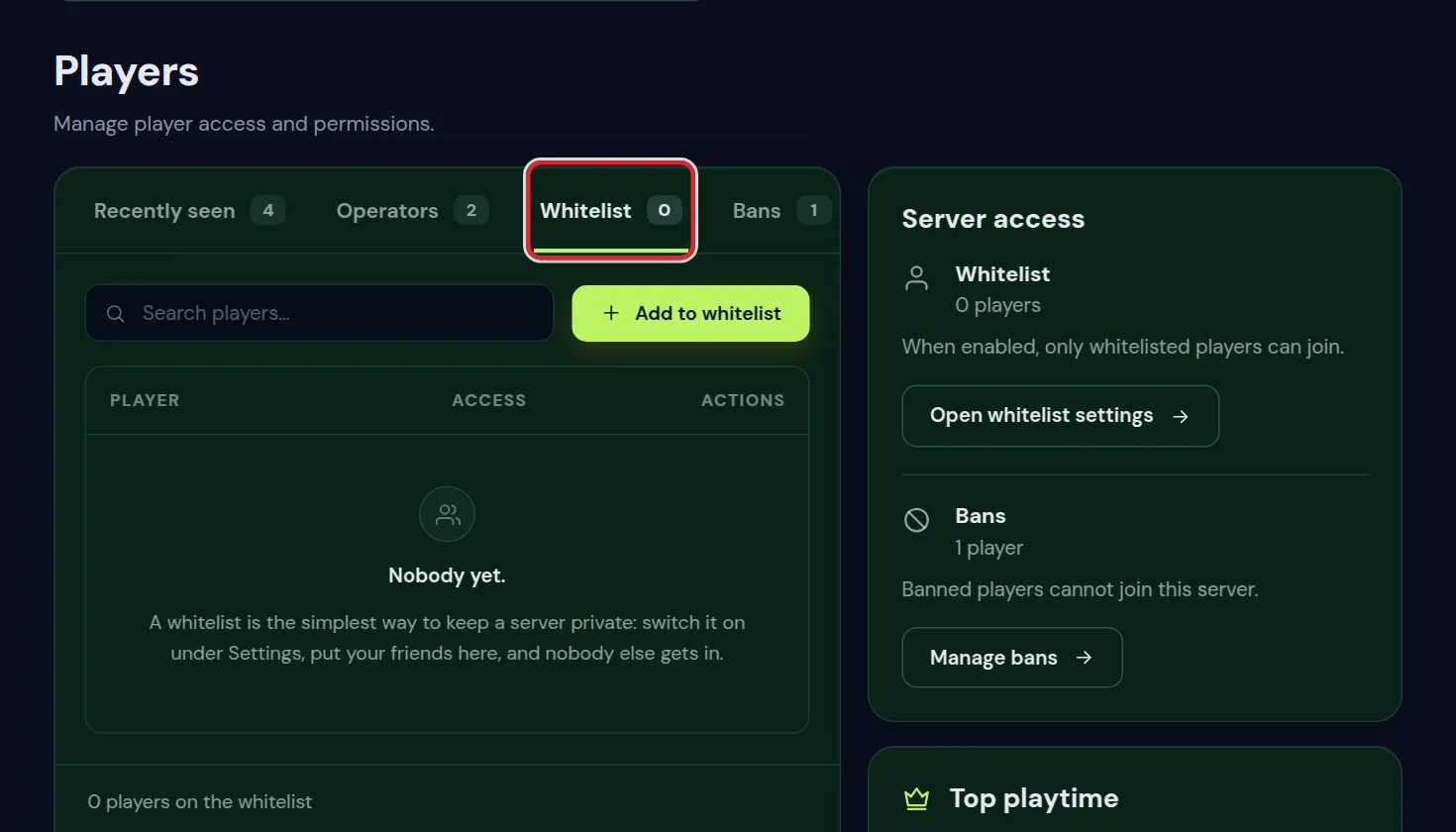
With commands
whitelist on
whitelist add Sam
whitelist remove Sam
whitelist list
Type these in the Console without a slash, or in the game with a slash if you are an operator.
How to op yourself on your Minecraft server
A new server has no operators, not even its owner. Give yourself op once, from the panel:
- Open the Console tab while the server runs.
- Type
opfollowed by your exact Minecraft name, without a slash, and press Enter. - The console answers with a line that you were made a server operator. In the game you can now use commands with a slash.
The Operators tab under Players does the same with a field and a button. Either way, it works for your own name and for anyone you trust.
The whitelist.json file and adding players by hand
The whitelist is stored in whitelist.json in the top folder of the server. Each entry holds the account ID (UUID) and the name of one player. The ID is what counts: a name typed into the file without the right ID lets nobody in.
So add players with the command or in the Players tab, which look up the ID for you. If you did edit the file, type whitelist reload in the console so the server reads it again without a restart.
Kick people who are no longer on the list from your Minecraft server
Removing someone from the whitelist does not throw them out while they are online. The setting enforce-whitelist=true in server.properties does: with it on, anyone not on the list is removed as soon as the whitelist is reloaded or turned on.
Whitelist not working on your Minecraft server
| What happens | Why | What to do |
|---|---|---|
| A player who is not on the list can still join | The whitelist is off, or the player is an operator; operators can always join | Turn the whitelist on, and check ops.json for names that should not be there |
| A friend on the list is turned away | A typo in the name, or they play Bedrock on a crossplay server | Check the spelling in the Players tab; add Bedrock players with fwhitelist add |
| Someone removed from the list stays online | Removing does not kick by itself | Kick them, or use enforce-whitelist |
Changes in whitelist.json do nothing | The server only reads the file at startup or on reload | Type whitelist reload |
The allowlist on a Bedrock Minecraft server
A Bedrock server does the same job under another name. Since 2022 it is called the allowlist: allow-list=true in server.properties switches it on, the names are kept in allowlist.json, and the console commands are allowlist add, allowlist remove and allowlist list. Operators on Bedrock are kept in permissions.json with the roles visitor, member and operator.
On a crossplay server you do not need any of this: the server is Java, so it uses the normal whitelist for Java players and fwhitelist for Bedrock players.
Minecraft server operators
An operator, or op, can use admin commands. Add one in the Players tab under operators, or with op Sam in the console. deop Sam takes it away.
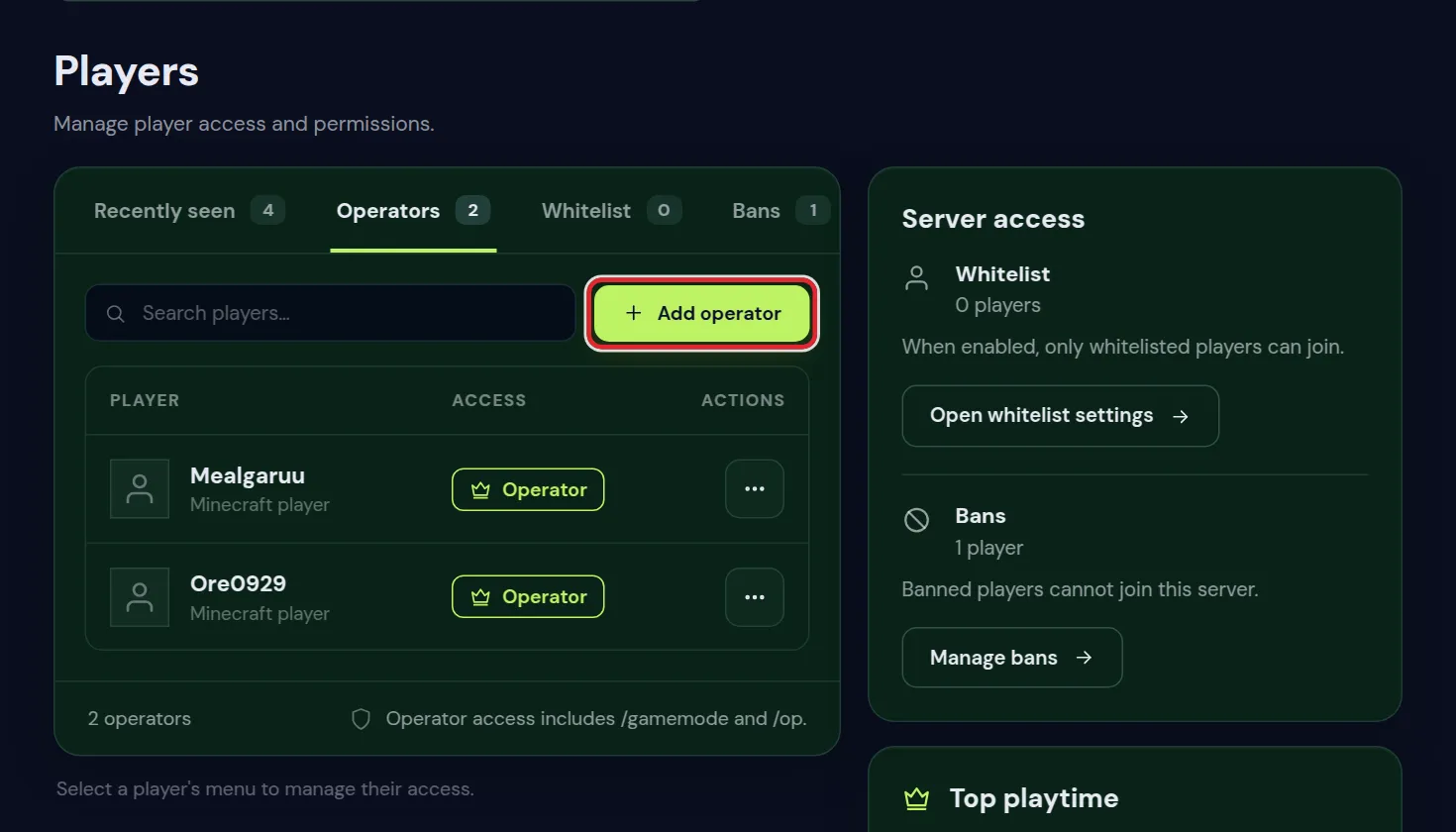
op in the console.Operators are stored in ops.json, each with a level from 1 to 4. The level decides how far their power goes.
The Bans tab next to it lists banned players and lets you ban or pardon one without a command.
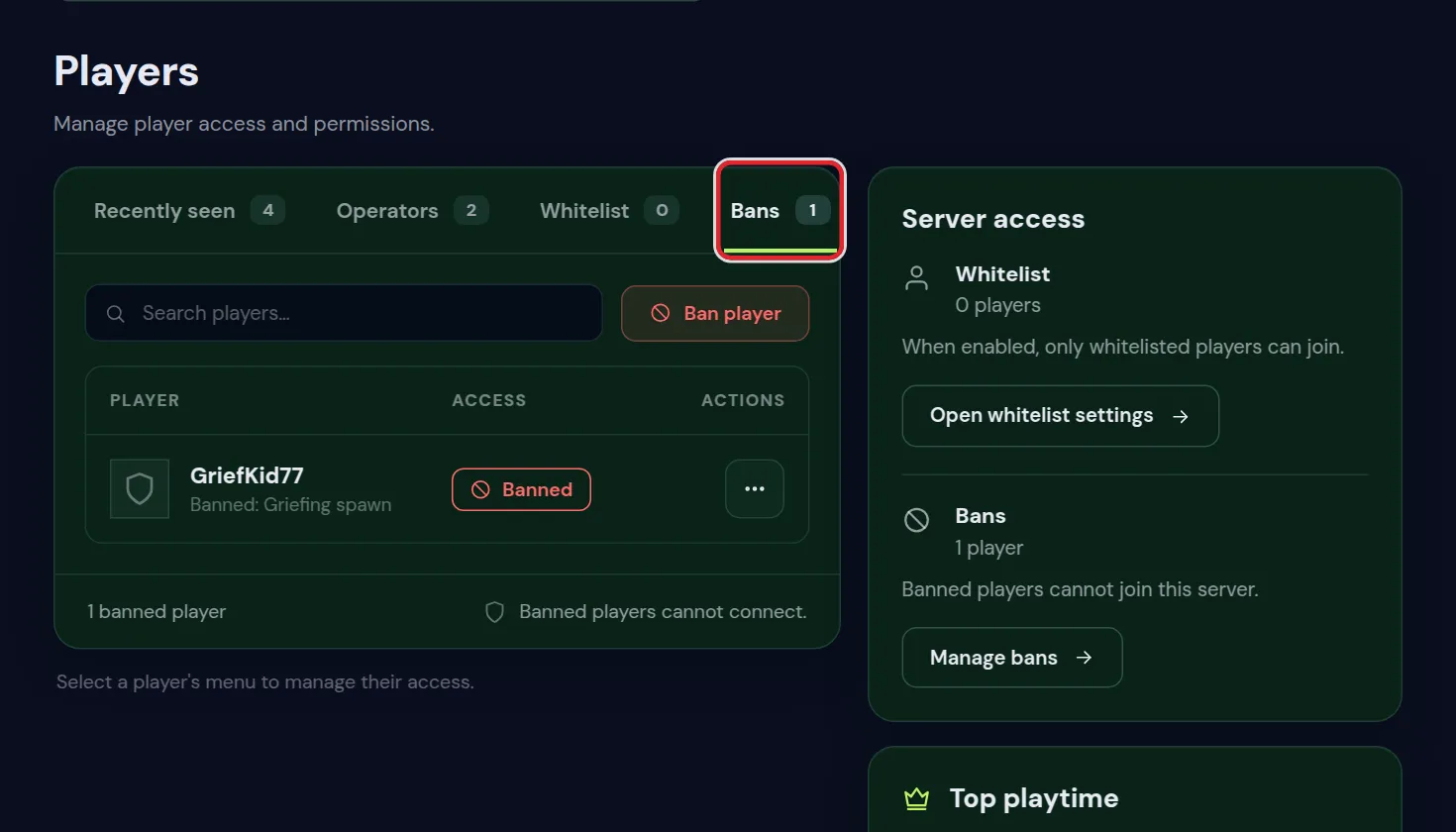
- Open the Players tab and find the player in the list.
- Open the menu next to the name and choose Ban player.
- Type a reason, for example
Griefing at spawn. - Click Ban player. A player who is online is kicked and cannot connect again until you unban them.
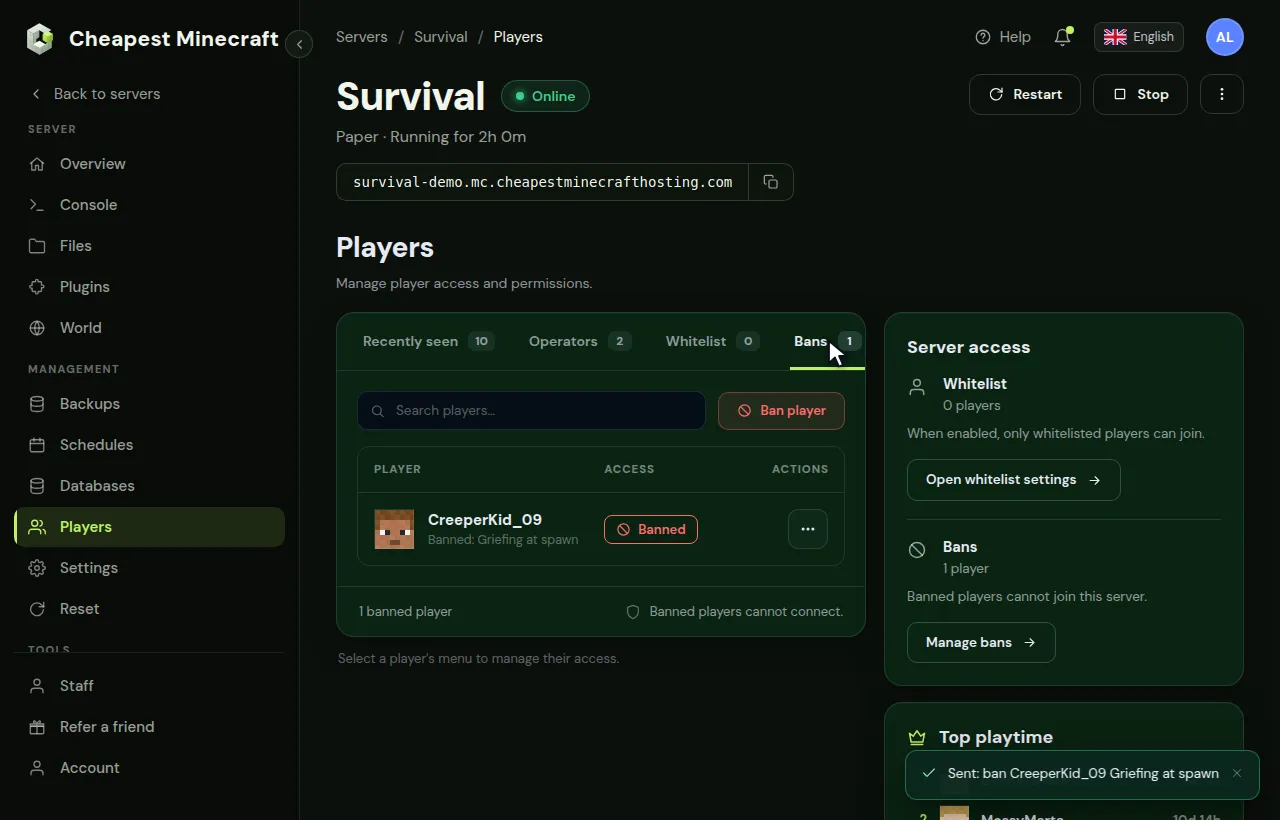
To let them back in, open the Bans tab, open the menu next to the name and choose Unban player.
What is in ops.json
Each operator is one entry in ops.json with four fields:
| Field | What it does |
|---|---|
uuid | The account ID of the player, which is what the server checks |
name | The name at the time they were made op, there for you to read |
level | The operator level, from 1 to 4 |
bypassesPlayerLimit | With true, this operator can join even when the server is full |
There is no command that lists the operators, so this file is the place to check who has op. Change a level or remove an entry with Edit in the Files tab while the server is stopped, then start it again.
The four Minecraft op levels
| Level | What it allows | Give it to |
|---|---|---|
| 1 | Build inside the spawn protection area | Trusted builders |
| 2 | Cheat commands: gamemode, give, teleport, time, weather, and command blocks | Event hosts, builders on a creative server |
| 3 | Player management: kick, ban, op and deop others | Moderators you trust |
| 4 | Everything, including stopping the server and saving | Only yourself |
New ops get the level set by op-permission-level in server.properties, which is 4 unless you change it. To give someone a lower level, change their level in ops.json in the Files tab and restart, or lower op-permission-level before you op them.
Which op level to give whom
A rule of thumb for a server among friends: keep level 4 for yourself, and give the lowest level that still lets someone do their job.
- A friend who builds at spawn: level 1 is enough, or switch spawn protection off.
- Someone who runs events with teleports, items or weather: level 2. They can also give themselves anything, so pick someone you trust with that.
- A moderator who handles griefers: level 3, or better a rank in a permissions plugin, so they can ban without being able to cheat.
- A co owner who should restart the server or change files: give them access to the panel rather than op, see give someone access to your server.
Op in the game and access to the panel are two separate things. An operator cannot touch files, backups or billing, and a panel user is not an operator in the game until someone ops their Minecraft name.
Minecraft spawn protection
By default, players who are not ops cannot break or place blocks within 16 blocks of the world spawn. That protects the spawn on public servers but confuses friends on a private one. Set spawn-protection=0 in server.properties to switch it off.
How big the spawn protection area is
The number in spawn-protection is the distance from the spawn point in each direction. The protected area is a square of twice that number plus one block: the default 16 protects a square of 33 by 33 blocks around spawn, over the full height of the world.
- Without a single operator on the server, spawn protection does nothing: everyone can build at spawn, whatever the setting says.
- It only protects the overworld spawn. The Nether and the End have no spawn protection.
- It only stops breaking and placing blocks and using some blocks. Mobs, explosions and fire still do damage, so on a public server a claim plugin protects spawn better.
When the built in Minecraft tools are not enough
Op levels are coarse. A level 2 op can give themselves any item. If you want a helper who can mute and kick but not cheat, use a permissions plugin instead. Set up permissions with LuckPerms walks through it.
Bans are in the Players tab as well, or with ban Sam and pardon Sam. A ban by IP (ban-ip) also catches a second account on the same connection, but it can hit innocent people who share a home connection.
Private, public or invite only: how to set up access
| Kind of server | Whitelist | What else to use |
|---|---|---|
| Friends only | On, with every friend added | Op for yourself, maybe level 2 for one helper |
| Invite only community | On, players are added after they apply, for example in Discord | A moderator rank in LuckPerms and a griefing log |
| Public server | Off | Land claims, a griefing log, bans and a moderator team with permissions |
| Closed for a while | Maintenance mode instead of the whitelist | Turn it off again and everything is as before |
For the last one, Minecraft server maintenance mode shows how to close the server without touching your whitelist. Against griefers on an open server, see stop griefing on your server.
Questions from Minecraft server owners
Does the whitelist work for Bedrock players on a crossplay Minecraft server?
Yes, but add them with Floodgate's own command, fwhitelist add, followed by their Bedrock name. The normal whitelist command expects a Java account.
Is the Minecraft username case sensitive on the whitelist?
No. Minecraft matches the account, not the capitals. The spelling does have to be right, including underscores and numbers.
A Minecraft player changed their name. Are they still whitelisted?
Yes. The whitelist stores the account ID next to the name, so a name change does not remove them.
Can operators join when the whitelist is on?
Yes. An operator can always join, even without being on the whitelist. Remove op from anyone who should be kept out.
How do I see who is op on my Minecraft server?
Open ops.json in the Files tab, or the Operators tab under Players. Minecraft has no command that lists operators.
How do I add someone to the whitelist while the server is offline?
Start the server and add them in the Players tab or with whitelist add. Writing their name into whitelist.json by hand does not work without their account ID.
What is the difference between op and admin on a Minecraft server?
Op is the built in admin status of Minecraft, with four levels. Admin is usually a rank from a permissions plugin such as LuckPerms, which can give exactly the commands you choose.
Checked against Minecraft Java 26.2, September 2026. Written by the Cheapest Minecraft Hosting team, first published , updated .