
 Astroworld
Getting started
How to join your Minecraft server
Your server has an address that works like a web address: players type it once, save it, and click it from then on. This guide shows where to find it and how to use it on every device.
In short
To join your Minecraft server, copy the address from the Overview tab of the panel. On Java, click Multiplayer, then Add Server, paste the address, click Done and double click the server. On Bedrock, tap Play, open the Servers tab, tap Add Server and fill in the address plus the Bedrock port from the panel. Play on the same Minecraft version as the server.
Find your Minecraft server address
- Open your dashboard and click your server.
- The Overview tab shows the address at the top. There is a button to copy it.
- On a crossplay or Bedrock server, the panel also shows the Bedrock port. Copy that too.
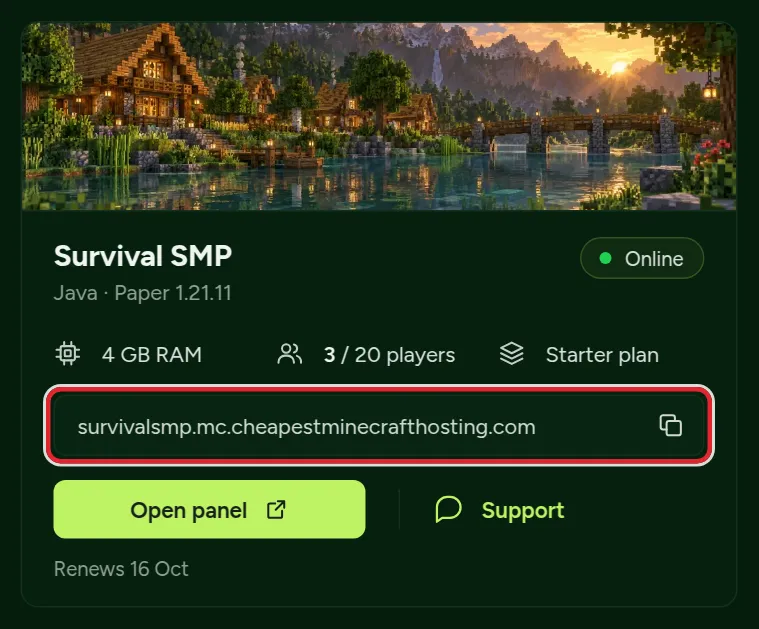
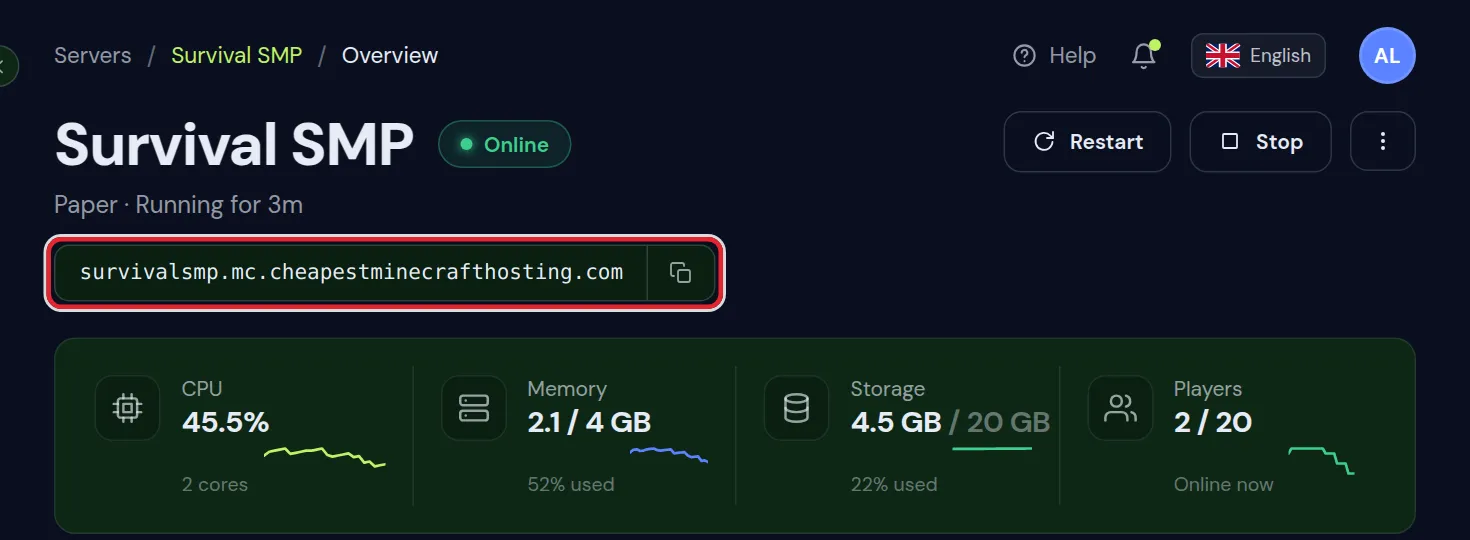
You chose the first part of the address when you ordered. You can add another address later under Settings, for example a shorter one, and both keep working.
Use the address, not a number. The address keeps working if your server is ever moved to another machine; a number might not.
Join from Minecraft Java Edition
- Start Minecraft Java Edition with the same version as the server. The version is in Settings under Minecraft version.
- Click Multiplayer, then Add Server.
- Type any name for it, and paste the address into Server Address.
- Click Done. The server appears in the list with its message and player count.
- Double click it to join.
If the server runs a modpack, players first need the same modpack in their launcher. Join a modded server shows how.
Join without saving the server: Direct Connection
To try a server once, there is no need to add it to the list. In the Multiplayer screen of Java, click Direct Connection, paste the address and click Join Server. Minecraft does not remember it, so the next time you paste it again.
Play the Minecraft version your server runs
The Minecraft Launcher starts the newest release unless you tell it otherwise. When the server runs another version, make an installation for it once:
- In the Minecraft Launcher, open Installations and click New installation.
- Give it a name, pick the version of the server in the version list and click Create.
- From then on, choose that installation next to the Play button on the main screen.
Bedrock has no choice of version: it updates itself. That is why a Bedrock or crossplay server always follows the newest Bedrock release.
Join from Minecraft Bedrock on phone, tablet or Windows
- Open Minecraft and tap Play.
- Go to the Servers tab and tap Add Server.
- Fill in a name, the address, and the port from your panel.
- Tap Save, then pick the server to join.
Bedrock on Xbox, PlayStation and Switch cannot add servers this way. Java and Bedrock crossplay mentions the workarounds console players use.
Join from a Mac, Linux PC or Chromebook
- Mac and Linux only have Java Edition. Players there join as Java players, with the address alone.
- A Chromebook runs the Bedrock version from the Google Play Store, so it joins like a phone: address plus Bedrock port, and only on a Bedrock or crossplay server.
- Windows can run both editions. The one a player starts decides how they join.
Not sure which edition a friend has? Java or Bedrock server shows how to tell from the main menu.
What the Minecraft server list tells you
Before you even click join, the multiplayer list on Java shows whether it will work:
| What you see | What it means |
|---|---|
| Green bars on the right | The server is online; more bars means a quicker connection |
| Your server message and a player count such as 3/20 | The server answered, so the address is right |
| A version number in red instead of bars | The server runs another Minecraft version than your game |
| A red cross with Can't connect to server | The server is stopped or still starting, or the address is not right |
| Can't resolve hostname | There is a typo in the address, or a new address has not reached every network yet |
The resource pack question when you join
Some servers send their own resource pack, and Minecraft asks whether to download it. Accept it to see the server the way the owner meant; if the pack is required, saying no disconnects you.
On Java you can change your answer later: select the server in the list, click Edit and set Server Resource Packs to Prompt, Enabled or Disabled. Owners who want to send a pack can follow add a resource pack to your server.
The Minecraft server shows as offline
When the list shows a red cross or cannot connect, check the panel first: is the server running? The Console tab shows it. A stopped server starts with the start button.
Running, but still no luck? Can't connect to your Minecraft server goes through the other causes one at a time.
Ping: where the server is and why it matters
Every action travels to the server and back. The servers stand in Poland, so for players across most of Europe that trip is short and the game reacts quickly. From North America or Asia every click travels much further: blocks break a moment later and fights feel slower, although everything still works.
Ping depends on distance and on the network of each player, not on the size of the plan, so more memory does not lower it. If everyone lags at once while the ping is fine, the server itself is busy; reduce lag on your server helps there.
Questions from Minecraft server owners
Do players need to type a port to join my Minecraft server?
Java players do not; the address is enough. Bedrock players type the port the panel shows, because Bedrock asks for it separately.
Can I change my Minecraft server address?
You can add another address in Settings. The old one keeps working, so players who saved it are not locked out.
Why does my friend see a different player count on my Minecraft server?
The server list refreshes when you open it. Press Refresh in the multiplayer screen to see the current count.
How do I join a Minecraft server without adding it to the list?
Use Direct Connection in the Multiplayer screen of Java and paste the address. The server is not saved, so you paste it again next time.
Can I join a Java Minecraft server from my phone?
Only if the server has crossplay. A phone runs Bedrock, which joins a Java server through Geyser with the address and the Bedrock port.
Can I join my Minecraft server from a Mac?
Yes, with Java Edition. Bedrock does not exist for Mac, so Mac players always join as Java players.
Why does the Minecraft server ask me to download a resource pack?
The owner set a server resource pack. Accept it to see the server as intended; if the pack is required, declining disconnects you.
Checked against Minecraft Java 26.2 and current Bedrock, September 2026. Written by the Cheapest Minecraft Hosting team, first published , updated .