
 Astroworld
Troubleshooting
Minecraft server keeps crashing: find the cause and stop it
A server that crashes once in a while after a long session is usually fine. A server that crashes every day, or every time players do one particular thing, has one cause behind it, and the panel gives you three places to find it: the log, the memory graph and the TPS.
If your server does not get past startup at all, Minecraft server won't start is the better page.
In short
A Minecraft server that keeps crashing has one cause behind it, and the panel shows three places to find it. Read the last red block in the console or the newest file in crash-reports, check the memory graph for a climb to the top before each crash, and check the TPS for a server that falls behind. Then update or remove the plugin or mod the log names, deal with the farm or chunk it points at, or give the server more memory if it ran out.
Crash watch keeps your Minecraft server online meanwhile
While you look for the cause, players should not have to wait for you. Crash watch, on the Overview tab under Protection, restarts your server by itself when it crashes or stops responding. Leave it on.
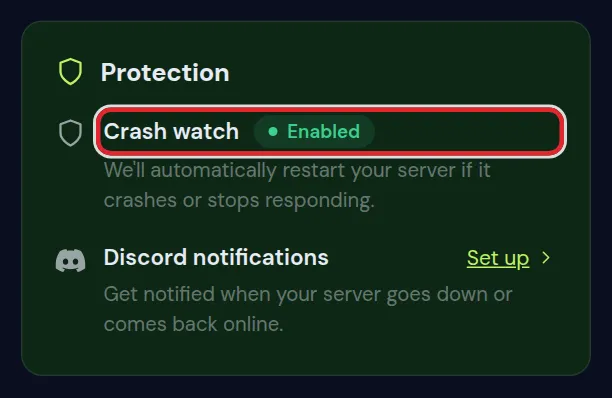
Crash watch hides a crash from players, not from you. Every restart it makes is in the log, so the cause stays findable.
1. Read the crash in the Minecraft server log
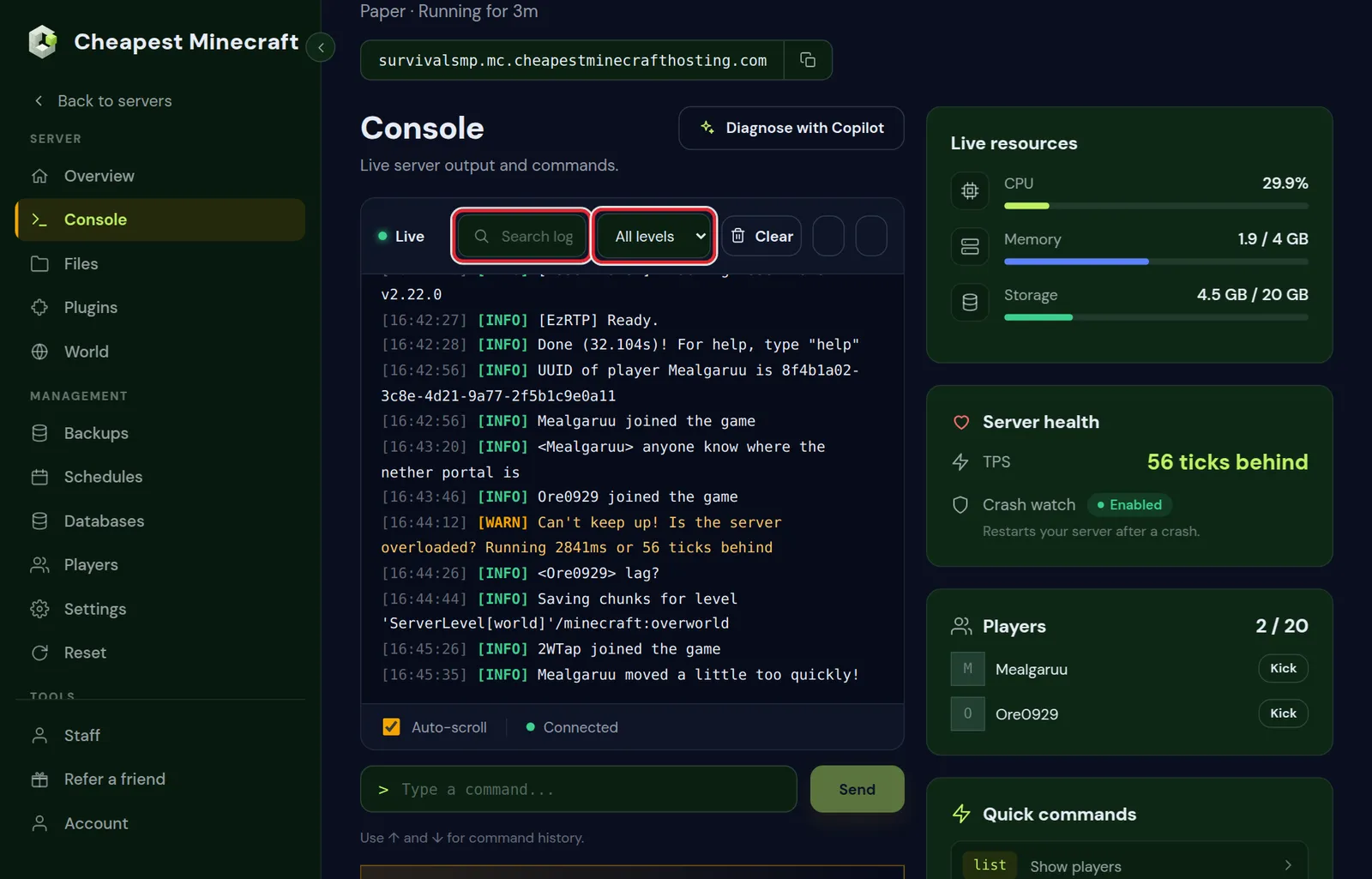
- Open the Console tab and set the level filter to Errors.
- Scroll to the last red block before the server stopped. The first line of that block names the kind of crash; the lines under it name the plugin or mod it happened in.
- Did crash watch already restart the server? Then the log of the crash is in the Files tab, in the
logsfolder, and Minecraft also writes a full report to thecrash-reportsfolder.
| What the log says | What it means | Where to look |
|---|---|---|
OutOfMemoryError | The server used all its memory | Section 2: memory |
The server has stopped responding! | One tick took so long that the server gave up | Section 3: TPS and heavy farms |
| A plugin or mod name in the lines under the error | That plugin or mod crashed | Section 4: plugins and mods |
Exception while loading or saving a chunk | One part of the world is damaged | Section 5: one chunk |
2. Check the memory graph of your Minecraft server
The Performance card on the Overview tab shows CPU, Memory and Players over the last 24 hours or 7 days. Open Memory and look at the moments your server crashed.
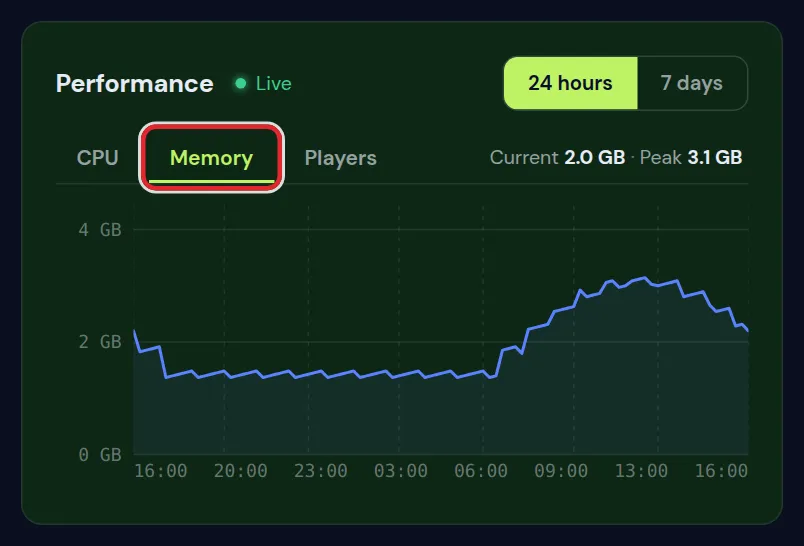
- It climbs to the top and the log says `OutOfMemoryError`: the server needs more memory than it has. Lower the view distance, remove plugins or mods you do not use, and pre-generate your world so new chunks do not pile up while players explore.
- It climbs slowly over days and never goes down after a restart: one plugin keeps too much in memory. Update your plugins first; memory leaks are usually fixed in a newer version.
- It stays well below the top: memory is not the problem. Go on to TPS.
Still at the top after that? How much RAM your server needs helps you pick the right size.
3. Check TPS: is the Minecraft server falling behind?
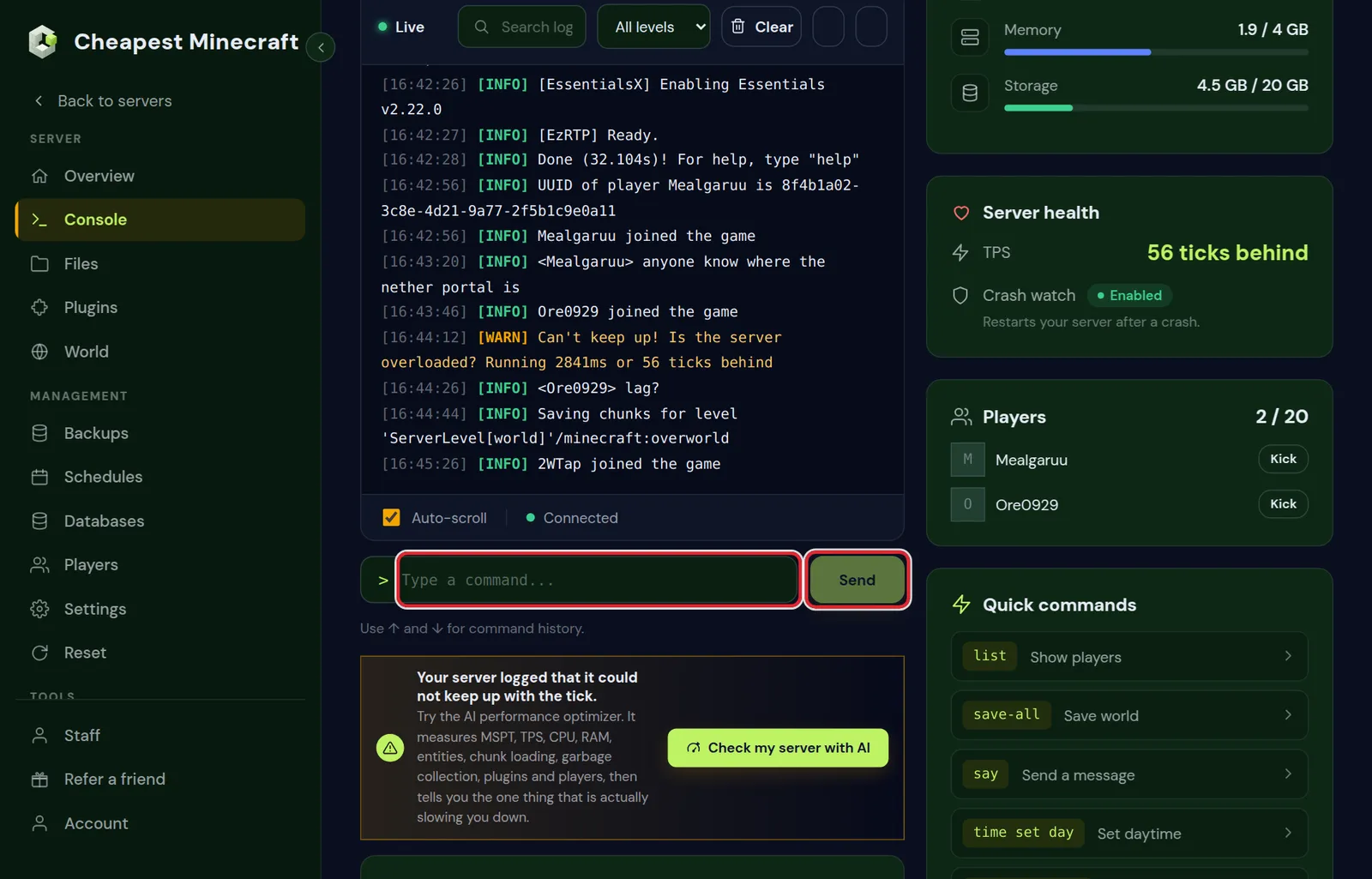
A Minecraft server runs 20 ticks per second. When it cannot keep up, it falls behind, and if one tick takes far too long the server gives up and stops. The Server health card in the Console tab shows it live.
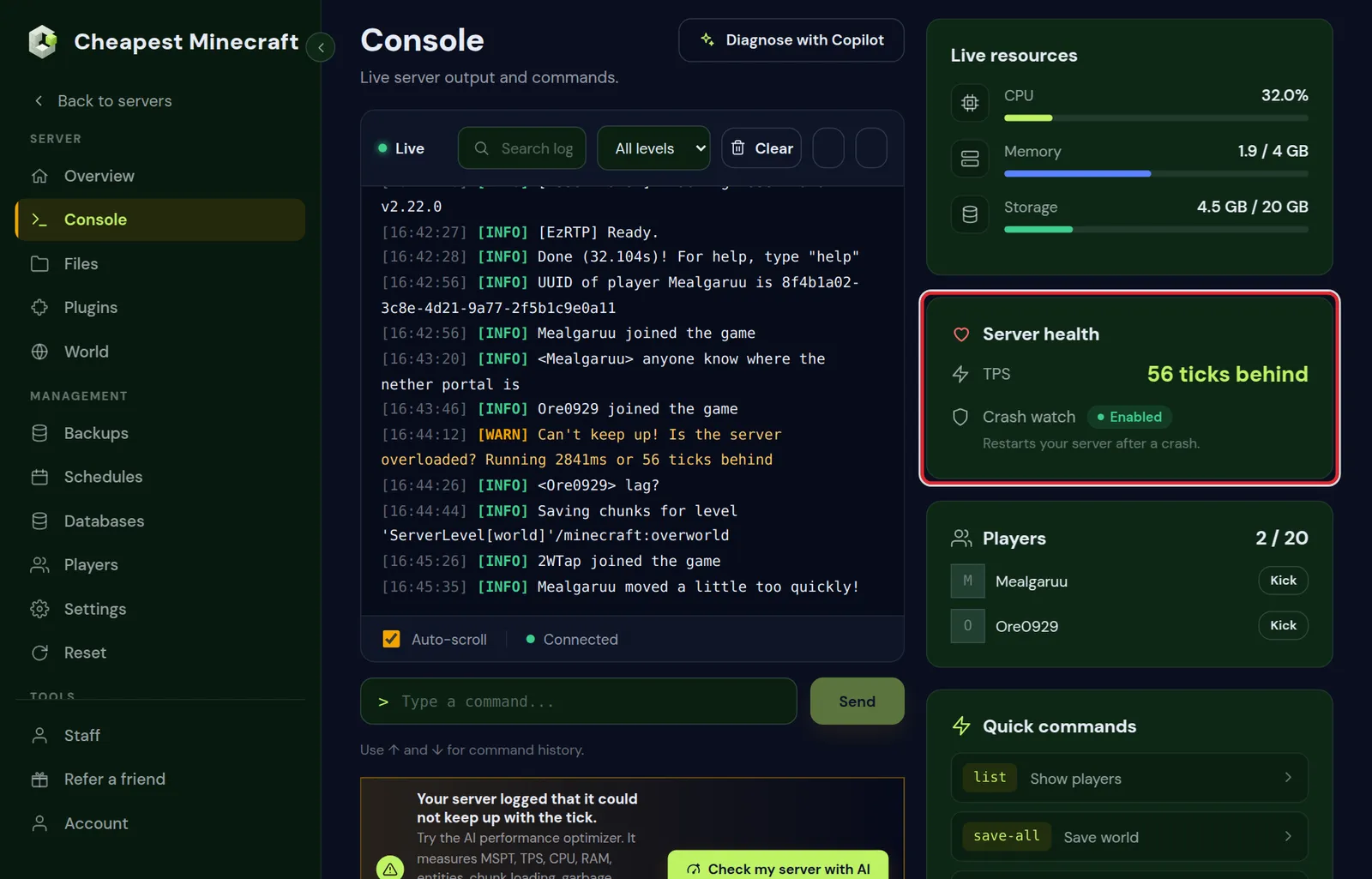
- Falling behind only when many players are on, or in one place: look for big mob farms, lots of dropped items or huge redstone machines there.
- Falling behind all the time: measure it. Reduce lag on your server shows how spark tells you exactly what takes the time.
- Falling behind right after startup and then fine: that is normal while the world loads.
4. Update or remove the plugin or mod that crashes the server
When the log names a plugin, check that plugin first. Crashes after a Minecraft update are very often a plugin that was made for the version before.
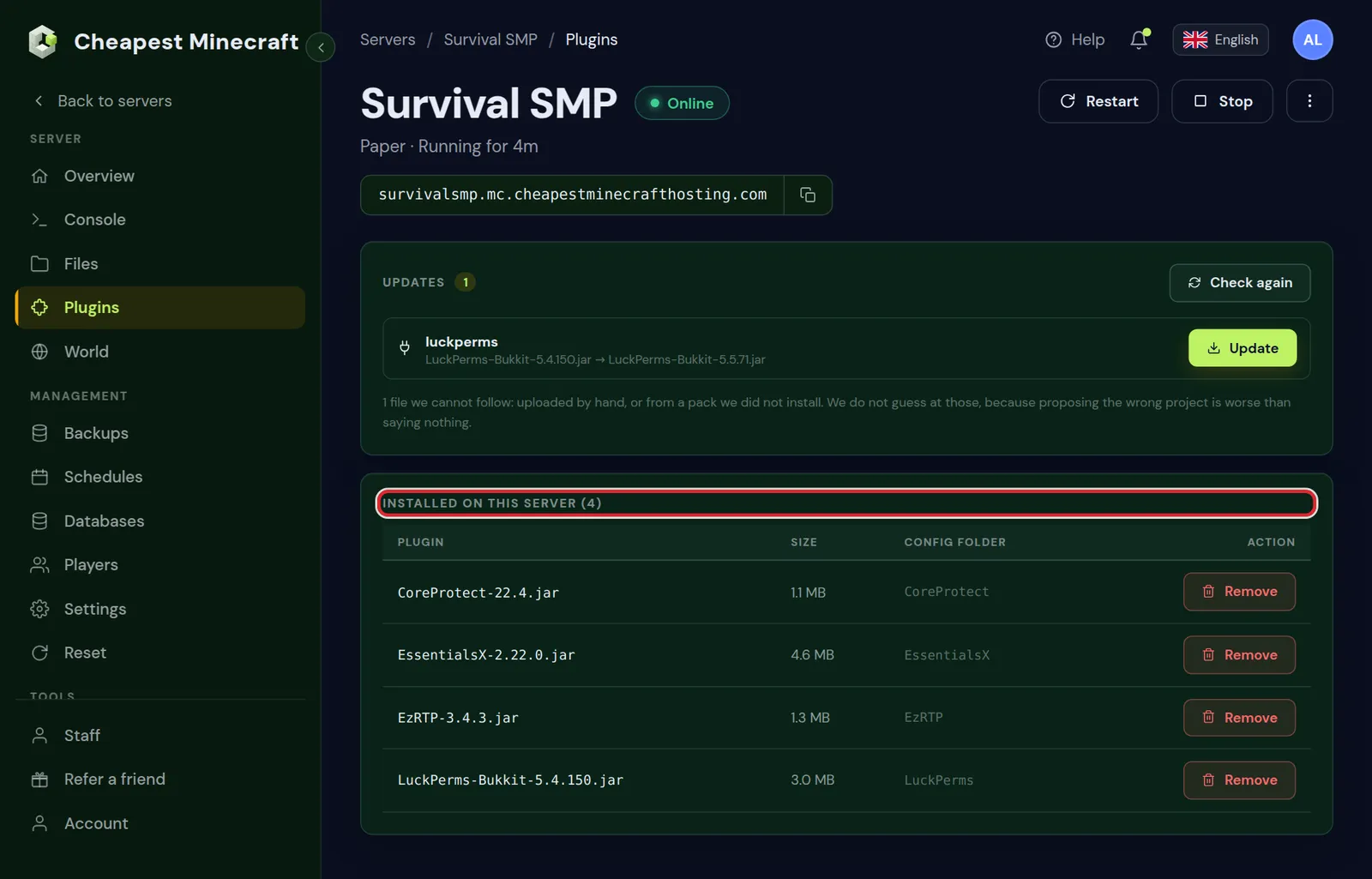
- Open the Plugins tab. The Updates box at the top lists plugins with a newer version.
- Update the plugin from the log, then restart the server.
- No update, and it keeps crashing? Click Remove on it under Installed on this server, restart, and play for a while to be sure the crashes stop.
On a modded server the same goes for mods: the crash report names the mod. Update it, or remove it from the mods folder, and remember that players must then remove it too.
5. When it crashes in one place in your Minecraft world
Does the server crash every time a player goes to one spot, or opens one chest? Then one chunk or one block entity is damaged, or a machine there overloads the server.
- Keep players away from that spot for now, for example by asking them or with a teleport.
- Look at the coordinates in the crash report. They point at the chunk.
- Restore a backup from before the problem began if the damage is big. Back up and restore your server shows how.
6. How to read a Minecraft crash report
A crash report in the crash-reports folder looks long, but only a few lines matter. Near the top, the line Description names the kind of crash. Further down, a part called Affected level often says where in the world it happened.
| Description in the report | What crashed | What to do |
|---|---|---|
Ticking entity | One mob, item or minecart that fails every tick | Use the coordinates under Entity's Exact location to remove it, see below |
Ticking block entity | A chest, hopper, furnace or modded machine | Use the Block location to remove that one block |
Exception in server tick loop | Something failed during a normal tick | The lines under the error name the plugin or mod |
Watching Server | The watchdog stopped a server that froze | Section 3: TPS and heavy farms |
Exception generating new chunk | World generation failed, usually in a mod that adds terrain or structures | Update that mod, or pre-generate with the mod removed to find it |
To remove a broken entity, run this in the console with the coordinates from the report. It removes everything except players within two blocks of that spot:
execute positioned 120 64 -340 run kill @e[type=!minecraft:player,distance=..2]For a broken block, setblock 120 64 -340 minecraft:air with its coordinates removes it, together with whatever it held. Make a backup first. Paper catches many of these crashes itself: it removes the failing entity and writes Entity threw exception at with the spot in the log instead of crashing.
7. Find the pattern: when does the Minecraft server crash?
Write down the time of each crash for a few days, from the log or from the Discord notifications of crash watch. The pattern usually points straight at the cause.
| When it crashes | Likely cause | Where to look |
|---|---|---|
| At the same time every day | A scheduled job: a restart, a backup, a plugin task or a map render | The Schedules tab and the settings of plugins with timers |
| At the busiest hour | Memory or processor runs out with many players | Sections 2 and 3 |
| When one particular player joins | Something in that player's data or near their location | The log lines just before the crash, which name the player |
| After several days without a restart | A plugin that slowly keeps more and more in memory | Section 2, and a daily restart in the meantime |
| When someone uses one item, block or command | A bug in the plugin or mod behind it | Section 4 |
A daily restart keeps a slow memory leak from ever reaching the top while you wait for a fixed version. Schedule automatic restarts sets it up with a warning for players.
Test the Minecraft server after every fix
Change one thing at a time and then let the server run as players normally use it. If you change three things at once and the crashes stop, you do not know which one fixed it. Save the world before each test by typing save-all in the console, or use the button for it under Quick commands.
Still crashing and you do not know why? Send us a message from the client area with the time of the crash. We read the log with you.
Prevent Minecraft server crashes from coming back
- Make a backup before every change, so a bad update costs minutes instead of a world.
- Update plugins and mods one at a time, with a restart and a short test in between.
- Keep some memory free at the busiest hour; a graph that touches the top every evening is a crash waiting to happen.
- Pre-generate the world inside a border, so exploring never pushes the server over the edge.
- Read the console after each restart for new warnings, before players find the problem for you.
Questions from Minecraft server owners
Does crash watch fix the Minecraft server crash?
No. It restarts the server so players can play on, but whatever caused the crash is still there. It keeps happening until you remove the cause.
Will more RAM stop my Minecraft server from crashing?
Only if the log says OutOfMemoryError or the memory graph hits the top before each crash. Most crashes come from a plugin, a mod or a farm, and more memory does not change those.
Where can I find old Minecraft crash logs?
In the Files tab. The logs folder keeps the log of each start, and Minecraft writes a full report of each crash to the crash-reports folder.
My Minecraft server freezes but does not crash. Is that the same?
Almost. A server that freezes is falling so far behind that it stops answering. The Server health card shows it as ticks behind, and the fix is the same as for lag.
What does Ticking entity mean in a Minecraft crash?
One entity, such as a mob, a dropped item or a minecart, fails every time the server updates it. The crash report gives its exact location; remove it with a kill command at that spot, or restore a backup.
Why does my Minecraft server crash when one player joins?
Something tied to that player fails: their saved data, an item in their inventory, or a block or entity where they stand. The log lines just before the crash name them; restoring their player file from a backup is a common fix.
Why does my Minecraft server crash at the same time every night?
Almost always a scheduled job, such as a restart, a backup or a plugin task that runs at that hour. Check the Schedules tab and the plugins with timers, and compare the times.
Can too many players crash a Minecraft server?
Only when the memory or processor runs out because of them. Size the server for the peak number of players online together; the player count alone does not crash it.
Checked against Paper for Minecraft Java 26.2 and our control panel, September 2026. Written by the Cheapest Minecraft Hosting team, first published , updated .