
 Astroworld
Plugins and mods
How to install mods on a Minecraft server
Mods change the game itself: new blocks, new mobs, new machines, or a faster server. They run on a modded server type, Fabric, Forge or NeoForge, and most of them also have to be in the game of every player who joins.
This guide is about adding mods one by one. For a complete pack such as All the Mods or Better MC, see install a modpack, which sets everything up in one go.
In short
To install mods on a Minecraft server, pick Fabric, Forge or NeoForge as the server type, on the Minecraft version your mods are made for, and start it once. Then add each mod from the Mods tab, or upload its .jar file to the mods folder, together with the libraries it depends on, such as Fabric API. Restart the server and give your players the same content mods in the same versions, or they cannot join.
Set your Minecraft server to Fabric, Forge or NeoForge
Mods need a mod loader. A mod made for Fabric does not load on Forge, and a mod made for 1.21.1 does not load on 26.1, so the loader and the version come first. Pick the loader that the mods you want are made for; Fabric, Forge or NeoForge explains the difference.
- Make a backup in the Backups tab.
- Open Settings and go to Server software.
- Choose Fabric, Forge or NeoForge as the server type and pick the Minecraft version your mods are made for.
- Save and start the server once, so it creates the
modsfolder and its first files.
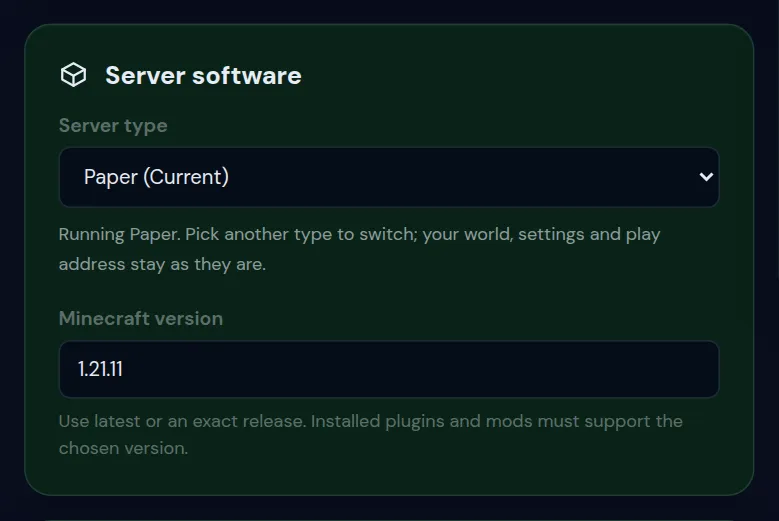
Paper, Purpur and Spigot run plugins, not mods. If you only want a few extras and players should join with a normal game, plugins may be the easier road: see install plugins.
Install a Minecraft mod from the Mods tab
- Open the Mods tab of your server.
- Under Verified Modrinth catalog, type the name of the mod in Search mods, for example
lithiumorfarmer's delight. - The results are matched to your server type and Minecraft version, so a mod that does not fit your server does not show up.
- Click Verify & install. The panel checks the file and puts it in
/mods. - Restart the server to load it.
Every mod in the mods folder shows in the list above the catalog, with its file name and size. Filter installed mods finds one quickly when the list gets long.
Upload a Minecraft mod by hand
For a mod that is not in the catalog, or a version you picked yourself:
- On the mod's download page, pick the file for your loader and your exact Minecraft version. Mods are
.jarfiles. - Stop the server.
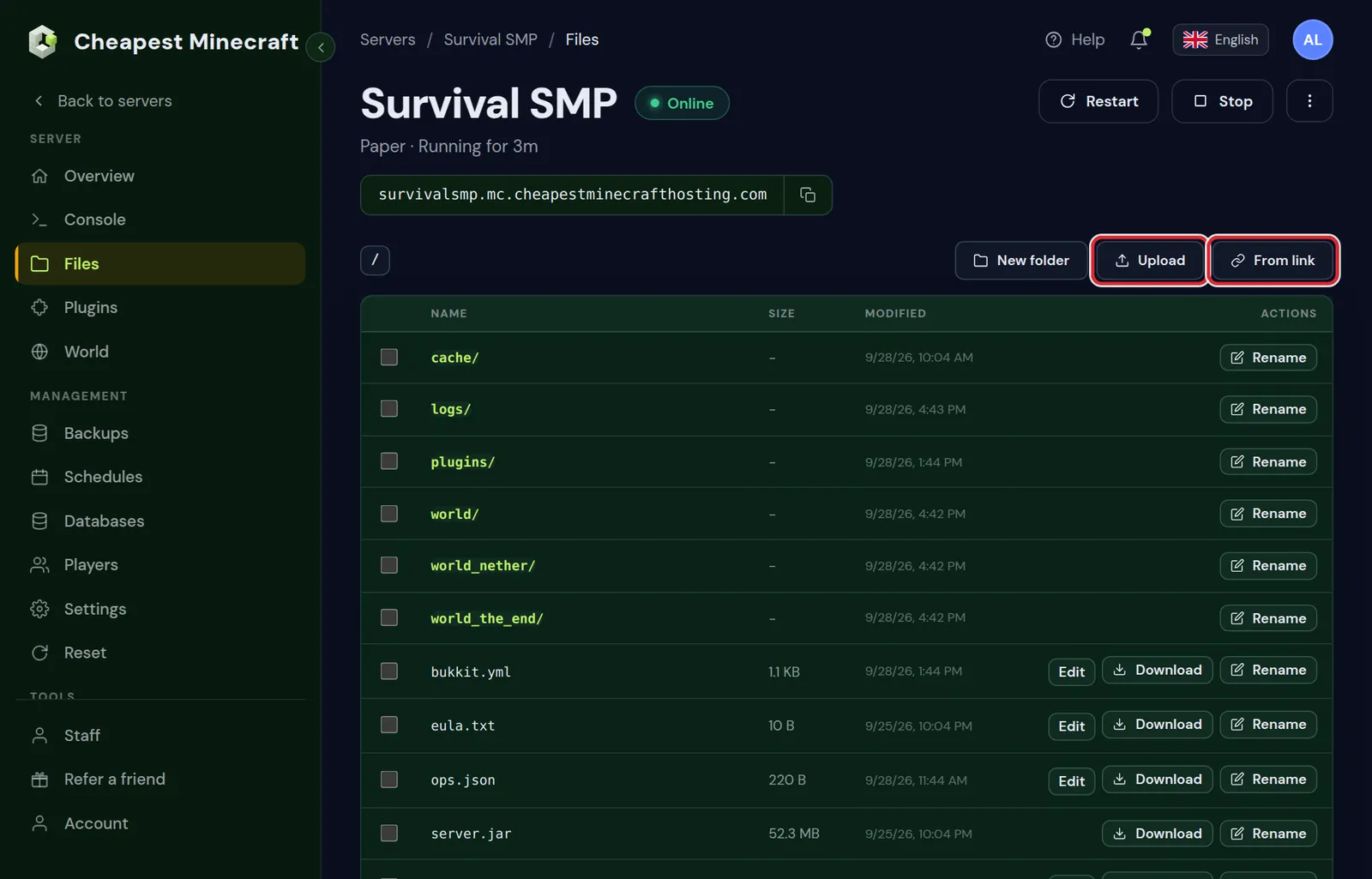
- In Files, open the
modsfolder and click Upload. - Choose the
.jarfile. Do not unpack it. - Start the server and watch the console while it loads.
Download mods only from the mod's own page on a known mod site. A .jar from a random link runs with full rights on your server.
Add Minecraft mods from a link or many at once over SFTP
Downloading a mod to your computer and uploading it again is not always needed. Two quicker ways:
- From link: copy the direct download link of the
.jaron the mod page, open themodsfolder in Files, click From link and paste it. The server fetches the file itself. - SFTP: for twenty or fifty mods at once, create an SFTP password in the Files tab, then connect with a program such as FileZilla or WinSCP, using the details the panel shows. Then drag the whole set of
.jarfiles intomodsin one go.
Either way, stop the server first, and start it after the last file has arrived, so it does not load half a mod list.
Dependencies: the Minecraft mods a mod needs
Many mods need another mod to work, a library that holds shared code. The mod page lists these as dependencies. Without them the server stops at startup and the console names the mod that is missing.
- Fabric API is needed by almost every Fabric mod. Install it first on any Fabric server.
- Libraries such as Architectury, Cloth Config or GeckoLib come up often; install the version for the same loader and Minecraft version.
- A dependency marked optional adds extra features, but the mod starts without it.
Minecraft server crashes after adding a mod: read the console
When a modded server stops during startup, the reason is almost always in the last lines of the console, and the panel keeps the full log in the logs folder. These are the messages we see most and what they mean.
| What the console says | What it means | What to do |
|---|---|---|
requires a mod which is missing (Fabric), or Missing or unsupported mandatory dependencies (Forge and NeoForge) | A library or other mod is not there, or its version does not fit | Install the mod it names, in the version range it gives |
A mod needs another version of minecraft | The mod file is made for a different Minecraft version | Download the file for your exact version, or change the server version |
The word duplicate next to a mod name | Two files of the same mod sit in mods | Keep the newest one and remove the other |
net/minecraft/client in the error, or invalid dist on Forge and NeoForge | A mod that only runs in the game is on the server | Remove that mod from the server; players can keep it |
Mixin apply for mod followed by a mod name | Two mods change the same part of the game, or one is outdated | Update both, or remove one of them to test |
UnsupportedClassVersionError with a class file version | A mod needs a newer Java than the server runs | See the Java version for each Minecraft version |
When the log is unclear, remove the mods you added last, start again, and add them back one at a time. The mod that brings the crash back is the one to look at. Minecraft server won't start covers startup problems that have nothing to do with mods.
Server side, client side or both: where a Minecraft mod runs
Not every mod belongs in the same place. The mod page usually says where it runs.
| Kind of mod | Examples | On the server | In each player's game |
|---|---|---|---|
| Content: new blocks, items, mobs | Create, Farmer's Delight, Alex's Mobs | Yes | Yes, the same version |
| Server performance | Lithium, FerriteCore, ModernFix | Yes | Not needed |
| Server tools | Chunky, spark, LuckPerms for Fabric | Yes | Not needed |
| Graphics and interface | Sodium, Iris, minimaps, zoom | No | Only if the player wants it |
A mod that only runs in the game, such as a shader loader, should stay off the server: at best it does nothing there, at worst the server refuses to start. Pre-generating the world with Chunky is covered in pre-generate your world.
Popular Minecraft server mods for Fabric, Forge and NeoForge
A short list of mods that are worth having on almost any modded server. None of them changes the gameplay, so players do not need them in their own game.
| Mod | What it does on the server | Loaders |
|---|---|---|
| Lithium | Speeds up game logic such as mobs, physics and chunk ticking without changing how the game plays | Fabric, NeoForge |
| FerriteCore | Lowers the memory the game uses | Fabric, Forge, NeoForge |
| ModernFix | A faster start and lower memory, felt most on big modpacks | Fabric, Forge, NeoForge |
| Chunky | Builds the map before players reach it, so new chunks do not cause lag | Fabric, Forge, NeoForge |
| spark | Shows what takes the tick time when the server lags | Fabric, Forge, NeoForge |
| LuckPerms | Ranks and permissions, so helpers get only the commands they need | Fabric, Forge, NeoForge |
| Ledger | Logs who placed and broke which block, and can roll it back | Fabric |
Not every mod exists for every Minecraft version. Search for them in the Mods tab; when one does not show up for your version, the mod page lists which versions it supports.
Get your players on the same Minecraft mods
When a content mod is missing or has another version in a player's game, the player cannot join and sees a list of what does not match. Two ways to keep everyone equal:
- Make a small modpack with the same mods and versions, and share it with your players. Their launcher installs it in one go.
- Keep a list of every mod with its exact version, and have players install the same files.
Join a modded server is the guide to send your players; it covers the launcher and the memory their game needs.
Make a modpack of your server's mods for your players
The easiest way to give friends exactly the mods of your server is a modpack file they can import in one click. The free launchers can make one:
- In the Modrinth App, the CurseForge app or Prism Launcher, make a new profile that uses the loader and Minecraft version of your server.
- Add the same content mods, in the same versions as on the server. Graphics mods such as Sodium can go in as well; the server does not mind them in the players' games.
- Export the profile as a modpack: a
.mrpackfile in the Modrinth App, a.zipin the CurseForge app. - Send the file to your players. They import it in their launcher, start it, and join with the address of your server.
When you add or update a mod on the server later, export the pack again and send the new file, so nobody is left on an old version.
Update or remove a mod on your Minecraft server
- Remove: click Remove next to the mod in the Mods tab and restart. The panel says "Mod removed. Restart to apply."
- Update: remove the old file and install the new one. Two versions of the same mod in
modsstop the server from starting. - Make a backup first. Removing a content mod also removes its blocks and items from the world, and that cannot be undone without the backup.
- Update the same mods in your players' games at the same time, or they cannot join.
Updating a modded Minecraft server to a new Minecraft version
A new Minecraft version means a new file of every mod, and some mods take weeks or months to catch up. Check before you switch:
- Make a backup in the Backups tab first, because a world never returns to an older version once a newer one has opened it.
- Check every mod on its page for a file for the new version. If an important content mod is missing, wait: without it, its blocks and items disappear from the world.
- Change the Minecraft version in Settings under Server software, then replace every mod in
modswith the file for the new version. - Start the server and read the console until it says Done. Then update the modpack or mod list of your players.
Change your Minecraft server version explains the version switch itself in more detail.
How much RAM Minecraft mods need
Every mod takes some memory. A handful of light mods runs well on the RAM of a normal server; a large collection of content mods needs about as much as a heavy modpack, 12 to 16 GB. How much RAM for a Minecraft server has the full table, and reduce lag helps when a modded server feels slow.
Mods on a Bedrock or crossplay Minecraft server
Bedrock has no mods in the Java sense. The official Bedrock server takes add-ons instead: behavior packs and resource packs that are uploaded to the server and switched on for a world. They are made for Bedrock only, and Java mods do not work there. On this hosting a Bedrock server runs Paper with Geyser, like a crossplay server, so it takes plugins and not add-ons.
A crossplay server runs Paper with Geyser, so it takes plugins rather than mods. If you want Bedrock friends to join, pick plugins for the extras; if you want mods, the server runs Fabric, Forge or NeoForge and everyone plays Java. Java or Bedrock server helps you choose.
Questions from Minecraft server owners
Can I install mods on a Paper Minecraft server?
No. Paper, Purpur and Spigot run plugins. Mods need Fabric, Forge or NeoForge. Change the server type in Settings under Server software, after a backup.
Where is the mods folder on my Minecraft server?
In the top folder of the server, next to server.properties. It appears after the first start on Fabric, Forge or NeoForge.
Do Minecraft Forge mods work on Fabric?
No. Each mod is built for one loader, although many mods publish a separate file for each. Download the file made for the loader your server runs.
Do players need to install the Minecraft mods too?
For mods that add blocks, items or mobs, yes, with the same version as the server. Mods that only make the server faster, or add server tools, are not needed in the players' games.
Why does my Minecraft server crash after installing a mod?
Usually a library it needs is missing, the file is for another loader or Minecraft version, the mod only runs in the game, or two versions of it sit in the mods folder. The last lines of the console name the mod; remove the mods you added last and add them back one by one to find it.
Do I need Fabric API on my Minecraft server?
Yes, as soon as one Fabric mod needs it, and almost all of them do. Install the Fabric API file for your exact Minecraft version, on the server and in the players' games.
How many mods can a Minecraft server run?
There is no fixed limit. Every mod adds memory and start time, so a few dozen run on a normal plan, while 300 mods or more need 12 GB or more; the sum per player is in how much RAM for a Minecraft server.
Can I install mods without my players installing them?
Only mods that work on the server alone, such as Lithium, FerriteCore, Chunky, spark and LuckPerms. Any mod that adds blocks, items or mobs has to be in every player's game as well.
Checked against the Mods, Files and Settings tabs of our control panel, September 2026. Written by the Cheapest Minecraft Hosting team, first published , updated .