
 Astroworld
Troubleshooting
Which Java version does your Minecraft server need?
Minecraft Java Edition runs on Java, and each Minecraft version is built for a certain Java version. Too old and the server refuses to start. Too new and older versions, especially old modpacks, can break in strange ways.
On our servers you rarely have to think about it: changing the Minecraft version in Settings sets the matching Java by itself. This page is for when you run something unusual, or when the console shows a Java error.
In short
A Minecraft server needs Java 25 for 26.1 and newer, Java 21 for 1.20.5 to 1.21.11, Java 17 for 1.18 to 1.20.4, Java 16 for 1.17, and Java 8 for 1.16.5 and older, such as 1.12.2. On our panel the Java version follows the Minecraft version you set in Settings, so you only pick one by hand for an unusual setup such as an old modpack.
The table: Java version per Minecraft version
| Minecraft version | Java version |
|---|---|
| 26.1 and newer | Java 25 |
| 1.20.5 to 1.21.11 | Java 21 |
| 1.18 to 1.20.4 | Java 17 |
| 1.17 and 1.17.1 | Java 16 |
| 1.16.5 and older, such as 1.12.2 and 1.8.9 | Java 8 |
Newer Java versions can often run a slightly older Minecraft, but the other way round never works. Old modded versions are the exception: Forge on 1.12.2 and 1.7.10 wants exactly Java 8.
When Minecraft changed its Java version
Mojang raises the Java requirement every few years, always together with a big update:
| Minecraft version | Released | Java needed from then on |
|---|---|---|
| 1.17 | 2021 | Java 16 |
| 1.18 | 2021 | Java 17 |
| 1.20.5 | 2024 | Java 21 |
| 26.1 | 2026 | Java 25 |
Before 1.17, every version ran on Java 8 for years. That is why so many old servers and packs still need it, and why a server that skips several Minecraft versions at once often needs a new Java as well.
How to set it on your Minecraft server
- Open Settings.
- Change the Minecraft version. The Java version follows automatically.
- Only if you need something else, pick a Java version by hand below it, for example Java 8 for an old modpack.
- Restart the server.
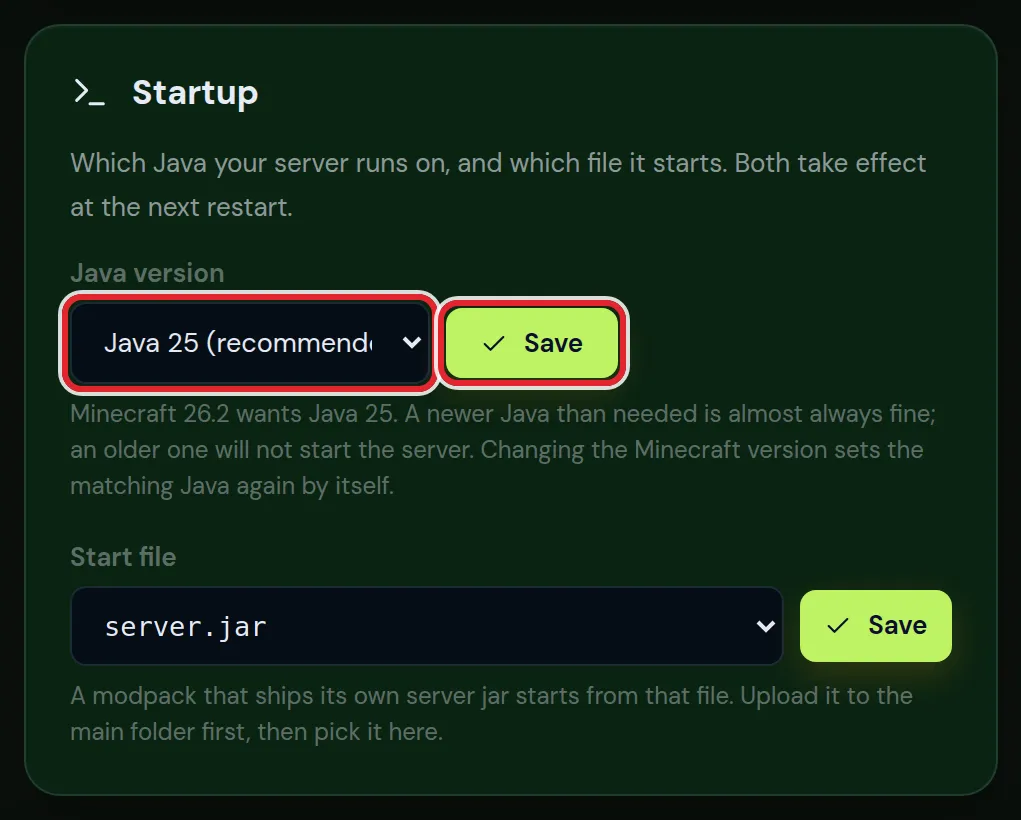
If you picked a Java version by hand and later change the Minecraft version, check the Java setting again. The automatic choice is almost always right.
Reading the Java version error
When Java is too old, the console shows an error like this:
java.lang.UnsupportedClassVersionError: ... has been compiled by a more recent version of the Java Runtime (class file version 69.0), this version of the Java Runtime only recognizes class file versions up to 65.0The two numbers tell you what was needed and what is installed. Translate them with this table:
| Class file version | Java |
|---|---|
| 69 | 25 |
| 65 | 21 |
| 61 | 17 |
| 60 | 16 |
| 52 | 8 |
So the example needs Java 25 and found Java 21. Raise the Java version in Settings, or check that the Minecraft version there matches the server files.
Other Java errors in the Minecraft console
Not every error with the word java in it is about the Java version. These are the ones we see most:
| Console line | Meaning | Fix |
|---|---|---|
Unrecognized VM option, then Could not create the Java Virtual Machine | A startup flag that this Java no longer knows, often an old memory flag from a modpack | Use the Java the pack was made for, usually Java 8 |
ClassCastException with URLClassLoader on an old Forge server | Forge for 1.12.2 or older is running on Java 9 or newer | Set the Java version to Java 8 in Settings |
NoSuchMethodError or NoClassDefFoundError with a plugin or mod name | Not a Java problem: the plugin or mod was made for another Minecraft version | Install the build for your Minecraft version |
OutOfMemoryError: Java heap space | Not a Java version problem either: the server ran out of memory | Lower the load, or see how much RAM a Minecraft server needs |
When the server stops before the console shows anything useful, work through the other causes in order with Minecraft server won't start.
Minecraft plugins and mods with their own Java needs
A plugin or mod built for a newer Java than your server runs gives the same class version error, but names that plugin. Either update Java together with Minecraft, or use an older build of that plugin that fits your version.
Old modpacks on Java 8 sometimes need extra startup flags that newer Java versions do not understand. If a pack's server files include their own start settings, use the Java version the pack's makers recommend.
Players need the right Java for Minecraft too
For the normal game, the Minecraft Launcher brings its own Java, so players do nothing. Third party launchers such as Prism Launcher can download the right Java per profile; when a modpack crashes at launch on a player's computer, a wrong Java in that launcher profile is a common cause.
Java on Bedrock and crossplay servers
A Bedrock server does not use Java at all. The official Bedrock server software from Mojang is a program of its own, so there is no Java setting to think about.
Crossplay changes nothing here: underneath it runs Paper with Geyser, so the table above applies as it is. Geyser itself needs a recent Java, which is one more reason to keep a crossplay server on a current Minecraft version. Java and Bedrock crossplay explains the rest of that setup.
Questions from Minecraft server owners
Can I run Minecraft 1.8.9 on Java 21?
Sometimes the plain game starts, but plugins and mods from that era expect Java 8 and break in odd ways. Use Java 8 for 1.8.9.
Does a newer Java make the Minecraft server faster?
A little, for versions that support it. The jump from Java 8 to 17 brought real gains. But never go above what the version or its mods support just for speed.
Where do I see which Java the Minecraft server uses?
In Settings, under the Minecraft version. Paper and Purpur also print it in the first lines of the console at startup.
Which Java version do I need for Minecraft 1.21?
Java 21. Every release from 1.20.5 up to 1.21.11 runs on Java 21.
Which Java version do I need for Minecraft 1.20.1?
Java 17. The versions from 1.18 to 1.20.4 need Java 17; from 1.20.5 on it is Java 21.
Which Java version do I need for Minecraft 26.1 and 26.2?
Java 25. Minecraft moved to Java 25 with the 26.1 release, and the versions after it stay there for now.
Do I need to install Java on the server myself?
No. The panel runs every server with the Java version that belongs to its Minecraft version, and you can choose another one in Settings when an old modpack needs it.
Does a Bedrock Minecraft server need Java?
No. The Bedrock server software does not run on Java. A crossplay server does, because it is a Java server with Geyser added.
Checked against Minecraft Java 1.8.9 to 26.2, September 2026. Written by the Cheapest Minecraft Hosting team, first published , updated .