
 Astroworld
Plugins and mods
How to install plugins on a Minecraft server
Plugins add features to a server without players installing anything: land claims, homes, shops, permissions, minigames. They run on the server only, so everyone joins with the normal game.
They need a plugin server. On Java that means Paper, Purpur or Spigot. A vanilla, Fabric or Forge server cannot load them.
In short
To install plugins on a Minecraft server, the server has to run Paper, Purpur or Spigot. Open the Plugins tab, search the catalog and click install, or upload the plugin's .jar file to the plugins folder, then restart the server. Players do not install anything: plugins run on the server only, so everyone joins with the normal game.
Check your Minecraft server type
Open Settings and look at the server type. If it says Paper, Purpur or Spigot, you are ready. If it says Vanilla, switch it to Paper there: the world stays exactly as it is.
If it says Fabric, Forge or NeoForge, you run mods instead. Those servers use mods, not plugins, and the two do not combine. Paper, Purpur or Spigot and Fabric, Forge or NeoForge help you pick.
Install Minecraft plugins from the catalog
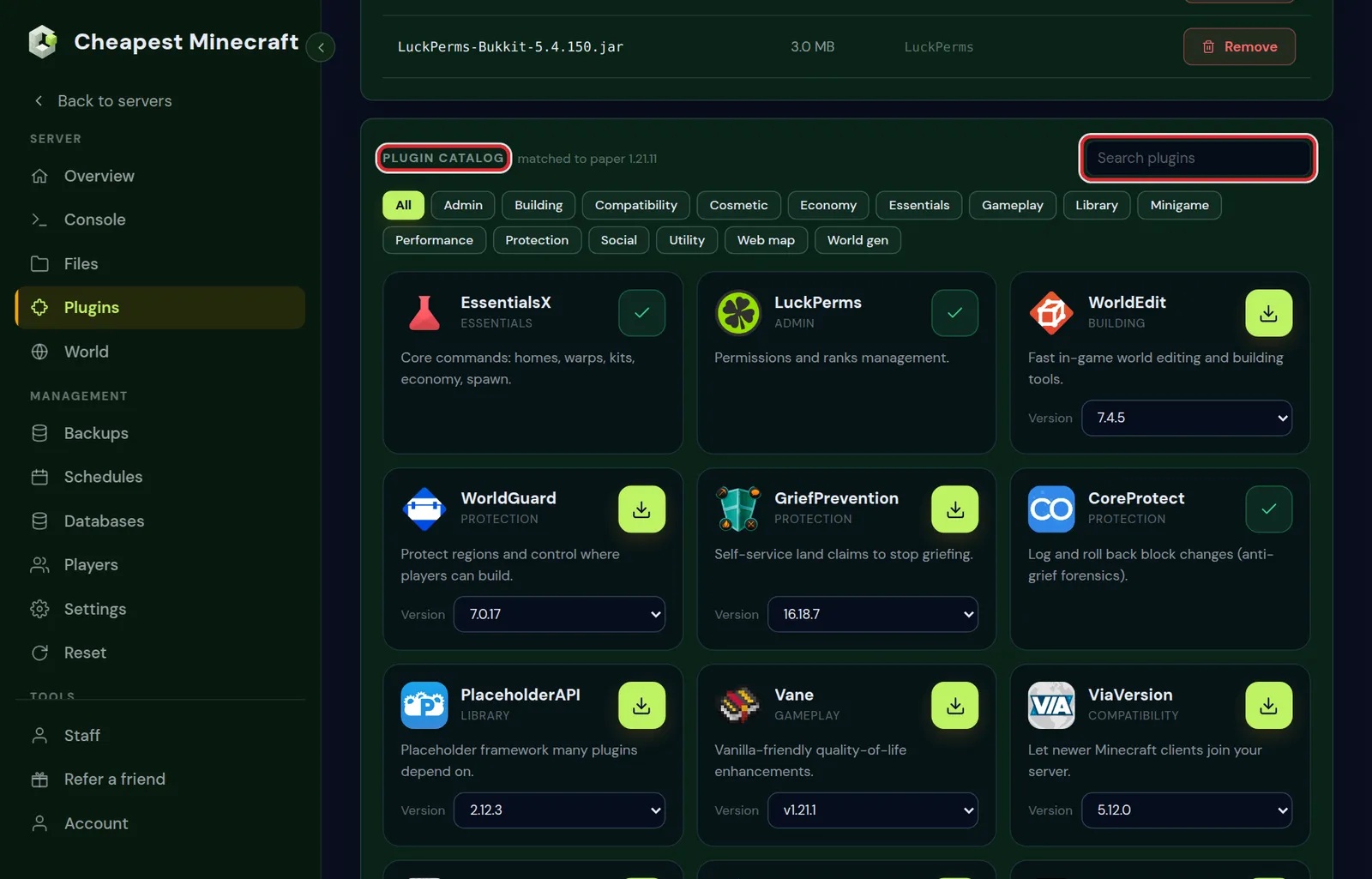
- Open the Plugins tab.
- Search the Plugin catalog below your installed plugins, for example for LuckPerms or EssentialsX.
- Click install. The panel picks the file that matches your server type and Minecraft version, so you do not have to choose a download yourself.
- Restart the server from the Console tab. Plugins load at startup.
After the restart, the console lists every plugin it loaded. Type plugins in the console to see the list at any time; loaded plugins show in green.
Upload a Minecraft plugin yourself
Not every plugin is in the catalog, and some are paid. For those, download the .jar file from the author's page and upload it.
- Download the version of the plugin that matches your Minecraft version. The plugin page usually lists which versions it supports.
- In the Files tab, open the
pluginsfolder. - Upload the
.jarfile there. Do not unpack it. - Restart the server.
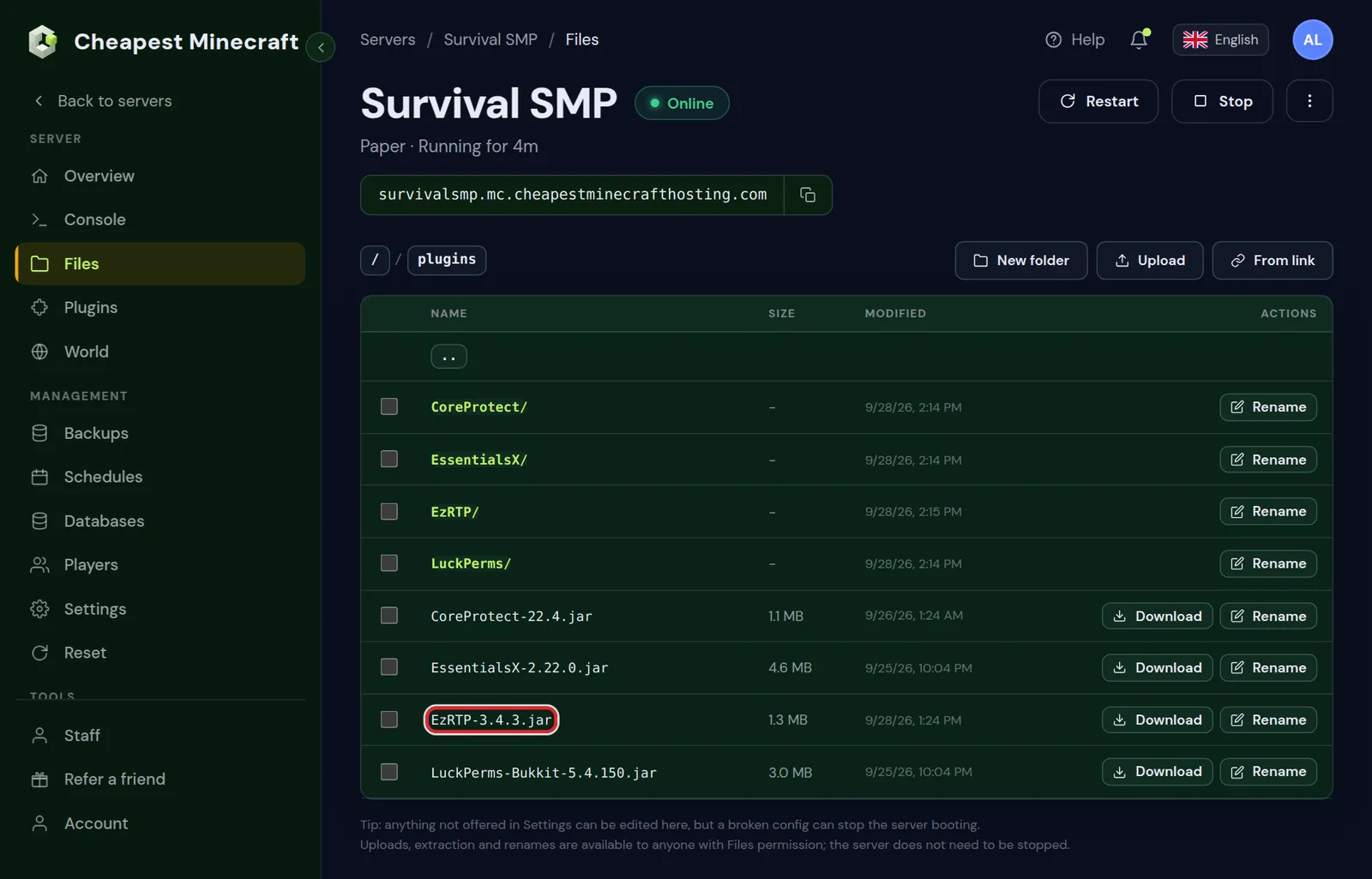
plugins folder as a .jar file.Only download plugins from the author's own page or a large plugin site. A .jar can do anything on your server, so a file from an unknown forum post is a real risk.
Where to download Minecraft plugins: Modrinth, Hangar and SpigotMC
When a plugin is not in the catalog, these are the places to look. Each lists the Minecraft versions a plugin supports, which is the first thing to check.
| Site | What it is | Good to know |
|---|---|---|
| Modrinth | Plugins and mods, with a filter for Paper, Purpur and Spigot | Clear version lists per Minecraft version |
| Hangar | The plugin site run by the Paper team | Made for Paper and the server types built on it |
| SpigotMC | The largest and oldest list of plugins, free and paid | Downloads often only work in a browser, so download first and upload the file |
| BuiltByBit | A marketplace for paid plugins and server setups | The licence belongs to the buyer; download and upload it yourself |
| BukkitDev | An older plugin list | Many plugins there have not been updated for current versions |
For a file with a direct download link, such as a release on Modrinth, Hangar or GitHub, you can skip your own computer: open the plugins folder in Files, choose From link and paste the download link.
Change a Minecraft plugin's settings
Most plugins create a folder with the same name inside plugins on their first start, with a config.yml in it. Edit that file in Files, save, and either restart the server or use the plugin's own reload command if it has one.
Avoid the general /reload command. It reloads every plugin at once, and many plugins do not survive it cleanly. A restart is safer.
Edit a plugin config.yml without breaking it
Plugin settings are written in YAML, a format that is strict about spaces. One wrong indent and the plugin falls back to its defaults or does not start. Four rules prevent almost every problem:
- Indent with spaces, never with tabs, and keep the same indent as the lines around the setting you change.
- Leave a space after every colon:
max-homes: 3, notmax-homes:3. - Put text with a colon, a hash or an ampersand between single quotes, such as
prefix: '&a[Shop] '. - Download the file before you edit it, so you can put the old version back in one upload.
When a config has an error, the console says so at startup with words such as mapping values are not allowed here or while parsing a block mapping, and a line number. Open the file at that line; the mistake is there or on the line just above.
Update or remove a plugin on your Minecraft server
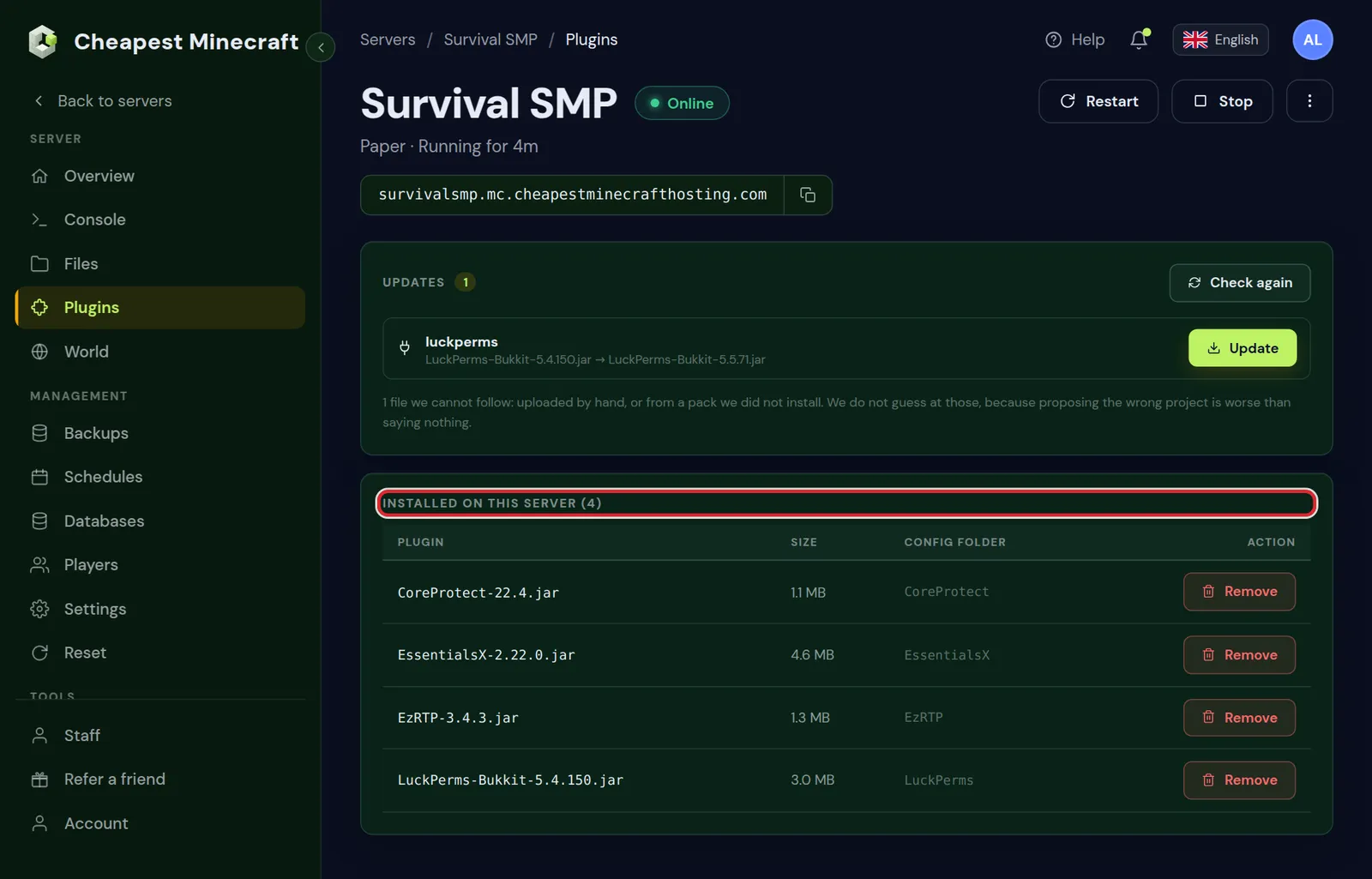
- Update: install the new version from the catalog, or upload the new
.jarand delete the old one. Two versions of the same plugin in the folder cause errors. - Remove: use Remove plugin in the Plugins tab and restart. Its settings folder stays unless you choose to delete it, so reinstalling later brings your settings back.
- After a Minecraft update: check that each plugin supports the new version before you change the server version. A backup first lets you go back if one does not.
Minecraft plugins worth knowing
| Plugin | What it does |
|---|---|
| LuckPerms | Groups and permissions, so you decide who can use which command |
| EssentialsX | Homes, warps, kits, spawn and a hundred small commands |
| CoreProtect | Logs every block change so you can undo griefing |
| GriefPrevention | Players claim land with a golden shovel |
| Chunky | Generates the world in advance to reduce lag |
| DiscordSRV | Links the server chat with a Discord channel |
| ViaVersion | Lets players on newer game versions join |
Start small. Every plugin costs a little memory and startup time, and a server with five well chosen plugins runs better than one with fifty.
Which plugin for which job on a Minecraft server
Most server owners look for a plugin by what they want to do. These are the ones from the catalog we would reach for first.
| You want | Plugins to look at |
|---|---|
| Ranks, staff roles and who may use which command | LuckPerms |
| Homes, warps, kits and a spawn command | EssentialsX, or HuskHomes for homes across several servers |
| Protect builds and land | GriefPrevention for claims, WorldGuard for regions, Towny for towns |
| Undo griefing and see who did it | CoreProtect |
| A live map of the world in the browser | BlueMap, Dynmap or squaremap |
| A neat tab list and name tags | TAB, with PlaceholderAPI for the values it shows |
| Bedrock players on a Java server | Geyser |
| Several worlds on one server | Multiverse-Core |
| Big building jobs with undo | WorldEdit |
| Catch cheaters | GrimAC |
| Close the server for work while staff can join | Maintenance |
| Skins for players who join through Geyser or a proxy | SkinsRestorer |
Each of these has its own guide here where it matters: permissions with LuckPerms, stop griefing, crossplay between Java and Bedrock and maintenance mode.
A plugin does not load on your Minecraft server
Look at the console right after startup. The line about the plugin usually says why.
Unsupported API versionor a class error: the plugin is made for another Minecraft version.Unknown dependency: it needs another plugin installed first. The message names it.- No mention at all: the file is not a plugin, or it is in the wrong folder.
Minecraft plugin errors in the console and how to fix them
Search the console for the plugin's name right after startup. These messages cover nearly every plugin that refuses to work.
| In the console | Cause | What helps |
|---|---|---|
Unsupported API version | The plugin is built for a newer Minecraft version than the server runs | Download an older version of the plugin, or update the server |
Unknown/missing dependency plugins with a name in brackets | It needs another plugin, often Vault or PlaceholderAPI | Install the plugin it names and restart |
Ambiguous plugin name | Two files of the same plugin are in plugins | Remove the older file |
Error occurred while enabling and Is it up to date? | The plugin loaded but failed while starting | Read the lines below it; usually an old version or a broken config |
does not contain plugin.yml | The file is not a plugin, often a Fabric or Forge mod or a zip | Remove it, or use the plugin file from the author's page |
UnsupportedClassVersionError | The plugin was built for a newer Java than the server has | Check which Java your Minecraft version needs |
A plugin that loads but does nothing usually lacks a permission. Operators have every permission; for everyone else, LuckPerms hands them out.
Questions from Minecraft server owners
Do players need to install Minecraft plugins?
No. Plugins run on the server only. Players join with the normal game, which is one of the big differences with mods.
Can I use plugins and mods at the same time on a Minecraft server?
Not on one normal server. Plugins need Paper, Purpur or Spigot; mods need Fabric, Forge or NeoForge. Hybrid server types exist, but they are unstable, so we recommend choosing one.
Do plugins work on a Bedrock Minecraft server?
Not on the official Bedrock server. A crossplay server is a Java Paper server, so plugins work there for Java and Bedrock players alike.
How many plugins can a Minecraft server handle?
There is no fixed number. What matters is what they do. Twenty light plugins cost less than one badly written one. Watch the memory graph and the console for lag warnings.
Where is the plugins folder on a Minecraft server?
Right at the top of the Files tab, beside server.properties. Paper, Purpur and Spigot create it on their first start, and every plugin gets its own settings folder inside it.
How do I reload a Minecraft plugin without restarting?
Use the plugin's own reload command, such as essentials reload for EssentialsX or lp reloadconfig for LuckPerms, after a change to its settings. For a new plugin or a new version of one, restart the server.
Do Bukkit and Spigot plugins work on Paper?
Yes. Paper runs Bukkit and Spigot plugins, and Purpur runs everything Paper does. The other way round is not always true: plugins made for Paper do not load on Spigot.
Why is a plugin shown in red in the plugins list?
It failed to start. Scroll up in the console to the startup lines with its name; the reason is there, often a missing dependency or a version that does not fit.
Checked against Paper for Minecraft Java 26.2 and our control panel, September 2026. Written by the Cheapest Minecraft Hosting team, first published , updated .