
 Astroworld
Plugins and mods
How to install datapacks on a Minecraft server
A datapack (or data pack) changes the game without mods: new recipes, loot, advancements, structures, even whole new terrain. It is a zip file the server loads, so players join with a normal game and install nothing.
Datapacks work on every server type: vanilla, Paper, Purpur, Fabric, Forge and NeoForge alike.
In short
To install a datapack on a Minecraft server, go to the World tab, search for the pack under Data packs, click Install and restart. By hand, upload the zip into the datapacks folder inside your world folder, usually world/datapacks, and restart. Type datapack list in the console to check that it loaded. Packs that change terrain only affect land generated after they were added.
Install a Minecraft datapack from the World tab
- Open the World tab of your server and find Data packs.
- Search for the pack, for example
terralith, and click Install next to it. - Restart the server. Datapacks load at the next restart.
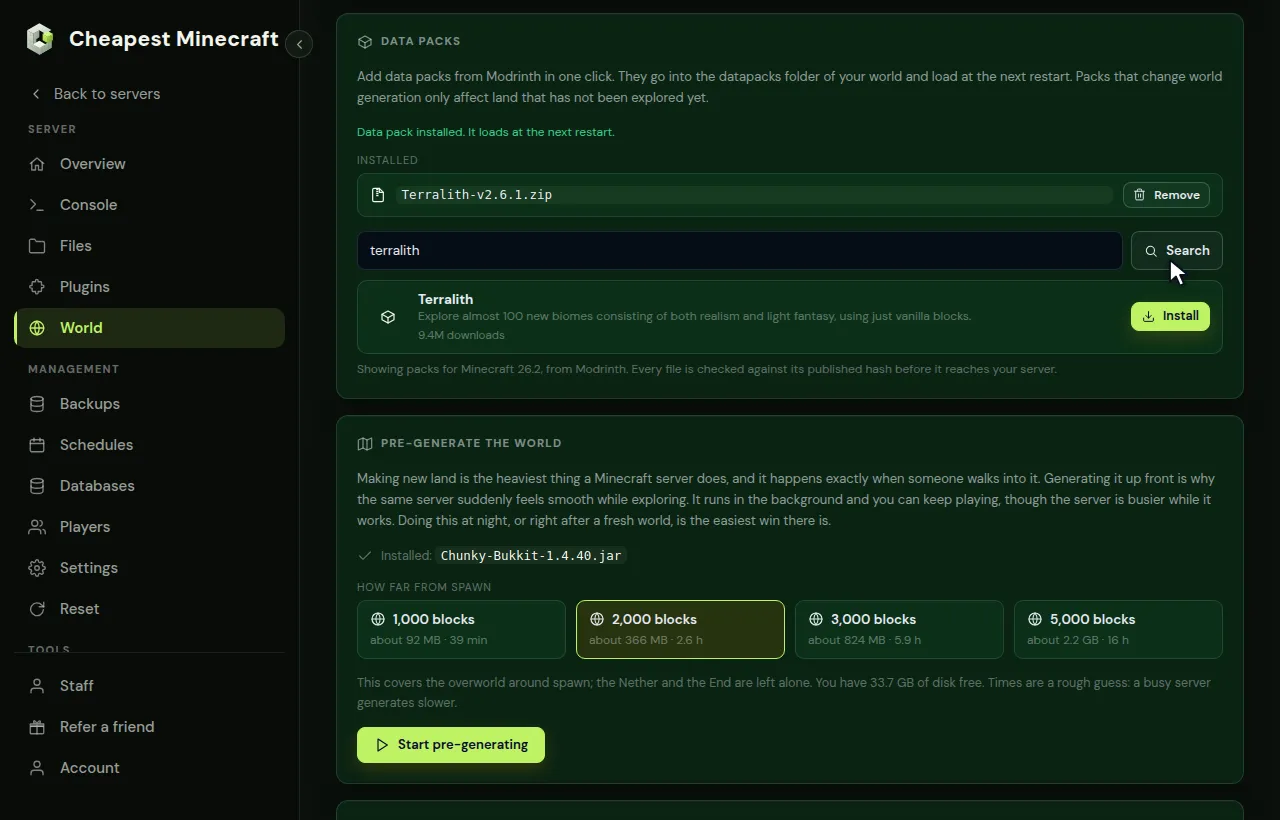
The pack goes into the datapacks folder of your world. Installed lists what is there, with Remove next to each pack.
Popular datapacks for a Minecraft server
A few packs that many servers run, as a place to start. Check that each one lists your Minecraft version before you install it.
| Datapack | What it does | Kind |
|---|---|---|
| Terralith | New overworld terrain and biomes, made from blocks the game already has | World generation |
| Tectonic | Higher mountains, wider valleys and deeper oceans | World generation |
| Incendium | A reworked Nether with harder structures to explore | World generation |
| Nullscape | A reshaped End with new islands | World generation |
| Dungeons and Taverns | New villages, dungeons and other places to find | Structures |
| BlazeandCave's Advancements Pack | Hundreds of extra advancements to chase | Gameplay |
| Vanilla Tweaks packs | Small extras such as More Mob Heads, Coordinates HUD or AFK Display | Gameplay |
Install a Minecraft datapack by hand
For a pack from somewhere else, or one you made yourself:
- Download the datapack. It is a
.zipfile, or a folder with apack.mcmetafile in it. - In Files, open your world folder, the name in
level-name, which is usuallyworld. Open thedatapacksfolder inside it. - Upload the zip there. There is no need to extract it.
- Restart the server.
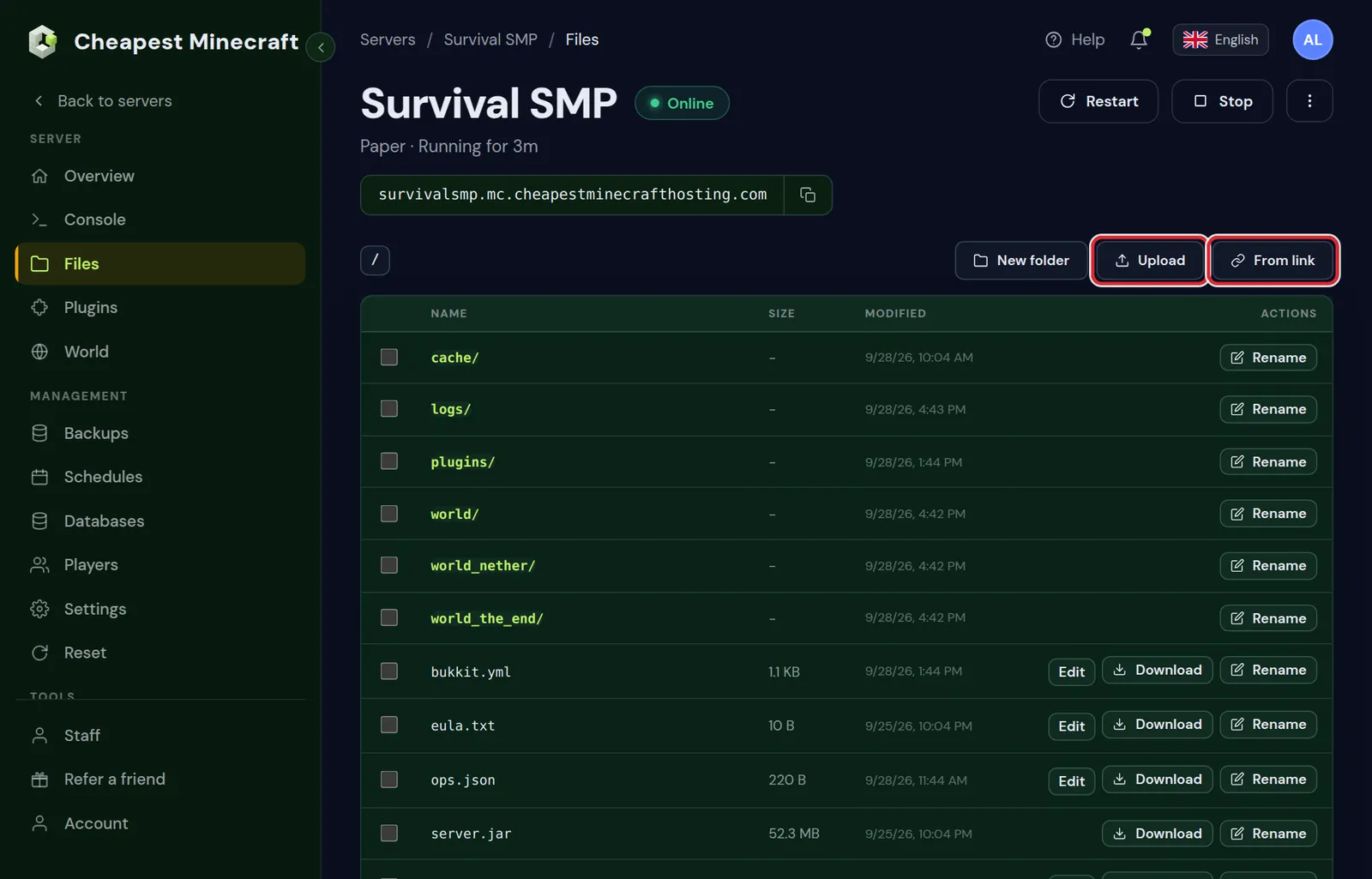
datapacks is inside it.The most common mistake is a zip inside a zip, or one folder level too many. Open the zip on your computer: pack.mcmeta must be right at the top, not inside another folder.
One datapacks folder for the Nether and the End on Paper
Paper, Purpur and Spigot keep the Nether and the End in their own folders, world_nether and world_the_end. Datapacks do not go there. Put every pack in the datapacks folder of the main world: the server reads them from there for all three dimensions.
Check that the datapack loaded on your server
Type datapack list in the Console. It shows the enabled packs first, then the packs that are there but switched off. A pack you uploaded shows as file/ followed by the name of the zip.
datapack enable "file/name.zip"switches on a pack that is listed as available.datapack disable "file/name.zip"switches one off without deleting it.
Not listed at all? The pack is in the wrong folder, packed one level too deep, or made for another Minecraft version. The console shows a warning at startup for a pack it could not load.
Reload datapacks and set their order
reloadloads new and changed datapacks without a restart. On Paper and Purpur, typeminecraft:reload, which reloads only the datapacks and leaves plugins alone.- Packs that change world generation still need a restart, and only shape land generated after it.
- When two packs change the same thing, the one loaded last wins. Add
firstorlastafter the name indatapack enableto move a pack to the front or the back.
Datapacks that change Minecraft world generation
Terrain, biome and structure packs only affect land that is generated after they are installed. Areas players already explored stay as they were, and the new terrain starts where the old land ends.
To have such a pack in a new world from the first chunk:
- Stop the server and rename the old world folder, as in change your server's seed.
- In Files, make a new folder with the name from
level-name, and adatapacksfolder inside it. - Upload the pack into that
datapacksfolder. - Start the server. The new world is generated with the pack.
Big terrain packs make new chunks heavier to generate. Pre-generating the land players will use keeps exploring smooth; see pre-generate your world.
Minecraft datapacks with their own textures
Some datapacks add items or blocks that need a resource pack for their look. The pack's page says so. Put that resource pack on the server as in add a resource pack to your server, and players get it when they join.
Datapacks, plugins and mods compared
| Datapack | Plugin | Mod | |
|---|---|---|---|
| Runs on | Every Java server type | Paper, Purpur and Spigot | Fabric, Forge or NeoForge |
| Players install | Nothing | Nothing | The same mods |
| Adds truly new blocks | No, it reuses blocks the game has | No | Yes |
| Survives a change of server type | Yes | No | No |
| Works on Bedrock | No, Bedrock has behavior packs | Through crossplay | No |
That makes datapacks the safe choice for changes that should stay close to the normal game. For land claims, ranks or shops, plugins do more; see install plugins. For new blocks, machines and dimensions you need mods, as in install mods on your server.
Questions from Minecraft server owners
Do players need to install the Minecraft datapack?
No. Datapacks run on the server. Only a resource pack that comes with some datapacks goes to the players, and the server can send that for you.
Do datapacks work on Paper and modded Minecraft servers?
Yes. Paper, Purpur, Fabric, Forge and NeoForge all load datapacks from the datapacks folder of the world, just like vanilla.
Can a datapack cause Minecraft server lag?
Most are light. Packs that run functions every tick, such as some mini games or complex mechanics, can lower the TPS. If the server slows down after adding one, remove it and compare.
How do I remove a datapack from my Minecraft server?
Click Remove next to it in the World tab, or delete the zip from the datapacks folder, and restart. Items and blocks that only existed through the pack can disappear from the world.
Where is the datapacks folder on a Minecraft server?
Inside the world folder: world/datapacks when level-name is world. On Paper only the folder of the main world counts; the Nether and the End use the same packs.
Do I have to restart my Minecraft server after adding a datapack?
A restart is the safe way. The reload command loads new packs too, and on Paper minecraft:reload reloads only the datapacks. Packs that change terrain only shape land generated after a restart.
Can I use datapacks on a Bedrock server?
No. Datapacks are a Java feature. Bedrock has behavior packs, which do a similar job and are added to the world in their own way.
Can I use datapacks and plugins together?
Yes. Paper and Purpur load both: datapacks from the world folder and plugins from the plugins folder.
Checked against the World and Files tabs of our control panel, September 2026. Written by the Cheapest Minecraft Hosting team, first published , updated .