
 Astroworld
Players
How to turn on keep inventory and other game rules on a Minecraft server
Game rules are the switches of a Minecraft world: whether players keep their items when they die, whether creepers blow holes in the ground, whether the sun moves. Keep inventory is the one server owners ask about most, and it takes one click.
Since Minecraft 1.21.11 the game rules have new names, so a command copied from an older guide often fails with "Incorrect argument for command". Below are both names for every rule.
In short
To turn on keep inventory on a Minecraft server, open the World tab, click Show game rules, switch on Keep inventory and save; it works at once in the overworld, the Nether and the End. By command it is gamerule keep_inventory true on 1.21.11 and newer, every 26.x version included, and gamerule keepInventory true on older versions. From the console on Paper, set it in each dimension with execute in.
Turn on Minecraft keep inventory from the World tab
- Start the server. Game rules live in the running world, so the card needs the server online.
- Open the World tab and find the Game rules card.
- Click Show game rules. The panel reads the current value of each rule.
- Switch on Keep inventory.
- Click Save.
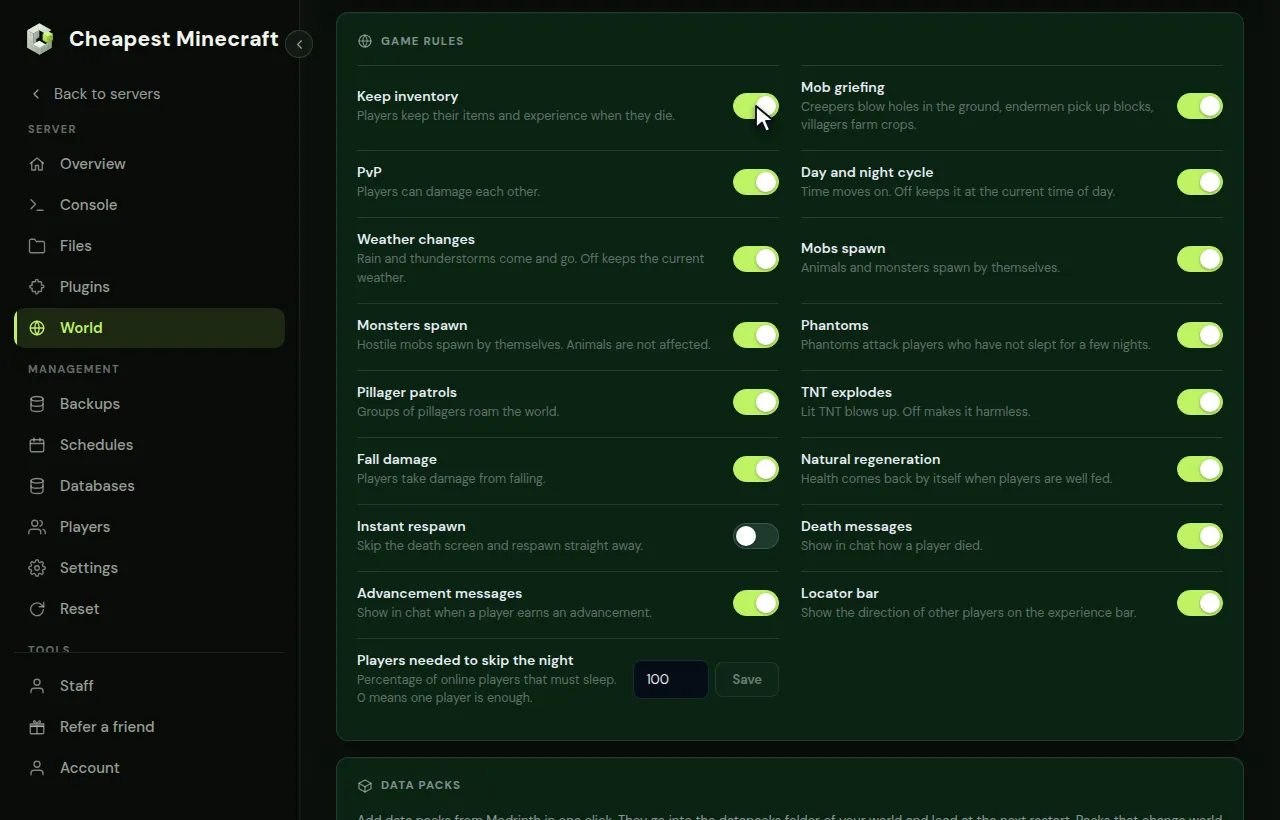
The change works straight away, without a restart, and the panel sets it in the overworld, the Nether and the End at once. Players keep their items and their experience when they die.
Reading the rules sends one short question per rule to the console, so you will see those lines appear there. That is the panel at work, not a problem.
Every Minecraft game rule in the panel
These are the switches on the Game rules card, with the name to use in a command. Servers on 1.21.11 or newer, including every 26.x version, use the new name; older servers use the old one.
| Switch in the panel | What it does | Name since 1.21.11 | Older name |
|---|---|---|---|
| Keep inventory | Players keep items and experience when they die | keep_inventory | keepInventory |
| Mob griefing | Creepers break blocks, endermen pick them up, villagers farm | mob_griefing | mobGriefing |
| PvP | Players can damage each other | pvp | none, use the PvP setting |
| Day and night cycle | Time moves on; off freezes the time of day | advance_time | doDaylightCycle |
| Weather changes | Rain and storms come and go; off keeps the current weather | advance_weather | doWeatherCycle |
| Mobs spawn | Animals and monsters spawn by themselves | spawn_mobs | doMobSpawning |
| Monsters spawn | Hostile mobs spawn; animals are not affected | spawn_monsters | none, use Spawn monsters |
| Phantoms | Phantoms attack players who have not slept | spawn_phantoms | doInsomnia |
| Pillager patrols | Groups of pillagers roam the world | spawn_patrols | doPatrolSpawning |
| TNT explodes | Lit TNT blows up; off makes it harmless | tnt_explodes | tntExplodes |
| Fall damage | Players take damage from falling | fall_damage | fallDamage |
| Natural regeneration | Health comes back when players are well fed | natural_health_regeneration | naturalRegeneration |
| Instant respawn | Skip the death screen | immediate_respawn | doImmediateRespawn |
| Death messages | Chat shows how a player died | show_death_messages | showDeathMessages |
| Advancement messages | Chat shows earned advancements | show_advancement_messages | announceAdvancements |
| Locator bar | Shows where other players are on the experience bar | locator_bar | locatorBar |
| Players needed to skip the night | Percentage of online players that must sleep | players_sleeping_percentage | playersSleepingPercentage |
A rule that your version does not know is left off the card, so what you see always works on your server. PvP and Monsters spawn only exist as game rules on newer versions; on older ones they are the PvP and Spawn monsters switches in Settings under Server settings.
When each Minecraft game rule was added, for older server versions
Servers on 1.8.9, 1.12.2 or 1.16.5 only know the rules that existed in that version. If a rule is missing from the card or a command fails on an older server, check this list.
| Game rule (older name) | First version with it |
|---|---|
keepInventory, mobGriefing, doMobSpawning | 1.4.2 |
doDaylightCycle, naturalRegeneration | 1.6.1 |
showDeathMessages | 1.8 |
doWeatherCycle | 1.11 |
announceAdvancements | 1.12 |
doInsomnia, doImmediateRespawn, fallDamage | 1.15 |
doPatrolSpawning | 1.15.2 |
playersSleepingPercentage | 1.17 |
locatorBar | 1.21.6 |
pvp and spawn_monsters as game rules | 1.21.11 |
So on a 1.8.9 or 1.12.2 server, gamerule keepInventory true works, but skipping the night with one sleeper does not exist yet; a sleep plugin does that job there.
Keep inventory with a Minecraft command
In the Console tab, type the command without a slash. In the game chat, an operator types the same with a slash in front.
gamerule keep_inventory trueThat is for 1.21.11 and newer. On an older server, use the old name:
gamerule keepInventory true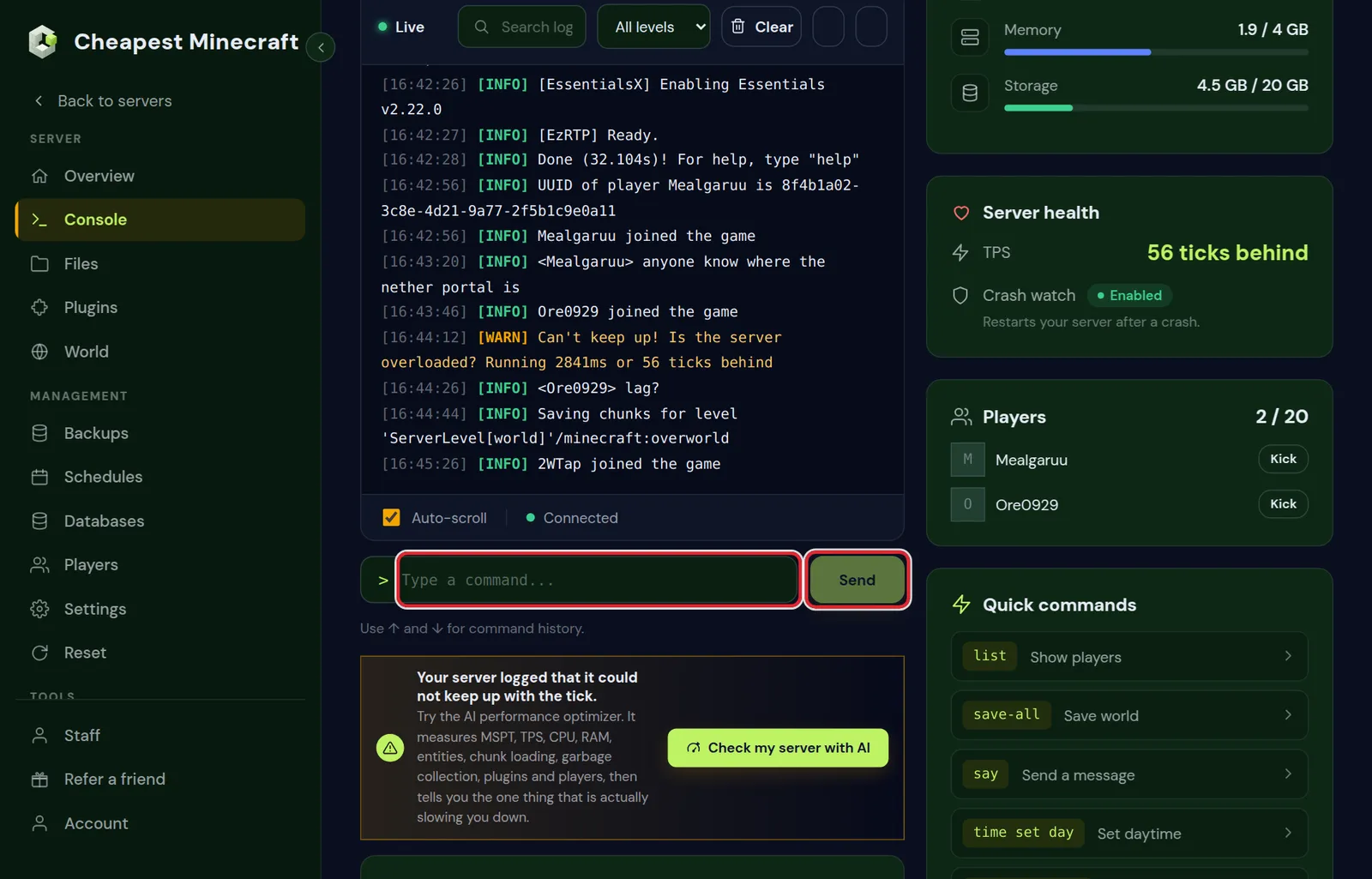
gamerule keep_inventorywithout a value shows the current setting: "Gamerule keep_inventory is currently set to: false".falsein place oftrueswitches a rule off again.- "Incorrect argument for command" almost always means the name belongs to the other version. Try the other column of the table.
- A number rule takes a number:
gamerule players_sleeping_percentage 0.
Keep inventory works in the overworld but not in the Nether on my Minecraft server
On Paper 26.2 we measured that the Nether and the End keep their own game rules. A plain gamerule from the console only sets the overworld, so a player who dies in the Nether still loses everything.
Set the rule in each dimension with execute in:
execute in minecraft:overworld run gamerule keep_inventory true
execute in minecraft:the_nether run gamerule keep_inventory true
execute in minecraft:the_end run gamerule keep_inventory true
The Game rules card in the World tab does this for you: every switch you save there goes to all three dimensions.
Why keep inventory is not working on your Minecraft server
Turned it on and players still lose their items? One of these is almost always the reason.
- They died in the Nether or the End while the rule was only set in the overworld. Use the World tab, or the three
execute inlines above. - The command used the name of the other version, so it never ran. Check the answer in the console: it should repeat the new value.
- A death plugin or mod handles the items, such as a graves plugin. Check its settings, or remove it to test.
- The rule was set on another world. After a world reset or a new seed, the new world starts with the defaults again.
To check the value in a dimension, ask it there: execute in minecraft:the_nether run gamerule keep_inventory prints the current setting of the Nether.
Keep inventory for one rank only with EssentialsX and LuckPerms
The game rule counts for everybody. On Paper or Purpur, EssentialsX can give keep inventory as a permission instead, so you can make it a perk of one rank while everyone else loses their items as normal.
- Install EssentialsX and LuckPerms from the Plugins tab and restart.
- Leave the game rule Keep inventory off.
- Give the rank the permission in the console, for example for a group called vip:
lp group vip permission set essentials.keepinv true. - To let them keep their experience as well:
lp group vip permission set essentials.keepxp true.
Permissions with LuckPerms explains how groups work and how players get into them.
Game rules for a friendly survival Minecraft server
Many SMPs change the same few rules before the first players join:
- Keep inventory on, so a death in lava does not cost someone a week of work.
- Mob griefing off, so creepers stop wrecking builds. Villagers then also stop farming and sheep stop eating grass, so decide which matters more.
- Players needed to skip the night at 0, so one sleeping player is enough to make it morning. On a server with a handful of friends, 50 is a fair middle.
- Phantoms off for players who build through the night.
- Locator bar off on a hide and seek or hardcore server, where finding each other should take effort.
For a harder game, go the other way: see make a hardcore Minecraft server. For protection against players rather than mobs, see stop griefing.
Alternatives to keep inventory: graves, the recovery compass and back
Some groups find full keep inventory too soft, but losing everything too harsh. A few middle roads:
- A graves plugin or mod puts the items in a grave or chest at the death spot, so the player has to go back for them. Many protect the grave for a while, so at first only its owner can open it.
- The recovery compass, crafted from echo shards found in ancient cities, points to the place of your last death. It is part of the normal game since 1.19.
- The back command of EssentialsX, with the permission
essentials.back.ondeath, takes a player back to where they died, so a long walk is not the punishment.
Keep inventory on a Bedrock Minecraft server
Bedrock has the same rule, written in lower case. Type it in the console of the Bedrock server:
gamerule keepinventory trueOn Bedrock it counts for the whole world at once, the Nether and the End included. On a crossplay server the Java rules on this page apply, also to the Bedrock players.
Game rules and Minecraft server settings are different things
Game rules are stored in the world. Difficulty, game mode, hardcore, the whitelist and the view distance are server settings, stored in server.properties and changed in Settings under Server settings. server.properties explained goes through them one by one.
Because game rules belong to the world, a new world starts with the default rules again. After you change your server's seed or reset the world, set them once more.
Questions from Minecraft server owners
Does Minecraft keep inventory also keep experience?
Yes. With keep inventory on, players keep both their items and their experience levels when they die.
Do game rules stay after a Minecraft server restart?
Yes. They are saved in the world, so a restart or a stop keeps them. Only a new world starts from the defaults.
Can I turn on keep inventory for one Minecraft player only?
Not with the game rule: it counts for everybody in that dimension. A plugin on Paper or Purpur can give keep inventory to some players or groups only.
Why is the Game rules card empty on my Minecraft server?
The server is not running. Start it, then click Show game rules. The proxy of a server network has no game rules at all, because a proxy has no world; set them on the servers behind it.
Is keep inventory on by default on a Minecraft server?
No. Every new world starts with keep inventory off, so players drop their items and most of their experience when they die until you switch it on.
Why does keep inventory not work in the Nether on my server?
On Paper the Nether and the End keep their own game rules. Switch it on in the World tab, which sets all three, or use execute in for each dimension from the console.
Does keep inventory work on a Bedrock server?
Yes. Type gamerule keepinventory true in the console of the Bedrock server. It counts for the whole world, the Nether and the End included.
Can operators keep their inventory while other players do not?
Not with the game rule. Use the permission essentials.keepinv from EssentialsX for the players or groups who should keep their items, and leave the game rule off.
Checked against the Game rules card in the World tab and the console of our control panel on Paper 26.2, September 2026. Written by the Cheapest Minecraft Hosting team, first published , updated .