
 Astroworld
Plugins and mods
Paper, Purpur or Spigot: which Minecraft plugin server?
Paper, Purpur and Spigot are three versions of the same idea: the Minecraft server with support for plugins added. They share one plugin system, so almost every plugin works on all three.
They are built on top of each other. Spigot came first, Paper started as Spigot with fixes and speed, and Purpur is Paper with extra options. Each one runs what the one before it runs.
In short
Pick Paper for almost every Minecraft plugin server: it runs Spigot plugins with less lag and fixes many bugs. Pick Purpur when you want extra gameplay options such as rideable mobs or spawner pickup, because it is Paper with hundreds of settings added. Pick Spigot only when an old plugin will not run on Paper. Switching between the three keeps your world and plugins.
The short answer: Paper, Purpur or Spigot
| Your server | Pick |
|---|---|
| A normal survival or community server | Paper |
| You want to tweak gameplay: rideable mobs, spawner pickup, phantom rules | Purpur |
| A plugin only works on Spigot (rare) | Spigot |
| Technical players who build farms around vanilla bugs | Paper, with a few settings changed |
If you are not sure, choose Paper. It is what most plugin authors test on.
Paper vs Purpur vs Spigot compared
| Point | Spigot | Paper | Purpur |
|---|---|---|---|
| Runs Bukkit and Spigot plugins | Yes | Yes | Yes |
| Runs plugins made for Paper | No | Yes | Yes |
| Speed with many players | Slowest of the three | Fast | As fast as Paper with its options off |
| Vanilla bugs such as TNT duplication | Work as in vanilla | Off by default, can be switched on | As on Paper |
| Extra gameplay options | A few | Many, mostly for performance | Hundreds, in purpur.yml |
| Settings files | bukkit.yml, spigot.yml | Those plus config/paper-global.yml and config/paper-world-defaults.yml | All of those plus purpur.yml |
| In our panel | Yes | Yes, recommended | Yes |
Spigot Minecraft server
Spigot is the classic plugin server. It is stable and every Bukkit plugin runs on it, but it has fallen behind on performance. Paper does the same job with less lag, so today Spigot mostly makes sense when a specific old plugin demands it.
Its settings are in spigot.yml and bukkit.yml.
Paper Minecraft server
Paper takes Spigot and makes it faster: chunks load in the background, entities and redstone cost less, and many bugs are fixed. It also adds settings for things like how many mobs spawn per chunk and how far items stay loaded.
One thing to know: Paper switches off a few bugs that some players rely on, such as TNT duplication. For a normal server that is a feature. For a technical server, most of them can be switched back on in config/paper-global.yml, under the section with unsupported settings.
Paper's own settings are split over config/paper-global.yml and config/paper-world-defaults.yml.
Paper and technical Minecraft: turn vanilla tricks back on
Paper switches off a handful of vanilla tricks that farms and flying machines use. Each has its own switch under unsupported-settings in config/paper-global.yml:
| Vanilla trick | Setting |
|---|---|
| TNT, carpet and rail duplicators | allow-piston-duplication |
| Breaking bedrock and end portal frames with pistons | allow-permanent-block-break-exploits |
| Headless pistons | allow-headless-pistons |
| Sand and gravel duplication through end portals | allow-unsafe-end-portal-teleportation |
Set the one you need to true and restart. They are called unsupported because the Paper team does not fix problems that come from them, so turn on only what your players really build.
Redstone itself can stay as it is: redstone-implementation in config/paper-world-defaults.yml is VANILLA by default, so contraptions behave as in the normal game. ALTERNATE_CURRENT makes large redstone builds cheaper, but it can change the order in which some contraptions fire.
Purpur Minecraft server
Purpur is Paper plus hundreds of gameplay options in one file, purpur.yml. Some examples of what you can switch on:
- Ride and steer almost any mob.
- Let players pick up spawners with a silk touch pickaxe.
- Change when phantoms appear, or stop them from spawning.
Out of the box Purpur behaves like Paper, so switching costs nothing until you change an option. Pick it when you like to fine tune; skip it when you want the game as Mojang made it.
Popular Purpur options and how to find them
| What you want | Look in purpur.yml for |
|---|---|
| Ride and steer a mob | ridable under that mob |
| Mine spawners with silk touch | silk-touch |
| Mending repairs the most damaged item first | use-better-mending |
| Villagers stuck in a trading hall use less processor time | lobotomize |
| Show players as AFK and handle idle players | idle-timeout |
| Fewer or no phantoms | the part for the phantom |
Open purpur.yml in Files, find the option, change its value and restart the server. Purpur also reads config/paper-global.yml and the other Paper files, so every Paper setting works on it too.
What about Folia for a Minecraft server?
Folia is a Paper variant that spreads the world over several processor cores. It is made for servers with hundreds of players spread over a big map. Most plugins do not work on it without changes, so it is not a choice for a normal server.
Vanilla or Paper for a small Minecraft server
Vanilla, the server software from Mojang without changes, is also on the list in Settings. It runs no plugins, and new Minecraft versions often arrive there first. For a few friends who want the game exactly as it is, it is fine.
Paper behaves almost the same, runs smoother and leaves room for plugins later, which is why it is the one we recommend. A vanilla world loads on Paper without changes, so you can switch the day you want your first plugin.
Switching a Minecraft server between them
Paper, Purpur and Spigot read the same world, so switching keeps your builds, inventories and plugins.
- Open Settings and find the server type.
- Pick the new type. The panel stops the server and makes a backup first.
- Start the server and check the console for plugin errors.
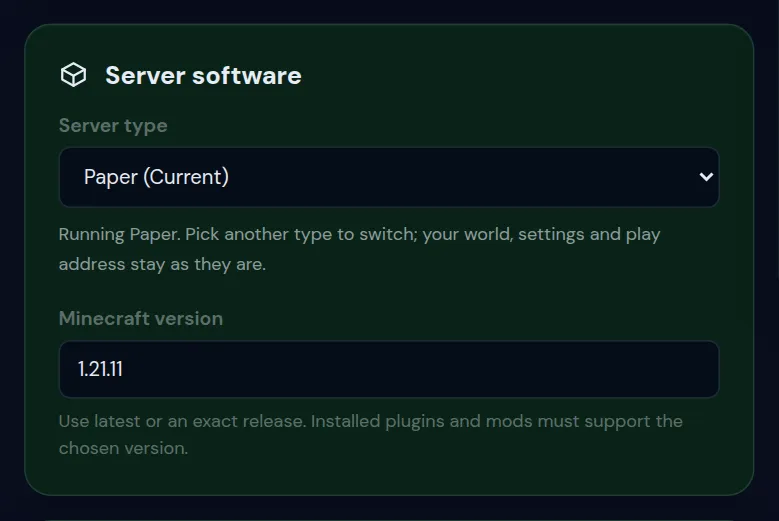
Going from Paper to Purpur and back again is safe. Going from any of them to Fabric or Forge is a different step: plugins stop working and you will need mods instead. See Fabric, Forge or NeoForge.
Plugins after switching: what to check
- Paper to Purpur, or back: every plugin keeps working.
- Spigot to Paper: plugins keep working, and Paper adds its own settings files next to the old ones on the first start.
- Paper to Spigot: plugins made for Paper stop loading. More and more plugins need Paper, so read the console after the first start.
- Any of them to another Minecraft version: plugins that reach deep into the game, such as anticheats and some world editors, need a build for that exact version.
Change your Minecraft server version covers the version side.
How to check which server software you run
Type version in the Console. The answer names the software and its build, such as Paper or Purpur followed by a number, and says whether a newer build is out. The same name is shown under Server software in Settings.
New Minecraft versions on Paper, Purpur and Spigot
When Mojang releases a new version, Paper first publishes test builds and calls a build stable once the worst bugs are fixed. Purpur follows Paper, usually soon after. Plugins need their own time as well.
That is why a new version can be offered for Vanilla and Fabric before Paper and Purpur, and why waiting a few weeks with a plugin server is often the calm choice.
Questions from Minecraft server owners
Do Spigot plugins work on a Paper Minecraft server?
Yes, nearly all of them. Paper is built on Spigot and keeps its plugin system. The rare exceptions are plugins that depend on the exact internal code of Spigot.
Is Purpur slower than Paper for a Minecraft server?
No. With its options left at their defaults, Purpur performs like Paper. Some options change gameplay in ways that add load of their own, so switch on only what you use.
Why do my Minecraft TNT duplicators not work on Paper?
Paper blocks TNT duplication and a few similar bugs by default. They can be enabled again in config/paper-global.yml under the unsupported settings, at your own risk.
Is Paper better than Spigot?
For almost every server, yes. Paper runs the same plugins with less lag and fixes many bugs. Spigot is only the better choice when an old plugin refuses to run on Paper.
Can I switch from Paper to Purpur without losing my world?
Yes. Purpur reads the same world and runs the same plugins. Change the server type in Settings; the panel makes a backup first.
Does Geyser crossplay work on Purpur?
Yes. Geyser and Floodgate run on Paper and on server software built on Paper, Purpur included.
How do I check if my Minecraft server runs Paper?
Type version in the console. The answer names the server software and its build number.
Checked against Paper, Purpur and Spigot for Minecraft Java 26.2, September 2026. Written by the Cheapest Minecraft Hosting team, first published , updated .