
 Astroworld
Troubleshooting
Fix "Outdated server" and "Outdated client" on a Minecraft server
A Minecraft client and server only talk to each other when they speak the same protocol version. When they do not, the server refuses the player before they reach the world, and the message tells you which side is behind.
There are three ways to fix it. Which one is right depends on whether one player is out of step or the whole group is.
In short
"Outdated server" means the player's game is newer than your server, and "Outdated client" means it is older. Current versions show "Incompatible client! Please use" with the server's version for both cases. Fix it by starting the game on the server's version, by changing the server version in the Settings tab, or on Paper by installing ViaVersion for newer players and ViaBackwards for older players.
What the Minecraft version messages mean
| Message | Who is behind | Seen on |
|---|---|---|
Incompatible client! Please use 26.2 | Either side; the number is the server's version | Current Java versions |
Outdated client! Please use 1.x | The player | Servers on older versions |
Outdated server! I'm still on 1.x | The server | Servers on older versions |
| Version text in red in the server list | Either side | Before joining |
Could not connect: Outdated server! | The server or Geyser | Bedrock players |
Could not connect: Outdated client! | The player's Bedrock app | Bedrock players |
In the multiplayer list, a server with another version shows its version in red where the ping bars normally are. Hover over it to see the version the server runs.
How to check the server version and the player's version
- Server: open Settings in the control panel. The Minecraft version field under Server software shows what the server runs. On Paper and Purpur you can also type
versionin the Console. - Java player: the version is in the bottom left corner of the title screen, and in the top left of the F3 screen in game.
If the field says latest, look at the first lines in the Console after a start: the server prints the exact version it runs.
Fix 1: start the game on the server's version
When one player is on a different version than everyone else, the quickest fix is on their side. In the Minecraft Launcher:
- Open Installations at the top.
- Click New installation.
- Pick the server's version under Version and click Create.
- Select that installation next to Play and start the game.
A player who is behind can also just pick Latest release, if the server runs the newest version. On a modded server, the modpack launcher sets the version for them; see join a modded server.
Fix 2: change the Minecraft server version in the panel
When most players have updated and the server has not, update the server.
- Open the Settings tab and find Minecraft version under Server software.
- Type
latestor an exact version such as26.2. - Click Change version and confirm.
- The panel stops the server, makes a backup, and installs the new version. Your world, plugins, mods and settings stay.
- Start the server and check the Console for plugins that do not support the new version.
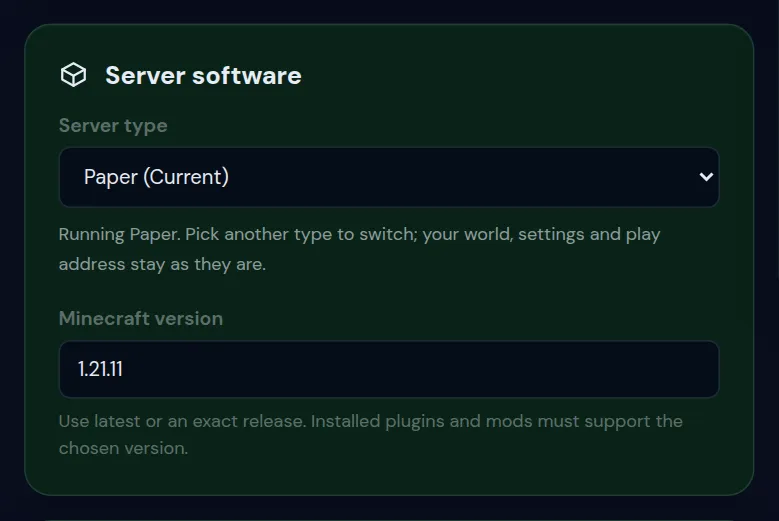
Plugins and mods must support the version you pick. Going back to an older version is risky, because a world saved by a newer version may not load on an older one. Change your Minecraft server version covers both in detail.
Fix 3: ViaVersion and ViaBackwards on Paper
On Paper and Purpur, plugins can translate between versions, so players on several versions can join one server.
| Plugin | Lets in | Needs |
|---|---|---|
| ViaVersion | Players on newer versions than the server | Nothing else |
| ViaBackwards | Players on older versions than the server | ViaVersion |
| ViaRewind | Players on 1.7 and 1.8 | ViaVersion and ViaBackwards |
- Open the Plugins tab.
- Type
ViaVersionin Search plugins in the Plugin catalog and click Install. - Do the same for ViaBackwards if older players need to join.
- Restart the server.
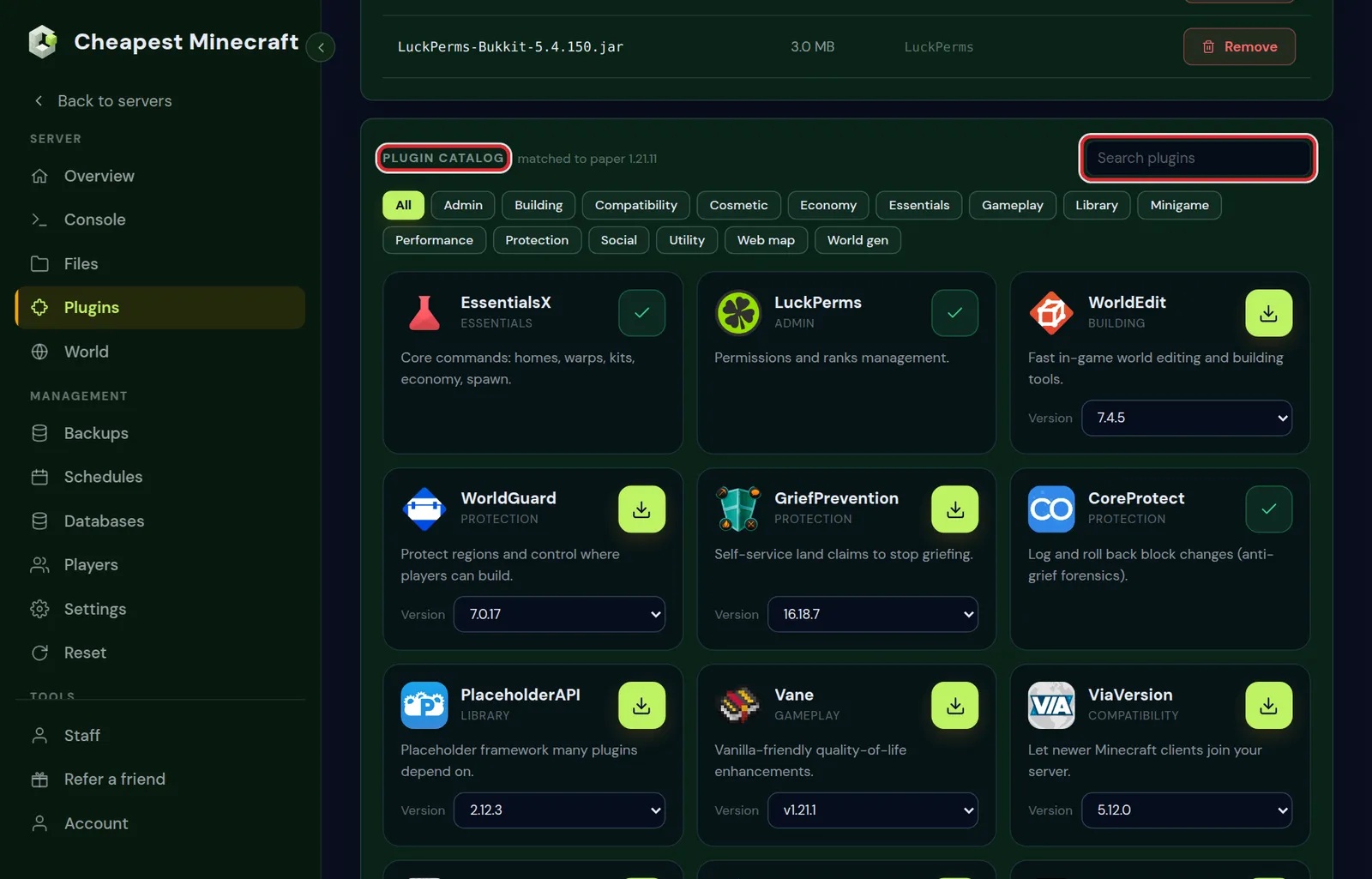
Keep the Via plugins up to date. A new Minecraft release needs a new ViaVersion before players on that release can join.
What ViaVersion cannot do
- Older players do not see newer content. Blocks and items that do not exist in their version are shown as something similar, and some mobs look different or are missing.
- Mods cannot be bridged. On Fabric, Forge and NeoForge every player needs the server's exact Minecraft version and the same mods.
- Some plugins break. Plugins that work with packets, such as anticheats and custom item plugins, can behave oddly for players on another version.
- Gameplay follows the server. A player on a newer version still plays by the rules of the server's version, so new features of their version do not appear.
On a server network, install the Via plugins on the Paper servers behind the proxy, and keep the proxy itself on its newest release.
Outdated server for Bedrock players on a crossplay server
Bedrock updates itself on phones, consoles and Windows, so Bedrock players are always on the newest version. On a Java server with Geyser, Geyser translates for them, and Geyser needs an update when a new Bedrock version comes out.
- Look up the Geyser and Floodgate files in the installed list of the Plugins tab.
- Make sure both are on their newest build. When the panel can follow a plugin, the Updates card at the top of the Plugins tab shows an Update button for a newer build. On a Crossplay plan the panel keeps Geyser and Floodgate installed and does not let you remove them.
- Restart the server.
- If the Java server runs an older version than Geyser supports, add ViaVersion as well.
A brand new Bedrock release can take a short while before Geyser supports it. During that time, Bedrock players who updated cannot join, and there is nothing to change on the server until the new Geyser build is out. Crossplay between Java and Bedrock explains the setup.
On the official Bedrock server software, the server itself must be updated. Pick the newest version under Server software in Settings and restart.
Questions from Minecraft server owners
What does "Outdated server" mean in Minecraft?
Your game is newer than the server. Start the game on the server's version, or ask the owner to update the server or install ViaVersion.
What does "Outdated client" mean in Minecraft?
Your game is older than the server. Update the game in the launcher, or start an installation with the server's version.
How do I let players on different versions join my server?
On Paper or Purpur, install ViaVersion for newer players and ViaBackwards for older players from the Plugins tab, then restart.
Does ViaVersion work on Fabric or Forge?
No. On a modded server every player needs the same Minecraft version and the same mods as the server.
Why do Bedrock players see Outdated server on my crossplay server?
Geyser does not support their new Bedrock version yet. Update Geyser and Floodgate and restart. A day-one Bedrock release may need a new Geyser build first.
Will updating the server break my world?
Updating to a newer version upgrades the world, and the panel makes a backup first. Going back to an older version is the risky direction.
Checked against the Settings and Plugins tabs of our control panel on Paper for Minecraft Java 26.2, October 2026. Written by the Cheapest Minecraft Hosting team, first published , updated .