
 Astroworld
Plugins and mods
Set up EssentialsX on your Minecraft server: homes, warps, kits and /tpa
EssentialsX is the plugin most Paper servers install first. It adds the everyday commands players expect on a multiplayer server: homes, warps, teleport requests, kits, private messages, nicknames and moderation tools.
It comes as one core plugin plus optional modules. This guide covers what to install, the commands for each feature, the config lines worth changing and the permissions your players need.
In short
Install EssentialsX from the Plugins tab on a Paper or Purpur server, add EssentialsX Spawn if you want /spawn, and restart. The settings are in plugins/Essentials/config.yml and kits in kits.yml. Then give players the commands they need with LuckPerms, such as essentials.home, essentials.sethome, essentials.warp and essentials.tpa, because most EssentialsX commands only work for operators until you hand out permissions.
EssentialsX modules: which ones to install
| Module | What it adds | Install it when |
|---|---|---|
| EssentialsX | The core: homes, warps, kits, /tpa, /back, /msg, nicknames, economy, moderation | Always |
| EssentialsX Spawn | /spawn, /setspawn, where new players and respawning players land | You want a spawn command or a separate spawn for new players |
| EssentialsX Chat | Chat format with group prefixes, local chat by distance | You want ranks shown in chat and no other chat plugin |
| EssentialsX AntiBuild | Blocks building for players without permission | Rarely; land claims usually do this better |
| EssentialsX Protect | Turns off certain damage and block changes, such as creeper blocks | You want simple world protection settings |
Every module must have exactly the same version as the core. Mixing versions stops the modules from loading.
How to install EssentialsX from the Plugins tab
- Make sure the server runs Paper or Purpur. Fabric and Forge cannot run plugins.
- Open the Plugins tab and type
EssentialsXin Search plugins under Plugin catalog. - Install EssentialsX. Install EssentialsX Spawn too if you want
/spawn. - Restart the server.
- Type
essentials versionin the Console. It replies with the version, which shows the plugin is running.
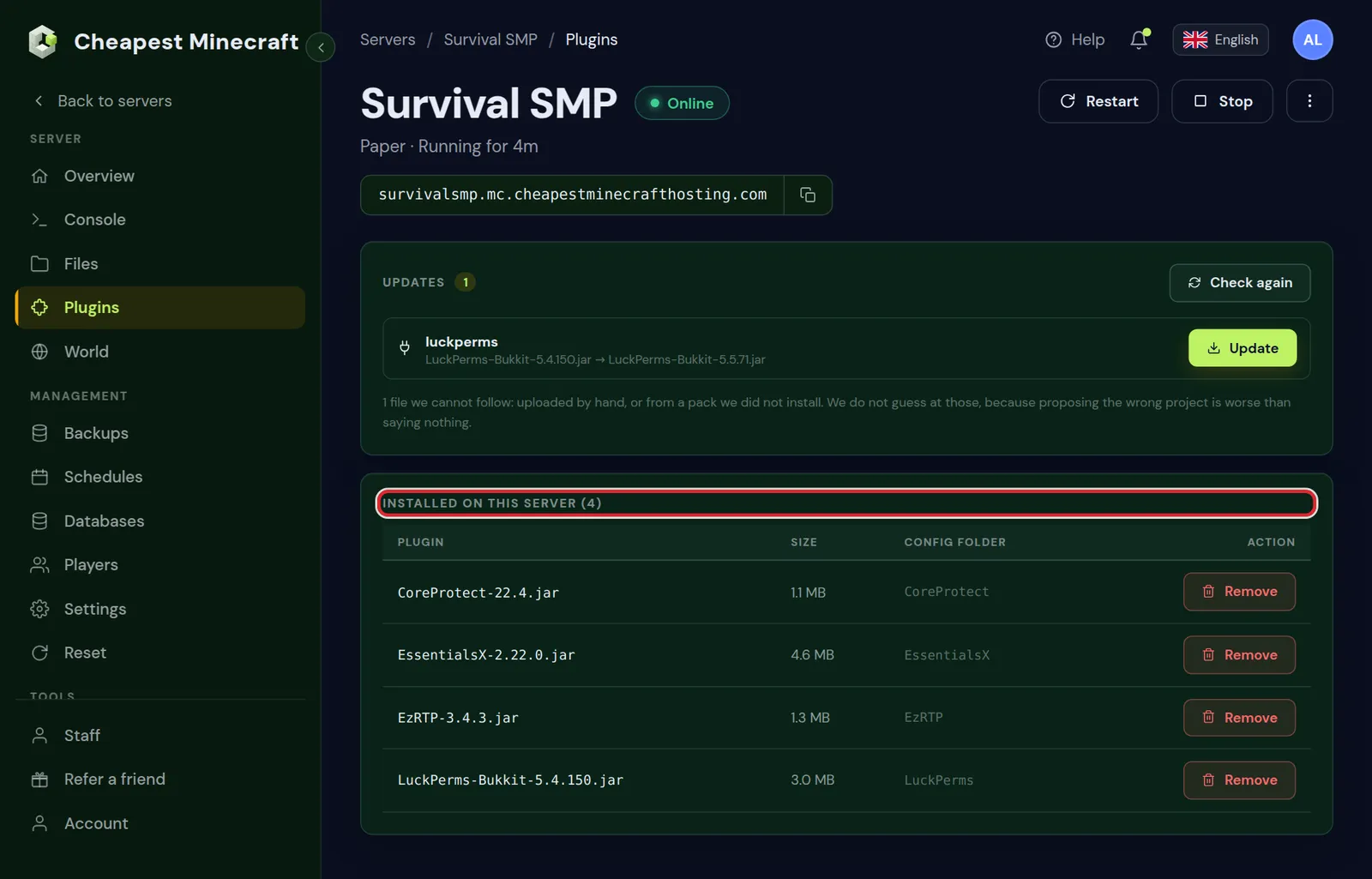
Modules that are not in the catalog, such as EssentialsX Chat, can be uploaded by hand to the plugins folder in the Files tab. Take them from the same release as the core. Install plugins covers uploading.
Homes: /sethome and /home
| Command | What it does |
|---|---|
/sethome | Saves the spot you stand on as your home |
/sethome base | Saves a home with a name, for players allowed more than one |
/home or /home base | Teleports you home; with several homes, /home lists them |
/delhome base | Deletes a home |
How many homes a player may have is set in config.yml:
sethome-multiple:
  default: 3
  vip: 5
  staff: 10
A player gets the number of a line through the permission essentials.sethome.multiple.vip, with the name of the line at the end. Players without one of those permissions get the default number.
Warps: /setwarp and /warp
/setwarp shopsaves your position as a warp called shop. Only staff should have this./warp shopteleports to it./warpon its own lists the warps./delwarp shopremoves it.
Give players essentials.warp to use warps and essentials.warp.list to see the list. To limit some warps to some players, set per-warp-permission: true in config.yml; a player then needs essentials.warps.shop for the warp called shop.
Teleport requests: /tpa, /tpahere and /back
| Command | What it does | Permission |
|---|---|---|
/tpa Sam | Asks to teleport to Sam | essentials.tpa |
/tpahere Sam | Asks Sam to teleport to you | essentials.tpahere |
/tpaccept and /tpdeny | Accepts or refuses a request | essentials.tpaccept, essentials.tpdeny |
/back | Back to where you were before the last teleport | essentials.back |
Two lines in config.yml decide how teleports feel:
teleport-delayis the number of seconds a player must stand still before a teleport happens. 3 stops players from teleporting out of a fight.teleport-cooldownis the number of seconds between two teleports.tpa-accept-cancellationis how many seconds a request stays open; 120 by default.
/back after death needs the permission essentials.back.ondeath as well. On a hardcore or survival server you may want to leave that one out.
Kits: give new players starter items
Kits live in plugins/Essentials/kits.yml. The quickest way to make one is in the game:
- Put the items for the kit in your inventory.
- Type
/createkit starter 86400. The number is the delay in seconds before a player can take the kit again; 86400 is one day. - Players with
essentials.kitandessentials.kits.startercan now type/kit starter.
To give the kit to every new player on their first join, set it under newbies in config.yml:
newbies:
  kit: starter
Run /essentials reload after editing config.yml or kits.yml, or restart the server.
Spawn with EssentialsX Spawn
- Stand where players should arrive and type
/setspawn. - Give players
essentials.spawnso they can type/spawn. - To send every player to spawn when they join, set
spawn-on-join: trueinconfig.yml. - To let players respawn at their home instead of spawn after dying, set
respawn-at-home: true.
For a separate arrival spot for first-time players, stand there and type /setspawn newbies. The newbies section of config.yml has spawnpoint: newbies, which sends new players to that spot.
Permissions for EssentialsX with LuckPerms
Without permissions, most EssentialsX commands work for operators only. Give the default group the basic set in the Console:
lp group default permission set essentials.home true
lp group default permission set essentials.sethome true
lp group default permission set essentials.spawn true
lp group default permission set essentials.warp true
lp group default permission set essentials.warp.list true
lp group default permission set essentials.tpa true
lp group default permission set essentials.tpaccept true
lp group default permission set essentials.tpdeny true
lp group default permission set essentials.back true
Staff ranks, moderation commands and temporary ranks are explained in permissions with LuckPerms. Avoid giving players essentials.*: it includes commands such as /give, /gamemode and /sudo.
Other EssentialsX config.yml settings worth changing
| Setting | What it does |
|---|---|
nickname-prefix | The character in front of nicknames, so players can tell a nickname from a real name; ~ by default |
max-nick-length | The longest nickname allowed |
teleport-safety | Moves players to a safe spot when the target of a teleport is dangerous |
starting-balance | The money new players get, when you use the EssentialsX economy |
currency-symbol | The symbol shown with money amounts |
Edit the file in the Files tab under plugins/Essentials. YAML uses spaces, not tabs, and a wrong indent stops the file from loading. Make a backup in the Backups tab before larger changes.
Questions from Minecraft server owners
Why can players not use /home or /tpa?
Most EssentialsX commands need a permission. Give the default group essentials.home, essentials.sethome and essentials.tpa with LuckPerms.
How do I get /spawn with EssentialsX?
Install the EssentialsX Spawn module next to the core, restart, stand at the spot and type /setspawn. Players need essentials.spawn.
How do I give players more than one home?
Add a line under sethome-multiple in config.yml, such as vip: 5, and give that group essentials.sethome.multiple.vip.
Where are EssentialsX kits stored?
In plugins/Essentials/kits.yml. Create one in game with /createkit name delay, using the items in your inventory.
Does EssentialsX work on Fabric or Forge?
No, it is a plugin for Paper, Purpur and Spigot. Modded servers use mods for homes and teleports instead.
How do I reload EssentialsX after a config change?
Type essentials reload in the console, or restart the server. After installing a new version, always restart.
Checked against the Plugins tab of our control panel and EssentialsX on Paper for Minecraft Java 26.2, October 2026. Written by the Cheapest Minecraft Hosting team, first published , updated .