
 Astroworld
Getting started
Download your Minecraft server world and play it in single player
Your world is a set of folders on the server. You can download it at any time: to keep a copy at home, to play it alone, to show a build to someone, or before a server ends.
There are two ways to get it: zip the world folders in the Files tab, or download a backup. This guide shows both, and how to open the result in single player.
In short
To download your Minecraft world, stop the server, open the Files tab, tick the world, world_nether and world_the_end folders and click Zip. Download the .tar.gz archive that appears. Or download a whole backup from the Backups tab. Extract it on your computer, put the world folder in the saves folder of Minecraft Java, and on Paper move the Nether and End folders into it. A Java world cannot be opened in Bedrock directly.
Which folders hold your Minecraft world
| Server type | Overworld | Nether | End |
|---|---|---|---|
| Paper, Purpur, Spigot | world | world_nether, with DIM-1 inside | world_the_end, with DIM1 inside |
| Vanilla, Fabric, Forge, NeoForge | world | world/DIM-1 | world/DIM1 |
The name world comes from the level-name line in server.properties. If you changed it, use that name. Player inventories, positions and advancements are stored inside the overworld folder, so they come along.
Data from plugins, such as land claims, homes and economy balances, lives in the plugins folder and is not part of the world. You only need it when you move to another server, not for single player.
Download the world from the Files tab
- Stop the server, so every chunk is saved and nothing changes during the copy. If it must stay online, type
save-allin the Console and wait for the line that says the game was saved. - Open the Files tab and go to the top folder.
- Tick the boxes in front of
world,world_netherandworld_the_end. - Click Zip 3 at the top. The panel says "Archive created." and a new
.tar.gzfile appears in the folder, with a name starting witharchive-. - Click Download next to that file.
- Delete the archive afterwards, so it does not take up storage on the server.
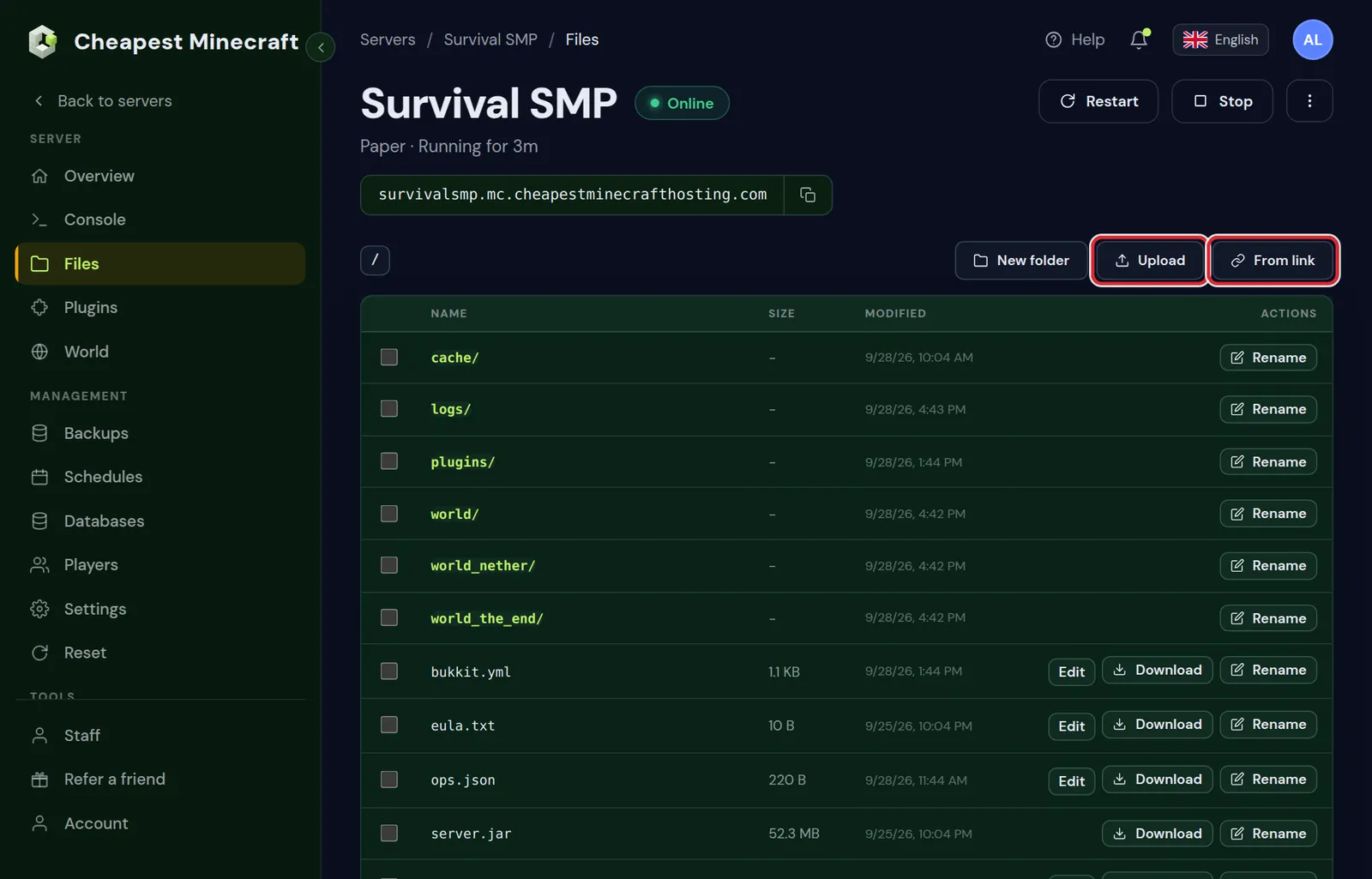
Folders have no Download button of their own; zipping them first is the way to download a folder. A large world can take a few minutes to zip.
Download a backup from the Backups tab
A backup holds the whole server folder: the world, plugins, settings and logs. It is the easiest way to get everything at once.
- Open the Backups tab.
- Click Create backup for a fresh copy, or pick an existing one with status Complete.
- Click Download next to it. You get a
.tar.gzfile.
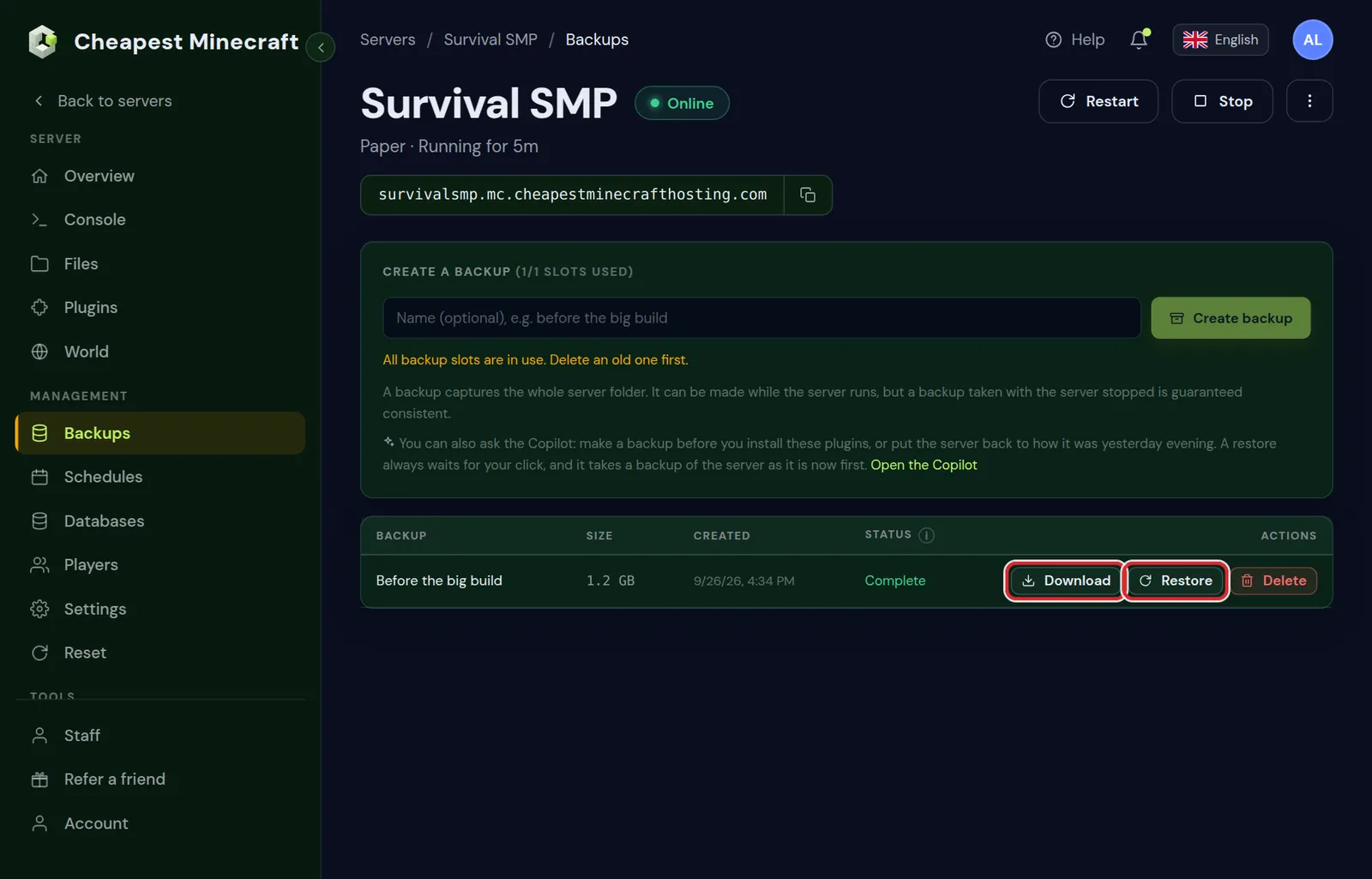
A backup made with the server stopped is guaranteed consistent. More about backups in back up and restore your server.
Extract the .tar.gz archive on your computer
- Windows: open the file with 7-Zip or another archive program. With 7-Zip, extract once to get a
.tarfile and once more to get the folders. - Mac: double-click the file. The folders appear next to it.
- Linux:
tar -xzfwith the file name, in a terminal.
From a backup, the world folders are among all the other server files. Take only the folders from the table above.
Open the server world in single player on Java
- Find the
savesfolder of Minecraft Java:%appdata%\.minecraft\saveson Windows,~/Library/Application Support/minecraft/saveson a Mac and~/.minecraft/saveson Linux. - Copy the
worldfolder intosaves. Rename it if you like; the new name shows in your world list. - From a Paper server: copy the
DIM-1folder from insideworld_netherinto your copied world folder, and theDIM1folder from insideworld_the_endas well. - Start Minecraft with the same version as the server, or newer, and open Singleplayer.
Without step 3 the overworld works, but the Nether and End start empty in single player. A vanilla, Fabric or Forge server already keeps them inside world.
Open the world in an older Minecraft version than the server and the game warns you. Choose the same version to be safe, or make a copy first.
Modded worlds and worlds with data packs
- A modded world needs the same mods in single player. Install the same modpack and version in your launcher, then put the world in that instance's
savesfolder. Without the mods, modded blocks and items disappear. - Data packs live in
world/datapacksand come along with the world. See install datapacks. - A world with a resource pack from the server: download the pack separately and add it in the game's resource pack menu.
Join a modded server explains how to get the same modpack version on your own computer.
Can you open a Java server world in Bedrock?
Bedrock cannot open a Java world as it is. The two editions save worlds in different formats. A converter such as Chunker can turn a Java world into a Bedrock world; some blocks, items and redstone come out different, so check the result before relying on it.
A world from a Bedrock server is a folder under worlds. Download it the same way and extract it. Then make a .zip of what is inside that folder, with level.dat at the top of the zip, rename the .zip to .mcworld and open it on a device with Bedrock to import it. Java or Bedrock server covers the differences between the editions.
Move the downloaded world to another server
The same archive works to move a world, for example to a second server of your own. Upload it in the Files tab of the new server, extract it, and set level-name. Move your world to our server covers the steps, including large worlds.
Questions from Minecraft server owners
How do I download my Minecraft server world?
Stop the server, tick the world folders in the Files tab, click Zip and download the archive. Or download a backup from the Backups tab.
Why are the Nether and End empty in single player?
On Paper they are separate folders. Copy DIM-1 from world_nether and DIM1 from world_the_end into the world folder in your saves.
Can I download a single folder in the Files tab?
Folders cannot be downloaded directly. Tick the folder, click Zip, then download the archive.
How do I open a .tar.gz file on Windows?
With an archive program such as 7-Zip. Extract twice: once to a .tar file, then to the folders.
Can I play my Java server world on Bedrock?
Only after converting it with a tool such as Chunker. Some blocks and redstone change in the conversion.
Does the download include player inventories?
Yes. Inventories, positions and advancements are stored inside the world folder.
Checked against the Files and Backups tabs of our control panel on Paper for Minecraft Java 26.2, October 2026. Written by the Cheapest Minecraft Hosting team, first published , updated .