
 Astroworld
Getting started
How to change the game mode and difficulty on a Minecraft server
Two server settings decide how Minecraft plays for everyone who joins. The game mode sets what a player can do: survival, creative, adventure or spectator. The difficulty sets how dangerous the world is, from peaceful to hard.
You can change both in two places: in server.properties, which the server reads when it starts, and with a command that works at once. This guide shows when to use which, who may use the commands, and what changes in the game at each difficulty level.
In short
To change the game mode and difficulty on a Minecraft server, open the Settings tab, choose a value under Difficulty and Default gamemode, press Save changes and restart the server. Switch on Force gamemode on join when players who joined before should also get the new mode. While the server runs, gamemode creative Name in the Console switches one player and difficulty hard changes the difficulty at once.
Change the game mode or the difficulty: which setting to use
Find the row that matches what you want. The settings are in the Settings tab; the commands go in the Console tab.
| You want | Change this | When it works |
|---|---|---|
| New players start in creative | Default gamemode to creative | After a restart, for players who join for the first time |
| Everyone plays in creative, also players who joined before | Default gamemode to creative and Force gamemode on join on | After a restart, each time a player joins |
| One player switches mode | gamemode creative Name in the Console | At once |
| No hostile mobs | Difficulty to peaceful, or difficulty peaceful in the Console | The command at once, the setting after a restart |
| Stronger mobs and starvation that can kill | Difficulty to hard, or difficulty hard in the Console | The command at once, the setting after a restart |
| One life per player | Hardcore on, in a new world | See make a hardcore Minecraft server |
How to change the default game mode and difficulty in the control panel
- Open the Settings tab of your server.
- Type
gamemodeordifficultyin Search settings, or scroll down to the Gameplay group. - Choose a value under Difficulty: peaceful, easy, normal or hard.
- Choose a value under Default gamemode: survival, creative, adventure or spectator.
- Switch on Force gamemode on join if players who joined before should also get the new mode.
- Press Save changes in the bar at the bottom of the page.
- Restart the server with the Restart button.
A changed field shows a star after its name until you save, and Discard in the same bar puts the old values back. The server reads these values only when it starts, which is why the restart is needed.
In the file, the same settings are four lines. You can also edit them in the Files tab and restart afterwards:
gamemode=creative
force-gamemode=true
difficulty=normal
hardcore=false
Write each value as a word in small letters. Every other line of the file is in server.properties explained.
Minecraft game modes on a server: survival, creative, adventure and spectator
| Game mode | What a player can do | Used for |
|---|---|---|
survival | Mine, build, fight, get hungry, take damage and die | SMPs and most public servers |
creative | Fly, take any block or item from the creative inventory and break blocks in one hit; mobs and falls do no damage | Build servers, testing redstone and farm designs |
adventure | Move, fight, trade and use doors, buttons and chests. Blocks can only be broken or placed with an item that has the can_break or can_place_on component | Maps, lobbies and event areas |
spectator | Fly through walls and watch through the eyes of a mob or player; a spectator cannot touch anything, and players in other modes cannot see them | Staff who watch the server, dead players on a hardcore server |
Creative players still die in the void and from the kill command. Adventure suits any area where players should play without changing the map, such as a parkour course or a spawn hub.
How to change a player's game mode with /gamemode
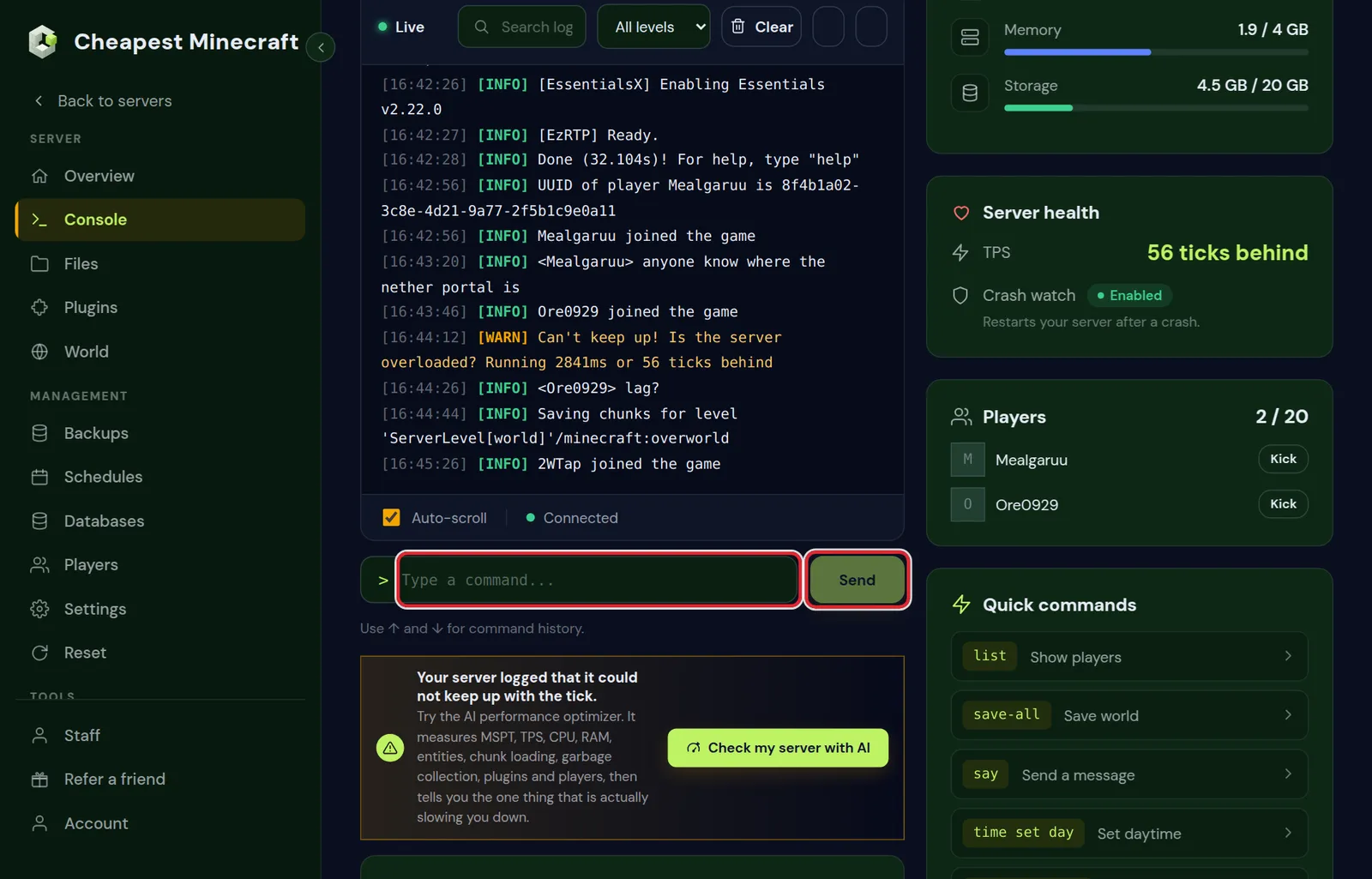
Type the command in the Console tab without a slash. In the game, an operator types the same command with a slash in front.
gamemode creative Steve
gamemode adventure @a[gamemode=survival]
gamemode survival @a[name=!Steve]
gamemode creative Steveswitches one player to creative.gamemode adventure @a[gamemode=survival]puts every player who is in survival into adventure, for example when an event starts.gamemode survival @a[name=!Steve]puts everyone in survival except Steve.- The console always needs a name or a selector, because it is not a player itself. In the game,
/gamemode creativewithout a name switches yourself. - Write the mode as a word. Numbers such as
gamemode 1stopped working in Java Edition 1.13.
In the game, operators can also hold F3 and press F4 to open the game mode switcher. Keep F3 held and press F4 again to move to the next mode, then let go of F3 to switch.
The defaultgamemode command changes the mode for new players while the server runs. Set the same mode under Default gamemode in Settings as well, so the server starts with it after a restart. Other admin commands are listed in Minecraft server commands.
Who can use /gamemode and /difficulty on a Minecraft server
In the game, gamemode, defaultgamemode and difficulty need operator level 2 or higher. A new operator gets level 4 unless op-permission-level says otherwise, so every operator can use them. The console can always use them.
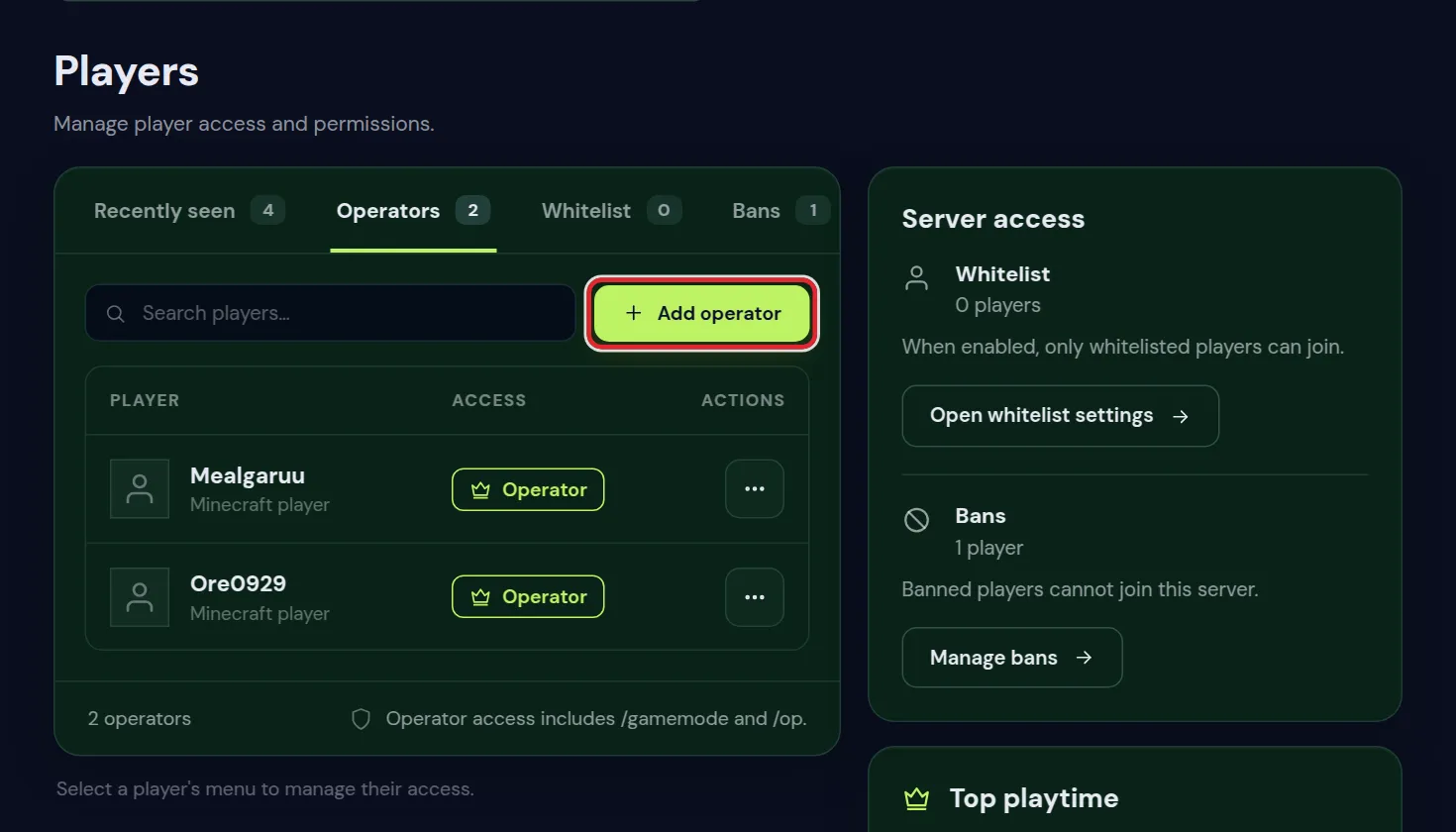
- Open the Players tab and go to Operators.
- Press Add operator and fill in the player's Minecraft username.
- The player can now use
/gamemodein the game.
An operator can use every command of the game. To give someone the game mode command and nothing else, use a permission plugin on Paper. With LuckPerms, from the console:
lp user Steve permission set minecraft.command.gamemode trueThe nodes of the game itself are minecraft.command.gamemode, minecraft.command.defaultgamemode and minecraft.command.difficulty. EssentialsX adds short commands such as /gmc for creative and /gms for survival, with permissions that start with essentials.gamemode. Permissions with LuckPerms explains groups and nodes, and whitelist and operator levels what each operator level allows.
How to change the difficulty on a Minecraft server with /difficulty
difficulty
difficulty harddifficultywithout a value shows the difficulty the server plays on now.difficulty hardchanges it at once, without a restart. The other values arepeaceful,easyandnormal.- Switching to
peacefulremoves hostile mobs straight away, named ones in a pen included. - Set the same value under Difficulty in Settings, so the server also starts on it after a restart.
- On a hardcore world the difficulty stays on hard, whatever the command or the setting says.
What each Minecraft difficulty changes
These are the differences players notice most on Java Edition:
| Peaceful | Easy | Normal | Hard | |
|---|---|---|---|---|
| Hostile mobs | Do not spawn | Spawn, deal less damage | Spawn, normal damage | Spawn, deal 50% more damage |
| Hunger | Health and hunger refill by themselves | Starving stops at 5 hearts | Starving stops at half a heart | Starving can kill |
| Villager killed by a zombie | No zombies | The villager dies | Becomes a zombie villager half of the time | Always becomes a zombie villager |
| Zombies break wooden doors | No | No | No | Yes, some zombies |
| Cave spider poison | No cave spiders | None | 7 seconds | 15 seconds |
| Raids | Cannot start | Yes | Yes | Yes |
Minecraft also keeps a local difficulty for every area. It rises the longer players spend in a chunk, as the world gets older and around the full moon, and it starts higher on hard. A higher local difficulty means more mobs with armour and enchanted weapons. Press F3 in the game to see the value on the Local Difficulty line.
Which difficulty to choose for your Minecraft server
- Mob farms and raid farms need easy or higher. On peaceful, hostile mobs do not spawn and raids cannot start, so XP farms that use hostile mobs stop working. Crop and animal farms keep working.
- Cheaper villager trades come from curing zombie villagers, so you need zombie villagers first. Only on hard does every villager a zombie kills turn into one; on easy the villager dies.
- New players who have not played survival before do best on easy or normal, where starving cannot kill them.
- A creative build server can stay on peaceful, so no mobs walk around the builds.
- An SMP for experienced players usually plays on normal or hard. How to set up a Minecraft SMP covers the other choices for an SMP.
The world, the builds and the inventories stay the same when you change the difficulty later.
Force gamemode on join: how it works on a Minecraft server
Minecraft saves the game mode of each player in their player data. With Force gamemode on join off, a player comes back in the mode they were in when they left, whatever the default says.
With it on, the server sets every player to the Default gamemode each time they join. That includes operators: when the default is survival, a builder who switched to creative is back in survival after the next join.
Switch it on when:
- You turn a creative build server into a survival server and everyone must start in survival.
- You run a lobby or an event map in adventure, so nobody keeps creative from an earlier visit.
- Staff use creative or spectator while they work, and that should end when they log out.
On a normal SMP you can leave it off. A player's mode then stays the way an operator set it.
Game mode or difficulty not changing on your Minecraft server
- The setting changed nothing. Check that you pressed Save changes and restarted the server afterwards.
- Players lose creative each time they join. Force gamemode on join is on and the default is survival. Switch it off, or set the default to creative.
- `Unknown or incomplete command` in the game. The player is not an operator, or their operator level is below 2. Add them under Operators in the Players tab.
- The difficulty is back on the old value after a restart. The server starts on the value under Difficulty in Settings; set it there as well.
- The difficulty will not leave hard. The world is a hardcore world; see make a hardcore Minecraft server.
- No monsters on easy, normal or hard. A game rule for mob spawning is off. Check the Game rules card in the World tab, as in keep inventory and game rules.
- A player's mode changes when they enter another world. A world plugin such as Multiverse-Core sets a game mode for each world.
Questions from Minecraft server owners
How do I change my game mode on a Minecraft server?
Become an operator and type /gamemode creative in chat, or type gamemode creative followed by your name in the Console tab of the panel. Use survival, adventure or spectator for the other modes.
Why does my Minecraft server keep putting me back in survival?
Force gamemode on join is on and the default game mode is survival, so every join resets your mode. Switch the setting off in the Settings tab, save and restart.
How do I change the difficulty without restarting the server?
Type difficulty followed by peaceful, easy, normal or hard in the Console tab. It works at once. Set the same value in the Settings tab too, so the server starts on it next time.
What difficulty does a new Minecraft server start on?
Minecraft's own default is easy. The Difficulty field in the Settings tab shows what your server uses now.
Can I set a different game mode for each world?
Minecraft itself has one default game mode for the whole server. On Paper, a world plugin such as Multiverse-Core can give each world its own game mode.
Is hard difficulty the same as hardcore?
Hard is a difficulty level, and players still respawn after they die. Hardcore is a separate setting that gives each player one life and always plays on hard.
Does peaceful mode stop mob farms?
Yes. Hostile mobs do not spawn on peaceful, so farms that need them stop, and raids cannot start. Farms for crops and animals keep working.
Checked against the Server settings in the Settings tab and the Players tab of our control panel on Paper for Minecraft Java 26.2, October 2026. Written by the Cheapest Minecraft Hosting team, first published , updated .