
 Astroworld
Plugins and mods
How to enable command blocks on a Minecraft server
A command block runs a Minecraft command when it gets a redstone signal, or every tick when it is set to repeat. Adventure maps, minigames, spawn teleporters and parkour timers are built with them. They have no crafting recipe, so an operator gets one with a command.
Minecraft 1.21.9 moved the on and off switch for command blocks from server.properties to a game rule. This guide shows both ways, which one your server version needs, and what each error message in chat means.
In short
Which switch turns on command blocks depends on your Minecraft version. On 1.21.11 and every 26.x version, type gamerule command_blocks_work true in the Console tab; on 1.21.8 and older, turn on Command blocks under Settings, which writes enable-command-block=true to server.properties, and restart. Then make yourself an operator, switch to creative and type /give @s minecraft:command_block in the game chat.
Which setting enables command blocks on your Minecraft version
| Minecraft version | Where command blocks are switched on | Default |
|---|---|---|
| 1.21.11 and every 26.x version | Game rule command_blocks_work | On |
| 1.21.9 and 1.21.10 | Game rule commandBlocksEnabled | On |
| 1.21.8 and older | enable-command-block in server.properties | Off |
Your version is in the Minecraft version field on the Settings tab. On a world created on 1.21.9 or newer, command blocks work without changing anything. If the game still says command blocks are not enabled on such a server, the game rule is set to false.
The Command blocks switch under Settings writes the enable-command-block line. Minecraft 1.21.9 and newer no longer read that line, so on those versions the game rule decides and the switch has no effect.
Enable command blocks on Minecraft 26.x with the game rule
- Start the server. Game rules can only be read and changed while it runs.
- Open the Console tab.
- Type
gamerule command_blocks_workand press Send. The console answers with the current value, for exampleGamerule command_blocks_work is currently set to: false. - Type
gamerule command_blocks_work trueand press Send. The change works at once, without a restart.
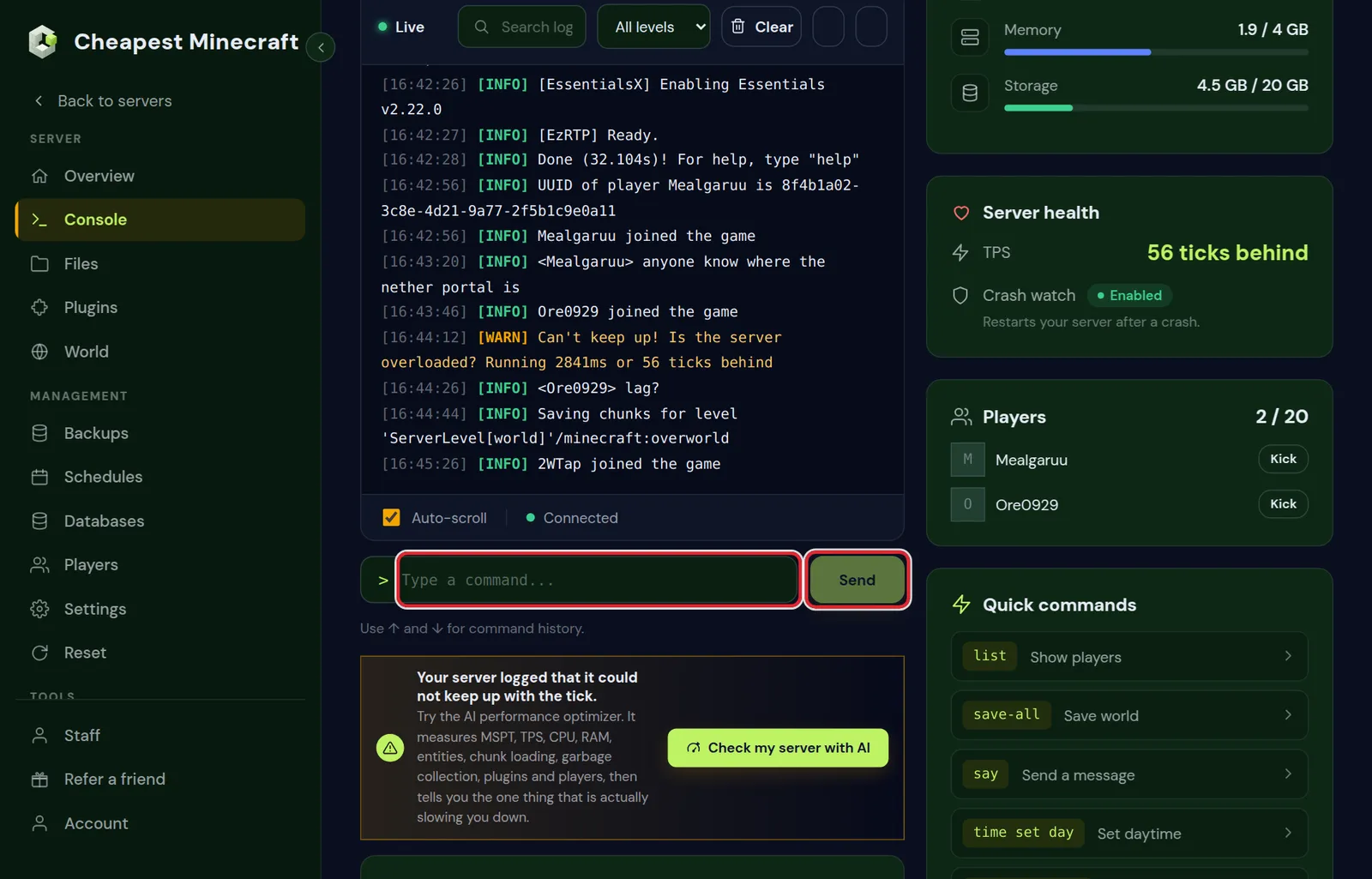
On 1.21.9 and 1.21.10 the rule has its older name: gamerule commandBlocksEnabled true. Each version only accepts its own name, so the other one gives an error. Keep inventory and game rules lists the old and new names of the other rules.
Command blocks in the Nether and the End on Paper
Paper and Purpur keep separate game rules for each world, and a gamerule typed in the console only changes the overworld. For command blocks in the Nether or the End, also send these two lines:
execute in minecraft:the_nether run gamerule command_blocks_work true
execute in minecraft:the_end run gamerule command_blocks_work true
On other server types the two extra lines do no harm.
Enable command blocks in server.properties on 1.21.8 and older
- Open Settings and go to Server settings.
- Under Gameplay, turn on Command blocks. Typing command in Search settings finds it.
- Press Save changes.
- Restart the server. Minecraft reads
server.propertiesonly when it starts.
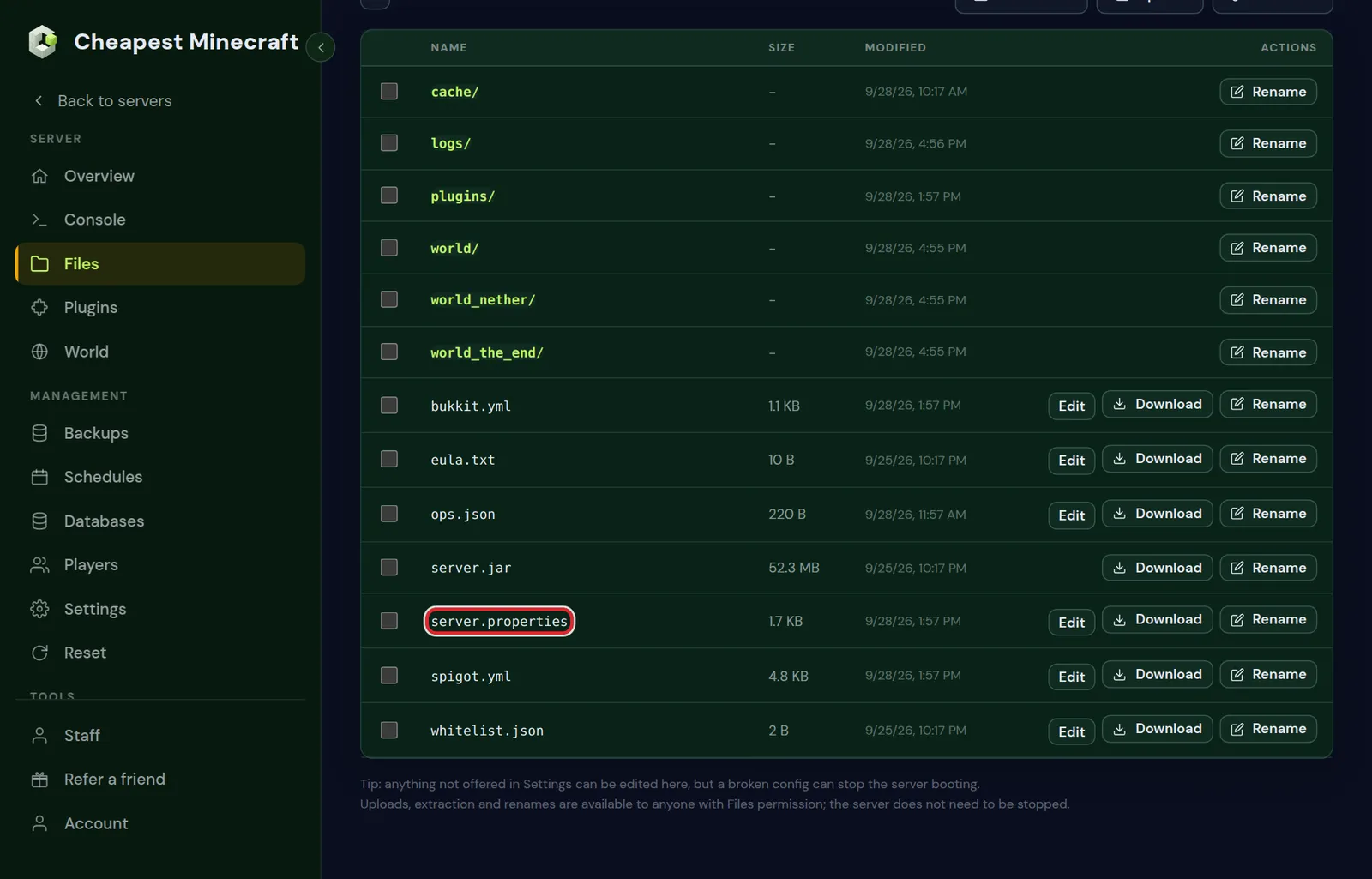
To change the file by hand, open Files, click server.properties in the top folder and set the line to enable-command-block=true. Use lower case and no spaces around the equals sign, then restart. What the other lines in that file do is in server.properties explained.
How to get a command block with /give
Before you can place a command block, your account needs two things:
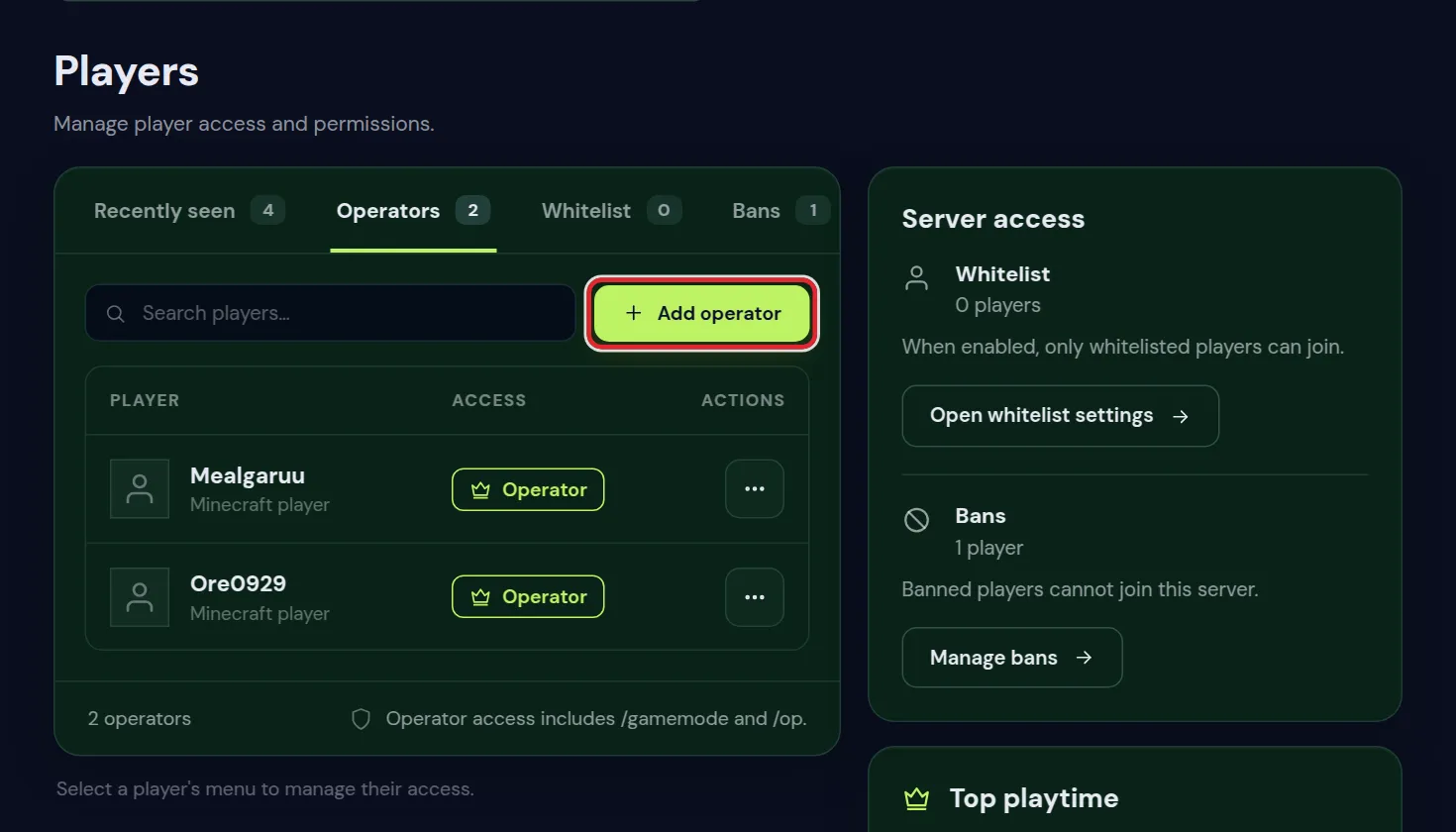
- Operator status of level 2 or higher. Open Players, choose Operators and press Add operator, or type
opand your name in the console. - Creative mode. Type
/gamemode creativein the game. In survival you can hold a command block, but you cannot place, open or break it.
Then type one of these commands in the game chat:
| Command | What you get |
|---|---|
/give @s minecraft:command_block | An impulse command block, the normal one |
/give @s minecraft:repeating_command_block | A repeating command block |
/give @s minecraft:chain_command_block | A chain command block |
/give @s minecraft:command_block_minecart | A minecart with a command block, which runs while it rolls over a powered activator rail |
@s stands for the player who types the command, so it only works in the game. In the console, use your Minecraft name: give Steve minecraft:command_block.
Operators can also turn on Operator Items Tab in the game options under Controls. The creative inventory then shows an Operator Utilities tab that holds all command blocks.
Op permission level needed for command blocks
Placing and editing command blocks needs operator level 2. A new operator gets the level set in op-permission-level in server.properties, which is 4 by default. This only matters when someone lowered it. The line is not in the Settings form; change it in the Files tab and restart.
| Operator level | Command blocks |
|---|---|
| 1 | Cannot place, open or edit them |
| 2 | Can place, edit and break them in creative |
| 3 and 4 | The same as level 2, plus commands such as kick, ban, op and stop |
A command block runs its own command at level 2. Commands that need level 3 or 4, such as op, ban, whitelist and stop, fail inside a command block. How to give one operator a different level is in whitelist and operator levels.
Command block types: impulse, chain and repeat
| Type | When it runs | Starts as |
|---|---|---|
| Impulse (orange) | Once each time it gets a redstone signal | Needs Redstone |
| Chain | Right after the command block that points into it has run, in the same tick | Always Active |
| Repeat (purple) | Every game tick while it is active, up to 20 times a second | Needs Redstone |
Right click a placed command block to open its screen. Type the command in the Console Command field and press Done. A slash in front of the command is optional. The chat confirms it with Command set: followed by the command.
The buttons in the command block screen
- Impulse, Chain or Repeat sets the type. Each click switches to the next one.
- Unconditional or Conditional: a conditional block only runs when the block pointing into it succeeded on its last run.
- Needs Redstone or Always Active: whether the block waits for a redstone signal.
- Previous Output shows the result of the last run, which is the quickest way to find a typo.
The arrows on the sides of a command block show which way it points. A chain block only runs when the block before it points straight into it, so build a chain in the direction of the arrows.
Command blocks are not enabled: Minecraft error messages and fixes
| Message in chat | What it means | Fix |
|---|---|---|
| Command blocks are not enabled on this server | The server runs 1.21.8 or older with enable-command-block=false | Turn on Command blocks under Settings and restart |
| Command blocks are not enabled | The server runs 1.21.9 or newer and the game rule is off | gamerule command_blocks_work true, or commandBlocksEnabled on 1.21.9 and 1.21.10 |
| Command set: ..., but command blocks are still disabled | On 1.21.11 and 26.x the command was saved in the block, but the game rule is off | The same game rule |
| Must be an opped player in creative mode | You are not an operator of level 2 or higher, or you are not in creative | Op yourself and type /gamemode creative |
Some problems show no message at all:
- Right click does nothing. You are in survival or adventure, or your operator level is below 2.
- The block runs once and then stops. It is an impulse block. Set it to Repeat for a command that has to keep running.
- Blocks in the Nether or the End stay silent on Paper. The game rule is off in that world; send the two
execute inlines from the game rule section. - A change in server.properties did nothing. The server was not restarted, or it runs 1.21.9 or newer, where that line is no longer read.
Hide command block output in chat and the console
When a command block runs a command such as give, tp or gamemode, operators get a line about it in chat and the console log gets one too. A repeat block that runs such a command produces 20 of those lines a second. These game rules control that:
| Game rule on 1.21.11 and 26.x | Name before 1.21.11 | What it controls |
|---|---|---|
command_block_output | commandBlockOutput | Whether command blocks report their commands to operators and the log |
send_command_feedback | sendCommandFeedback | Whether players see the result of commands they type themselves |
max_command_sequence_length | maxCommandChainLength | How many commands one chain or function may run in a tick, 65,536 by default |
gamerule command_block_output falseSet command_block_output to false once your build works, so the chat stays readable for players and staff.
Repeating command blocks and Minecraft server lag
A repeat block set to Always Active runs 20 times a second for as long as its chunk is loaded. A command that searches every entity, such as kill @e[type=minecraft:item], costs tick time on every run.
- Narrow the selector.
@e[type=minecraft:item,distance=..20]only looks within 20 blocks of the command block. - Check first, then act. Put
execute if entity @a[distance=..30]in the repeat block and the real work in conditional chain blocks behind it, so the work only happens when a player is near. - Move large systems into a data pack. A function in the
minecraft:ticktag runs every tick like a repeat block, and you edit it as a text file. See install datapacks.
When a command block lags the server or loops something harmful, gamerule command_blocks_work false stops every command block at once. Find the block, fix the command and switch the rule back on. Reduce lag shows how to measure what costs tick time.
Make a backup in the Backups tab before you test commands such as fill, clear or kill in a repeat block. A wrong selector runs 20 times a second, and commands have no undo.
Command block safety on a public Minecraft server
Only operators of level 2 or higher in creative can place, edit or break command blocks. Other players can still trigger them with a button, lever or pressure plate, which is how maps let players use them without any rights.
- A command block keeps running after the operator who set it up goes offline or loses operator status. Check what their blocks do before you take someone's rights away.
- Turn command blocks off when your server does not use them.
- For staff who need a few commands and no command blocks, use a permissions plugin. Permissions with LuckPerms sets that up command by command.
- For the commands themselves, Minecraft server commands lists the ones admins use most, with examples.
Questions from Minecraft server owners
Why does my Minecraft server say command blocks are not enabled?
On 1.21.8 and older, enable-command-block in server.properties is false by default; turn on Command blocks under Settings and restart. On 1.21.9 and newer, the game rule is off; type gamerule command_blocks_work true in the console, or gamerule commandBlocksEnabled true on 1.21.9 and 1.21.10.
Do I need to restart the server after enabling command blocks?
Only on 1.21.8 and older, because server.properties is read at startup. On 1.21.9 and newer the game rule works as soon as you send it in the console.
Why can I not place a command block in Minecraft?
You need operator level 2 or higher and creative mode. Without either one, the block cannot be placed and the chat may say Must be an opped player in creative mode.
Where is the command block in the creative inventory?
It is in the Operator Utilities tab, which appears after an operator turns on Operator Items Tab in the game options under Controls. The quicker way is /give @s minecraft:command_block.
Can a command block run /op or /stop?
No. A command block runs its command at operator level 2, and op, ban, whitelist and stop need level 3 or 4. Run those in the Console tab instead.
Do command blocks work on Paper, Fabric and Forge servers?
Yes. Command blocks are part of Minecraft itself, so every Java server type has them. On Paper and Purpur the Nether and the End have their own game rules, so switch the rule on in those worlds as well.
How do I enable command blocks on a Bedrock server?
On the official Bedrock server the switch is the game rule commandblocksenabled. Changing it needs cheats on, which is allow-cheats=true in the server.properties of that server.
Checked against the Settings, Console and Players tabs of our control panel and the game rules of Minecraft Java 26.2, October 2026. Written by the Cheapest Minecraft Hosting team, first published , updated .