 Astroworld
Players
How to join a Minecraft server on PS5, Xbox and Nintendo Switch
A friend on a PlayStation, an Xbox or a Switch plays Minecraft Bedrock. On a phone or a Windows PC, Bedrock has an Add Server button. On a console that button is missing: the Servers tab only lists a handful of featured servers.
That does not lock console players out of your server. It means they take a detour. This guide explains what the server needs, then each detour step by step, so you can send your friend the part that fits their console.
In short
Minecraft on PS5, PS4, Xbox and Nintendo Switch has no button to add a server by address, so console players need one of three workarounds. The easiest is a phone app such as BedrockTogether: type the server address and Bedrock port in the app, and the server appears as a LAN game on the console. The second is changing the DNS setting of the console to a BedrockConnect server, which adds a server list to the game. The third is set up once by the server owner: a friend account that players add, after which the server shows up as a friend's world. In all three cases the server has to accept Bedrock players, which a crossplay server does.
What a console player needs before joining
| What | Why | Where to get it |
|---|---|---|
| A server that accepts Bedrock | Consoles run Bedrock, so a plain Java server turns them away | A crossplay or Bedrock server |
| The server address | The name players connect to | Top of the control panel, with a copy button |
| The Bedrock port | Bedrock needs a port number next to the address | In the control panel of a crossplay or Bedrock server |
| A Microsoft account | Minecraft signs every Bedrock player in with one, on PlayStation and Switch too | Free, made in the game or on the Microsoft website |
| Online play on the console | Joining a server counts as online play | The online subscription of the console, where it asks for one |
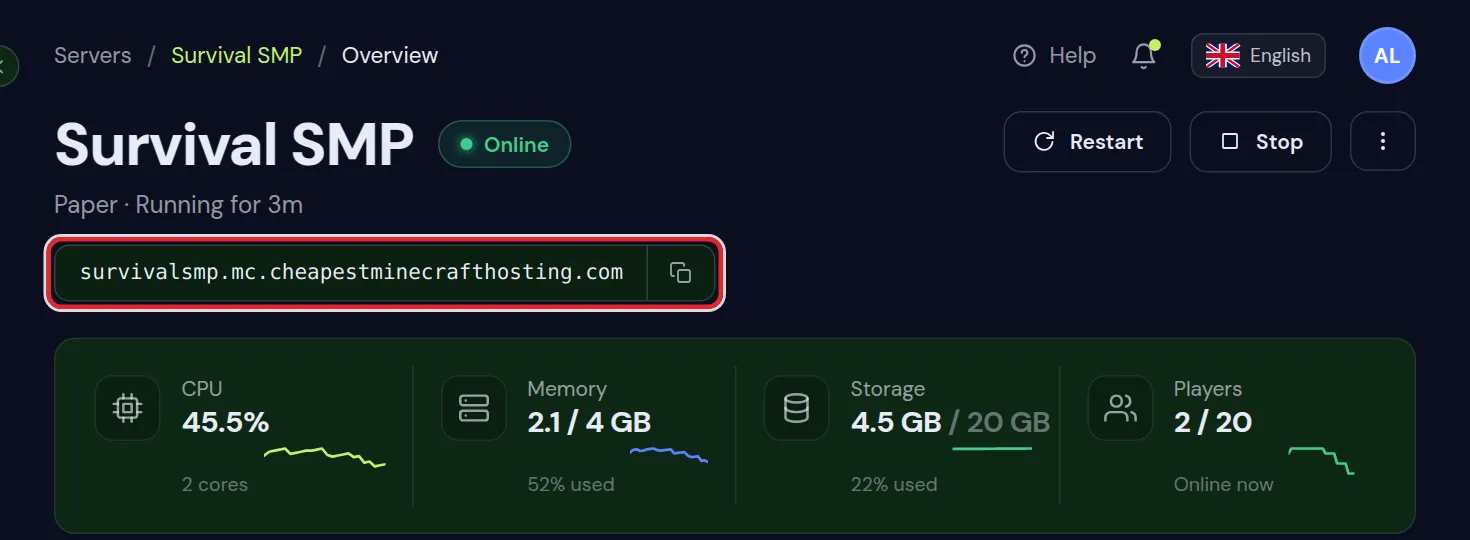
Give your friend the address and the Bedrock port together. Java players only need the address, which is why server owners often forget the port.
Make sure your Minecraft server lets console players in
There are two kinds of server a console can join.
| Server | Who can play | Good to know |
|---|---|---|
| Crossplay | Java players on PC together with Bedrock players on consoles, phones and Windows | A Java server on Paper with Geyser and Floodgate. Plugins work for everyone |
| Bedrock | Only Bedrock players: consoles, phones, tablets and Windows | No Java players and no Java plugins |
On our servers you choose the Crossplay edition when you order, and Geyser and Floodgate are installed and set to your Bedrock port from the first start. Crossplay between Java and Bedrock explains how it works, and Java or Bedrock server helps you choose between the two.
Keep a crossplay server on a recent Minecraft version. Consoles update Bedrock by themselves, and an old Geyser then answers with an outdated server message.
Which way to join fits your console
| Way | Who sets it up | What it needs | Best for |
|---|---|---|---|
| A phone app (LAN game) | The player, each time they play | A phone or tablet on the same Wi-Fi as the console | Most players: no console settings change |
| DNS change (BedrockConnect) | The player, once | Changing the network settings of the console | Players without a spare phone |
| A friend account (MCXboxBroadcast) | The server owner, once | A spare Microsoft account and an upload to the server | Servers with many console players |
All three work on PlayStation 4 and 5, Xbox One and Series, and Nintendo Switch. None of them changes the game or needs a modified console.
Way 1: join with a phone app such as BedrockTogether
Minecraft on a console can join LAN games: worlds that another device on the same network is sharing. A small app on a phone or tablet uses that. It tells the console there is a LAN game, and passes the player on to your server.
- Install BedrockTogether on a phone or tablet, from the App Store or Google Play.
- Connect the phone to the same Wi-Fi network as the console. Not a guest network.
- Open the app and type the server address and the Bedrock port.
- Tap the button to run it, and leave the app open.
- On the console, start Minecraft and press Play.
- Look on the Worlds tab, or the Friends tab on an older version. The server appears there as a LAN game within a few seconds.
- Select it to join. The first time, the game asks whether you trust the server; accept it. Once you are in the world, the phone can go back in your pocket.
The app only has to run while you connect. If you leave the server and want back in, open the app again.
The LAN game does not show up
- The phone and the console are on different networks. Mobile data on the phone does not work: it has to be the same Wi-Fi.
- The Wi-Fi is a guest network or has client isolation on, which stops devices from seeing each other. Use the normal home network.
- The console is on a cable and the phone on Wi-Fi of another router or mesh point. Put both on the same router.
- The app was closed before the console found the game. Keep it open on screen until you are in.
Other apps do the same job, and there are versions for a computer too. Whichever you use, the address and the port are the same.
Way 2: change the DNS of the console to BedrockConnect
BedrockConnect is a free tool that adds a server list to the game. You set the console to use a BedrockConnect server for DNS. When you then open one of the featured servers in the Servers tab, a menu opens instead, where you type any address.
- Look up the current DNS address on the BedrockConnect page on GitHub. It lists several servers and the steps for each console.
- On the console, open the network settings and set up the internet connection by hand.
- Leave everything on automatic except DNS. Set the primary DNS to the BedrockConnect address, and the secondary to a normal public DNS server.
- Save, and start Minecraft.
- Press Play, open the Servers tab and select any featured server.
- In the menu that opens, choose to connect to a server, and type your server address and Bedrock port.
- Add it to the list, so next time it is one click.
Where the DNS setting is
| Console | Path in the settings |
|---|---|
| PlayStation 5 | Settings, Network, Settings, Set Up Internet Connection, your network, Advanced Settings, DNS Settings: Manual |
| PlayStation 4 | Settings, Network, Set Up Internet Connection, Custom, DNS Settings: Manual |
| Xbox | Settings, General, Network settings, Advanced settings, DNS settings, Manual |
| Nintendo Switch | System Settings, Internet, Internet Settings, your network, Change Settings, DNS Settings: Manual |
Things to know before you change DNS
- DNS decides where the console looks up every address, so only use a DNS server you trust. The BedrockConnect project lists its own servers and the code is public.
- The main BedrockConnect server is often blocked on consoles. If the menu does not open or the internet on the console acts up, try another server from the list on its page.
- To undo it, set DNS back to automatic. Nothing else on the console changes.
Way 3: a friend account that puts your server on the Worlds tab
This one is for the owner of the server. A tool called MCXboxBroadcast signs in to a spare Microsoft account and advertises your server through it. A console player adds that account as a friend, and your server shows up in their game as a friend's world. No phone, no DNS.
- Make a new, free Microsoft account for this. Do not use your own: the account is used by the tool the whole time.
- Download the MCXboxBroadcast extension from its page on GitHub.
- In the Files tab, open the Geyser folder inside
plugins, and upload the file to theextensionsfolder in it. - Restart the server and open the Console tab.
- The extension prints a link to the Microsoft sign in page with a code. Open it in a browser and sign in with the new account.
- If players later see the world but cannot get in, open the config file the extension made and set the address and port it advertises to your play address and your Bedrock port. Then restart once more.
- Give your players the gamertag of that account. They add it as a friend, and the account adds them back by itself.
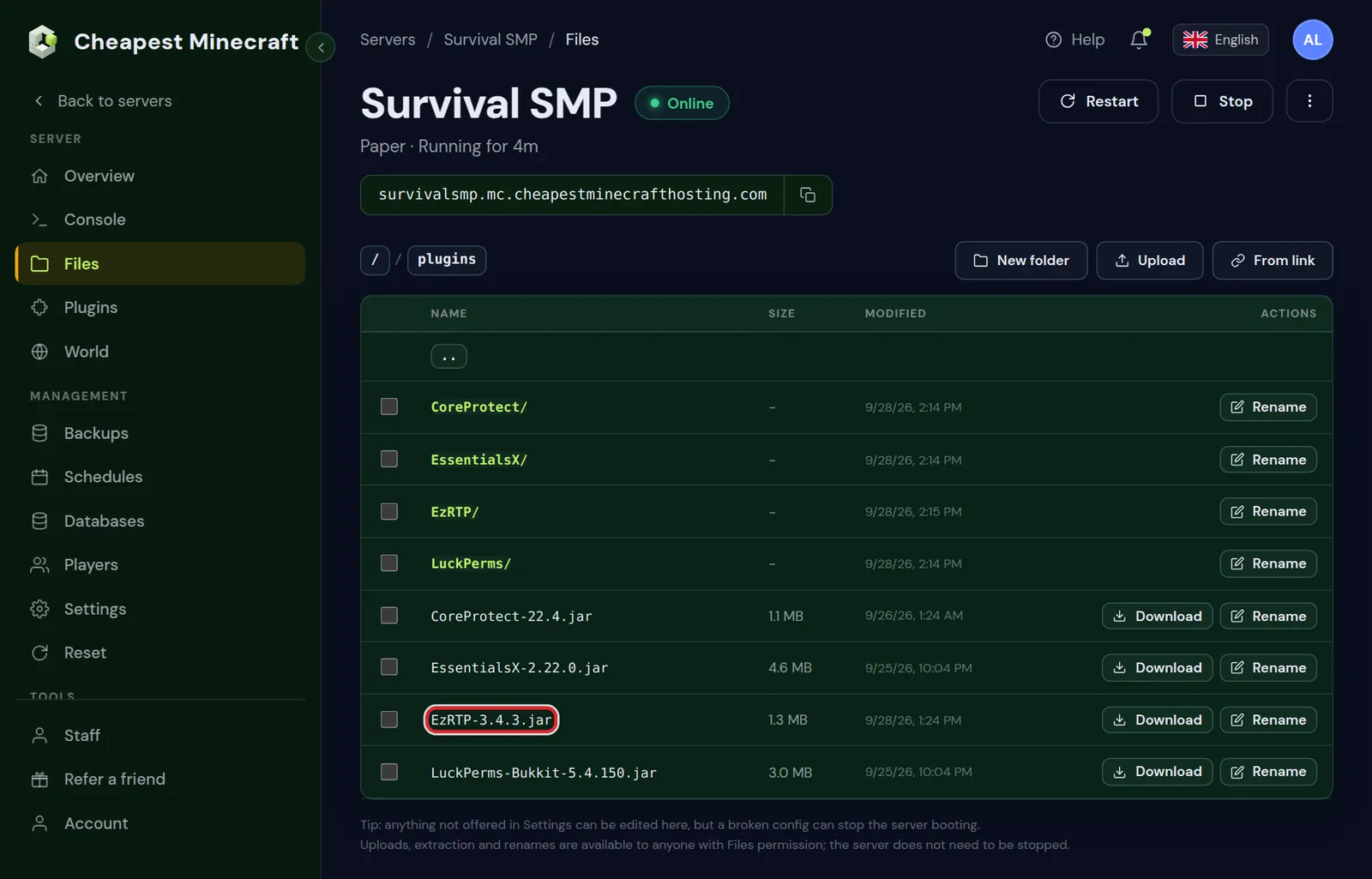
After that, console players open Play, go to the Worlds tab and find your server under their friends. It can take a minute before a new friend sees it.
A friend account can only hold a limited number of friends. For a server for friends that is plenty. A large public server usually runs several accounts.
Edit Minecraft server files shows how to upload a file and edit a config in the Files tab.
Put console players on the whitelist
If your server has a whitelist, a console player is turned away until their name is on it. Their name is not the one on screen: Floodgate puts a dot in front of every Bedrock gamertag, so Steve123 becomes .Steve123.
- Open the Players tab of the control panel.
- In the whitelist field, type a dot and then the gamertag, for example
.Steve123, exactly as your friend spells it. - Click Add to whitelist. The panel looks up the Xbox account and adds the right entry.
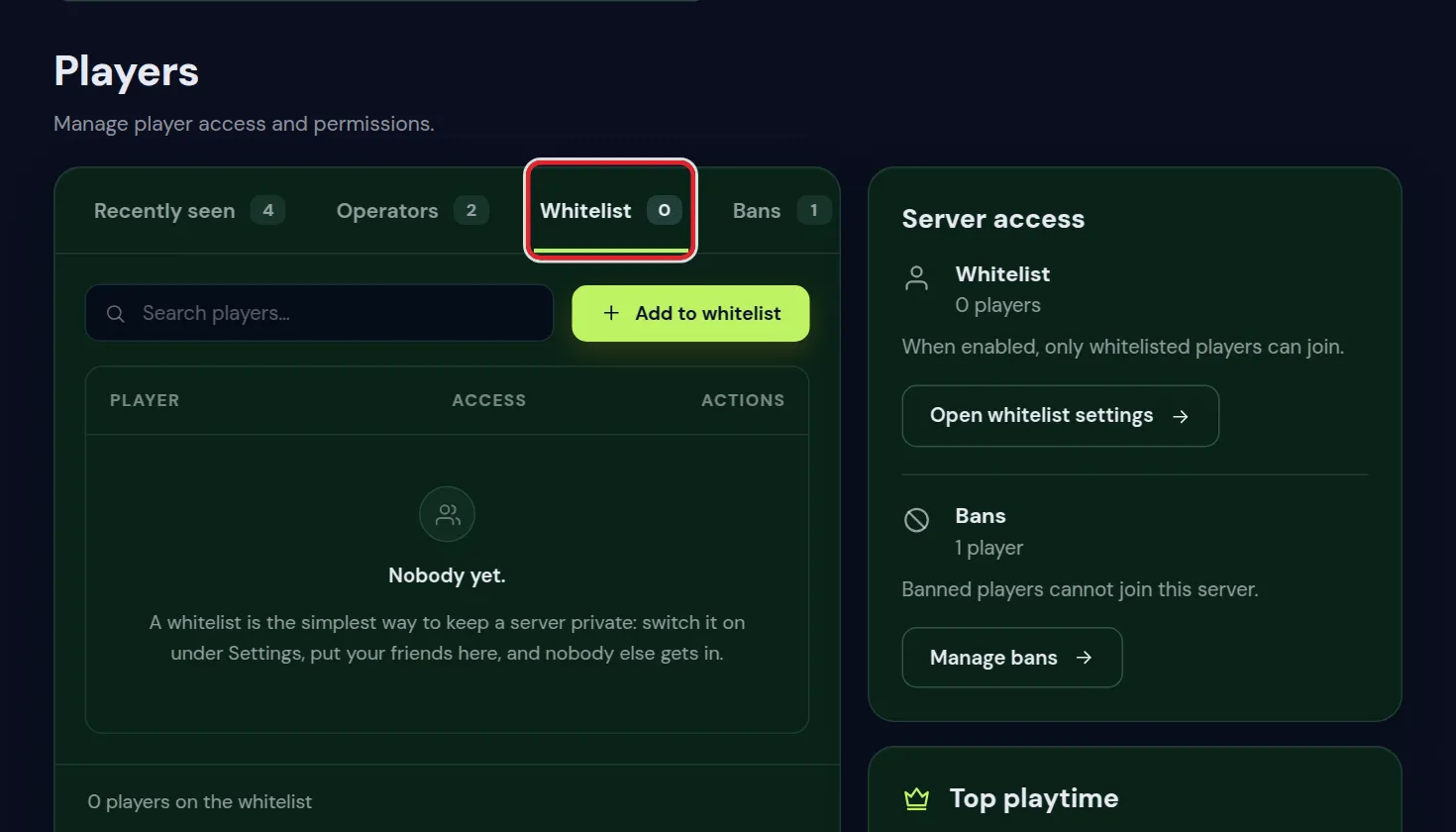
The normal whitelist add command only knows Java accounts and answers that the player does not exist. Whitelist Bedrock players has the other two ways that work, and what to do with a gamertag that has spaces.
A console player cannot join: messages and fixes
| What the console shows | Cause | Fix |
|---|---|---|
| Unable to connect to world | Wrong port, the Java port instead of the Bedrock port, or the server is off | Check the Bedrock port in the panel and that the server is running |
| Outdated server | The console updated Bedrock and Geyser on the server is older | Update Geyser, or the server to a current version, and restart |
| Outdated client | The console has not updated Minecraft yet | Update the game on the console |
| You are not whitelisted on this server | The whitelist is on and the gamertag is not on it | Add the gamertag in the Players tab |
| You cannot play online multiplayer because of how your Microsoft account is set up | The privacy settings of the account block multiplayer, common on child accounts | Allow joining multiplayer games in the Xbox privacy settings of that account |
| The game asks for an online subscription | The console wants its online service for multiplayer | That is between the player and the console; the server cannot change it |
| Nothing appears on the Worlds tab | The phone app is on another network, or the friend account is not accepted yet | See the list under way 1, or wait a minute and reopen the tab |
| Stuck on Locating server | The address has a typing mistake, or the DNS server is blocked | Copy the address from the panel, or pick another BedrockConnect server |
The account setting in the fifth row is the one parents run into most. It is changed on the Microsoft website, in the privacy and online safety settings of the child's account, and it applies to every server, not only yours. Can't connect to your server goes through the other reasons a player is refused.
When one console player gets in and another does not, the server is fine. Look at the settings of the player who is stuck.
What is different for console players on a Java server
A crossplay server is a Java world, shown to Bedrock players through a translator. For survival with friends you will not notice. A few things are good to know.
- Names of Bedrock players start with a dot, in chat, in commands and on the whitelist.
- Skins from the console show up for Java players. Capes and some marketplace items may not.
- Java mods that players have to install do not reach consoles. Server side plugins work for everyone.
- Combat and redstone follow Java rules for all players, because the world is a Java world.
- Voice chat mods for Java do not work on consoles. Use the party chat of the console, or a call on a phone.
For a family with a PC and a console, or a group of friends on mixed devices, crossplay is the way to share one world. How to set up a Minecraft SMP covers the rest of a friends server, and a Minecraft server for kids the settings that keep a young group safe.
Questions from Minecraft server owners
Can you join a Minecraft server on PS5?
Yes. PS5 has no Add Server button, so you use a workaround: a phone app such as BedrockTogether that makes the server appear as a LAN game, a DNS change to BedrockConnect, or a friend account the server owner set up. The server has to accept Bedrock players.
How do I add a server on Minecraft PS5 or PS4?
You cannot add one in the game itself. Type the server address and Bedrock port in a phone app on the same Wi-Fi, and select the LAN game that appears on the Worlds tab of the console.
Can Xbox players join a Java Minecraft server?
Yes, when it is a crossplay server with Geyser and Floodgate. Xbox players join with the same three workarounds as PlayStation and Switch, using the server address and the Bedrock port.
How do I join a Minecraft server on Nintendo Switch?
Use a phone app on the same Wi-Fi, or set the DNS of the Switch to a BedrockConnect server under System Settings, Internet. Then type the server address and Bedrock port.
What port do console players use for a Minecraft server?
The Bedrock port of the server, not the Java port. Bedrock uses 19132 by default, but a hosted server usually has a port of its own. On our servers it is shown in the control panel.
Do console players need to buy Minecraft Java Edition?
No. Floodgate lets Bedrock players in with the Microsoft account they already use on the console.
Is changing the DNS on a console safe?
It changes where the console looks up addresses, so only use a DNS server you trust. You undo it by setting DNS back to automatic. If you would rather not change it, use a phone app instead.
Why does my console say Unable to connect to world?
Usually the port is wrong or the server is off. Use the Bedrock port from the control panel, check that the server is running, and try again.
Checked against our crossplay servers, the address and Bedrock port in our control panel, and the Geyser documentation about consoles, November 2026. Written by the Cheapest Minecraft Hosting team, first published , updated .