
 Astroworld
Players
Set up a safe Minecraft server for kids
A private server gives children a world where only their own friends play. The parent who owns the server decides who gets in, what the game rules are and when the server is open.
This guide lists the settings in the order we would set them, for a server for a family, a group of school friends or a club.
In short
A safe Minecraft server for kids has the whitelist on, so only friends you added can join, and an address you share only with those families. Turn PvP off, set the difficulty to peaceful or easy, turn on keep inventory and turn off mob griefing. Keep operator rights and the control panel account with the parent, read the chat history in the Console tab now and then, and make a backup before every change.
Turn on the whitelist so only known friends can join
The whitelist is the most important setting. With it on, the server refuses everyone whose Minecraft name is not on the list, even if they know the address.
- Ask each family for the exact Minecraft name of their child.
- Open the Players tab and click Open whitelist settings on the Server access card.
- Turn on Whitelist and Enforce whitelist immediately, then press Save changes.
- Back in Players, open the Whitelist list and add each name with Add to whitelist.
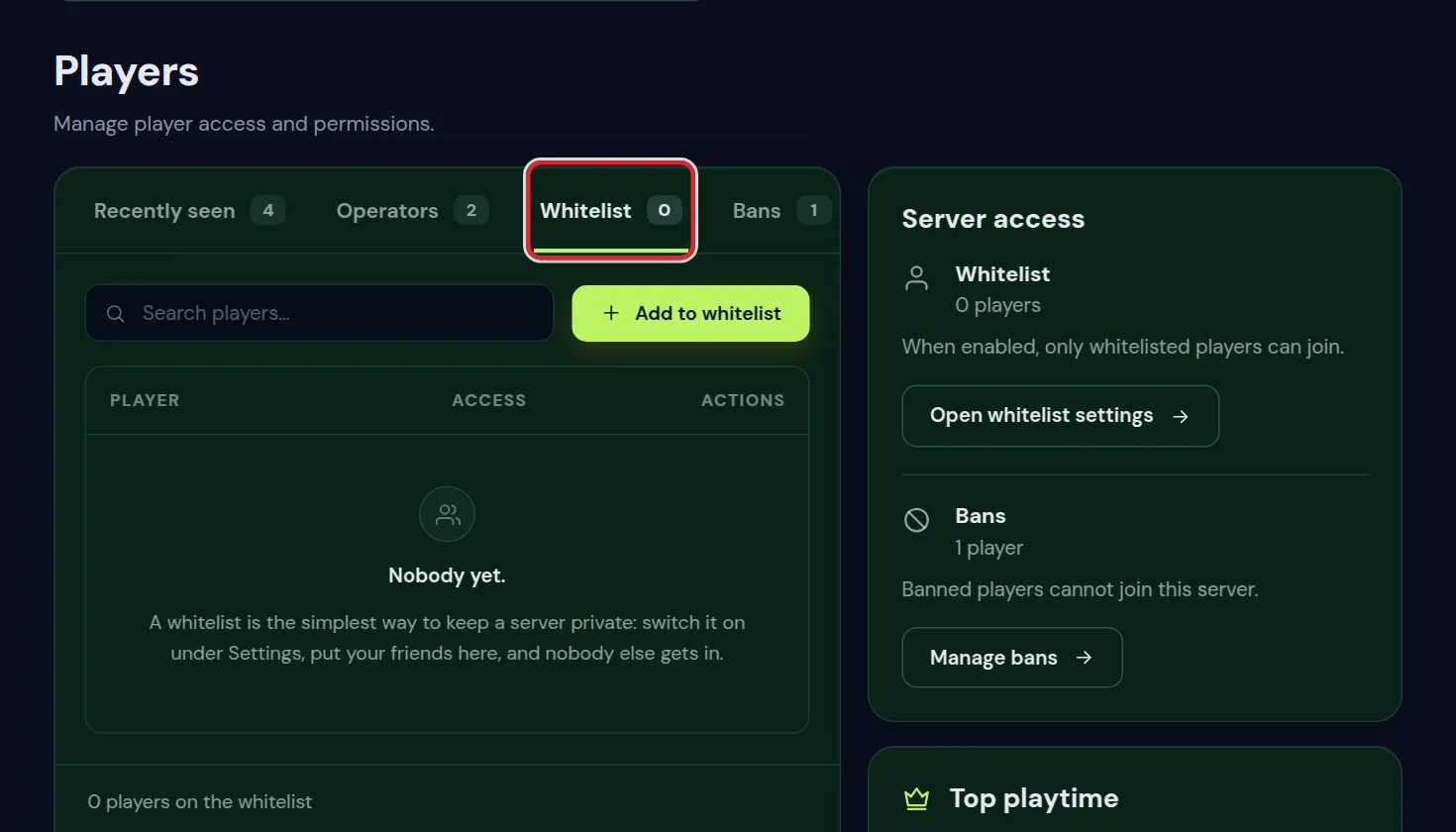
Bedrock players on a crossplay server and other details are covered in whitelist and operators. Keep Verify accounts with Mojang on, so nobody can join under a whitelisted child's name.
Share the server address only with the families
- Send the address directly to the parents, by message or email. Do not post it on social media, in public Discord servers or on server lists.
- Turn on Hide the player list under Access in Settings, so the server list does not show who is online.
- Ask children not to share the address with friends of friends. With the whitelist on, a stranger still cannot join, but fewer people trying is better.
How children add the server in their game is in join your Minecraft server.
Chat on a Minecraft server for kids
On a whitelisted server, children only chat with the friends on the list. Two more checks help:
- The Chat history card in the Console tab lets you look back through chat by player, word or period. Private messages show who wrote to whom, without the text. See search the chat history.
- In the game, each child can set Chat to Commands only or Hidden in the chat settings, if they should not chat at all.
Parents can also limit multiplayer and chat for a child's Microsoft account in the family settings of that account. Those limits apply on every server, including yours.
Game settings for a friendly server: PvP, difficulty and keep inventory
| Setting | Where | Value for young players |
|---|---|---|
| PvP | World tab, Game rules, or Settings on older versions | Off, so children cannot hurt each other |
| Difficulty | Settings, Gameplay | Peaceful for the youngest, easy for older children |
| Keep inventory | World tab, Game rules | On, so nothing is lost on death |
| Mob griefing | World tab, Game rules | Off, so creepers do not blow up builds |
| TNT explodes | World tab, Game rules | Off, to stop accidents and pranks with TNT |
| Players needed to skip the night | World tab, Game rules | 0, so one child in bed skips the night |
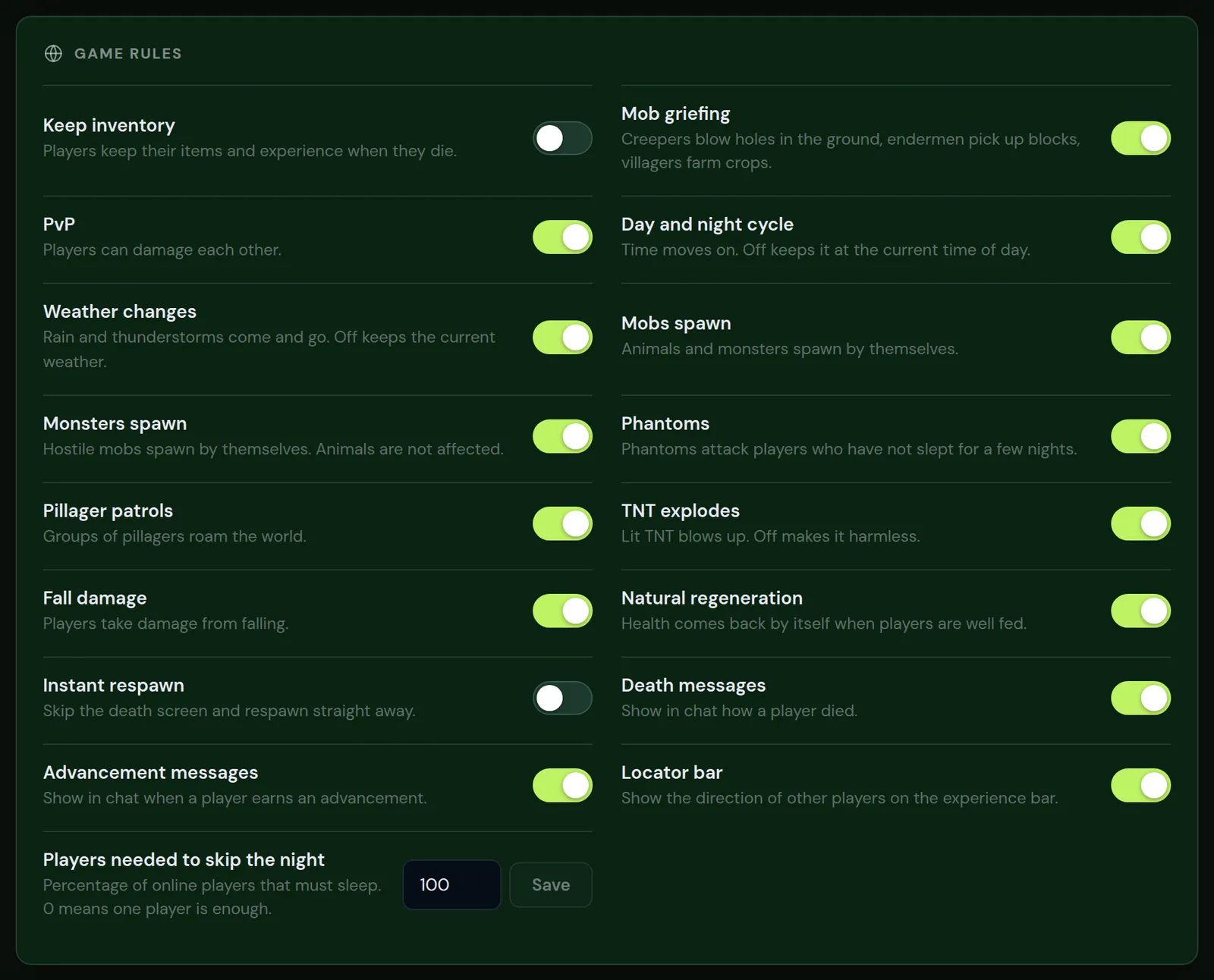
Peaceful removes hostile mobs completely. Easy keeps zombies and skeletons, with little damage. Game rules work straight away without a restart; see keep inventory and game rules for every switch.
Protect builds against griefing
Even friends break each other's builds by accident or as a joke. Two plugins on a Paper server help:
- GriefPrevention: each child claims their own land with a golden shovel, and others cannot break or take anything there.
- CoreProtect: logs every block placed and broken, so the parent can see who did it and undo it.
Both are in the Plugin catalog of the Plugins tab. Stop griefing shows how to set them up and how to roll back damage.
Who gets operator rights on a kids server
An operator can change the gamemode, give items, teleport, kick and ban. On a server for children, keep that with the parent.
- Make the parent operator, and nobody else.
- Do not op a child to let them fly or build in creative; use a separate creative world or a LuckPerms rank with only those rights. See permissions with LuckPerms.
- Check the Operators list in the Players tab now and then.
Control panel access for parents
The hosting account owns the server: settings, files, backups and billing. Keep it in the parent's name.
- Turn on two-factor login on the parent's account; see account settings and two-factor login.
- To let another parent help, invite them in the Staff tab with their own login and the rights they need.
- Older children who help run the server can get the Viewer or Moderator role, and never the owner's password. Give someone access explains the roles.
Opening hours, playtime and backups
- Opening hours: two schedules in the Schedules tab, one with the power action Start in the morning and one with Stop in the evening, close the server at bedtime. Schedule automatic restarts shows how to make them.
- Playtime: the Top playtime card in the Players tab shows who played the most hours. See when your players are online adds the busy hours.
- Backups: make one in the Backups tab before every change, so a lost build can come back. See back up and restore your server.
Questions from Minecraft server owners
How do I make a Minecraft server safe for my kids?
Turn on the whitelist, share the address only with families you know, turn PvP off, use peaceful or easy, and keep operator rights with the parent.
Can strangers join a whitelisted server?
No. Only Minecraft names on the whitelist can join, as long as Verify accounts with Mojang stays on.
Can I read what the children say in chat?
Yes, the Chat history card in the Console tab searches public chat by player, word and period. Private messages show who wrote to whom, not the text.
What difficulty is best for young children?
Peaceful for the youngest, since it removes hostile mobs. Easy for children who want some adventure.
Can I close the server at bedtime?
Yes. Make a schedule in the Schedules tab with the Stop power action in the evening and another with Start in the morning.
Should my child be operator?
We advise against it. An operator can ban others and change every setting. Give them only the rights they need with a LuckPerms rank.
Checked against the Players, Settings, World, Console and Schedules tabs of our control panel on Paper for Minecraft Java 26.2, October 2026. Written by the Cheapest Minecraft Hosting team, first published , updated .