
 Astroworld
Plugins and mods
Play a custom adventure, parkour or puzzle map on your Minecraft server
Adventure, parkour and puzzle maps are Minecraft worlds built by map makers, usually downloaded as a zip with a world folder inside. Most of them run on a server as well as in single player, with a few settings changed.
This guide takes you from the downloaded zip to a working map, without losing the world your server already has.
In short
To play a custom map on your server, set the server to the Minecraft version the map was made for, upload the map's world folder in the Files tab and set level-name in server.properties to that folder's name. Turn on Command blocks in the Settings tab, set the default gamemode the map asks for, usually adventure, and add the map's resource pack as the server resource pack. Restart and join.
Before you upload: check the map's version and notes
| Check | Why it matters |
|---|---|
| The Minecraft version the map was made for | Commands and blocks change between versions; a map on another version can break halfway |
| Single player only, or multiplayer | Some maps track one player with commands and fail with two |
| The number of players | Co-op maps often name a number, such as 2 to 4 |
| A resource pack | Many maps need their own textures and sounds |
| Settings the maker asks for | Difficulty, gamemode, render distance, or plain vanilla |
Set the server to the map's version first: open Settings, change Minecraft version under Server software and click Change version. Change your Minecraft server version covers what happens to the existing world.
Use the server type Vanilla for maps whose maker asks for it. Paper changes a few game mechanics that some technical maps rely on. For most adventure and parkour maps, Paper works as well.
Upload the map folder in the Files tab
- Stop the server.
- Open the Files tab and go to the top folder.
- Click Upload and pick the map's zip file. For a large map, put the zip online and paste its download link under From link.
- Click Extract next to the zip.
- Open the extracted folder. It must contain
level.datdirectly. If you see one more folder withlevel.datinside, that inner folder is the world. - Rename the world folder to a short name without spaces, such as
parkour.
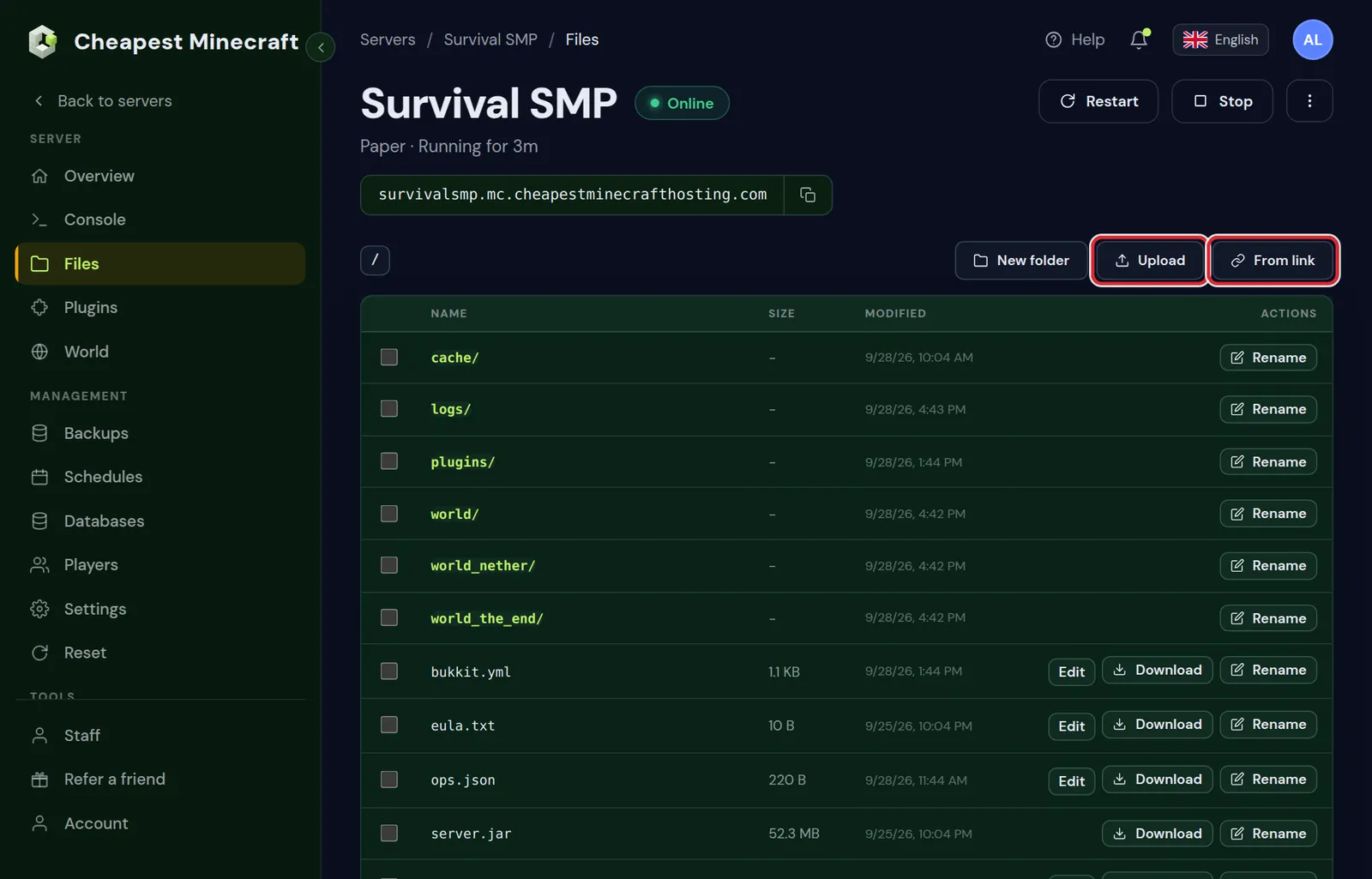
Your old world folder stays where it is. You do not have to delete it to play the map.
Set level-name to load the map
- Click
server.propertiesin the top folder of the Files tab. - Find the line
level-name=worldand change it to the folder name of the map, such aslevel-name=parkour. - Save the file.
The server now loads the map instead of your normal world. To go back later, set level-name=world again and restart; both worlds stay as they are.
On Paper, the Nether and End of a single player map are moved into their own folders, such as parkour_nether, on the first start. That is normal.
Turn on command blocks for adventure maps
Almost every adventure and puzzle map runs on command blocks: checkpoints, doors, dialogue and scores. They do nothing on a server until you allow them.
- Open the Settings tab and go to the Gameplay group under Server settings.
- Switch Command blocks to On.
- Press Save changes.
This is the line enable-command-block=true in server.properties. Command blocks placed by the map maker run for every player; only operators in creative mode can place or edit them.
Adventure mode and the other settings maps need
| In the panel | Value for most maps | Why |
|---|---|---|
| Default gamemode | adventure | Players cannot break or place blocks unless the map allows it |
| Force gamemode on join | On | Puts returning players back in adventure |
| Spawn protection (blocks) | 0 | Lets the map's own mechanics work near spawn |
| Difficulty | What the map asks for | Combat maps are balanced for one difficulty |
| PvP | Off for co-op maps | Stops players from hitting each other by accident |
| Allow flight | On for parkour maps with launch pads | Avoids kicks for floating |
Change them under Server settings in the Settings tab, then press Save changes. Do not make yourself an operator during a run unless you need to fix something; operators can skip parts of the map by accident.
For a parkour map, set View distance (chunks) to what the map maker suggests. Long jumps need the far platforms to be visible.
Game rules on a custom map
Game rules are saved inside the world, so the map arrives with the rules its maker chose. Leave them as they are unless the notes say otherwise.
To check or change one, start the server, open the World tab and click Show game rules on the Game rules card.
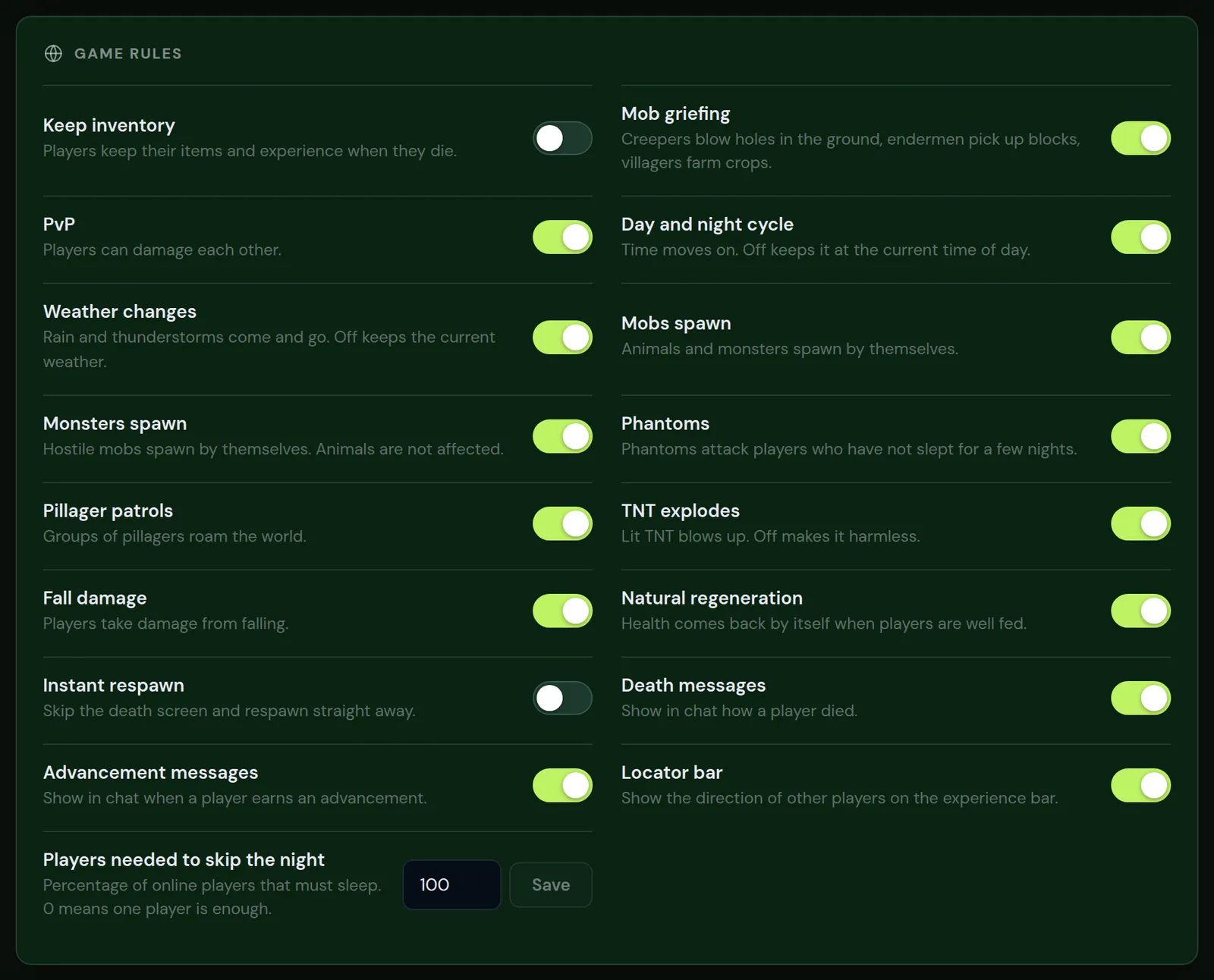
| Switch | Common choice on maps |
|---|---|
| Keep inventory | On for puzzle and parkour maps, so a fall does not cost the items the map gave you |
| Day and night cycle | Often off; the map sets its own time |
| Mob griefing | Off, so creepers do not destroy the map |
| Instant respawn | On for parkour maps |
Every switch is explained in keep inventory and game rules.
Use the map's resource pack on the server
In single player, a map can load a resources.zip from its own world folder. On a server, players only get a pack that the server offers them.
- Find the map's pack: a
resources.zipin the world folder, or a separate download on the map page. - Put the zip online with a direct download link.
- Fill in Resource pack URL and Resource pack SHA-1 under General in the Settings tab, and turn on Force resource pack if the map is unplayable without it.
- Save and restart.
Add a resource pack to your server covers the link, the checksum and what to do when the pack does not load.
Spawn, start and reset the map
The map has its own spawn point, usually at the start room. Players who join for the first time arrive there. Players who already played on your normal world arrive there too, because their position and inventory are saved inside the world folder of the other world.
- If players land in the wrong place, the map maker may have used a command to set the spawn. Stand at the start and type
setworldspawnas an operator. - Start the server and join before your friends, to check that the first room works.
- To play the map again from the start, upload a fresh copy: the old copy keeps all progress.
Make a backup in the Backups tab after uploading, before anyone plays. Restoring that backup is the quickest way to reset the map for a second group.
Questions from Minecraft server owners
How do I put a downloaded map on my Minecraft server?
Upload the zip in the Files tab, extract it, and set level-name in server.properties to the folder that holds level.dat. Restart the server.
Why do command blocks not work on my server?
Command blocks are off by default on a server. Turn on Command blocks under Gameplay in the Settings tab, save and restart.
Do I lose my survival world when I load a map?
No. It stays in its own folder. Set level-name back to world and restart to return to it.
Why are the map's textures missing?
On a server, a map's own resource pack is not loaded. Offer it as the server resource pack in the General group of the Settings tab.
Can I play a custom map on a Bedrock server?
Java maps only work on a Java server. Bedrock maps come as .mcworld files and need a Bedrock server.
What gamemode should a custom map use?
Usually adventure, so players can only break and place what the map allows. Turn on Force gamemode on join as well.
Checked against the Files, Settings and World tabs of our control panel on vanilla and Paper for Minecraft Java 26.2, October 2026. Written by the Cheapest Minecraft Hosting team, first published , updated .