
 Astroworld
Plugins and mods
How to set up Simple Voice Chat on your Minecraft server
Simple Voice Chat puts proximity voice in Minecraft: you hear players who stand near you, louder when they are close and silent when they walk away. It also has groups, so friends can keep talking from opposite sides of the map.
The mod has two halves. One runs on the server and carries the sound, the other runs in the game of every player who wants to talk. The server half needs a port of its own, and that port is where almost every setup goes wrong. This guide takes you through all of it, in the order you do it.
In short
To set up Simple Voice Chat on a Minecraft server, install it on the server (as a plugin on Paper or Purpur, as a mod on Fabric, Forge or NeoForge), open a UDP port for it and restart. On our servers you add the port in the Ports tab of the control panel, choose Simple Voice Chat and click Set it for me, which writes the port and the voice host into voicechat-server.properties. Every player who wants to talk installs the same mod in their own game. If the icon with the crossed plug stays on screen, the UDP port is not open or not set in the config.
What Simple Voice Chat needs on a Minecraft server
| Part | What it is | Who arranges it |
|---|---|---|
| The server side | A plugin on Paper and Purpur, or a mod on Fabric, Forge and NeoForge | You, once, on the server |
| A UDP port | A second port next to the one players join on, only for sound | You, once, in the Ports tab |
| The client side | The same mod in the player's own Minecraft | Every player who wants to talk |
Voice travels over UDP, a different kind of traffic than the game itself. The port players join on does not carry it, which is why the server needs one more port and why voice can fail while the game works fine.
Players without the mod can still join and play. They just hear nothing and do not show a speaker icon. Players on Bedrock, which means phones, tablets and consoles, cannot use it at all, because Bedrock does not load Java mods. On a crossplay server only the Java players can talk.
Install Simple Voice Chat on a Paper or Purpur server
- Open the control panel of your server and click Plugins.
- Type
Simple Voice Chatin the search box. - Check that the version matches the Minecraft version of your server, then click install.
- Restart the server once. The plugin makes its settings file at the first start.
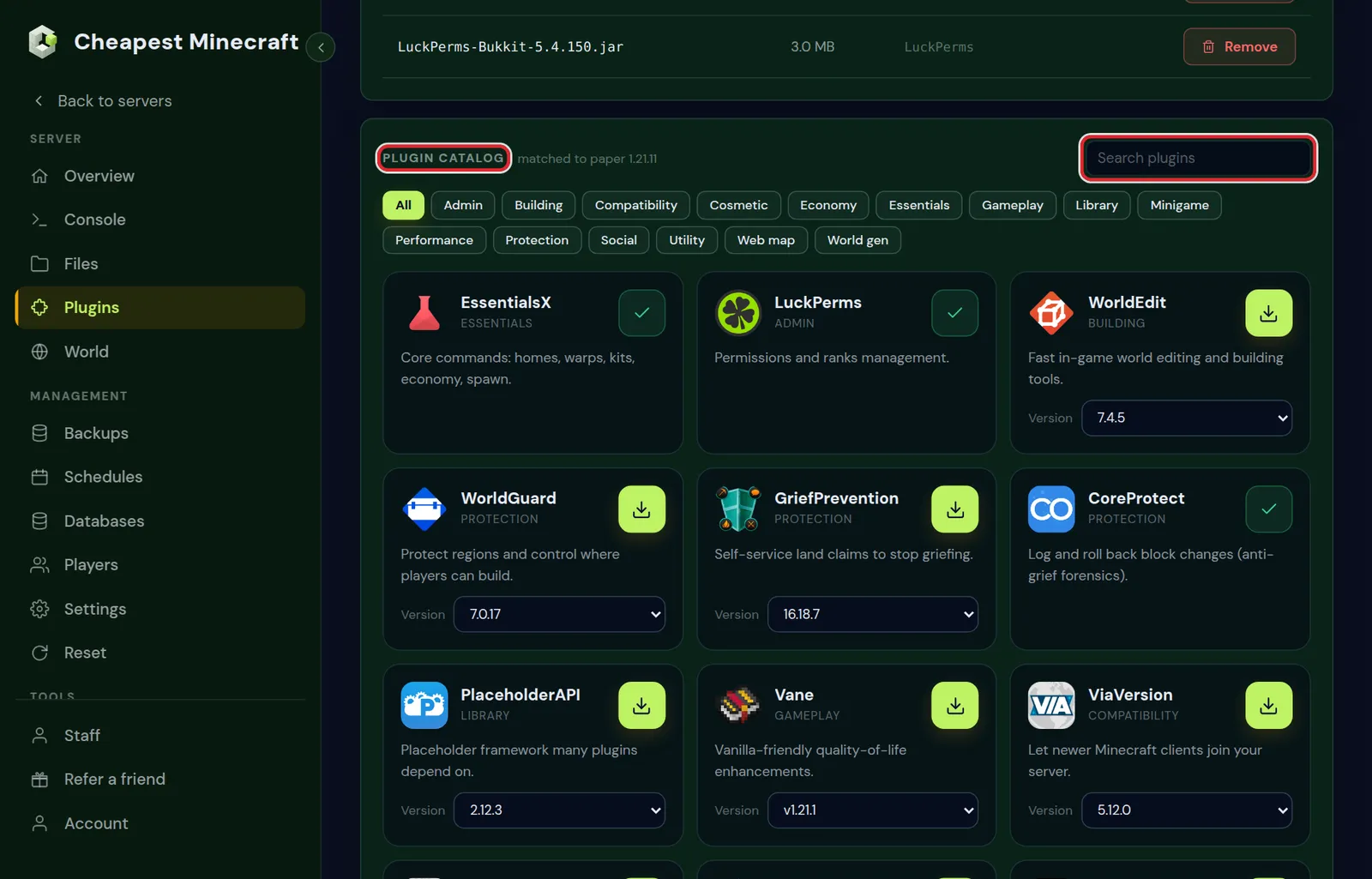
You can also download the plugin file yourself and upload it to the plugins folder in the Files tab. Install plugins covers both ways.
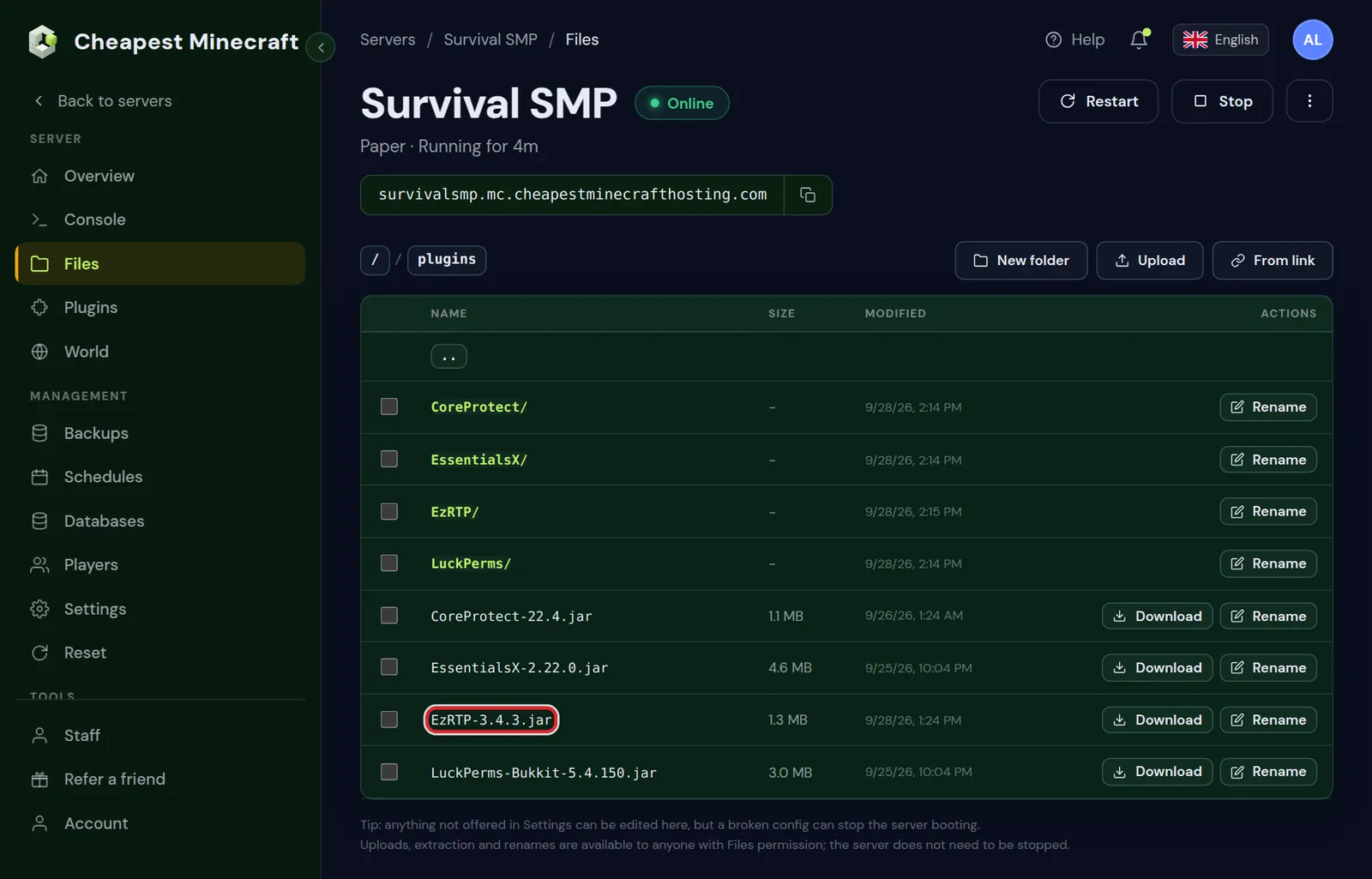
After the restart, the folder plugins/voicechat holds a file named voicechat-server.properties. That file has to exist before the next step can write the port into it.
Install Simple Voice Chat on a Fabric, Forge or NeoForge server
- Open the Mods tab of your server and search for
Simple Voice Chat. - Install the build for your mod loader and your Minecraft version.
- On Fabric, also install Fabric API if the server does not have it yet.
- Restart the server once, so the settings file is made.
On a modded server the file is at config/voicechat/voicechat-server.properties. Many modpacks already contain Simple Voice Chat. In that case you skip the install and only open the port. Install mods on a Minecraft server explains the Mods tab and uploads by hand.
A Paper server with the plugin works with players who run the Fabric, Forge or NeoForge version of the mod. The two sides do not have to use the same loader, only versions that match.
Open the voice chat port in the control panel
This is the step that makes voice chat connect. On a server in Poland you do it yourself in the Ports tab, and it is free.
- Click Ports in the menu on the left, then Add a port.
- Under What is it for?, choose Simple Voice Chat. The protocol is set to UDP for you.
- Leave the port number on Auto and click Open port.
- In the Next step box, click Set it for me. The panel writes the port and the voice host into
voicechat-server.propertiesand keeps a copy of the old file. - Restart the server.
- Click Test on the port.
The test often answers no reply, which is normal for most UDP programs. That is fine: voice chat does not reply to a test packet, and nothing refused it. The real test is joining with the mod installed.
On a server in Germany or Canada there is no Ports tab yet. Send a message to support with the name of your server and the words Simple Voice Chat, and we open the port and set the file for you, at no cost.
Only the owner of the server sees the Ports tab. Open a port on your Minecraft server describes every button on that page, including who may connect and the flood limits.
Why the default port 24454 does not work by itself
Out of the box, Simple Voice Chat listens on UDP port 24454. On a home computer you would forward that port on your router. On a hosted server the number has to be one that is open for your server, and no two servers can share it.
That is what the Ports tab arranges. It gives your server a port number of its own and tells you which number the plugin has to listen on. Two lines in the settings file carry it:
| Line in voicechat-server.properties | What it does | What to put there |
|---|---|---|
port | The port the plugin listens on inside the server | The server port the Ports tab shows |
voice_host | The address the mod of each player connects to for sound | Your play address with the public port number |
Set it for me fills in both. If you edit the file by hand, copy the two values from the port in the Ports tab exactly, save, and restart. A voice_host that is empty or wrong is the reason voice works for nobody even though the port is open.
What your players install to use voice chat
Every player who wants to talk or listen needs the mod in their own game. Send them this list.
- Install Fabric, Forge or NeoForge for the Minecraft version of the server. Fabric is the lightest when you only want voice chat.
- Download Simple Voice Chat for that loader and version, and put the file in the
modsfolder of your Minecraft installation. - On Fabric, put Fabric API in the same folder.
- Start the game with that profile and join the server.
- The first time, a chat message asks you to set up voice chat. Press V and follow the guide: choose your microphone, your speakers, and push to talk or voice activation.
The keys players use
| Key | What it does |
|---|---|
| V | Opens the voice chat menu: volume per player, groups, microphone test and settings |
| M | Mutes or unmutes your microphone, when you use voice activation |
| N | Turns voice chat off or on for yourself. Nobody hears you and you hear nobody |
| H | Hides or shows the voice chat icons on screen |
| The key you picked in the setup guide | Push to talk. The mod has no push to talk key until you choose one |
These are the keys the mod starts with. Players can change them under Options, Controls, Key Binds, where whisper and the group menu can get a key of their own too. A player who hears nothing should open the menu with V first and run the microphone test there.
Players who join a modded server already have the mod when it is part of the modpack. Join a modded Minecraft server shows how to get the same mod list as the server.
Simple Voice Chat server settings worth changing
The plugin works with its own defaults. These lines in voicechat-server.properties are the ones server owners change most. Edit the file in the Files tab, save and restart.
| Setting | Starts as | What it changes |
|---|---|---|
max_voice_distance | 48 | How many blocks away a player can still be heard |
whisper_distance | 24 | How many blocks a whisper carries |
enable_groups | true | Whether players can make groups that hear each other anywhere |
force_voice_chat | false | Set to true to kick players who do not have the mod |
allow_recording | true | Whether players can record the voice chat from their own game |
spectator_interaction | false | Whether spectators can talk to other players |
spectator_player_possession | false | Whether a spectator can talk to the player they are watching |
A distance of 48 blocks suits a survival world. For a roleplay or horror server, 16 to 24 blocks makes players come closer to talk. For an event with one speaker, raise it or use a group.
Leave port and voice_host alone once voice chat works. They belong to the port from the Ports tab.
Edit Minecraft server files shows the editor in the Files tab, and how to put a file back when a change goes wrong.
Groups, commands and permissions
A group is a private call inside the server. Members hear each other at any distance, and players outside it do not hear them. Players open the voice chat menu with V, go to groups, give the group a name and, if they want, a password.
| Command | What it does |
|---|---|
/voicechat help | Lists the commands of the mod |
/voicechat test <player> | Checks whether that player is connected to voice chat. For operators only |
/voicechat invite <player> | Invites a player to your group |
/voicechat join <group> | Joins a group by name |
/voicechat leave | Leaves your group |
The commands are typed in the game chat, by a player who has the mod installed. They do not work from the console of the server.
On Paper and Purpur you can decide who may talk with a permissions plugin. The permission names are voicechat.speak, voicechat.listen, voicechat.groups and voicechat.admin. Everyone has the first three from the start, and only operators have the last. Taking voicechat.speak from a rank mutes those players for everyone, which is a clean way to handle someone who misuses the microphone. Permissions with LuckPerms explains ranks and permissions.
Simple Voice Chat not working: the crossed plug and other fixes
When voice chat cannot reach the server, the mod shows a small plug icon with a cross in the corner of the screen. Find your case in the table.
| What you see | Cause | Fix |
|---|---|---|
| Crossed plug for every player | The UDP port is not open, or the settings file has the wrong port or voice host | Add the port in the Ports tab, click Set it for me, restart |
| Crossed plug right after adding the port | The server has not restarted since | Restart the server, then let players join again |
| Crossed plug for one player only | That player's network blocks UDP, common on school, work and some mobile connections, or a VPN is in the way | Try another network or turn the VPN off |
| A message that the voice chat version is not compatible | The mod of the player and the one on the server are too far apart | Update both to the newest release for your Minecraft version |
| Connected, but nobody hears you | Wrong microphone, muted, or push to talk without holding the key | Press V, pick the microphone, run the microphone test, and check that you are not muted. After the setup guide the microphone starts muted when you chose voice activation |
| You hear players only when they are close | That is proximity chat working as designed | Make a group from the menu behind V, or raise max_voice_distance |
| Voice stopped after you changed the server address | The voice host still points at the old address | Open the port in the Ports tab and click Set it for me again, then restart |
| Bedrock or console players hear nothing | Bedrock cannot load the mod | Only Java players can use voice chat |
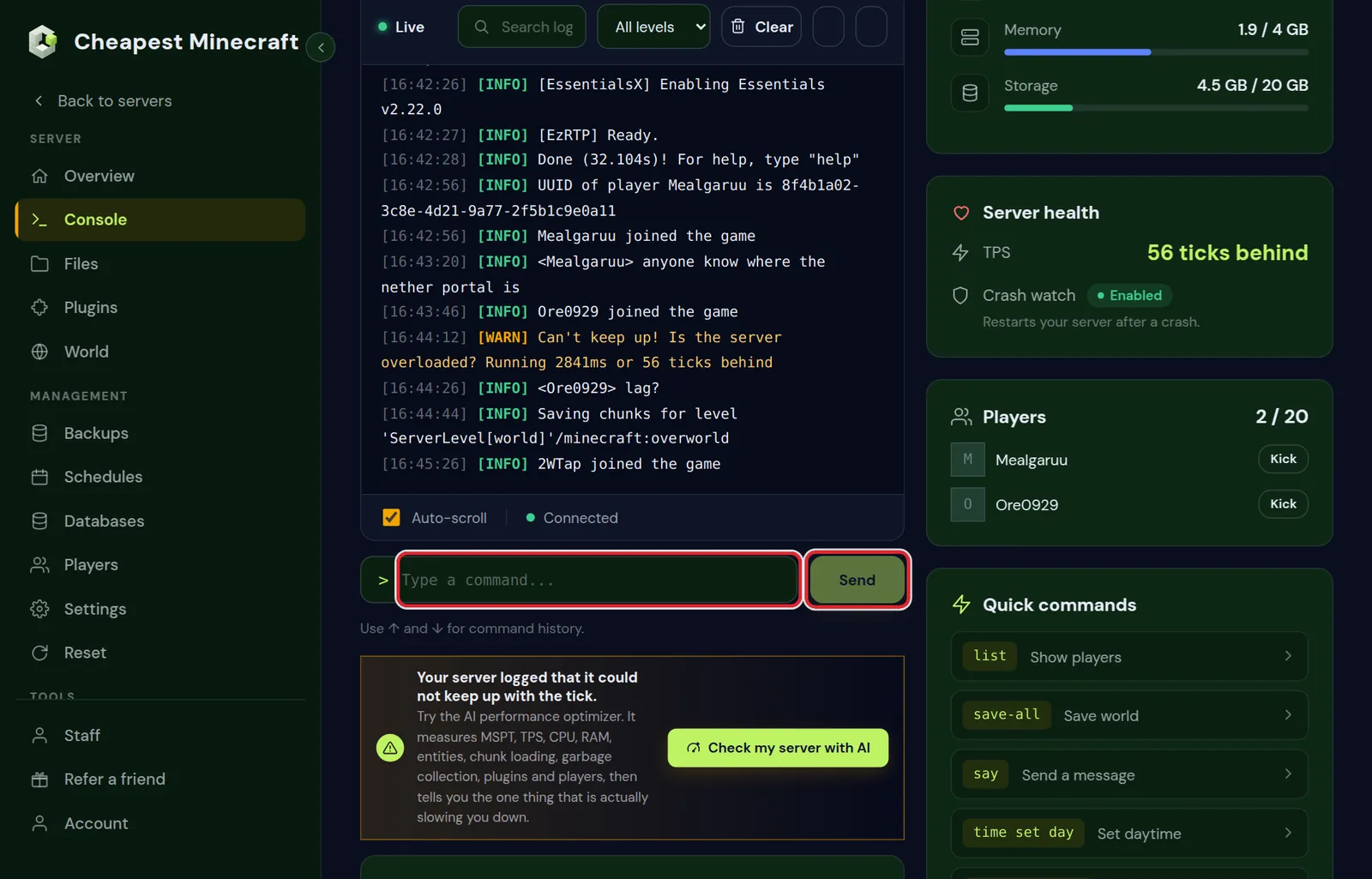
Still stuck? Open the Console tab and look at the lines the plugin writes at startup. It says which port it started on. That number has to be the server port the Ports tab shows. Read Minecraft server logs helps you find those lines.
Does voice chat slow the server down?
Hardly. The server does not mix or process the sound; it passes small packets from the player who talks to the players near enough to hear. On a server for friends you will not see it in the memory graph or the tick time.
What does matter on a busy server is the distance. With a large max_voice_distance and many players in one place, every voice goes to everyone. Keep the distance modest on a public server, and let big gatherings use groups.
You do not need a bigger plan for voice chat. If the server lags, the cause is somewhere else; reduce lag on your Minecraft server lists where to look.
Questions from Minecraft server owners
What port does Simple Voice Chat use?
UDP port 24454 by default, set on the port line of voicechat-server.properties. On a hosted server you use the port your host opens for you instead. On our servers the Ports tab gives you the number and writes it into voicechat-server.properties with Set it for me.
Do all players need the Simple Voice Chat mod?
Only the players who want to talk or listen. Players without the mod can still join and play, unless you set force_voice_chat to true.
Does Simple Voice Chat work on a Paper server?
Yes. There is a plugin version for Paper and Purpur. Players join with the Fabric, Forge or NeoForge version of the mod in their own game.
Why does Simple Voice Chat say it is not connected?
The mod cannot reach the voice port of the server. Open a UDP port for Simple Voice Chat, set the port and the voice host in voicechat-server.properties, and restart the server.
Can Bedrock and console players use Simple Voice Chat?
No. Simple Voice Chat is a Java mod, and Bedrock on phones, tablets and consoles cannot load it. On a crossplay server only the Java players can talk.
Where is the Simple Voice Chat config file on the server?
On Paper and Purpur it is plugins/voicechat/voicechat-server.properties. On Fabric, Forge and NeoForge it is config/voicechat/voicechat-server.properties. The file appears after the first start with the mod installed.
How do I change how far voices carry?
Change max_voice_distance in voicechat-server.properties. It starts at 48 blocks. Save the file and restart the server.
Does opening the voice chat port cost extra?
No. Opening a port for voice chat is free on our servers, in every location.
Checked against the Plugins, Mods, Files and Ports tabs of our control panel and the server settings file of Simple Voice Chat on a Paper server, November 2026. Written by the Cheapest Minecraft Hosting team, first published , updated .