
 Astroworld
Troubleshooting
Fix "Can't keep up! Is the server overloaded?" on a Minecraft server
Every Minecraft server sooner or later writes this warning in its log. It sounds alarming, and players often notice something at the same moment: blocks that come back, mobs that jump, a short freeze.
One warning is no reason to change anything. A warning every few minutes is. This guide explains the line, how to tell the two apart, and how to find the cause.
In short
"Can't keep up! Is the server overloaded? Running 2841ms or 56 ticks behind" means the server fell more than two seconds behind its schedule of 20 ticks per second and skipped the missed ticks to catch up. Once at start or after a big save it is harmless. When it repeats every few minutes during play, something takes too much time per tick: usually entities, chunk generation, a heavy plugin or a server short of memory.
What "Can't keep up! Is the server overloaded?" means
[16:44:12 WARN]: Can't keep up! Is the server overloaded? Running 2841ms or 56 ticks behindA Minecraft server runs 20 ticks per second, one every 50 ms. When ticks take longer than that, the server falls behind its own clock. Once it is more than 2 seconds behind, it writes this warning and skips the ticks it missed instead of trying to run them all at high speed.
| Part of the line | Meaning |
|---|---|
Running 2841ms | How far behind the server was, in milliseconds |
or 56 ticks behind | The same delay counted in ticks of 50 ms; these ticks are skipped |
WARN | A warning, not an error; the server keeps running |
The server writes the warning at most once every 15 seconds. Several lines close together mean the server stayed behind for a while.
When the Can't keep up warning is harmless
- Once at start. Loading the world, plugins and mods takes a few seconds in which the first ticks run late.
- Right after a large world save, such as
save-allon a big world, or a backup that flushes the world. - After a big one-off event: a large TNT blast, a WorldEdit operation, or a player teleporting into land that has to be generated.
- After a long garbage collection pause on a server that is otherwise fine.
In all of these cases the warning appears once or twice, TPS goes back to 20, and players notice at most a short hitch. There is nothing to fix.
When the warning is a real problem
| Pattern in the log | What it points at |
|---|---|
| A warning every few minutes during play | The server is short of tick time all the time |
| Warnings only when many players are online | Load per player: view and simulation distance, or memory |
| Warnings when players explore new land | Chunk generation |
| Warnings in one area, when a player is near a base | A farm, redstone clock or pile of entities in that area |
| Warnings that grow over hours until a crash | A memory leak or memory too small for the server |
| Hundreds or thousands of ticks behind | A long freeze; check for a watchdog warning or a crash right after |
Count how often it happens. Note the time of each warning and what players were doing. That pattern is the fastest route to the cause.
Find Can't keep up in the console and in older logs
- Open the Console tab.
- Type
keep upin the Search logs... box, or pick Warnings in the level filter next to it. - Look at the times of the lines and what happened just before each one: joins, saves, commands.
- For earlier days, open the
logsfolder in the Files tab.latest.logis the current log; older days are packed as.log.gzfiles you can download.
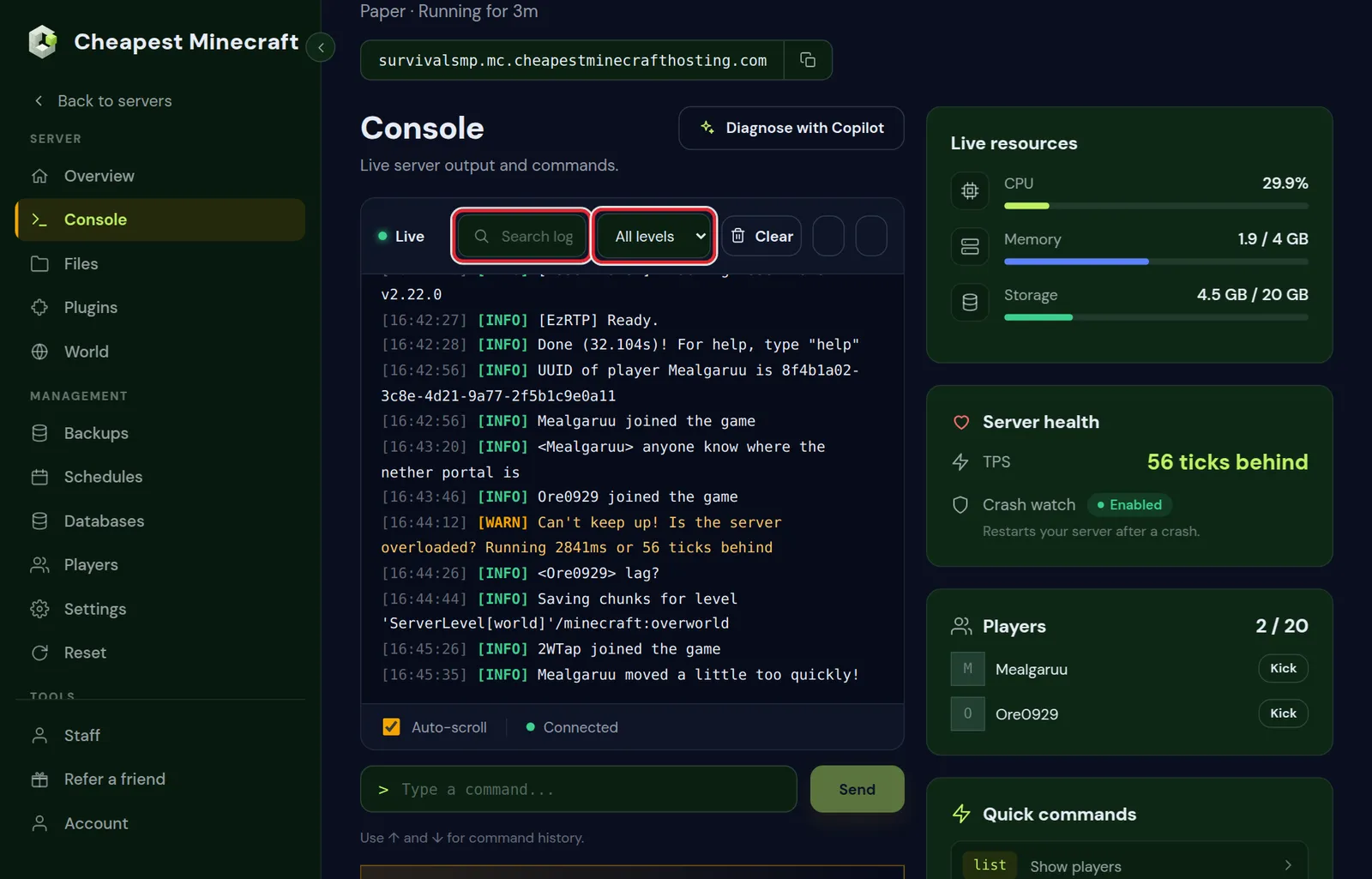
While a recent warning is on screen, the Server health card next to the output shows how many ticks the server was behind, such as 56 ticks behind, for five minutes. A strip on the same tab counts the warnings when there are several, with a Check my server with AI button that opens the AI Copilot for a performance check.
Measure where the tick time goes
The warning tells you that the server is behind, not why. Measure it while the warnings happen:
- Type
spark tpsin the console. A median tick time above 50 ms confirms the server is behind; a normal median with a high maximum means spikes. - Run
spark profiler start --timeout 120while the problem is there. - Open the link spark posts after two minutes and expand the largest branch.
spark is built into Paper and Purpur, and is a plugin or mod on other servers. Reduce lag shows how to read the report and what each common result means.
Common causes and fixes
| Cause | Fix |
|---|---|
| Too many entities in loaded chunks | Thin out mob farms and item piles; on Paper, paper entity list shows where they are |
| High simulation distance | Lower Simulation distance (chunks) in Settings to 5 or 6 |
| Players generating new land | Pre-generate the world and set a world border |
| Memory full, long garbage collection | Check the Memory graph on the Overview tab; see how much RAM |
| A heavy plugin or mod | Update it, change its settings, or replace it |
| Hopper chains and redstone clocks | Ask players to switch clocks off and shorten hopper lines |
| Vanilla server software | Switch to Paper in Settings; it runs the same world with less work per tick |
Change one thing at a time and watch the log for a day. If the warnings stop, you found it.
Can't keep up right after the server starts
A warning during the first minute is expected. When the server is behind for several minutes after every start, look at what runs at startup:
- Plugins that scan or convert data on start, such as after an update.
- A world that is being upgraded to a new Minecraft version; the first start after a version change takes longer.
- Large spawn areas kept loaded, or chunk loaders in a modpack.
If the server then crashes or stops responding, follow Minecraft server keeps crashing.
Turning the warning off
On Paper, Purpur and Spigot, warn-on-overload under settings in bukkit.yml controls the warning. Setting it to false hides the line.
Hiding it does not make the server faster, and the panel can no longer show how far behind the server was. Leave it on while you look for the cause; it is the clearest sign of when the server struggles.
Questions from Minecraft server owners
Is Can't keep up a problem on my Minecraft server?
Once at start or after a big save, no. Repeated during play, yes: the server does not finish its ticks in time and players feel lag.
What does "Running 2841ms or 56 ticks behind" mean?
The server was 2.8 seconds behind its schedule, which is 56 ticks of 50 ms. It skipped those ticks to catch up.
Does more RAM fix Can't keep up?
Only if memory was full. When the memory graph has room, the cause is the work per tick, such as entities, chunk generation or a plugin.
Why does Can't keep up appear when nobody is online?
Farms and machines in chunks that stay loaded still run, and a world save can cause a single warning. Repeated warnings with no players point at loaded chunks or a plugin.
Can I hide the Can't keep up message?
On Paper and Spigot, set warn-on-overload: false in bukkit.yml. It only hides the line; the lag stays.
Why do players get kicked after Can't keep up?
During a long freeze players can time out, or get kicked for moving too fast or floating when their movement arrives in bursts. Fix the lag and those kicks stop.
Checked against the Console tab of our control panel on Paper and vanilla Minecraft Java 26.2, October 2026. Written by the Cheapest Minecraft Hosting team, first published , updated .