
 Astroworld
Troubleshooting
Fix "java.lang.OutOfMemoryError: Java heap space" on a Minecraft server
Java keeps everything the server works with in one block of memory, the heap: the loaded world, the players, the entities and the data of every plugin and mod. When the heap is full and Java cannot free enough, it throws an OutOfMemoryError. The server then freezes, crashes or keeps running in a broken state.
This guide shows how the heap of your server is set, how to see that memory is the problem, and how to fix each of the common causes.
In short
java.lang.OutOfMemoryError: Java heap space means Java tried to make room for new data and the heap was full. On a Minecraft server that comes from too many loaded chunks, a modpack that is too big for the memory, or a plugin or mod that keeps data it no longer needs. Lower the view distance, pre-generate the world, update or remove the plugin that leaks, and restart. When the server simply needs more memory, contact support or order a larger server.
What the OutOfMemoryError lines mean
| Line in the log | What ran out |
|---|---|
java.lang.OutOfMemoryError: Java heap space | The heap is full; the server needs more than it has, or something holds on to too much |
java.lang.OutOfMemoryError: GC overhead limit exceeded | Java spends almost all its time cleaning up and frees almost nothing; the heap is full in practice |
java.lang.OutOfMemoryError: unable to create native thread | The server or a plugin started too many threads; often a plugin bug |
The first two are the usual ones. Both mean the same thing for you: the data the server keeps is bigger than its heap.
How the panel sets the Java heap from your plan
When we set up a server, the panel gives Java a heap a little below the memory of the plan. The rest of the plan's memory is for what Java needs outside the heap: its own code, threads and network buffers. The margin is 15% of the plan, at least 768 MB and at most 2 GB.
| Plan memory | Java heap | Room outside the heap |
|---|---|---|
| 2 GB | 1,280 MB | 768 MB |
| 4 GB | 3,328 MB | 768 MB |
| 8 GB | About 6.8 GB | About 1.2 GB |
| 12 GB | About 10.2 GB | About 1.8 GB |
| 16 GB and more | Plan minus 2 GB | 2 GB |
You do not set the heap yourself; the Startup card in Settings only chooses the Java version and the start file. How much RAM a Minecraft server needs explains why a heap the size of the whole plan would make the server crash without a line in the log.
Check the memory graph and the console
- Open the Overview tab and click Memory in the Performance card. Pick 24 hours or 7 days.
- Look at the moments the server crashed or froze. A line that climbs to the top and stays there points at memory.
- Open the Console tab. The Live resources card shows memory now, against the plan.
- When the output shows an
OutOfMemoryError, a strip on the Console tab says "Your server ran out of memory in the output above."
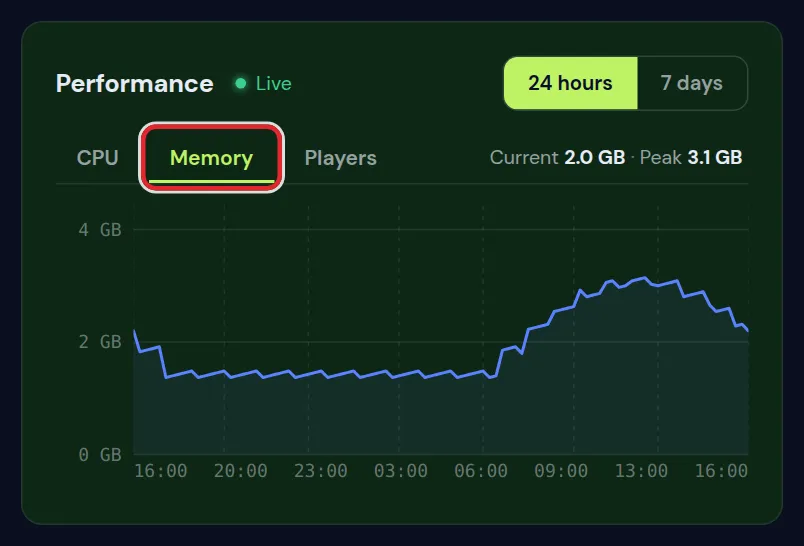
| Shape of the memory line | What it means |
|---|---|
| Saw tooth: up, down, up, down | Healthy; Java fills memory and cleans it up |
| Up with the players in the evening, down at night | Normal; more players load more chunks |
| Steady climb over hours or days, never back down | A memory leak in a plugin or mod |
| Flat against the top during play | The server needs more memory than it has |
After a crash with this error, the Server health card on the Console tab can show why the server stopped last time, with the plugin or mod that was busy when memory ran out, if the log names one.
Cause 1: too many loaded chunks
Every loaded chunk lives in the heap with its blocks, entities and block entities. More chunks are loaded when the view distance is high, when players are spread out, and when chunks are kept loaded by plugins, spawn chunks or chunk loaders in modpacks.
- Lower View distance (chunks) in Settings to 8, and Simulation distance (chunks) to 6. Save and restart.
- Pre-generate the world so exploring does not create new chunks that pass through memory.
- On modded servers, look for chunk loaders that players placed and forgot; each keeps its chunks in memory all the time.
Cause 2: a modpack that is too heavy for the memory
Every mod loads its own code, recipes and data into the heap before a single player joins. A large modpack can use most of the heap at idle.
- Start the server with nobody online and wait a few minutes.
- Read the memory on the Live resources card.
- If idle memory is already above two thirds of the plan, there is not enough room for players. Remove optional mods you do not use, or move to more memory.
The memory a pack needs is usually on its own page; install a modpack and the modpack pages list it for the packs we cover.
Cause 3: a memory leak in a plugin or mod
A leak is a plugin or mod that keeps data it no longer needs, such as a list of every player who ever joined, or every block a player ever broke. Memory then grows slowly until it runs out, often after a day or two of uptime.
- On Paper and Purpur, type
spark heapsummaryin the console shortly after a restart, and again a few hours later. - Open both reports and compare. A class with a plugin or mod name that grew a lot points at the leak.
- Update that plugin or mod. Leaks are often fixed in a newer version.
- If there is no fix, remove it or look for an alternative.
Until it is fixed, a daily restart clears the heap before it fills up. Schedule automatic restarts shows how.
Other causes: farms, item piles and world edits
- Huge mob or item farms with thousands of entities in loaded chunks. Each entity takes memory. Find them with
paper entity liston Paper. - Large WorldEdit operations, such as copying or replacing millions of blocks at once. Work in smaller pieces, or use FastAsyncWorldEdit.
- Big maps with many item frames, such as image walls. Each map holds its own data.
When the server needs more memory
If the memory sits at the top during normal play, after you lowered the view distance and checked for leaks, the server needs a larger plan. You cannot change the plan in the panel yourself. Contact support, 24/7, or order a larger server on the configurator and move your world over.
More memory does not fix a leak; it only makes the server run longer before it fills up. Check for a leak first.
Questions from Minecraft server owners
What does java.lang.OutOfMemoryError: Java heap space mean?
Java's memory for the server, the heap, is full and Java cannot free enough room for new data. The server then freezes or crashes.
Can I give my Minecraft server more heap with -Xmx?
Not on our panel. The heap is set from your plan when the server is created, with room left for Java itself. For more heap you need a plan with more memory.
Why does my server run out of memory after a day?
A slow climb that never comes back down is usually a memory leak in a plugin or mod. Compare two spark heapsummary reports a few hours apart to find it.
Will lowering the view distance fix OutOfMemoryError?
Often, yes. Fewer loaded chunks per player means a smaller heap. It does not fix a leak or a modpack that is too big for the memory.
How do I get more memory for my server?
Contact support or order a larger server and move your world over. Plan changes are not made in the panel.
Does a restart fix OutOfMemoryError?
It clears the heap, so the server runs again. The error comes back unless you fix the cause.
Checked against the Overview and Console tabs and the startup settings of our control panel on Paper for Minecraft Java 26.2, October 2026. Written by the Cheapest Minecraft Hosting team, first published , updated .