
 Astroworld
Troubleshooting
Is my Minecraft server down? How to check in two minutes
"The server is down" can mean many things: the server stopped, it is stuck, the address does not lead to it, the Minecraft login service has a problem, or one player's internet is out. Each has another fix.
Work through the checks below in order. Most of the time the first or second step gives the answer.
In short
To check whether your Minecraft server is down, open the control panel: the status next to the server name says Online, Starting, Stopping or Offline, and the last lines in the Console tab say why it stopped. If the panel says Online but nobody can join, try from another network such as mobile data and check whether players can join other servers, because the Minecraft login service may be down. Our /uptime page shows how each part of the service performed over the last 30 days.
1. Check the server status in the control panel
Open your server in the control panel. The label next to the server name shows the state:
| Status | What it means | What to do |
|---|---|---|
| Online | The server process runs | Go to step 3 if players still cannot join |
| Starting | The server is loading the world and plugins | Wait; a modded server can take a few minutes |
| Stopping | The server is saving and shutting down | Wait until it says Offline |
| Offline | The server is not running | Read the console, then press Start |
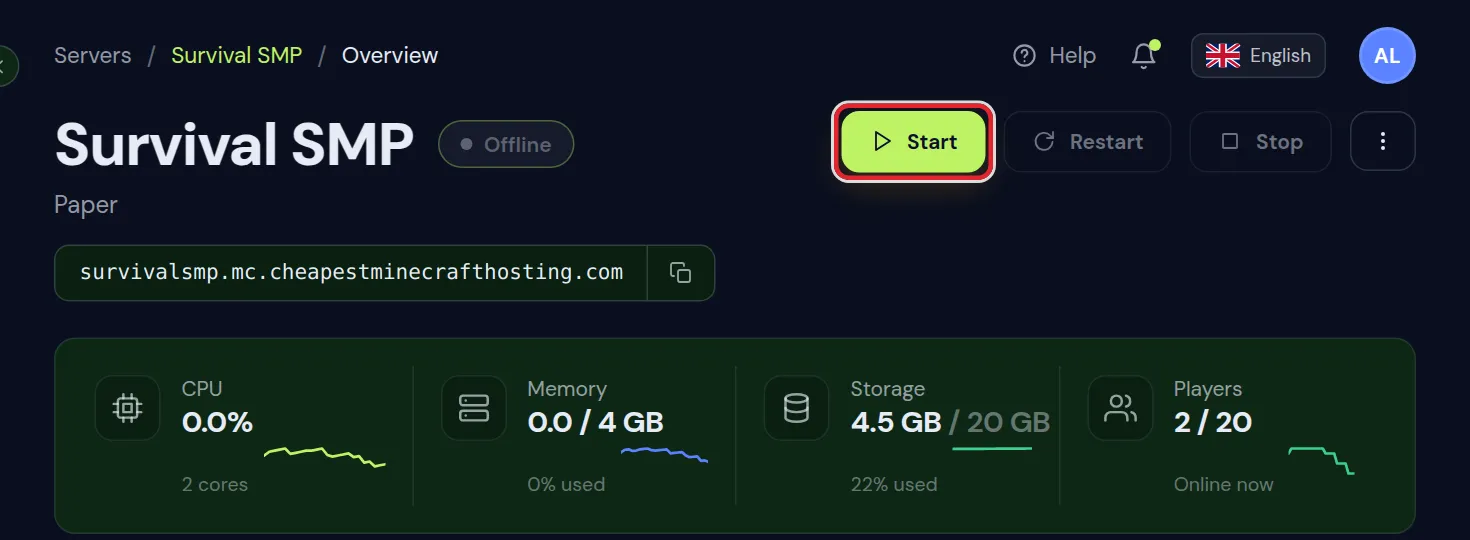
If the server is suspended, a notice on the Overview tab says so and asks you to settle the outstanding invoice. See billing and invoices.
2. Read the last lines in the Console tab
A server that stopped by itself almost always writes the reason in its last lines. Open the Console tab and scroll to the bottom.
| Last lines show | Likely cause | Next step |
|---|---|---|
| An error with a plugin or mod name | That plugin or mod crashed the server | Update or remove it |
java.lang.OutOfMemoryError | The server ran out of memory | Check the memory graph on Overview |
| The watchdog and a thread dump | The server froze for too long | Look for a lag machine or a heavy plugin |
Stopping server with nothing else | Someone or a schedule stopped it | Check the Activity tab |
| Nothing after a start | The server is still loading | Wait a minute and look again |
Crash watch, shown in the Server health card on the Console tab, starts a crashed server again by itself and can show why it stopped last time. Minecraft server keeps crashing helps when it happens more than once.
3. The panel says Online but nobody can join
- Players use an old or wrong address. Copy the address from the top of the panel with the copy button and compare.
- The versions do not match. A player with another Minecraft version gets a version message, not a timeout.
- The whitelist is on and the player is not on it.
Each of these, with the exact message players see, is covered in can't connect to your server.
4. Check from another network
When only one player cannot reach the server, the problem is often their own connection, router or network filter.
- Ask a second player to join. If they can, the server is up.
- Let the first player try from another network, such as a phone hotspot with mobile data.
- If it works there, the problem is with the player's home network: a router, a firewall, a school or work network, or a parental filter.
A server list entry that keeps showing "Pinging..." or "Can't connect to server" for one player only, while others play, points at that player's network.
5. Is the Minecraft login service down?
Every Java server with online mode on checks each joining player with the Minecraft login service. When that service has a problem, players cannot join any online server, also yours, even though your server runs fine.
- Players see
Failed to verify username!orAuthentication servers are down. Please try again later, sorry!. - The same players cannot join other well-known servers either.
- Players who were already online usually keep playing.
There is nothing to change on your server. Wait; these outages are usually short. Do not turn off online mode to get around it, because that lets anyone join under any name.
6. Check our uptime page
Our uptime page shows the availability of each part of the service over the last 30 days: Minecraft servers, play addresses, the server platform, the control panel, the account area, sign in, ordering, the website and the nightly backups. It also explains what counts as downtime and links to the live status.
Your own server's history is on the Overview tab of the panel. The Availability card shows how often your server answered our checks since it was created, as a percentage and a row of bars over time.
A server that you stopped yourself counts as not reachable in your own history, because from the outside a stopped server and a crashed one look the same.
7. Get told when your server goes down
- Crash watch restarts the server after a crash and you get an email about it.
- Discord notifications on the Overview tab post to your Discord when the server goes down or comes back online. Click Set up on the card.
A scheduled restart clears the memory of a server that runs for days; see schedule automatic restarts.
8. Still down? Contact support
If the panel itself does not load, the server will not start and the console gives no clear reason, or the uptime page shows a problem, contact support. Technical support answers 24/7.
- The name of the server.
- The time it went down, as close as you know.
- The last lines of the console, copied as text.
- What players see when they try to join.
Questions from Minecraft server owners
How do I know if my Minecraft server is down?
Open the control panel. Offline next to the server name means it is not running; the last lines in the Console tab say why.
My server is Online but nobody can join. Why?
Players may use an old address, the versions may differ, the whitelist may block them, or the Minecraft login service may be down.
Why can only one player not connect?
Usually their own network. Let them try from mobile data. If that works, their router, firewall or a network filter blocks the connection.
Is it my server or the Minecraft login service?
If players cannot join other well-known servers either and see Failed to verify username or Authentication servers are down, it is the login service.
Where can I see the uptime of your servers?
On our /uptime page, per part of the service over the last 30 days. Your own server's history is in the Availability card on the Overview tab.
Will my server start again after a crash?
Yes, with Crash watch enabled the panel restarts it and emails you. If it keeps crashing, find the cause in the console.
Checked against the Overview and Console tabs of our control panel and the uptime page of this site, October 2026. Written by the Cheapest Minecraft Hosting team, first published , updated .