
 Astroworld
Performance
Minecraft server TPS and MSPT explained
A Minecraft server works in ticks. In every tick it moves mobs, grows crops, runs redstone, handles what players did and sends the result back. Two numbers describe how well that goes: TPS and MSPT.
This guide explains both numbers, the commands to read them, what the panel shows, and the usual reasons a server falls below 20 TPS.
In short
TPS is the number of ticks per second a Minecraft server runs, and the target is 20. MSPT is the number of milliseconds one tick takes, and it must stay under 50 to keep 20 TPS. Check them with /tps and /mspt on Paper or /tick query on vanilla. When MSPT goes over 50, TPS drops and everything in the game slows down.
What TPS means on a Minecraft server
TPS stands for ticks per second. A Minecraft server aims for 20 ticks every second, so one tick every 50 milliseconds. The game clock is built on that: a day lasts 24,000 ticks, which is 20 minutes at 20 TPS.
A server never runs faster than 20 TPS. When it falls below, the game itself slows down. At 10 TPS a day lasts 40 minutes, crops grow at half speed and mobs move in jumps.
| TPS | What players notice |
|---|---|
| 20 | Nothing, the server keeps up |
| 18 to 19.9 | Hardly anything; short dips are normal |
| 15 to 18 | Blocks that come back after breaking, mobs that stutter, slower furnaces |
| 10 to 15 | Clear lag: rubber banding, delayed doors and buttons, slow farms |
| Under 10 | The server feels broken; players get pulled back and may time out |
What MSPT means and why 50 ms is the limit
MSPT stands for milliseconds per tick: how long the server needs to do the work of one tick. With 20 ticks per second, each tick has a budget of 50 ms.
- MSPT under 50: the tick is done in time. The server waits for the rest of the 50 ms and TPS stays at 20.
- MSPT over 50: the tick takes longer than its slot. The next tick starts late and TPS drops. At 100 MSPT, the server manages about 10 TPS.
MSPT is the more useful number of the two. A server at 20 TPS with 45 MSPT is close to the edge, and one busy moment drops it. A server at 20 TPS with 15 MSPT has a lot of room. TPS shows the same 20 for both.
| MSPT | Room left in the 50 ms budget |
|---|---|
| Under 25 | Plenty, the server can take more players or farms |
| 25 to 40 | Fine, but watch it as the server grows |
| 40 to 50 | Close to the limit; busy moments will drop TPS |
| Over 50 | Behind; TPS is below 20 |
How to check TPS and MSPT on a Minecraft server
| Command | Server type | What it shows |
|---|---|---|
tps | Paper, Purpur, Spigot | TPS over the last 1, 5 and 15 minutes |
mspt | Paper, Purpur | Average, minimum and maximum tick time over the last 5 seconds, 10 seconds and 1 minute |
tick query | Every Java server from 1.20.3 | The target tick rate and the average time per tick, with percentiles |
spark tps | Any server with spark; built into Paper | TPS over five windows and tick times with the 95th percentile |
Type them in the Console tab without the slash, or in the game with a slash as an operator. Run them when players report lag, not afterwards: a 15 minute average hides a five minute dip.
Leave tick rate and tick freeze alone on a live server. They change the speed of the game for everyone on the server.
The TPS in the Server health card of the control panel
The Console tab has a Server health card next to the output. It shows a TPS line and the Crash watch setting.
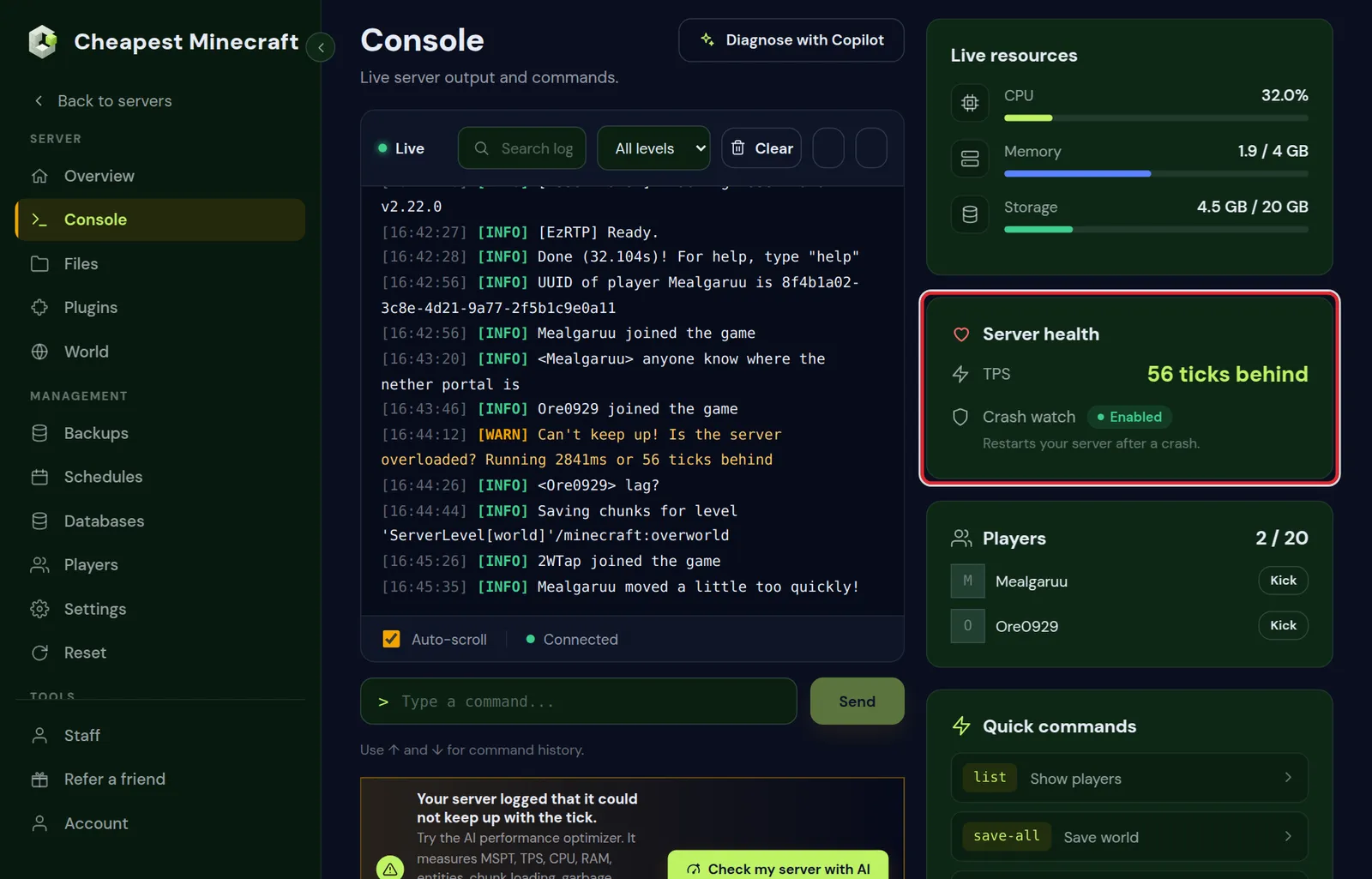
The panel sends no command to measure TPS. It reads the console output that is already on your screen:
- While the server runs and has not logged a delay in the last five minutes, the card shows 20.0.
- When the server logs a line such as
Can't keep up! Is the server overloaded? Running 2841ms or 56 ticks behind, the card shows the number of ticks from that line, such as 56 ticks behind, for five minutes. - When the server is stopped, the card shows a dash.
When the output shows such a line, a strip on the Console tab says so, and with several lines it counts how often the server fell behind. Its Check my server with AI button opens the AI Copilot with a performance check ready to send. For an exact TPS and MSPT, use the commands above.
Common causes of low TPS
| Cause | How you recognise it |
|---|---|
| Too many entities | Mob farms, villager halls or piles of dropped items; MSPT rises when players are near them |
| High simulation distance | MSPT goes up with every player online, spread over the map |
| New chunks being generated | Lag when players explore new land, quiet when they stay home |
| Hoppers and redstone clocks | Constant load, also at night when the area is loaded |
| A heavy plugin or mod | spark shows its name at the top of the report |
| Short of memory | Memory graph at the top and long garbage collection pauses |
| World saves | A spike every few minutes, at the moment of the autosave |
Reduce lag works through these causes in order, from measuring with spark to the settings that fix each one.
Low TPS or high ping: server lag versus connection lag
Players say "lag" for two different problems. Check which one you have before changing anything.
| Low TPS (server lag) | High ping (connection lag) | |
|---|---|---|
| Who feels it | Everyone at the same time | One player or a few |
| TPS and MSPT | TPS below 20, MSPT over 50 | 20 TPS, MSPT under 50 |
| Typical signs | Slow crops, stuttering mobs, blocks reappearing | Delayed hits, rubber banding for that player only |
| Where to fix it | On the server | The player's own connection or distance to the server |
Low frame rate on a player's computer is a third kind. It shows as a choppy picture even in single player, and the server cannot change it.
TPS on a modded Minecraft server
Fabric, Forge and NeoForge have no /tps or /mspt of their own. Use tick query, which every current Java server has, or add the spark mod for the same view as on Paper. Forge and NeoForge also have forge tps and neoforge tps, which list the tick time per dimension.
Modded servers often run at a higher MSPT at the same TPS than Paper, because every mod adds work to the tick. A modpack that idles at 30 MSPT with one player has less room for a group; see how much RAM a Minecraft server needs for sizing a modded server.
Questions from Minecraft server owners
What is a good TPS for a Minecraft server?
20, the maximum. Short dips to 19 are normal. A server that stays below 18 has a problem worth looking into.
What is a good MSPT?
Under 50 ms keeps 20 TPS. Under 30 ms leaves room for busy moments and more players.
How do I check TPS on my Minecraft server?
Type tps in the console on Paper, Purpur or Spigot, or tick query on vanilla and modded servers. spark tps gives the most detail.
Can a Minecraft server run above 20 TPS?
Not in normal play. 20 is the target, and a server that finishes a tick early waits for the next slot.
Does more RAM raise TPS?
Only when the server was short of memory. Low TPS from farms, redstone or plugins depends on how much work each tick has, and memory does not change that.
Why does the panel show 20.0 TPS while players lag?
The panel only lowers the number when the server logs that it fell behind. If players lag at 20 TPS, the cause is often ping or their own frame rate.
Checked against the Console tab of our control panel and Paper and vanilla Minecraft Java 26.2, October 2026. Written by the Cheapest Minecraft Hosting team, first published , updated .