
 Astroworld
Plugins and mods
How to change your Minecraft server type without losing the world
The server type is the software that runs your Minecraft server. Paper and Purpur load plugins, Fabric, Forge and NeoForge load mods, and Vanilla runs the game exactly as Mojang releases it. You change it in the Settings tab of the control panel.
The panel stops the server and takes a backup before it changes anything. This guide covers what each switch does to plugins, mods and the world, what to check afterwards and how to go back.
In short
To change your Minecraft server type, open the Settings tab, pick the new type under Server type in the Server software card and click the Switch to button, such as Switch to Fabric. The panel stops the server, makes a backup and installs the new software; the world, server.properties and play address stay. Plugins only load on Paper and Purpur and mods only on Fabric, Forge and NeoForge, but their files stay on the disk.
Minecraft server types you can switch between
The Server type list offers six types. Which tab you get in the panel depends on the type:
| Server type | Loads | Tab in the panel | Common use |
|---|---|---|---|
| Paper | Bukkit and Paper plugins | Plugins | Survival, SMP and community servers |
| Purpur | The same plugins as Paper | Plugins | Paper with extra gameplay options in purpur.yml |
| Vanilla | No plugins and no mods | Neither | The game exactly as Mojang releases it |
| Fabric | Fabric mods | Mods | Performance mods, light packs, new versions early |
| Forge | Forge mods | Mods | Older modpacks, such as on 1.12.2 and 1.20.1 |
| NeoForge | NeoForge mods | Mods | Large modern packs on 1.20.2 and newer |
On a server ordered with the Crossplay or Bedrock edition, the list only shows Paper and Purpur. Bedrock players join through Geyser, which runs on those two types; see Java and Bedrock crossplay.
To decide between types, read Paper, Purpur or Spigot for plugin servers and Fabric, Forge or NeoForge for mod loaders.
Before you change the Minecraft server type
- Back up first. The panel makes a backup itself and does not switch until that backup has finished. For a copy on your own computer, download it from the Backups tab afterwards, as in back up and restore your server.
- Tell your players. The server stops during the switch and everyone online is disconnected. Maintenance mode keeps them out while you set up the new type.
- List what your plugins do. Ranks, land claims, homes, shops and economy stop on Vanilla and on a mod loader. Decide which mods take over those jobs before you switch.
- Check the Minecraft version. If the Minecraft version field says
latest, read the version part below first. - Going to a modpack? The modpack installer is in the Mods tab, which only exists on Fabric, Forge and NeoForge. Switch to the loader of the pack first, then follow install a modpack; the installer sets the exact loader and Minecraft version the pack needs.
How to change your Minecraft server type in Settings
- Open your server in the control panel and go to the Settings tab.
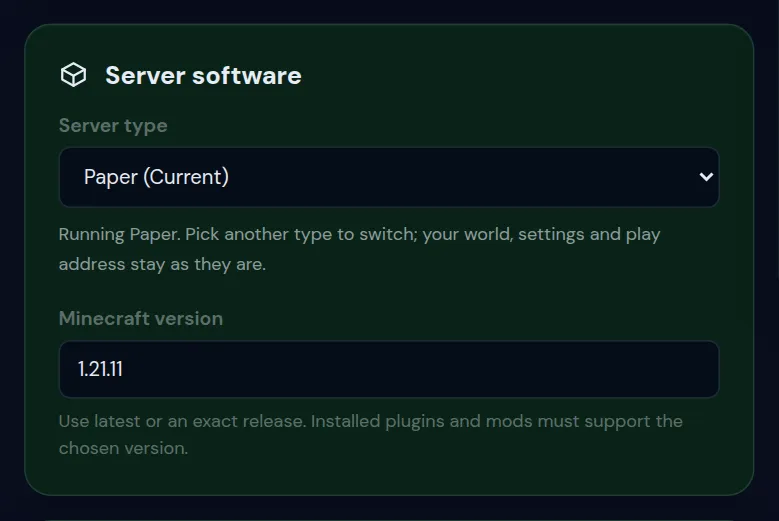
- In the Server software card, open the Server type list. Your current type is marked (Current).
- Pick the new type. A box opens with a line about that type, a warning when plugins or mods stop loading, and two lists: Stays as it is and Changes.
- Read both lists, then click the button for the new type, such as Switch to Fabric.
- Confirm in the window Switch to Fabric? with the button of the same name.
- Keep the page open while the button shows each step. When the message says the new type is being installed, wait until the install is done and press Start.
People you gave access to can switch the type when they have the Settings permission. Give someone access to your server explains the permissions.
What the panel does when you switch server type
The button runs four steps in a fixed order. Nothing about the type changes before the last one.
| The button shows | What happens |
|---|---|
| Stopping the server | The panel stops the server and waits until it is off. Players online are disconnected. |
| Making a backup | A backup named Before switch to with the new type, the date and the time is started. When every backup slot is in use, the oldest backup moves to the Bin to make room. |
| Waiting for the backup to finish | The switch waits until the backup is complete, for up to twenty minutes. A big world takes a few minutes here. |
| Switching the server type | The panel sets the new type, the Java version that belongs to your Minecraft version, and starts fetching the new server files. |
When the last step is done, a message says the new type is being installed and that nothing was deleted. The install takes a few minutes. Until it is finished, the Overview shows This server is still installing, and the Console shows when the install is done.
Start the server after that. The first start on a new type takes longer than usual, because the new software sets up its own files. Read the Console for errors before players join.
What happens to your world, plugins and mods
A switch replaces the server software. The disk stays as it is. These come through every switch:
- The world, with every player's inventory and position.
server.propertiesand the settings you made in the panel.- The play address, the port and your backups.
- Every file on the disk, including plugins and mods the new type cannot load.
| From | To | What happens |
|---|---|---|
| Paper | Purpur | Every plugin keeps working. Purpur adds purpur.yml with its own options on the first start. |
| Purpur | Paper | Every plugin keeps working. purpur.yml stays on the disk and is no longer read. |
| Paper or Purpur | Vanilla | Plugins stop loading. Their jars and data stay in plugins. The Plugins tab is no longer shown. |
| Paper or Purpur | Fabric, Forge or NeoForge | Plugins stop loading, as above. The Mods tab appears in place of Plugins. |
| Vanilla | Any other type | Nothing is lost. The Plugins or Mods tab appears. |
| Fabric, Forge or NeoForge | Paper, Purpur or Vanilla | Mods stop loading. Their jars stay in mods. Blocks and items from those mods are unknown to the game. |
| Fabric, Forge or NeoForge | Another mod loader | Mods built for the old loader do not load. A modpack stops working and has to be installed for the new loader. |
Everything a plugin did stops with it: permissions, homes, shops, protection and economy. Its data stays in the plugin's own folder, so it all works again when you switch back to Paper or Purpur.
Moving between mod loaders? In Files, move the old jars from mods to a folder such as mods-fabric. The new loader then starts with an empty mods folder, and the old set is ready if you switch back.
Check your Minecraft world after switching server type
Start the server on the new type and look around before you let players in. Two things can affect the world itself.
Blocks and items from mods that no longer load
Minecraft cannot keep blocks, items and creatures it does not know. When the mod that added them is no longer loaded, chunks that are loaded and saved can lose that content for good, including modded items in chests and inventories. If modded builds matter, keep players off the server and go back as described under undo below.
The Nether and the End after leaving Paper or Purpur
Paper and Purpur can keep the Nether and the End in folders of their own next to the world folder: world_nether and world_the_end. Vanilla, Fabric, Forge and NeoForge look for them inside world, and generate a new Nether and End when a player goes there and finds none.
Walk through a Nether portal you built before the switch. If the Nether has none of your builds, stop the server before anyone builds there and contact support, 24/7. The old dimensions are still on the disk.
Minecraft version and Java after a server type change
The Minecraft version field keeps its value when the type changes. With an exact version, such as 1.21.1, the new type is installed on that version. With latest, each type gets its own newest version:
| New server type | What latest installs |
|---|---|
| Paper and Purpur | The newest Minecraft version with a stable Paper build |
| Vanilla | The newest Minecraft release |
| Fabric, Forge and NeoForge | The newest version their installer offers |
Right after a Minecraft update these can differ, because Paper and Purpur follow a new version later than Vanilla and Fabric. A world that has been played on a newer version should not be opened on an older one; change your Minecraft server version explains why.
- Type
versionin the Console to see which Minecraft version the server runs now. - If the field says
latest, type that exact version in Minecraft version and click Change version. - Switch the server type.
- After the first start, check the first lines of the Console. They name the version the new type runs.
Java follows the Minecraft version on every type, so you do not have to set it yourself. Which Java version your server needs has the table.
Move LuckPerms permissions from Paper to a modded server
LuckPerms runs as a plugin on Paper and Purpur and as a mod on Fabric, Forge and NeoForge, but each install keeps its own data. Export the groups and users before the switch and import them on the new type:
- On Paper or Purpur, type
lp export permissionsin the Console. The export file lands inplugins/LuckPerms. - Switch the server type and install LuckPerms for the new loader, as in install mods on a Minecraft server.
- Start the server once, so LuckPerms creates its folder
config/luckperms. - In Files, download the export file from
plugins/LuckPermsand upload it toconfig/luckperms. - Type
lp importfollowed by the name of that file in the Console.
Homes, claims, shops and balances belong to their plugin and cannot be imported into a mod. Mods for those jobs are listed in Fabric, Forge or NeoForge. Permissions with LuckPerms covers groups and commands.
Server type switch messages and what to do
| Message | What it means | What to do |
|---|---|---|
| The backup finished but failed, so nothing was changed. | The backup did not complete, so the switch stopped before the type changed. | Start the switch again. If it fails twice, contact support. |
| The backup is taking longer than twenty minutes. Nothing was changed; try again once it is done. | The world is large and the backup is still running. | Wait until the backup shows as complete in Backups, then switch again. |
| Stop the server first so the backup is consistent. | The server did not stop within about a minute and a half. | Stop it in the Console, wait until it is off and switch again. |
| Make a backup first. A finished backup from the last day is required before the type changes. | The panel found no finished backup from the last 24 hours. | Start the switch again from the Server type list, so the panel makes one. |
| Switch this server to Fabric, Forge or NeoForge to use server mods. | Shown in the Mods tab while the server runs Paper, Purpur or Vanilla. | Switch to a mod loader first. |
If the server does not start on the new type, Minecraft server won't start goes through the usual causes.
How to undo a Minecraft server type change
- Switch back. Pick the old type in the same list and go through the same steps. The plugin or mod files were never removed, so they load again. This is enough when nobody played on the new type.
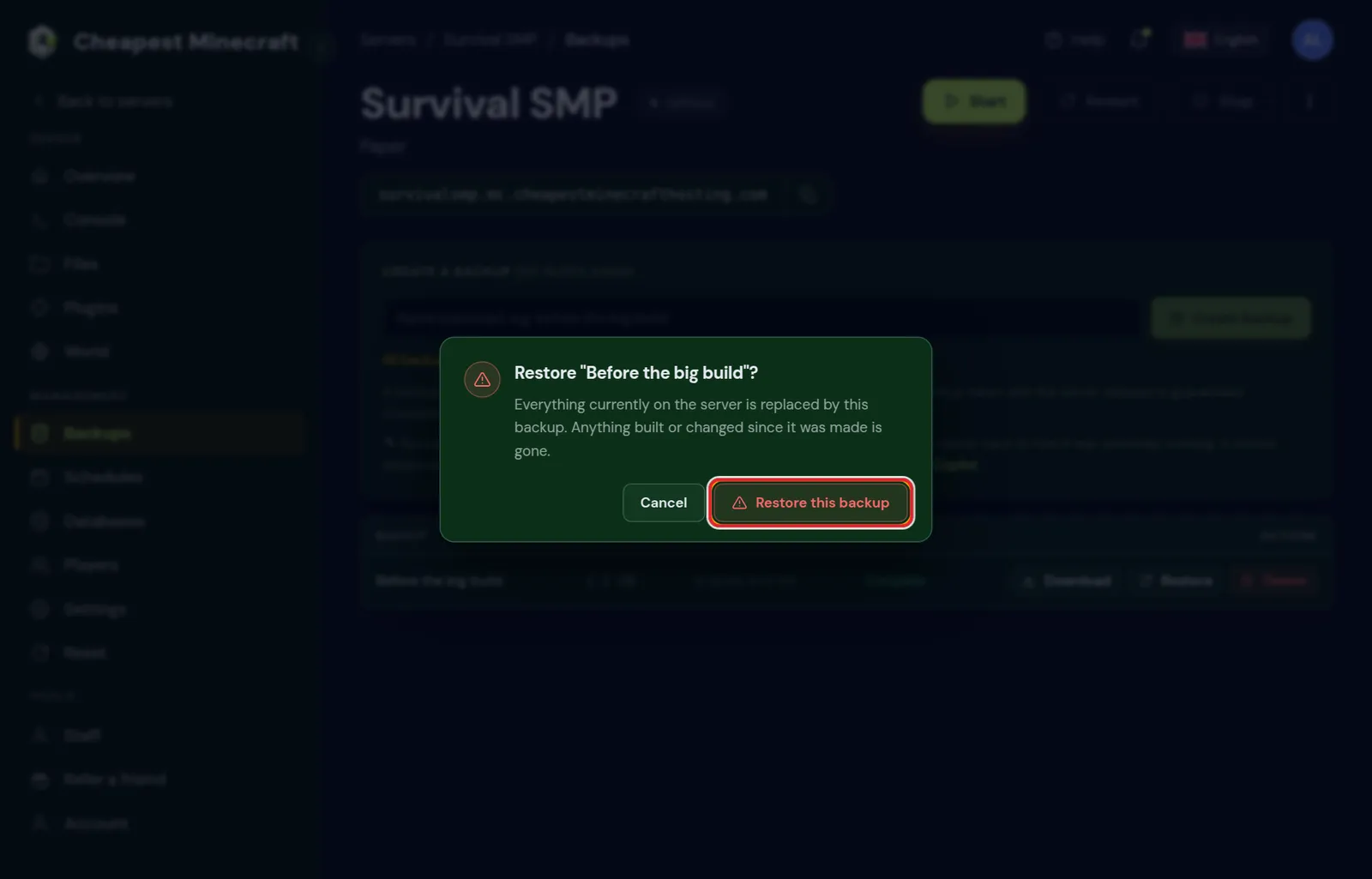
- Switch back and restore. When players played on the new type or modded blocks went missing, switch back first. Then restore the backup named Before switch to with the type you left for, from the Backups tab. The server returns to the moment before the first switch; anything built after it is gone.
Switch the type back before you restore. A restore puts back files, while the server type is a setting of the panel.
Questions from Minecraft server owners
Will changing my Minecraft server type delete my world?
No. The panel deletes no files. Only blocks and items from mods that no longer load can disappear from the world, and the backup the panel makes first brings them back.
Can I switch from Paper to Fabric and keep my plugins?
The plugin files stay in the plugins folder, but Fabric does not load them. Permissions, claims, homes and everything else they did stop until you switch back or set up mods for the same jobs.
How long does it take to change the server type?
A few minutes in most cases: stopping, the backup and the download of the new server files. A big world makes the backup slower, and the panel waits up to twenty minutes for it.
Can I switch my Minecraft server back to Paper?
Yes, from the same Server type list. Your plugins load again the first time the server starts on Paper.
Why can I only choose Paper or Purpur as server type?
Your server runs the Crossplay or Bedrock edition. Bedrock players join through Geyser, which runs on Paper and Purpur, so the other types are not offered.
Do players need to change anything after a server type switch?
On Paper, Purpur and Vanilla they join with the normal game. Mods that add blocks, items or mobs have to be installed by every player as well; join a modded server explains their side.
Do I lose my whitelist and operators when I change server type?
No. The whitelist, operators and bans are kept in whitelist.json, ops.json and banned-players.json, which every server type reads. Ranks from a permissions plugin are stored separately, so move those as in the LuckPerms part of this guide.
Checked against the Server software card in the Settings tab of our control panel, October 2026. Written by the Cheapest Minecraft Hosting team, first published , updated .