
 Astroworld
Players
Get Minecraft server alerts in Discord with a webhook
A Discord webhook is a private address that lets one service post messages into one channel of your Discord. The control panel uses it to post what happens to your Minecraft server, such as a crash or a finished backup, in the channel you choose.
This guide covers the alerts only. A two-way chat bridge between the game and Discord needs a plugin or mod; link chat to Discord explains that setup.
In short
To get Minecraft server alerts in Discord, create a webhook in Discord under Server Settings, Integrations, Webhooks and copy its URL. Paste it into the Discord notifications card on the Settings tab of the control panel, switch on the events you want and click Save. The panel then posts in that channel when the server starts, stops, crashes, comes back after a crash or finishes a backup, and when a word you choose appears in the console.
How to make a Discord webhook for your Minecraft server
- Open your Discord server, click the server name at the top left and choose Server Settings.
- Open Integrations, then Webhooks.
- Click New Webhook, or Create Webhook if the server has none yet. Discord adds a webhook with a default name.
- Click the new webhook to open it and pick the channel the alerts should go to. You can also change its name and avatar here.
- Click Copy Webhook URL, then Save Changes.
Creating a webhook needs the Manage Webhooks permission in that Discord. The owner and administrators have it.
Crash and console alerts are mostly for you and your staff, so a private channel such as #server-alerts suits them better than the general chat.
The copied URL starts with discord.com/api/webhooks/, followed by a number and a long code. That code works as a key to the channel.
Add the Discord webhook in the Settings tab of the control panel
- Open your server in the control panel and go to the Settings tab.
- Find the Discord notifications card and paste the URL into Webhook URL.
- Click Send a test message. A message titled Notifications are on appears in the channel. This works before you save, so you know the URL is right.
- Under Notify me when, switch on the events you want.
- Click Save. The status next to the card title changes from Not connected to Connected.
The card accepts Discord webhook addresses only. A channel link, an invite or any other address is refused with the message that it is not a Discord webhook.
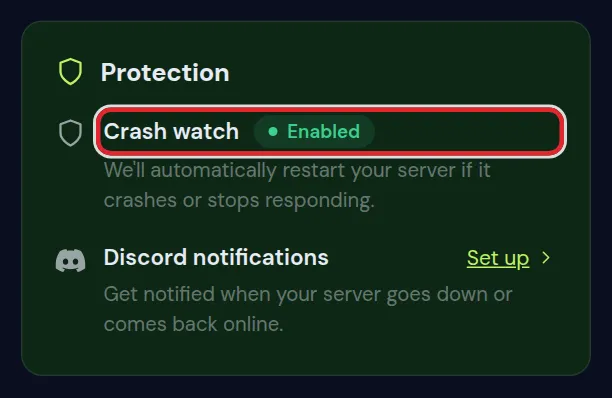
The Overview tab links to the same card. In the Protection card, Set up next to Discord notifications opens Settings, and the link reads Manage once a webhook is saved.
Which Minecraft server events can post to Discord
There are seven switches. The first five are under Notify me when; the last two are under Advanced alerts.
| Switch | When the message is sent | On by default |
|---|---|---|
| Server started | Someone presses Start or Restart in the panel | No |
| Server stopped | Someone presses Stop or Kill in the panel | No |
| Server crashed | Crash watch restarted the server three times within an hour and it went down again | Yes |
| Back online after a crash | The server went down on its own and crash watch started it again | Yes |
| Backup finished | An automatic backup of the server completed | Yes |
| Something in public chat | A check of the public chat found talk about a dupe or an exploit, or many players complaining at once | No |
| A word from the console | One of your own words appears in the server log | No |
The two crash alerts come from crash watch, which brings a crashed server back by itself. Finding the cause of repeated crashes is covered in Minecraft server keeps crashing.
Backup finished is about the automatic backups. Restoring one is explained in back up and restore your server.
What a Minecraft server alert looks like in Discord
Each alert is an embed: a title, one or two lines of text, the play address of the server, the server name at the bottom and the time. A coloured bar on the left shows the type at a glance.
| Switch | Title in Discord | Colour |
|---|---|---|
| Server started | Server started, or Server restarting | Green |
| Server stopped | Server stopped | Grey blue |
| Back online after a crash | Server went down, we started it again | Green |
| Server crashed | Server is down and we could not start it | Red |
| Backup finished | Backup finished | Blue |
| Something in public chat | Something in public chat needs a look | Orange |
| A word from the console | "your word" showed up in your console | Orange |
| Test message | Notifications are on | Amber |
- On a Java server with players online, Restart first counts down 60 seconds in the game chat. The alert is then titled Server restarting and says players were warned.
- The recovery alert says roughly how many seconds the server was off.
- The sender shows as Cheapest Minecraft Hosting, whatever name you gave the webhook. The avatar you picked in Discord stays.
- Alerts are written in English, also when the panel is set to another language.
Advanced alerts: console keywords and public chat
Click Advanced alerts below the normal switches to open the two extra ones.
Set up console keyword alerts
- Switch on A word from the console. The field Words to watch for in the console appears.
- Type your words or short phrases, separated by commas. You can enter up to ten, each between 3 and 60 characters.
- Click Save.
- The panel reads
logs/latest.logabout once a minute and only looks at lines that are new since the last check. - Upper and lower case do not matter.
- Each word sends at most one message every 30 minutes. The message shows up to three of the matching lines, and how often the word came past.
Useful console words for a Minecraft server
| Word or phrase | What it catches |
|---|---|
OutOfMemoryError | Java ran out of memory; see how much RAM a Minecraft server needs |
Can't keep up | The server falls behind on ticks and players feel lag; see reduce lag |
has not responded for | Paper's watchdog warns that the main thread is stuck |
Could not pass event | A plugin threw an error while handling a game event |
a server operator | Someone was given or lost operator rights; see whitelist and operators |
issued server command: /gamemode | Someone used the gamemode command on Paper, Purpur or Spigot |
Plugin lines such as Could not pass event and issued server command only exist on plugin servers. On Fabric, Forge and NeoForge, OutOfMemoryError and Can't keep up work the same.
The public chat alert
Something in public chat posts only serious findings from a check of the public chat. Smaller findings are not sent to Discord. If that chat check does not run for your server, this switch sends nothing. To read back what players said, use search the chat history.
Change, test or turn off Discord notifications
- Once a webhook is saved, the field stays empty and reads A webhook is set. Paste a new one to replace it.
- To change only the switches, leave the field empty and click Save. The saved webhook stays.
- To post in another channel, change the channel of the webhook in Discord; the URL stays the same. A new webhook works too: paste it and click Save.
- Send a test message tests the URL in the field, or the saved one when the field is empty.
- Turn off asks you to confirm, then forgets the webhook and stops every alert. The channel and the webhook in Discord remain, so delete the webhook there as well if you no longer use it.
Switching every alert off and clicking Save does not stop the messages. With no switch on, the panel falls back to the three defaults: Server crashed, Back online after a crash and Backup finished. Use Turn off to stop all alerts.
Why a Minecraft server Discord alert did not arrive
| What you see | Cause | What to do |
|---|---|---|
| "That is not a Discord webhook" on Save | The pasted address is not a webhook URL | Copy it again with Copy Webhook URL |
| "Discord did not accept that webhook" on the test | The webhook or its channel was deleted in Discord | Create a new webhook and paste it |
| The test arrives but alerts do not | The switch for that event is off, or the change was not saved | Switch it on and click Save |
No alert after stop in the console or /stop in the game | Only the Stop and Kill buttons send Server stopped, and a clean shutdown does not count as a crash | Use the Stop button when you want the alert |
| Only one recovery alert in a crash loop | Back online after a crash is sent for the first restart in an hour | The next alert is Server crashed, when crash watch gives up |
| Alerts stop during a lot of activity | At most ten messages per server go out in 15 minutes | Wait 15 minutes and read the Console in the meantime |
| No console word alerts | The log file logs/latest.log is larger than 4 MB, or the word is spelled differently in the log | Restart the server to start a fresh log, and copy the word straight from a log line |
| No alert for a backup you made yourself | Only automatic backups send Backup finished | Check the Backups tab instead |
A server stopped with Stop, Kill or stop in the panel console stays off until someone starts it. After /stop typed in the game, crash watch starts it again without an alert.
Still no messages? Contact support, 24/7. Never include the webhook URL in your message.
Keep the Discord webhook URL safe
- Anyone with the full URL can post in your channel under any name. Do not share it in chat, on a screenshot or in a video.
- If it leaked, delete the webhook in Discord, create a new one and paste that in the panel. The old URL stops working the moment it is deleted.
- People you gave the Settings right can change the alerts. The panel never shows them the saved URL; see give someone access to your server.
Questions from Minecraft server owners
Can I get a Discord message when my Minecraft server goes down?
Yes. Save a webhook in Discord notifications on the Settings tab and keep Server crashed and Back online after a crash switched on. Discord then hears when crash watch restarts the server and when it gives up.
Do I need a Discord bot or a plugin for Minecraft server alerts?
No. A webhook needs no bot account, no token and nothing installed on the server. The panel sends the messages, so it works the same on Paper, Fabric, Forge and NeoForge.
Can I send Minecraft server alerts to two Discord channels?
No. The card holds one webhook per server, so the alerts of that server go to one channel. If you have several servers, each one can post to its own channel or all to the same one.
Can a Minecraft server alert ping me on my phone?
The alerts contain no mentions, so they do not ping a role. Set the notification setting of that channel in Discord to All Messages and your phone shows every alert.
Does the Discord webhook show Minecraft chat in Discord?
No. The webhook only posts server events. For chat in both directions you need DiscordSRV or Discord Integration; see link chat to Discord.
Do Discord alerts slow down my Minecraft server?
No. The panel sends the messages from outside the game, and the console word check reads the log file without touching the running server.
Checked against the Discord notifications card on the Settings tab of our control panel, October 2026. Written by the Cheapest Minecraft Hosting team, first published , updated .