
 Astroworld
Troubleshooting
Auto restart your Minecraft server after a crash
A Minecraft server can stop on its own: a plugin throws an error, the memory runs out, or the server freezes and its watchdog shuts it down. On our servers crash watch sees that the server is off and starts it again, so players can rejoin after a short wait.
This guide explains what crash watch counts as a crash, how often it restarts, how to switch it off and what to do when the server goes down again and again. How to find the cause of a crash is in Minecraft server keeps crashing.
In short
Crash watch in our control panel starts your Minecraft server again when it stops without anyone pressing Stop. It checks the server every 15 seconds, reads the last console lines, starts the server and emails you those lines. After 3 restarts within one hour it leaves the server off. You switch it on or off with the Crash watch button in the Server health card on the Console tab.
How crash watch detects a Minecraft server crash
Crash watch checks every 15 seconds whether your server is running. When the server is off, it looks again a moment later, so the gap in a normal restart is not taken for a crash. Is it still off, crash watch reads the last console lines and starts the server.
A crash leaves an error, a crash report or an OutOfMemoryError in those lines. A clean stop ends with Stopping server and no error. Crash watch also remembers a stop from the panel.
| What happened | What crash watch does | Email to you |
|---|---|---|
| The server crashed or ran out of memory | Starts it again | Yes, at the first restart in an hour |
| The server froze and its watchdog stopped it | Starts it again | Yes, at the first restart in an hour |
| Someone pressed Stop or Kill in the panel | Leaves it off until someone presses Start | No |
Someone typed stop in the panel console | Leaves it off until someone presses Start | No |
An operator typed /stop or /restart in the game, or a plugin shut the server down | Starts it again | No |
| A clean stop outside the panel after 3 restarts within one hour | Leaves it off | No |
| A crash after 3 restarts within one hour | Stops restarting and leaves it off | Yes |
How often crash watch restarts a Minecraft server
Crash watch restarts a server at most 3 times within one hour. A fourth start would most likely end in the same crash, so crash watch then leaves the server off and emails you the last console lines.
Before it gives up, it checks two things that make a server fail at every start: a missing or broken server jar and a eula.txt that is not set to true. When it finds one of those, it repairs it and starts the server one more time.
After crash watch gives up, it does not start the server again for one hour. If you start it yourself in that hour and it crashes again, crash watch leaves it off. Fix the cause first, then press Start.
In the first hour after a server is created, crash watch restarts it the same way but sends no crash emails, because that is when most people install plugins and change files.
How to turn auto restart on or off for your Minecraft server
Crash watch is on for every new server. The switch is in the console:
- Open the Console tab of your server.
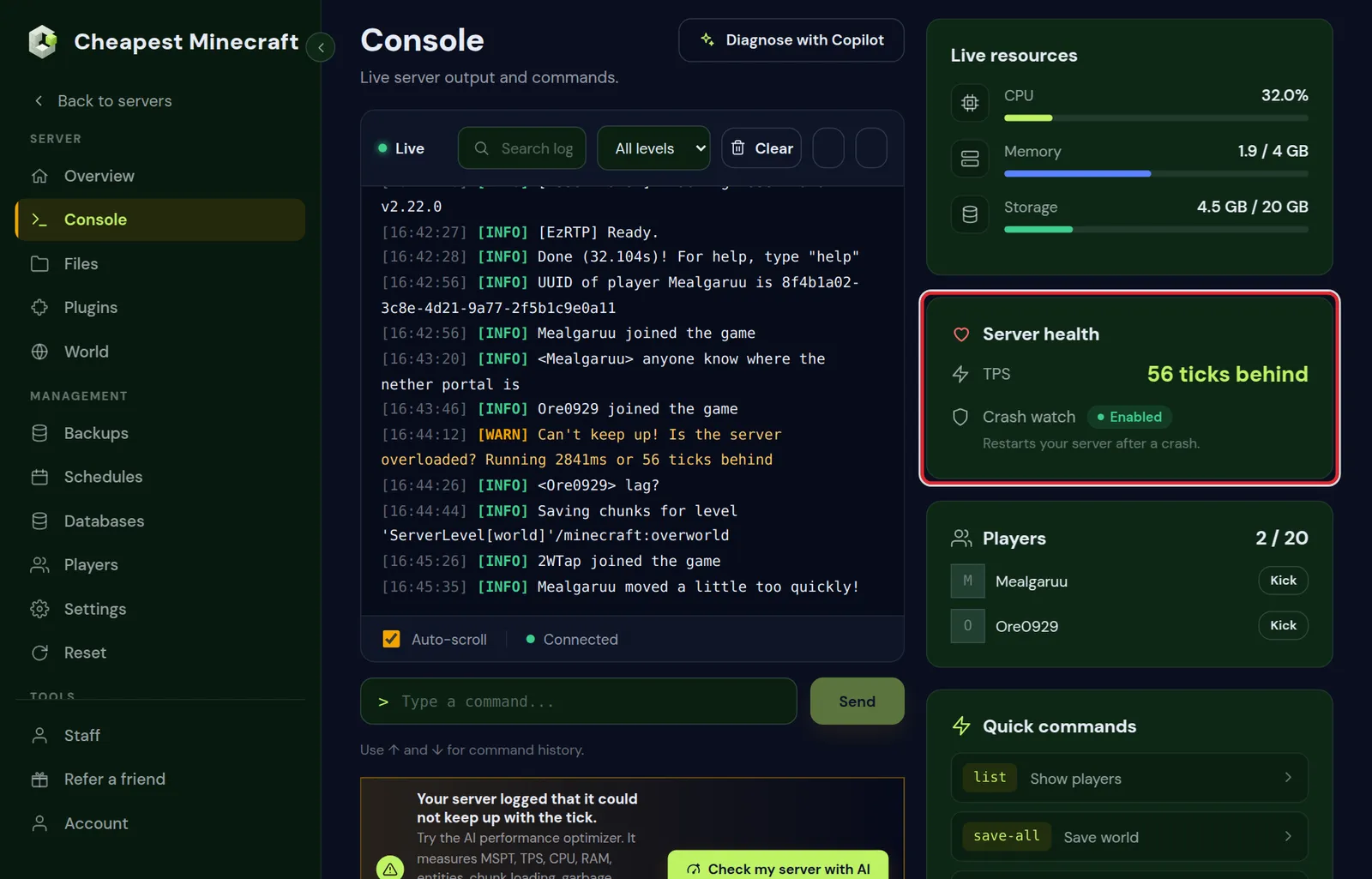
- Find the Server health card. The Crash watch row is under TPS.
- Click Enabled to turn crash watch off. The label changes to Off.
- Click Off to turn it on again. The label changes back to Enabled.
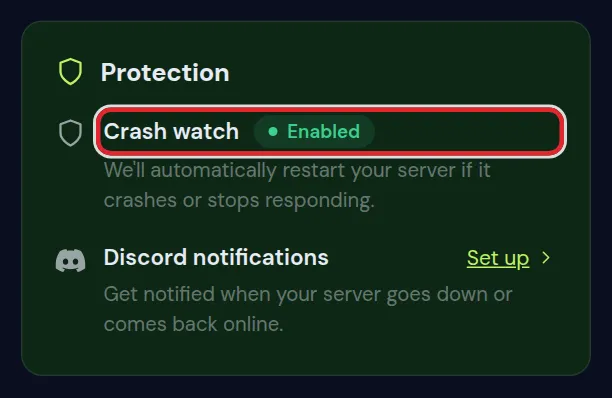
The Protection card on the Overview tab shows the same status. There it is a label only; the switch is the one in the Server health card.
Turning crash watch off and on again resets its count to 3 restarts and clears the hour it waits after giving up.
People you gave access to your server need the Power permission to see and change crash watch. Give someone access to your server shows how to set permissions.
When to turn off auto restart on a Minecraft server
Keep crash watch on for a server that people play on. Switch it off for a while in these cases:
- You are testing a modpack or a set of mods and want the server to stay off after each crash, so the error stays at the bottom of the console.
- A plugin stops the server on purpose, for example after a failed check at startup, and you want it to stay off until you have fixed its config.
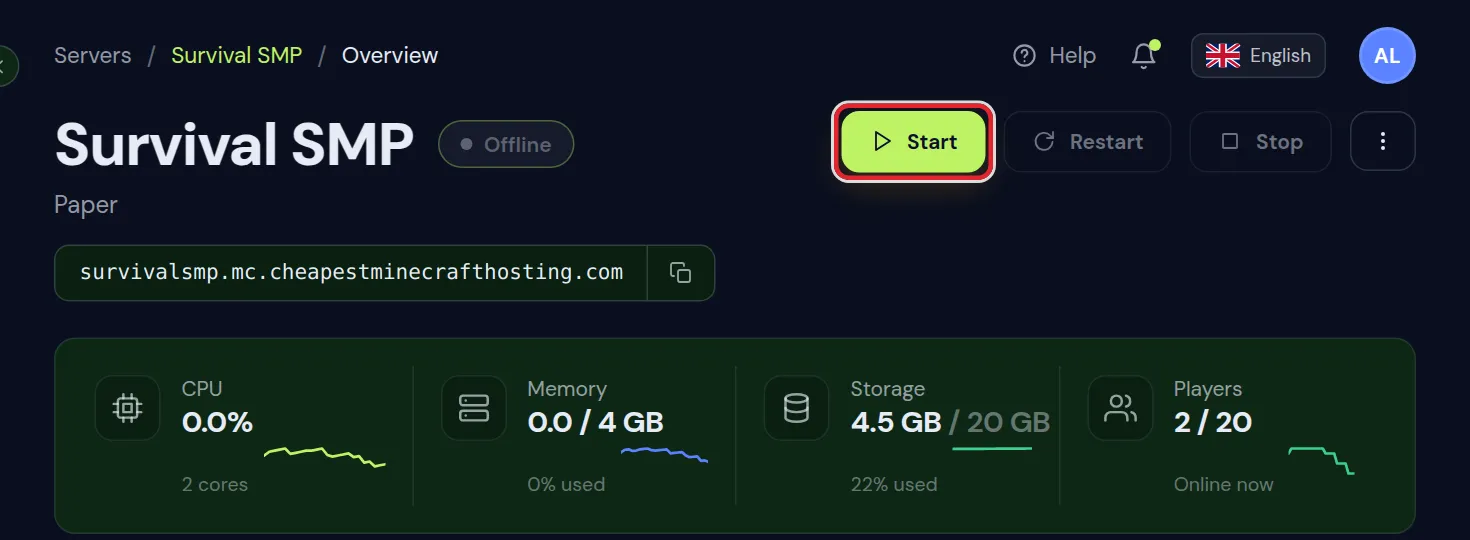
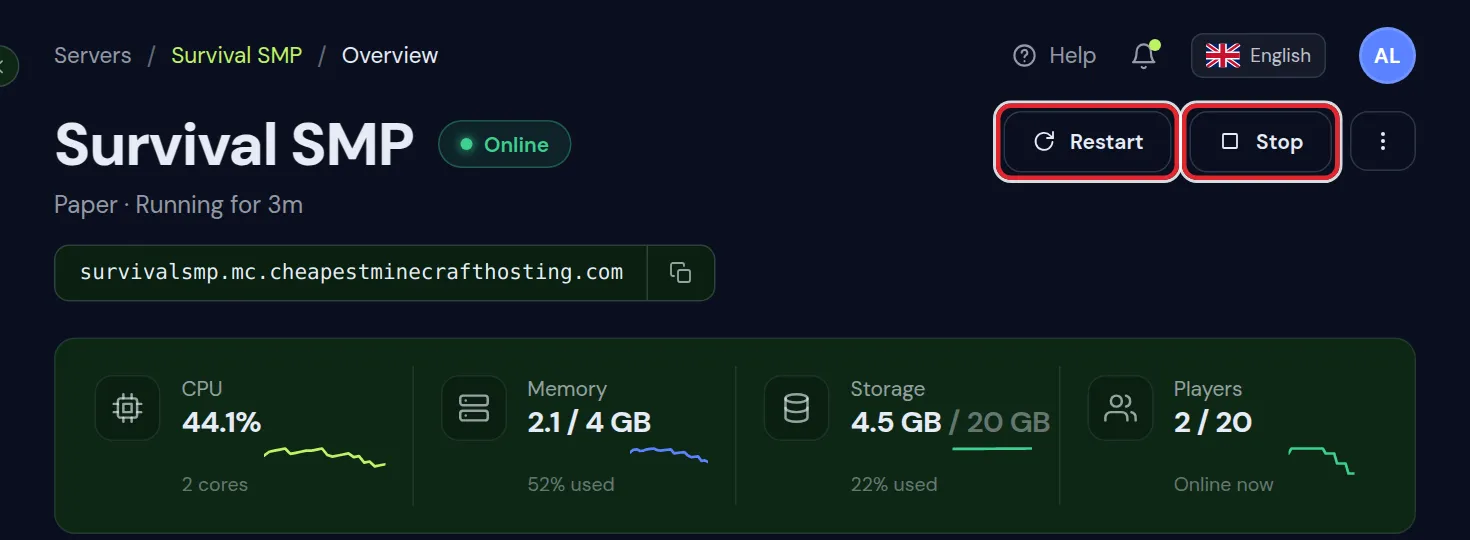
To keep the server off for an evening, press Stop at the top of the panel and leave crash watch on. It does not start a server that was stopped from the panel.
With crash watch off, the Performance graphs on the Overview tab keep recording and the Server health card keeps showing the TPS.
Turn crash watch back on when you finish testing. With it off, a crash at night keeps the server down until someone starts it.
Why your Minecraft server crashed: the explanation in the panel
Crash watch reads the console before it starts the server again. When it recognises the cause, the Server health card shows a box under Crash watch with the cause in plain words, the steps to fix it and the log line behind it. The heading says what happened:
- Why it crashed last time: crash watch restarted the server after this crash.
- Why it keeps crashing: crash watch gave up after 3 restarts in an hour.
- Why it stopped last time: the server stopped cleanly and the log shows the reason.
The box stays for 48 hours or until you click Got it. When crash watch does not recognise the cause, no box appears; then the console and the crash-reports folder in the Files tab are the places to look.
On the Overview tab you can add the same explanation as a widget: click Edit, then Add widget, and pick Last crash. Without a recent crash the widget says No crashes in the last 48 hours.
| What the box says | What to do |
|---|---|
| The server ran out of memory. | Lower the view distance, remove what you do not use and check how much RAM your server needs |
| Something on the server needs a newer Java version than the one it runs. | Pick that version, see Java version for Minecraft |
| A client-only mod is in the mods folder, and it cannot run on a server. | Delete it from the mods folder of the server |
| A mod is missing something it needs. | Install the mod it names, see install mods on a Minecraft server |
| The same mod or plugin is installed twice. | Delete the older of the two files |
| A mod does not fit this Minecraft version or one of the other mods. | Update that mod, or change the Minecraft version to the one it was made for |
| A config file is damaged or has a typing error. | Fix the file in the Files tab, or restore it from a backup |
| The world was saved with a newer Minecraft version than the server runs. | Set the server to that version or newer |
| The server froze and shut itself down. | Update or remove the plugin or mod it names, and see reduce lag |
What to do when your Minecraft server keeps restarting
A server that goes down again a few minutes after every restart has a cause that a restart does not remove. End the loop first, then fix the cause.
- If the server is running, press Stop at the top of the panel, so crash watch leaves it off while you work on it.
- Read the box under Crash watch in the Server health card, or the console lines in the crash watch email.
- Open the Activity tab and look at what changed just before the first crash: a new plugin, an edited file or another version. See what changed on your server explains the list.
- Make a backup in the Backups tab. Back up and restore your server shows how to go back if a fix makes things worse.
- Undo or fix that one change, for example remove the plugin you added last.
- Press Start and watch the console until the server says
Done. - Check that the Server health card shows Crash watch as Enabled.
Does the server fail at every start, before anyone can join? Minecraft server won't start covers the startup errors. Does it run for a while and then go down? Minecraft server keeps crashing shows how to read the log, the memory graph and the TPS.
Crash emails and Discord notifications for your Minecraft server
Crash watch sends at most one restart email per server per hour, to the account that owns the server.
| Moment | Discord message | |
|---|---|---|
| First restart after a crash in an hour | That the server was restarted, with the last console lines | Server went down, we started it again |
| Second and third restart in that hour | None | None |
| Crash watch gives up | Subject ends in keeps crashing, we stopped restarting it, with the last console lines | Server is down and we could not start it |
Discord messages need a webhook from your Discord channel. Open the Settings tab and find Discord notifications. Paste the Webhook URL, check that Server crashed and Back online after a crash are ticked under Notify me when, and click Save. The Set up link in the Protection card opens the same tab.
Want us to look at a server that keeps crashing? Reply to the email crash watch sent when it gave up. Technical support answers 24/7.
Auto restart for a frozen Minecraft server
Crash watch acts when the server process has stopped. A server that freezes keeps its process running, so it is first stopped by its own watchdog, and crash watch starts it after that. The watchdog stops the server when one tick takes longer than this:
| Server software | Watchdog setting | Default |
|---|---|---|
| Paper, Purpur and Spigot | timeout-time in spigot.yml | 60 seconds |
| Vanilla, Fabric, Forge and NeoForge | max-tick-time in server.properties | 60000 milliseconds |
Leave the watchdog on. Without it, a frozen server stays frozen.
Frozen for more than a minute or two without coming back? Press Stop. If the server does not stop, open the menu next to Stop and choose Kill. Kill ends the process at once, so changes the world had not saved yet are lost. Then press Start.
Crash watch and planned Minecraft server restarts
A restart with the Restart button or from a task in the Schedules tab does not count as a crash and sends no email.
Crash watch reacts to a stop nobody planned. A daily restart at a quiet hour warns players first and frees memory that some plugins fill up over days; schedule automatic restarts sets one up.
Questions from Minecraft server owners
Does a Minecraft server restart by itself after a crash?
On our servers, yes. Crash watch is on for every new server and starts it again after a crash, up to 3 times within one hour.
How do I stop my Minecraft server from restarting by itself?
Check what restarts it. Crash watch does after a crash or a stop from inside the game, and a task in the Schedules tab can restart it at set times. Set crash watch to Off in the Server health card, or remove the task.
Why did my Minecraft server not come back after a crash?
Crash watch was off, it had already restarted the server 3 times that hour, or the server was stopped with Stop, Kill or by typing stop in the panel console.
Will I lose my world when crash watch restarts the server?
You lose only what the world had not saved at the moment of the crash. Crash watch starts the server again and leaves the world files as they are; it does not roll anything back.
How fast is a crashed Minecraft server back online?
Crash watch checks every 15 seconds and looks once more before it starts the server. Then the server needs its normal start time, which is longer on a big modpack than on Paper.
Does crash watch work on a modded Minecraft server?
Yes. It works on every server type in the panel, including Fabric, Forge, NeoForge and modpacks, and the crash explanation recognises common mod problems such as a missing dependency or a client-only mod.
Checked against crash watch in the Console and Overview tabs of our control panel on Paper for Minecraft Java 26.2, October 2026. Written by the Cheapest Minecraft Hosting team, first published , updated .