
 Astroworld
Getting started
Set up your Minecraft server with AI
Build my server is a set of six questions in the AI Copilot of your control panel. You pick the kind of server, the number of players, the difficulty, PvP and what players should be able to do. The panel then prepares the plugins and settings that match those answers and applies them in the mode you chose.
This guide lists what each answer changes, what the panel checks before it installs a plugin and how to undo the result. The AI Copilot page describes the rest of what the Copilot does.
In short
To set up a Minecraft server with AI, open the Copilot tab in the control panel, press Build my server and answer the six questions; only the kind of server is required. The panel turns your answers into a plan: a backup first, then a card with the server settings and one card that installs all plugins and restarts the server once. The settings and plugin changes appear in the Activity tab, each with an Undo button.
How to open Build my server in the Minecraft control panel
- Open your server in the control panel.
- On the Overview, find the Copilot card and click Build my server. You can also open the Copilot tab under Tools in the menu.
- On the Copilot screen, pick the mode under the message box: Ask first, Accept edits or Auto. The mode decides which changes go through without your click.
- Press Build my server under the message box. A window with six questions opens.
- Answer the questions, read the instruction at the bottom and press Make this server.
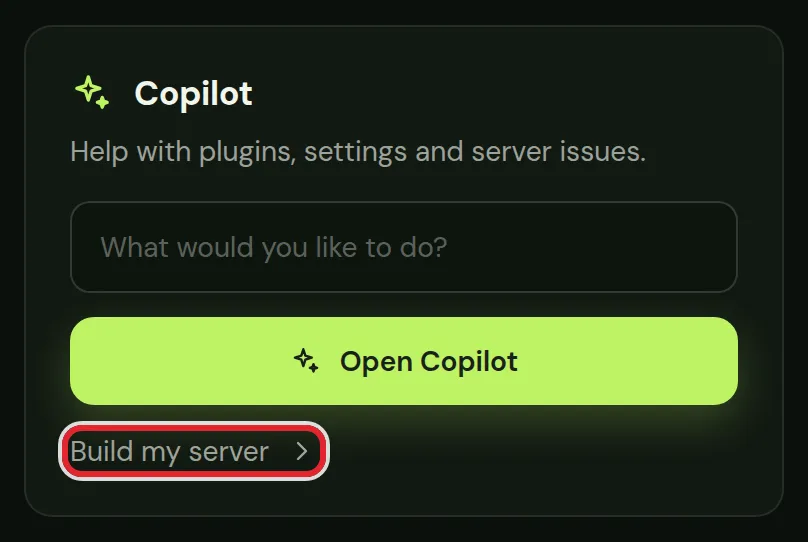
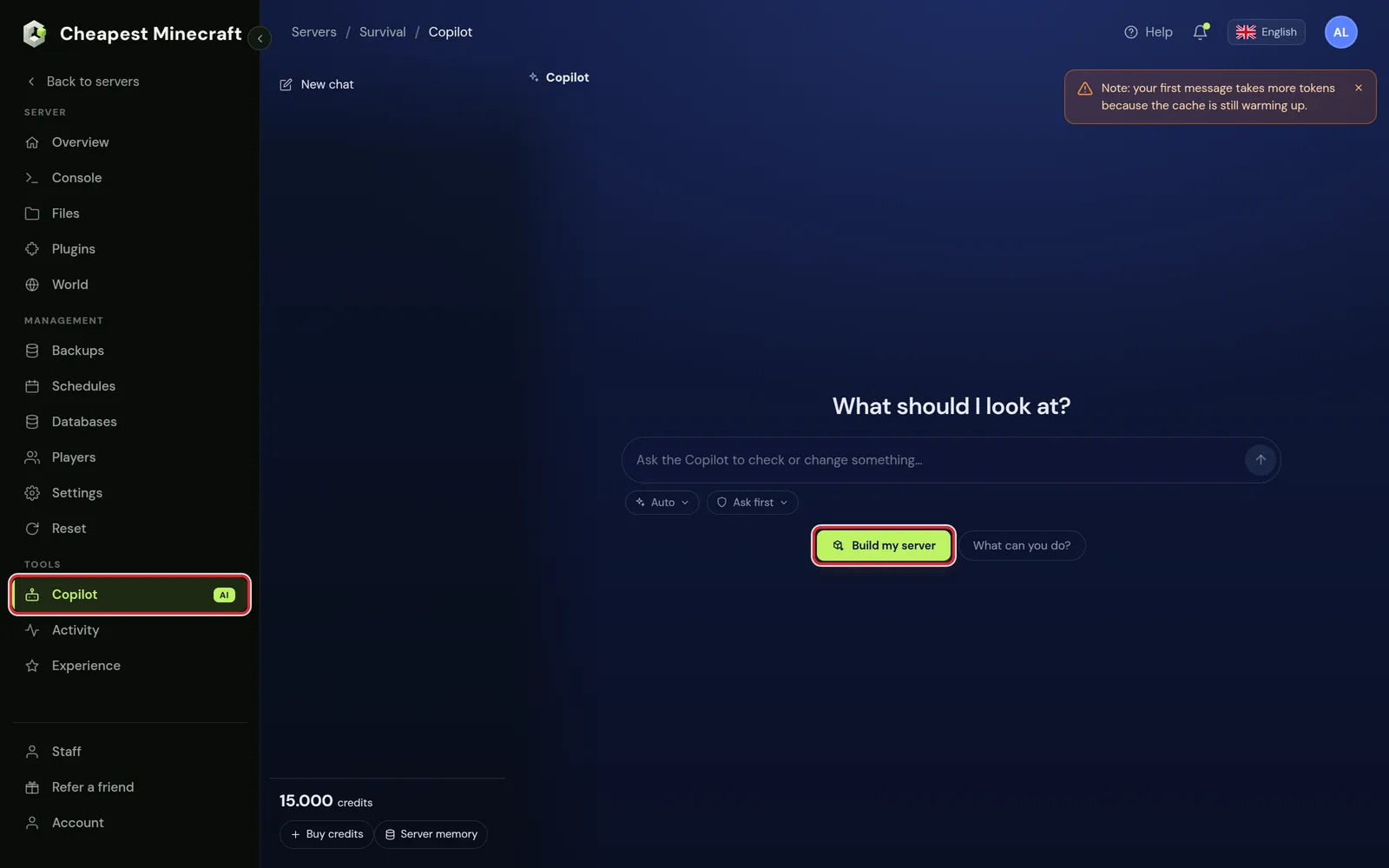
Coming from the Overview, the message box already holds a starting line. You can send that line and describe the server in your own words, or use the button for the six questions.
The six Build my server questions
Only the first question is required. Skip any other question and the panel leaves that part of the server as it is.
| Question | Answers | What it changes |
|---|---|---|
| What kind of server do you want? | Survival with friends; Public survival (SMP); Skyblock; Creative building; Minigames; Roleplay; Factions or prison; Modded or RPG; Anarchy, almost no rules | The base set of plugins |
| How many players do you expect? | Just me and a few friends; Up to 20 players; Up to 50 players; 100 players or more | max-players in server.properties |
| How hard should the game be? | Peaceful, no hostile mobs; Easy; Normal; Hard | difficulty in server.properties |
| Should players be able to fight each other? | Yes, PvP on; No, PvP off; Only in an arena | pvp in server.properties |
| What should players be able to do? | A list of options, pick as many as you want | Extra plugins |
| Anything else the Copilot should know? | Free text | Read by the AI after the plan is made |
At the bottom of the window, This is what the Copilot gets shows your answers as one instruction. Make this server opens a new Copilot chat and starts the plan straight away, without a second Send click.
Which plugins the AI installs for each kind of Minecraft server
For every part of a server the panel keeps a short list of plugins from the Copilot's checked catalog, best first. When a plugin from the list is already on the server, it stays and nothing is added for that part. Otherwise the panel takes the first plugin that has a build for your Minecraft version and does not clash with a plugin on the server.
| Kind of server | Plugins the panel starts from |
|---|---|
| Survival with friends | CoreProtect |
| Public survival (SMP) | LuckPerms, EssentialsX, CoreProtect, GriefPrevention |
| Skyblock | Iridium Skyblock, LuckPerms, EssentialsX |
| Creative building | FastAsyncWorldEdit, WorldGuard, CoreProtect |
| Minigames | Multiverse-Core, ScreamingBedWars, LuckPerms |
| Roleplay | LuckPerms, EssentialsX, GSit, HexNicks, CoreProtect |
| Factions or prison | Towny, LuckPerms, EssentialsX, VaultUnlocked, CoreProtect |
| Modded or RPG | AuraSkills, MythicMobs, LuckPerms |
| Anarchy, almost no rules | None |
When the first plugin on a list does not fit your server, the next one takes its place: WorldEdit for FastAsyncWorldEdit, OneBlock or Skyllia for Iridium Skyblock, zEssentials for EssentialsX and EliteMobs for MythicMobs.
Extra Minecraft plugins for what players can do
| Option | Plugins |
|---|---|
| Claim their own land | GriefPrevention, or Dominion or SimpleClaimSystem |
| Buy and sell in an economy | EssentialsX, VaultUnlocked and QuickShop-Hikari for player shops |
| Earn ranks and permissions | LuckPerms |
| Get kits and daily rewards | EssentialsX and NDailyRewards |
| Set homes and warps | EssentialsX |
| Follow quests | BetonQuest, or AuroraQuests |
| Play minigames | Multiverse-Core and ScreamingBedWars, or Kenshin's Hide And Seek |
| Use custom items | ExecutableItems with the SCore library it needs, or ItemEdit |
| Chat with Discord | DiscordSRV |
| Be protected from griefing | CoreProtect and GriefPrevention |
| Explore a custom world | Terra, or TerraformGenerator |
A plugin that two answers ask for is installed once. Custom world generation only shapes land that has not been generated yet, so you see it in new areas or after you reset your Minecraft world.
Most of these plugins need their own setup after the build: ranks and groups in LuckPerms, a claim tool for your players, or a Discord bot for DiscordSRV. Permissions with LuckPerms, stop griefing and link chat to Discord cover those next steps.
Minecraft server settings that Build my server changes
The panel reads server.properties first and only puts lines on the card that differ from the current value. When every answer matches what is set now, there is no settings card.
| Setting | Line in server.properties | Value from your answers |
|---|---|---|
| Difficulty | difficulty | peaceful, easy, normal or hard |
| PvP | pvp | true for PvP on and for an arena, false for PvP off |
| Max players | max-players | 10, 20, 50 or 100 |
| Default gamemode | gamemode | creative, only for Creative building |
The card shows the old and new value of each line, such as Difficulty: Normal → Hard, before anything is written.
With Only in an arena, PvP stays on and WorldGuard is added, together with FastAsyncWorldEdit or WorldEdit to mark out the area. Once the arena is built, ask the Copilot to set up the region so PvP is off everywhere else.
PvP is also a game rule on Minecraft 1.21.11 and newer. After the build, check the PvP switch under Game rules in the World tab. Keep inventory and game rules explains that card.
A higher Max players value gives the server no extra memory. For 50 or 100 players, read how much RAM a Minecraft server needs.
Ask first, Accept edits or Auto: how the build is applied
The plan comes as up to three cards: Make a backup first, a card that edits server.properties, and one card that installs every plugin and restarts the server once at the end. When the plan has settings and no plugins, a Restart server card takes the place of the plugin card.
| Mode | What happens with the build cards |
|---|---|
| Ask first | Nothing changes until you press Apply this change on a card. With more than one card, Fix automatically applies them all in order. |
| Accept edits | The backup, the settings and the plugin card with its restart go through by themselves. A separate Restart server card waits for your click. |
| Auto | Every card goes through by itself. |
Ask first is the standard mode. The panel remembers the mode you pick in this browser.
The backup Build my server takes first
Before it changes anything, the panel makes a backup named Before Build my server with the date and time. It appears in the Backups tab like any other backup.
- In Accept edits and Auto, the panel waits up to a minute for that backup before it goes on, because the plugin card restarts the server.
- When the backup fails, nothing else is applied by itself. The other cards stay in the chat for you to decide.
- When the backup is still running after a minute, the changes go ahead and the backup finishes on its own.
- Undo never deletes this backup.
Restore it when you want the whole server back to the state before the build, for example after you also changed files yourself. Back up and restore your server shows the steps.
Undo Build my server and see what the AI changed
The reply in the chat lists the plan in plain words: the plugins, the plugins that were already installed, the settings and anything left out. Every change can be taken back in three places:
- Undo on a card takes back that one change. On the plugin card it removes the plugins it installed and restarts the server.
- Undo everything from this message sits under Done on your server when the panel applied the cards by itself. It undoes them in reverse order.
- The Activity tab lists each change with the AI label and its own Undo button.
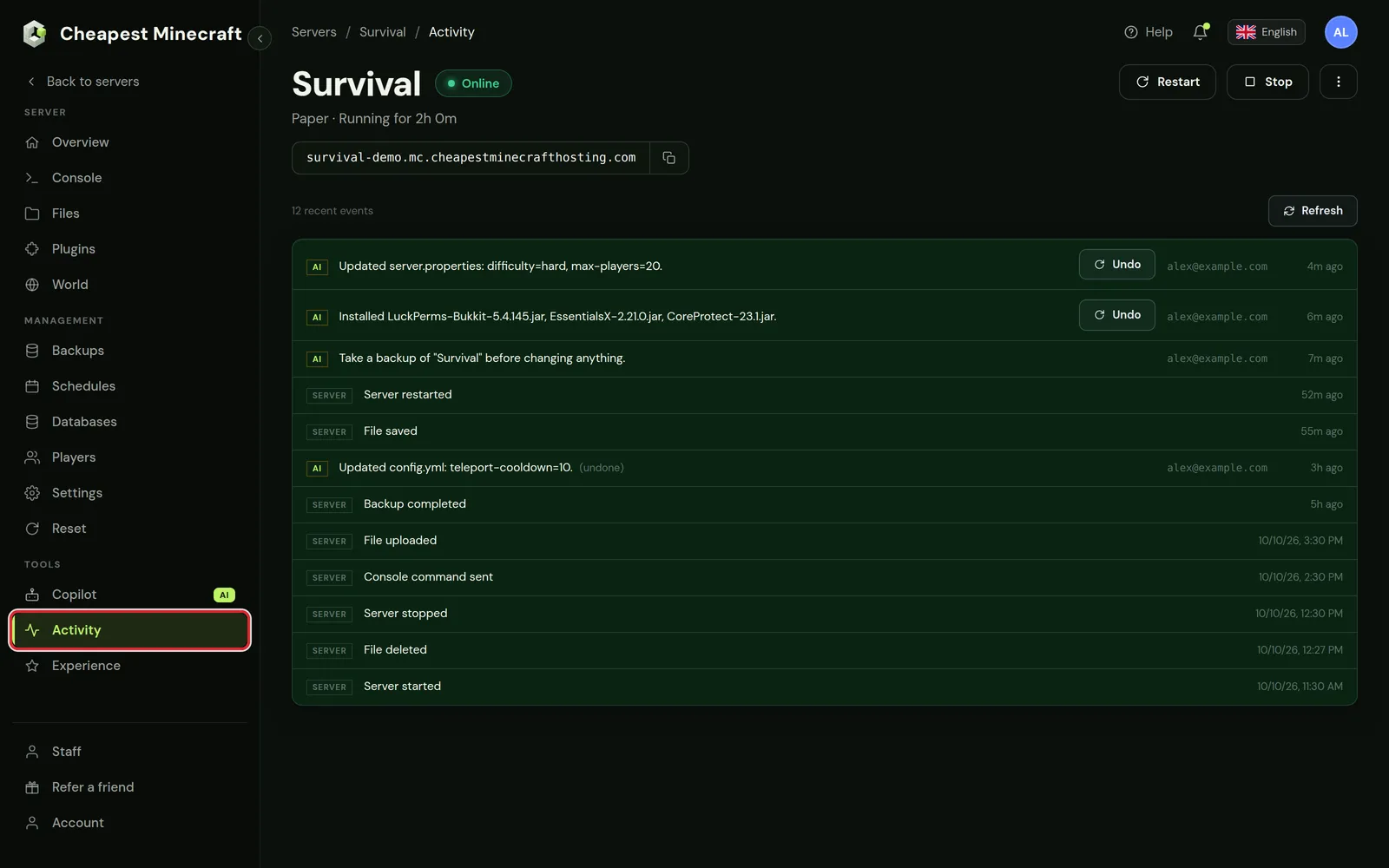
Undo on the settings card puts the old server.properties back without a restart. Restart the server afterwards so it reads the old values. See what changed on your server explains the Activity list in full.
What Build my server leaves out
The reply names every skipped part under Left out, with the reason. The common reasons:
| Situation | What the panel does |
|---|---|
| The server runs Vanilla, Fabric, Forge or NeoForge | No plugins are planned, because these types do not load Bukkit plugins. Your settings answers are still applied. |
| The Minecraft version is unknown | No plugin builds can be picked. Start the server once and run Build my server again. |
| A plugin for the same job is already installed | That plugin stays as it is. With CMI on the server, no EssentialsX is added; with Lands or Residence, no GriefPrevention. |
| A plugin would clash with one on the server or in the plan | That part is left out. |
| No plugin on the list has a build for your version yet | That part is left out, and the reply names the newest version that plugin supports. |
| More than 15 plugins are picked | The first 15 go on the card. Ask the Copilot to install the rest once that card is done. |
For plugins on a Vanilla or modded server, switch it to Paper or Purpur first; Paper, Purpur or Spigot helps you choose. Mods go in through the panel, see install mods on a Minecraft server.
Set up a Minecraft server with AI in your own words
The six questions cover the common server types. For anything else, type the request in the Copilot message box, for example:
Set up a survival server for 15 friends with land claims, homes and a shop, difficulty hard and PvP off.The Copilot reads your server, picks plugins from the same catalog and prepares cards in the mode you chose. The last field of the six questions works the same way: the panel makes the plan from the fixed answers, then the AI reads your note and can add cards for it.
Rules that should hold in every chat go under Server memory at the bottom of the conversation list, in the box House rules you write, one rule per line. An example is: always take a backup before you change a config file. These rules can only make the Copilot more careful, and only the server owner can change them.
Questions from Minecraft server owners
Can AI set up a Minecraft server for me?
Yes. On a Paper or Purpur server, Build my server installs the plugins and changes the settings that fit your answers. On Vanilla, Fabric, Forge and NeoForge it changes the settings only.
Does Build my server delete my Minecraft world?
No. It edits server.properties, adds plugins and restarts the server. Deleting worlds or player data is on the list of things the Copilot will not do. For a new world, use the Reset tab as in reset your Minecraft world.
Can I run Build my server more than once?
Yes. Plugins that are already installed stay as they are, and settings that already have the chosen value are skipped. Each run starts a new Copilot chat and takes a new backup when there is something to change.
How do I undo everything Build my server did?
Use Undo everything from this message when the panel applied the cards by itself, or Undo on each card, newest first. To go back further, restore the Before Build my server backup in the Backups tab.
Where do the plugins come from?
From the Copilot's checked plugin catalog, each in the build made for the Minecraft version your server runs. To add a plugin that is not in the catalog, upload it yourself as in install plugins.
Can my staff use Build my server?
Only people you gave the Copilot permission can open the Copilot and its questions. Give someone access to your server shows where to set it.
Checked against the Copilot tab and Build my server in our control panel on Paper for Minecraft Java 26.2, October 2026. Written by the Cheapest Minecraft Hosting team, first published , updated .